|
This page may contain links that result in small commissions to keep this free site up and running.

Welcome Guest! Registering and/or logging in will remove the anchor (bottom) ads. It's Free!
To participate in the forum you must log in or register.
| Author |
 Replies: 16 / Views: 3,422 Replies: 16 / Views: 3,422 |
|
Bedrock Of The Community
Australia
38679 Posts |
|
|
Quote:
In what format are the magazines? (looseleaf, stapled, bound, etc.) And what paper size are they?
Hi Jed, The Magazines are from 1930 A4 format to the single page stapled (unstapled 2 x A4 page) I do not mind to mutilate to preserve, by cutting the spine. (non bound) I require a scanner that offers duplex scanning and OCR searchable text to *.pdf. Any input welcomed ------------------------------------- Here's some info of interest It just so happens that I'm currently doing some work with a Fujitsu S1500M document scanner, and I have to say, it's really quite something. I've found it online for as little as $410, and it includes not only Acrobat Pro, but also some rather excellent OCR software from Abbyy that creates a searchable PDF file. Scans 20 pages a minute, both sides simultaneously, automatically straightens out skewed pages, auto color/b&w detection, this thing just works and really exceeded my conservative expectations. It's exactly what you're looking for, IMO. posted by dbiedny at 6:16 AM on May 24, 2009 As a guy who manages the scanning department for a document imaging service provider: cutting the spines and scanning is fastest and easiest, depending on your scanner; even cheap fax/scan machines with a sheet feeder are faster than laying the magazines on a flatbed by hand. The non-destructive scanner above may work OK, but the flimsiness of the materials and a lack of rigid cover may make that "v" a liability. A recent project was done with a homebrew planetary camera setup similar to fake's system, because the customer is not interested in cutting the books up (exampes here) - comparing in similar projects where we cut the spines and using a Canon 7580 (sheet-fed, both sides scanned at once), it would take slightly less time, be significantly better images, and require far fewer reshoots to use the scanner than the camera-on-a-stick. However, we can still do 1000+ pages an hour with a skilled camera operator, which is far faster than a cheap sheet-feeder scanner you can buy at OfficeMax. You may get a good mix of cheapness, speed, and ease by putting a digital camera on a tripod, drop a plumbline and prop up the tripod do you can get a nice, square view of a tabletop. Lay the magazine flat (the Family Handymans I have from the 70s and 80s are staple-bound, so it should go well; perfect/gluebound spines won't work so well) and photograph the two-page spread in a single shot. a 10+ MP camera, zoomed properly, should keep you in the 200-300DPI-comparable range of a flatbed scanner, which isn't reproduction-quality, but good enough for reading and reference, and will probably be OK for OCR. You can get low-glare or nonreflective plexiglass to lay over the magazine, to hold the pages flat, too. In summary: high-speed sheetfed scanner: fast, OCR-friendly, easy, expensive. Enlarging-stand/planetary-camera/camera-on-a-stick: Pretty fast, not as OCR-friendly, error-prone, cheap. Flatbed scanner: very slow, OCR-friendly depending on operator skill, not as error prone, moderately easy depending on material, cheap. posted by AzraelBrown at 7:27 AM on May 24, 2009 |
|
Send note to Staff
|
|
|
|
|
Pillar Of The Community
United States
2941 Posts |
|
|
Rod, I got a little lucky. I found a used Epson 10000XL (new price US$3,000) with ADF (new price US$1,300) on ebay for under US$1,000. It's proven to be great for this project. It's large format (12.2" x 17.2") and the ADF is perfect for large volume document scanning. I can put a stack of pages on the feeder, hit scan, and let it scan while I'm at work or overnight. With newer publications that are in booklet format, I cut the spines so they'll run through the feeder, then hole punch the originals and keep them in 3-ring binders. The first publication I tried this with, I was able to create >6,000 pages of OCRed PDFs in about a week, working just in the evenings. If you can find the 10000XL, it's a great scanner. It's too expensive to buy at full retail, but you can usually find used ones on ebay. If you prefer a cheaper route, I'd be glad to do some scanning for you. How many total magazines, and about how many pages per? |
Send note to Staff 
|
|
|
|
Bedrock Of The Community
Australia
38679 Posts |
|
|
Thanks for the advice Jed,  $3,000 is not out of the question, but I probably would like to wait to see if I can pick up a bargain. I am looking for a new (second hand) van, for travelling, so I have to be budget concious. You are very generous with your offer, but what I have to do, will make your eyes water. 840 magazines x 60 pages (average) That is the dream, reality can serve up what it wants. When it gets serious, I'll contact the publisher for approval and also find out if they have the magazines archived, possibly not, but I don't want to reinvent the wheel. Questions: Hypothetically I have Magazine #1 62 pages, both sides = 124 scanned pages scanned to *.pdf searchable text. Time to scan ? size of pdf ? or size of file? I shall probably keep the early mags, I would think they are scarce, but the later issues, possible dig into the garden for mulch The early mags are just begining to experience paper failure so it will be good to save these from extinction. |
|
Send note to Staff
|
|
|
Bedrock Of The Community
Australia
38679 Posts |
|
|
A few more questions  I am a bit of a dunce with ebay, I don't belong, so, do I have to join to "watch" upcoming auctions / sales? and also to contact the vendor direct to ask questions? Is there such a thing as a "wanted" or "Seek" option with ebay? I am good at bargaining, but totally lost with ebay. In Australia the Epson 10000XL goes for $6,265 full retail without ADF Used on ebay are $1,600 with adf (sold out) Others New without adf for $1,999 so there is a huge array of prices for the article. I was pleasantly surprised to see the small footprint of the 10000xl I expected a large thingy on wheels  |
|
Send note to Staff
|
|
|
Rest in Peace
Australia
631 Posts |
|
|
Quote:Is there such a thing as a "wanted" or "Seek" option with ebay? Hey Rod All you need to do is run a "search" for what you want then you can "save" it and ask to be notified for a period when new items meeting your criteria are listed I use this function for a number of items and find it quite useful |
|
Send note to Staff
|
|
|
Rest in Peace
Canada
6750 Posts |
|
|
Quote:
do I have to join to "watch" upcoming auctions / sales?
and also to contact the vendor direct to ask questions? Yes. Then when you sign in you can go to your 'My ebay' page and look at your Watched items. Quote:Is there such a thing as a "wanted" or "Seek" option with ebay? Beyond what huckles said, their is a "want' list you can add to so people can contact you through your ebay name on ebay for that item. |
|
Send note to Staff
|
|
|
Bedrock Of The Community
Australia
38679 Posts |
|
|
Bedrock Of The Community
United States
12128 Posts |
|
|
Quote:
Questions:
Hypothetically I have Magazine #1
62 pages, both sides = 124 scanned pages
scanned to *.pdf searchable text.
Time to scan ? size of pdf ? or size of file? A quick math lesson based on the above question: Purely an approximation, but I have two relatively modern magazines (full color on all pages) in a searchable PDF that I have downloaded to my PC. Magazine #1 is 103 pages and the file size is 6.6 MB; Magazine #2 is 127 pages and file size is 14.6 MB. This averages out to around 65 KB to 115 KB per page. Since you're talking 840 magazines x 60 pages (50,400 pages), you'd be talking a file size of 6 GB of disk space (+/-). Of course, the disk space would be considerably less if in black and white versus color. If you were to use the Scan Snap mentioned earlier in this thread, that operates at 20 ppm, it would take about 6-7 minutes to do one magazine or around 5880 minutes (98 hours) to scan it all in at that speed. |
|
Send note to Staff
|
| Edited by wt1 - 02/20/2012 06:46 am |
|
|
Rest in Peace
United States
7097 Posts |
|
|
You should always do it in color to protect the integrity of publication. Just my 2¢ and nothing more. |
|
Send note to Staff
|
|
|
Pillar Of The Community
United States
2941 Posts |
|
|
The size will vary greatly depending on whether you're scanning in B&W/grayscale/color, in what resolution you're scanning, and the fonts used in the original document. In my experience, the OCR process can really drive the file size. The biggest files I have aren't the modern, full-color ones using standard computer fonts, but the old B&W ones that were done on a typewriter.
Full color, 600 DPI, unoptimized PDFs will probably run about 700kb/page. You can optimize them to around 100kb/page without losing too much quality.
I ran a few scanning speed tests on my 10000XL:
Color, 600 DPI: 110 sec/page
Color, 300 DPI: 20 sec/page
Grayscale, 600 DPI: 35 sec/page
Grayscale, 300 DPI: 12 sec/page
B&W, 600 DPI: 30 sec/page
B&W, 300 DPI: 10 sec/page |
|
Send note to Staff
|
|
|
|
Bedrock Of The Community
Australia
38679 Posts |
|
|
Thanks guys, that's very interesting,
so what are your comments re colour?
The problem that arises, is all magazines up to 1980
(That's 50 years) are all black and white, roughly 12pt arial
BUT! with colour covers.
Can I scan the covers in colour and the rest grey scale somehow
YET still have in PDF format?
That seems to me to be a real headache.
My ABBYY reader requires a min of 300 dpi for OCR
I have found just 400dpi is very adequate for flat bed OCR
Postmaster, I have experienced the same thing with typewritten hardcopy
the definition lacks hence the scanner needs more data to register.
The magazines have decent clarity so I would hope the ocr works well.
I presume when you quote 1 page you mean both sides.
I think my early target will be 60 magazines 1930-1935
they are the ones most in need of preservation.
|
|
Send note to Staff
|
|
|
Pillar Of The Community
United States
2941 Posts |
|
|
You might also keep an eye on the Epson store. They're usually out of stock, but when they do have them they sell for US$1,300 without the ADF. I went back and looked, and this is the seller I got mine from. Won the auction for $821.11 + $79.99 shipping. The footprint is actually not bad. It's not that much larger than a regular size flatbed. 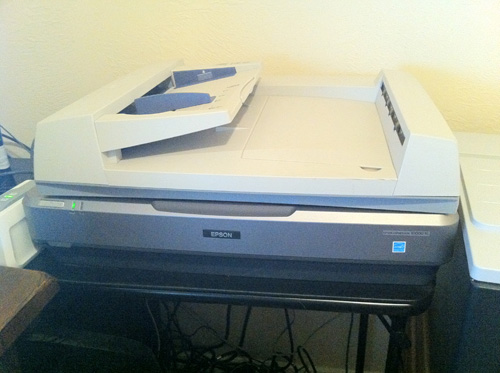 |
|
Send note to Staff
|
|
|
|
Bedrock Of The Community
Australia
38679 Posts |
|
|
Here is an example of the Byrum catalogue typewritten but saved to *.pdf The loss of definition is highlighted, but at least some wonderful person had the forethought to save information that may otherwise be lost. Mr. Byrum's work gets to endure and be appreciated. 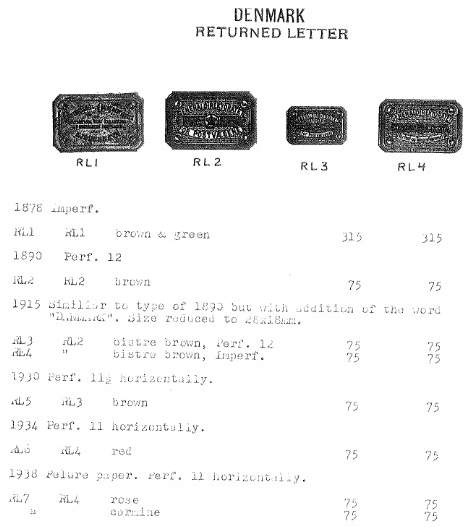 |
|
Send note to Staff
|
|
|
Bedrock Of The Community
Australia
38679 Posts |
|
|
Pillar Of The Community
United States
2941 Posts |
|
|
Pillar Of The Community
United States
2941 Posts |
|
|
For items with color covers, I generally scan the entire publication in color. The size difference between B&W pages scanned in grayscale versus color is minimal, and it saves the effort of scanning the covers separately.
Alternatively, I use Adobe Acrobat for scanning the publications, and it's easy to insert pages into a PDF, so if I wanted to scan them separately they could be combined in a matter of seconds. |
|
Send note to Staff
|
|
|
|
Replies: 16 / Views: 3,422 |
|
|
To participate in the forum you must log in or register. | |
Disclaimer: While a tremendous amount of effort goes into ensuring the accuracy of the information contained in this site, Stamp Community assumes no liability for errors. Copyright 2005 - 2026 Stamp Community Family - All rights reserved worldwide. Use of any images or content on this website without prior written permission of Stamp Community or the original lender is strictly prohibited.
Privacy Policy / Terms of Use Advertise Here |
| Stamp Community Forum |
© 2007 - 2026 Stamp Community Forums |
| It took 0.45 seconds to lick this stamp. |
 |
|
|
|


 Posted 02/19/2012 5:30 pm


