I know this isn't the official support site for StampSmarter, but since there seems to be a lot of overlap in users here, it seemed like a fair place to start.
I was trying to use the Plate Block Number Lookup Tool, which is a phenomenal and useful resource, and I was fairly regularly getting some errors like below. After refreshing the page and starting over, it would normally work the second or third try. Sometimes I could lookup 4 or 5 numbers in a row and it would work fine, other times it failed 2 or 3 times in a row... I had a few dozen Washington Franklin plate numbers I was trying to look up and it took longer than anticipated to get through them all.

Here is the text of the stack trace if that is at all helpful.
[ViewStateException: Invalid viewstate.
Client IP:
Port: 35233
Referer:
https://stampsmarter.org/PNT/PlateNumByPN.aspx Path: /PNT/PlateNumByPN.aspx
User-Agent: Mozilla/5.0 (Macintosh; Intel Mac OS X 10_15_7) AppleWebKit/605.1.15 (KHTML, like Gecko) Version/17.6 Safari/605.1.15
ViewState: oXBNklqOpEcA0E9sQ4TIINQRd7EbjE3B4QcOhbju/twl+/2PEAiNKZzLp0ty9ZWOxu7dvdWe+i0mZLzN
yx97aAvP8jNKTS1PzlkZN8cMsFwWC8OjKnoxeggw+MfA0oKv1HwnRn2XRXXyje4hKVncQwLLHd6S
N1JBmHWMDGYlbqZsCjH35swfwqzcLKI2XuYTHroc5Qk1Wkdo/XJb3FXTxqN2v5UmDxH2h9x+VkoU
hgEHCUokGYiRHPy4vP2qZwtjHdT6D//RFboxrrbsVTWNo0OEaqP95gVjGzTNTydlBV1Y9A/XUN+tx7
CTOE+8qFvVN+7f9yeIKMopQVbVm9wWnuI0DHoaL8MY36TCtyB5N2YpyuQO3+xRx/jEtTYlPbZhSc
u9mGHjGl7UgA4NyXWs/AJwaaO9qKImgIYopUVzAahG1vvyXckcXCqzjhX8eVUzsJ5Hh4foIct8x4nE
hh6iH1QZrXCIIbgGO46eTLGl5E/P/1vKzEemJb7E554HUFx2qfoewUuFlPPCAfT8v2avs0L3fo63+IOf
Rt8Er8LS8+MjIV7QCRmSdtKVrR6VdHXIPwryDgXGT/GzisUk6PYH+GaCQO6i0M42qzP2f/sumftiFn
KrZ1x2PqRPbgoUTJCf51Nu86R8R/9V4z2oBXGVvbiLWHtWmZnqizdZKOTPRSEqIYbAsz00Hmbhd
fqfOPSDqZbKkBjxKiMQYVa9q285TUbeRpqs6/xlX/C9oU8M5b0...]
[HttpException (0x80004005): Validation of viewstate MAC failed. If this application is hosted by a Web Farm or cluster, ensure that <machineKey> configuration specifies the same validationKey and validation algorithm. AutoGenerate cannot be used in a cluster.
See
http://go.microsoft.com/fwlink/?LinkID=314055 for more information.]
System.Web.UI.ViewStateException.ThrowError(Exception inner, String persistedState, String errorPageMessage, Boolean macValidationError) +153
System.Web.UI.ObjectStateFormatter.Deserialize(String inputString, Purpose purpose) +896
System.Web.UI.Util.DeserializeWithAssert(IStateFormatter2 formatter, String serializedState, Purpose purpose) +61
System.Web.UI.HiddenFieldPageStatePersister.Load() +305
System.Web.UI.Page.LoadPageStateFromPersistenceMedium() +367
System.Web.UI.Page.LoadAllState() +46
System.Web.UI.Page.ProcessRequestMain(Boolean includeStagesBeforeAsyncPoint, Boolean includeStagesAfterAsyncPoint) +9458
System.Web.UI.Page.ProcessRequest(Boolean includeStagesBeforeAsyncPoint, Boolean includeStagesAfterAsyncPoint) +345
System.Web.UI.Page.ProcessRequest() +75
System.Web.UI.Page.ProcessRequest(HttpContext context) +70
System.Web.CallHandlerExecutionStep.System.Web.HttpApplication.IExecutionStep.Execute() +790
System.Web.HttpApplication.ExecuteStepImpl(IExecutionStep step) +195
System.Web.HttpApplication.ExecuteStep(IExecutionStep step, Boolean& completedSynchronously) +88
Here is a different error I got when I first started. There is no sign-in password for StampSmarter, is there?
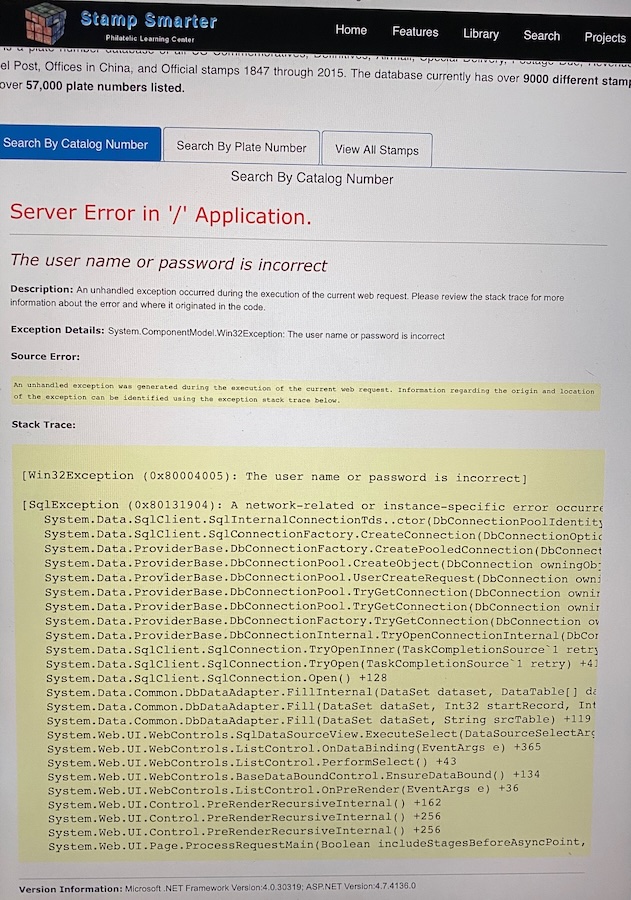
A few errors I found in the data:
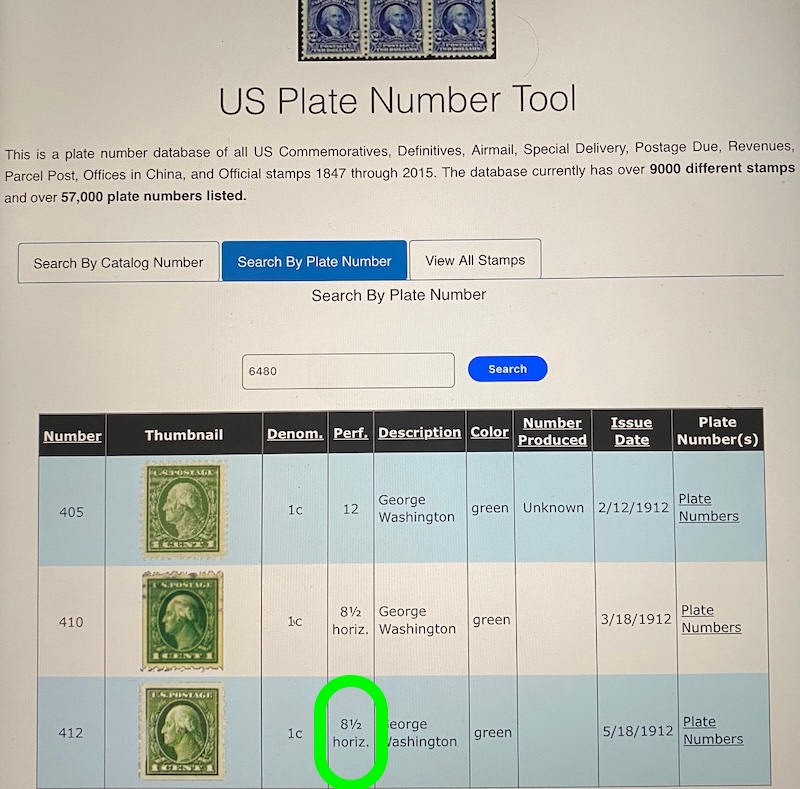
412 is Perf 8 1/2 vert not horiz.
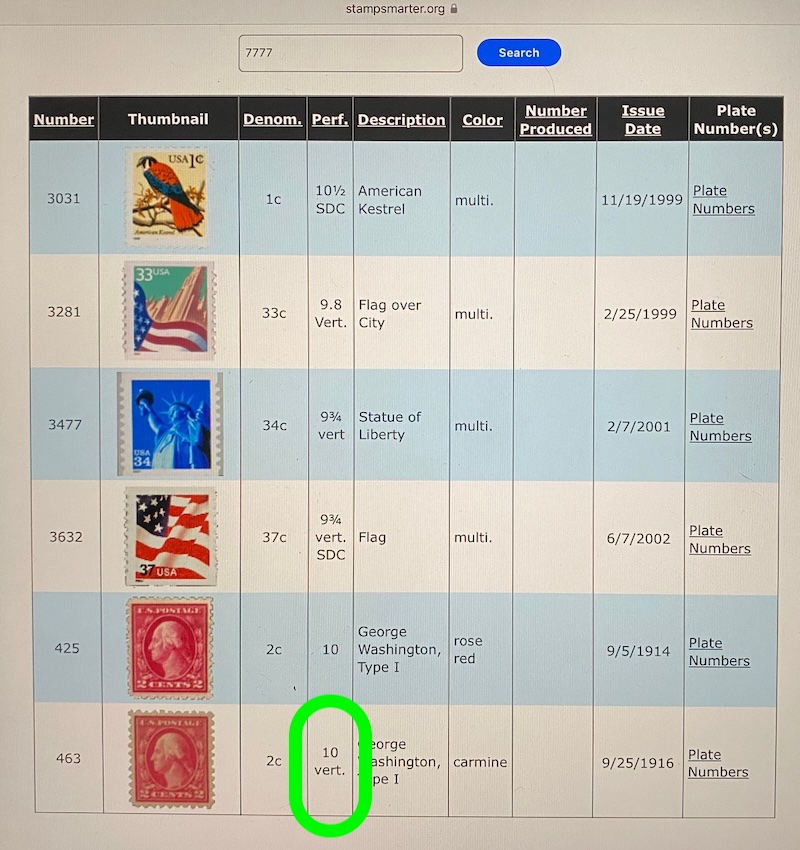
463 is Perf 10, not Perf 10 vert
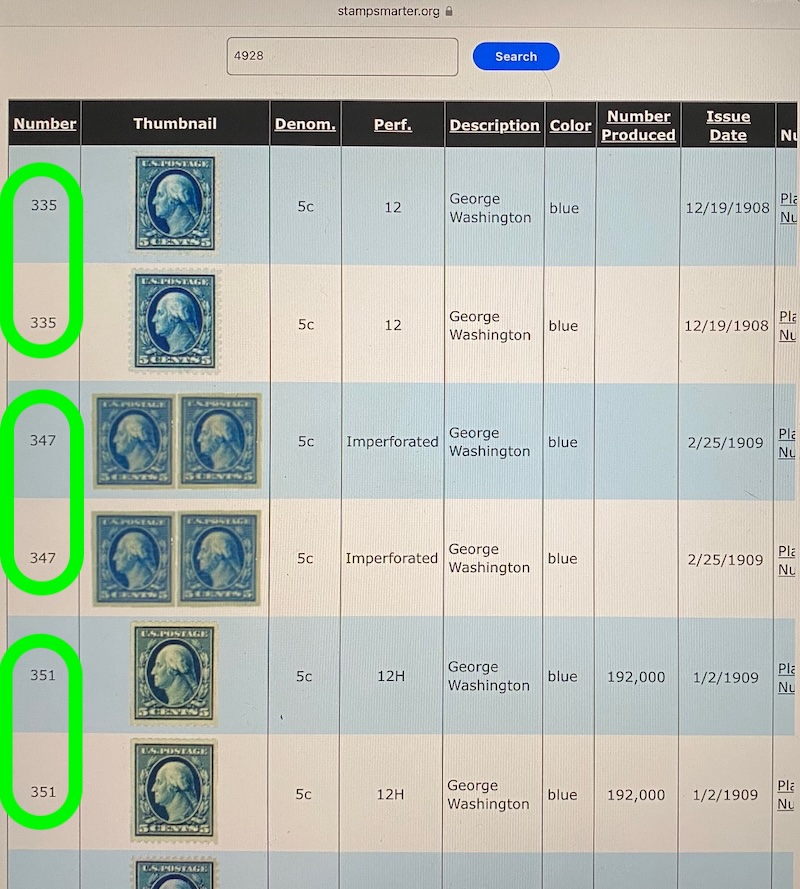
Every plate number that I looked up for 343-347 gave me double results.
I'd be happy to help fix these database errors if I only knew how. Maybe someone here knows someone who is able to fix them. If not, no biggie, just fyi. I will enjoy continuing to use the tool for as long as it works.
Edit: for long lines in the http copy/paste that was messing up the formatting.





 Posted 12/16/2025 4:31 pm


