Stamp Community Family of Web Sites
Thousands of stamps, consistently graded, competitively priced and hundreds of in-depth blog posts to read


Stamp Community Forum
 
Username:
Password:
Save Password
Forgot your Password?

This page may contain links that result in small commissions to keep this free site up and running.

Welcome Guest! Registering and/or logging in will remove the anchor (bottom) ads. It's Free!

Found A Nice 10c Ke7

Previous Page
 
To participate in the forum you must log in or register.
Author Previous TopicReplies: 25 / Views: 4,873Next Topic
Page: of 2
Valued Member
410 Posts
Posted 05/12/2014   1:28 pm  Show Profile Bookmark this reply Add CoinWatcher to your friends list  Get a Link to this Reply
JR1960, thanks. I just use Macro/auto/auto adjust and crop.
wert, I am just going by what Ralph Trimble said.
watermark, any idea what may have caused those diagonal lines?
Send note to Staff  Go to Top of Page
Pillar Of The Community
United States
725 Posts
Posted 05/12/2014   3:14 pm  Show Profile Bookmark this reply Add watermark to your friends list  Get a Link to this Reply
Re-entry lines usually mimic lines that are present in the original design of the stamp. Re-entries are caused by re-rocking the transfer roll into the plate either to strengthen or repair a previous rocking. If this process is slightly misaligned doubled lines can occur. The lines I described earlier meet these standards.

The diagonal lines on this stamp are not part of the design of the stamp on the transfer roll. These diagonal lines could be plate scratches or cracks. They could also be stray ink from improper wiping of the plate or a foreign object that picked up ink and transferred it to the paper during printing. The paper appears coarse so they might even be ink pulls.
Send note to Staff  Go to Top of Page
Edited by watermark - 05/12/2014 3:18 pm
Valued Member
187 Posts
Posted 05/13/2014   5:36 pm  Show Profile Bookmark this reply Add JR1960 to your friends list  Get a Link to this Reply
Coinwatcher, I've tried using macro with auto focus on my Canon Rebel digital SLR at max quality and I seem to get a good photo, but when I use the image optimizer to upload to my post it reduces the quality too much. How are you getting such a high res image posted here?
Send note to Staff  Go to Top of Page
Rest in Peace
7742 Posts
Posted 05/13/2014   5:45 pm  Show Profile Bookmark this reply Add wert to your friends list  Get a Link to this Reply
That's exactly what I was thinking watermark...I really think this stamp (sheet) got rocked one too many times...Hard to see a re entry in this stamp..But I could be wrong.
Send note to Staff  Go to Top of Page
Valued Member
410 Posts
Posted 05/13/2014   6:12 pm  Show Profile Bookmark this reply Add CoinWatcher to your friends list  Get a Link to this Reply
JR1960 you need to adjust the "IMAGE QUALITY" in the Image Optimizer so the image is as close to 100 as possible.
Send note to Staff  Go to Top of Page
Valued Member
187 Posts
Posted 05/14/2014   07:56 am  Show Profile Bookmark this reply Add JR1960 to your friends list  Get a Link to this Reply
CoinWatcher I am doing that, but then the actual visible size of the image gets too small so you can't see the detail.
Send note to Staff  Go to Top of Page
Moderator
Learn More...
United States
5101 Posts
Posted 05/14/2014   10:12 am  Show Profile Bookmark this reply Add Partime to your friends list  Get a Link to this Reply
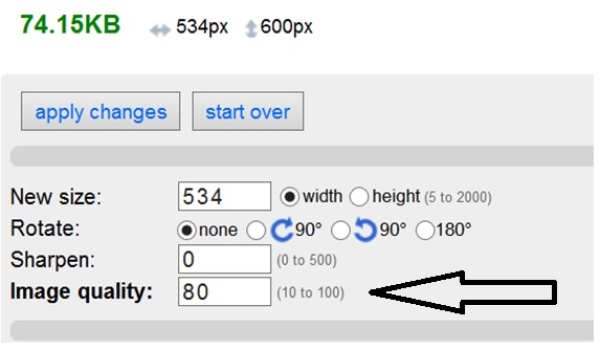
JR1960. I think if you adjust the Image Quality, not the Image Size, you will see that the picture stays the same size, but actually has very little effect on the quality. You need to adjust the item shown below. Just keep decreasing it until your image is less than 100kb. I've gone as low as 30 in this area, and the image still looks fine.

Send note to Staff  Go to Top of Page
Valued Member
187 Posts
Posted 05/14/2014   10:54 am  Show Profile Bookmark this reply Add JR1960 to your friends list  Get a Link to this Reply
Partime I know what you mean, but then I have a high quality tiny image, not a blown up high quality image that shows the detail I am trying to show. It appears I have to either have a big image with poor resolution, or a small image with high resolution. I can't figure out how you guys are posting big images with high resolution under 100k.

I appreciate everyone's efforts, I fully admit I feel like a tool asking these dumb questions
Send note to Staff  Go to Top of Page
Pillar Of The Community
United States
725 Posts
Posted 05/14/2014   11:13 am  Show Profile Bookmark this reply Add watermark to your friends list  Get a Link to this Reply
Are you using a scanner? If you are, try scanning at 1200dpi. This gives a sharp clear image. Chances are this image will be too big to post directly. Go to image optimizer and adjust the size as in the instructions to 100 or slightly less. If you want a small potion of the stamp, say a corner or top, just scan that portion of the stamp. You may find that you can post these images without using the optimizer.
Send note to Staff  Go to Top of Page
Moderator
Learn More...
United States
5101 Posts
Posted 05/14/2014   11:37 am  Show Profile Bookmark this reply Add Partime to your friends list  Get a Link to this Reply

Quote:
... but then I have a high quality tiny image, not a blown up high quality image that shows the detail I am trying to show


I think the problem is that you are also adjusting the "New size" in the same window. Be sure to leave this number at 500 - 800, and your image size should be very large indeed.

So, leave your "New Size" to about 500-800.
Adjust your "Image Quality" lower.
Press "Apply Changes" and see if the total file size is about 98k, or less.
If File size is still too big, keep lowering the number in "Image Quality" until it works.
When done, save the file, and all should be good.
Send note to Staff  Go to Top of Page
Page: of 2 Previous TopicReplies: 25 / Views: 4,873Next Topic  
Previous Page
 
To participate in the forum you must log in or register.

Go to Top of Page

Disclaimer: While a tremendous amount of effort goes into ensuring the accuracy of the information contained in this site, Stamp Community assumes no liability for errors. Copyright 2005 - 2026 Stamp Community Family - All rights reserved worldwide. Use of any images or content on this website without prior written permission of Stamp Community or the original lender is strictly prohibited.
Privacy Policy / Terms of Use    Advertise Here
Stamp Community Forum © 2007 - 2026 Stamp Community Forums
It took 0.17 seconds to lick this stamp. Powered By: Snitz Forums 2000 Version 3.4.05