Quote: Ok, I took the Steiner example and modified this line: STAMP_ADD (28.0 31.0 "1 C" " " "" "" "This is center text.\nLet's see how it works.\nIt appears to be taking up a lot of space." "")
Actually, there is a very simple fix, with a slightly less simple explanation. The fix is to remove the 2 extra sets of double quotes between "1 C" and "This is ....".
STAMP_ADD (28.0 31.0 "1 C" "" "This is center text.\nLet's see how it works.\nIt appears to be taking up a lot of space." "")
The explanation. Prior to V3.8, the STAMP_ADD command required three text items for three lines of text inside the stamp, and another three text items for under the stamp for a total of six text items.
As a way of simplifying the command, while at the same time adding functionality the STAMP_ADD command now requires only four text items; one for inside the stamp and three for under the stamp. It also now processes "\n" new line indicators inside text items to generate multiple lines of text inside or under the stamp.
However, in order to maintain backwards compatibility with older albums, if a STAMP_ADD command has 6 text items, it is processed in exactly the same way that an older version of AlbumEasy would process it. If it has 4 text items, it is treated as the new command.
I was considering issuing a warning if older syntax was detected, but with older albums containing hundreds of STAMP_ADD commands, the user would be absolutely swamped by the warnings so decided not to.
I had thought that I had updated all the example files to use the new syntax, but somehow I must have missed the Steiner example, I better check them all. Clive
AlbumEasy - Free software for creating custom stamp album pages ChromaMate - Compare, match, analyse, free colour matching software ImageSleuth - Images, hidden inside images, revealed. A retroReveal alternative PSGSA - The Philatelic Society for Greater Southern Africa
I spent some time with AlbumEasy today and what a great program - thank you.
It was impressively easy - just after looking at a few examples - to replicate exactly a page I made earlier using Word, and I can already see this being so much more efficient moving forward. Thanks again.
AlbumEasy - Free software for creating custom stamp album pages ChromaMate - Compare, match, analyse, free colour matching software ImageSleuth - Images, hidden inside images, revealed. A retroReveal alternative PSGSA - The Philatelic Society for Greater Southern Africa
I have just started playing around with AlbumEasy and I am very impressed. I have watched your introductory tutorial and that made things a lot easier to start. One question I cannot seem to find an answer for is how can you adjust the spacing between stamp "boxes" in a row? If I adjust the horizontal and vertical page settings, the vertical changes are obvious, but the horizontal stays the same regardless of the value I change the setting to. What am I missing? Thanks.
Hi PMStamp, The horizontal page setting controls the distance that page elements such as stamp boxes or text will be separated from the left and right borders. To control the amount of space between stamp boxes, use the ROW_START_FS command to set the spacing between the boxes in the row. One can also insert "blank" stamp boxes in the row to further adjust the spacing if so desired - to insert blank stamp boxes use the STAMP_ADD_BLANK command Clive
AlbumEasy - Free software for creating custom stamp album pages ChromaMate - Compare, match, analyse, free colour matching software ImageSleuth - Images, hidden inside images, revealed. A retroReveal alternative PSGSA - The Philatelic Society for Greater Southern Africa
AlbumEasy - Free software for creating custom stamp album pages ChromaMate - Compare, match, analyse, free colour matching software ImageSleuth - Images, hidden inside images, revealed. A retroReveal alternative PSGSA - The Philatelic Society for Greater Southern Africa
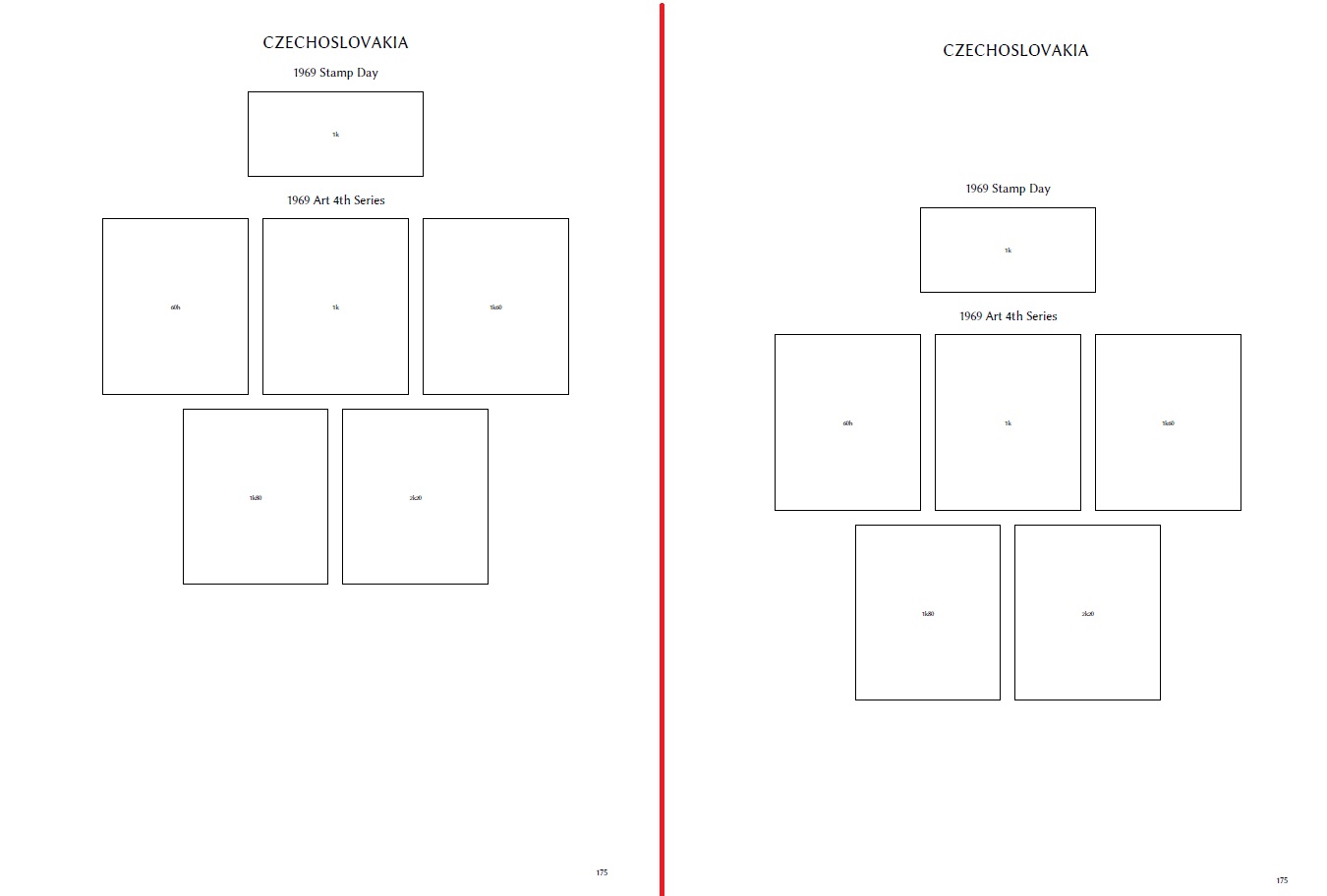
I also downloaded AlbumEasy these days and I'm beginning to familiarize with it. Even if I absolutely hate coding the language remains fairly simple. Is it possible to force the vertical centering of the page as in the example to the right?
As someone who doesn't use Clive's system, but pen and ink, I'd underline the desirability of centring the content on an album page - it's one reason why Steiner pages look wrong. In fact, if you were a picture-framer, you'd usually a slightly larger margin at the bottom than the top, but that is probably balanced on an album page by the country title.
Quote: Is it possible to force the vertical centering of the page as in the example to the right?
Hi MaryMonty, There is no facility for doing this automatically, but you can adjust the vertical spacing by means of any of the PAGE_TEXT commands. These accept an optional vertical spacing parameter that controls the amount of space after the text e.g PAGE_TEXT_CENTRE (HN 12 "This line of text is followed by 35mm of blank space" 35.0)
It can also be used with blank text to just insert vertical space: e.g PAGE_TEXT (HN 1 "" 35.0)
The vertical spacing parameter can also be negative which will move the next item up: e.g PAGE_TEXT (HN 12 "The top of the next item will be placed 15.5mm ABOVE the bottom of this line of text" -15.5)
AlbumEasy - Free software for creating custom stamp album pages ChromaMate - Compare, match, analyse, free colour matching software ImageSleuth - Images, hidden inside images, revealed. A retroReveal alternative PSGSA - The Philatelic Society for Greater Southern Africa
How do you use a Font other than the standard ones? I don't see how to figure out a two character abbreviation or set up a new one or just use the font name? No example that I can find in the Help either.
Hi, banknoteguy, This video shows how to use fonts:
xIPRChXDfsM
I recommend, that if you decide to watch it that you do so full screen. Unfortunately, the audio quality is not great, but hopefully, it will give you the general idea.
The Fonts.txt and International.txt example albums included with AlbumEasy are also intended as examples of how to use fonts.
Please shout if you have any more questions, Clive
AlbumEasy - Free software for creating custom stamp album pages ChromaMate - Compare, match, analyse, free colour matching software ImageSleuth - Images, hidden inside images, revealed. A retroReveal alternative PSGSA - The Philatelic Society for Greater Southern Africa
Disclaimer: While a tremendous amount of effort goes into ensuring the accuracy of the information contained in this site, Stamp Community assumes no liability for errors. Copyright 2005 - 2026 Stamp Community Family - All rights reserved worldwide. Use of any images or content on this website without prior written permission of Stamp Community or the original lender is strictly prohibited. Privacy Policy / Terms of UseAdvertise Here





 Posted 06/16/2019 6:59 pm


 the language remains fairly simple.