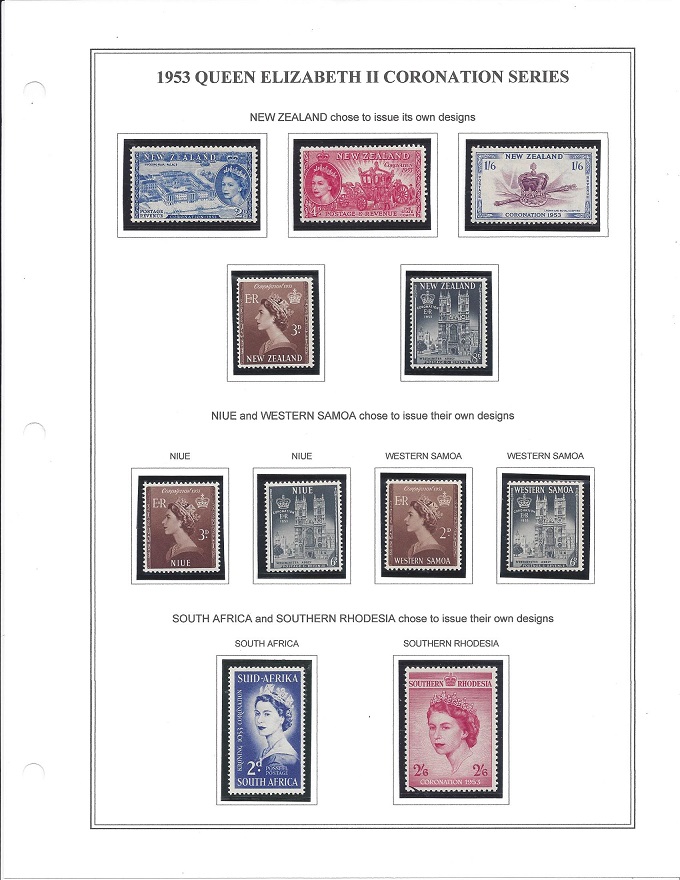
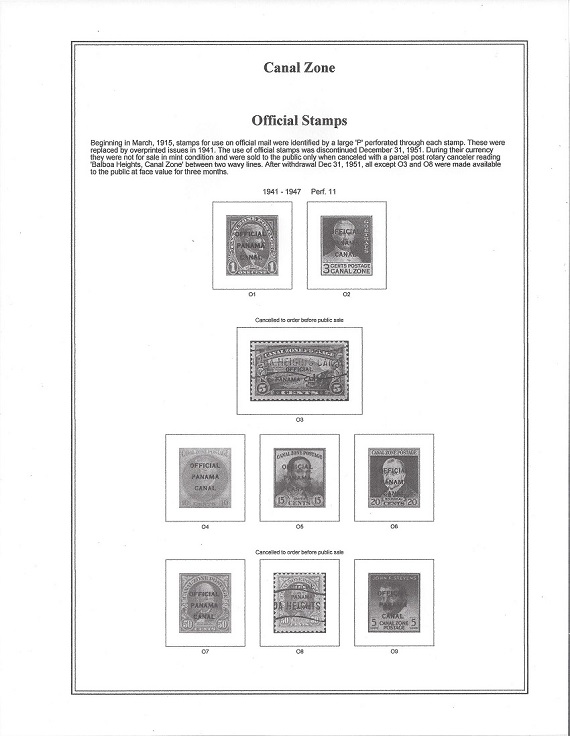
I thought I would give a try at making a cut & paste album page.
I first printed a blank 2 line Steiner page with the words Ecuador on the first line and Revenue Stamps on the second line.
I then Drew the size box I wanted on a 3x5" card and scanned it. I then put the image in MS Paint and trimmed it to size.
I then placed it on a matrix page with other boxes of various sizes
To make an album page I set my margins and then I typed the description and date then cut and pasted as many boxes I needed and repeated until I filled the page.
Then I printed over the Steiner page.
Since I mount ALL of my stamps the boxes don't have to look perfect just neat. The mounts cover the boxes so the lines don't show. The boxes are just used as a guide as to where to neatly place the stamps. I used lined 3x5" cards because the lines can be used for hand written notes.
You are not going to make a flowchart but are going to use the shapes in the WORD application. Also note that with a little bit of effort you can make an entire page layout. When finished one can turn off the grid lines. Here is a link for setting the Grid Line size, etc.: https://wordribbon.tips.net/T005947...ng_Grid.html
A lot of users do not know about Word's flow charting capability and assume they have to buy a graphics package, notably it is easier with such a package, but WORD flowchart could do a decent job. One just has to expend a little effort.
I bought a beautiful Scott International collection and the collector made lots of extra pages. I told him how nice they were and he told me he made them with MS Word, here's an example;
Quote: I first printed a blank 2 line Steiner page with the words Ecuador on the first line and Revenue Stamps on the second line.
I then Drew the size box I wanted on a 3x5" card and scanned it. I then put the image in MS Paint and trimmed it to size.
I then placed it on a matrix page with other boxes of various sizes
To make an album page I set my margins and then I typed the description and date then cut and pasted as many boxes I needed and repeated until I filled the page.
Then I printed over the Steiner page.
That does sound like an awful lot of work Timm. You might find AlbumEasy takes a lot less effort, but then again you may not :) Some people love it, others have a less benevolent attitude to it. To see whether it is for you, you could check out the introduction/tutorial video:
AlbumEasy - Free software for creating custom stamp album pages ChromaMate - Compare, match, analyse, free colour matching software ImageSleuth - Images, hidden inside images, revealed. A retroReveal alternative PSGSA - The Philatelic Society for Greater Southern Africa
This cut & past method actually quite simple and fast. Most of the work is making a matrix page with various box sixes to cut and past from. Once that is done the actual album page is quite simple to make.
Just set your margins, select the font and type in your description and then cut and paste in your boxes. I did the entire page in 2 minutes.
I'd love to find out more about that guy who made his own International pages! I'm going to guess he printed on blank (with border) International pages, but I suppose you could scan the Scott border, too. And of course you have to be able to print that somewhat larger page somehow, so you might need a large-format printer to do this. With one, I imagine you could also print Scott Specialty-sized pages that you made yourself either onto Specialty blank pages (with borders already on them) or just add your own preferred border to your design.
It was definitely printed on Blank Scott pages. I wondered the same thing about the printing. The conversation was getting strange so I backed off. He asked me not to leave feedback for him and he assumed I didn't want feedback because people could see where I sourced my material?
He told me the collection has 42,000 stamps in Part I, obviously I was pretty skeptical but with all the extra pages maybe it does. The strangest part is that he sells on ebay so why would he sell it to me to breakup?
I can ask him how he printed the pages if you want.
I also recommend AlbumEasy. I've used it for years to make numerous albums and individual special pages.
You can also download (free) complete albums created and donated to Clive's website by users like me at http://www.thestampweb.com/albums.html Download the pdf files and print the pages you want. If you have the AE software, you can also download the .txt files, which allows you to make any changes you want.
Here's a few pages I've made for my personal albums. Scott catalogue numbers shown are not included in the albums available from AE due to copyright issues, but you can always add them yourselves, like I did.on the pages. I also include images of the stamps within the boxes. These can be either in full color or greyscale (which takes less ink to print). The first three pages have the stamps mounted in Scott mounts. The last page is without stamps.
AlbumEasy - Free software for creating custom stamp album pages ChromaMate - Compare, match, analyse, free colour matching software ImageSleuth - Images, hidden inside images, revealed. A retroReveal alternative PSGSA - The Philatelic Society for Greater Southern Africa
Ken, yes I'd love to know how your seller printed his pages. It doesn't surprise me that he printed onto blank (with border) Scott pages. That makes it easier, and the resulting pages will match the other pages well. I'd guess he solved the printing problem simply by using a wide-bed printer.
As for print-your-own pages in general, they always seem to end up being the small 8 1/2 x 11" size that regular printers can handle. This size does not appeal to me. The page layouts on small pages nearly always look crowded compared to the more elegant layouts possible on larger pages. Even going up to only the Scott International page size makes the page look better, and Scott Specialty pages are even better than that for spreading out stamps and information. Some European pages like those from Schaubek, Lighthouse and others, make for the most beautiful looking pages -- in my opinion. Page layouts from Bill Steiner and others look pretty good on larger pages, and it can be done.
I realize that money is involved in all this! It's not always possible for most collectors to afford larger pages on which they can print less crowded layouts. And they would need a large format printer, larger paper, and so on, to print those pages. I've successfully used my local copy shop to copy smaller pages onto larger pages, and the resulting pages look far better to me. Some of you might consider doing this to get away from small notebook-sized album pages in 3-ring binders.
I like your idea about using a copy shop to create pages on Scott Blanks. I haven't tried it but intend to try it in near future.
20 years ago I had access to my office's larger laser printer and printed Steiner pages on Scott Specialty Blanks and they turned out great. (I did it after hours so I was only stealing a bit of toner)
The point of this thread was NOT to promote Album Page making programs. It is to suggest that you can reduce the number of pages in your album. Many of the Steiner pages, especially in the back of book sections, have just a single stamp on a page. 10 years of semi-postal with 1 stamp issued per year means 10 album pages. With Cut and Paste you can reduce that number to just 1 or 2 pages.
This page was made by cut and past by combining two different Steiner Album pages.
As I recall in the old days Steiner made available a version that could be loaded directly into PageMaker. I find it hard to believe it was 20 years ago that I was doing this.
Disclaimer: While a tremendous amount of effort goes into ensuring the accuracy of the information contained in this site, Stamp Community assumes no liability for errors. Copyright 2005 - 2026 Stamp Community Family - All rights reserved worldwide. Use of any images or content on this website without prior written permission of Stamp Community or the original lender is strictly prohibited. Privacy Policy / Terms of UseAdvertise Here





 Posted 02/17/2020 04:11 am