| Author |
 Replies: 3,825 / Views: 255,685 Replies: 3,825 / Views: 255,685 |
|
|
|
Valued Member
United States
342 Posts |
|
|
You're very welcome. You're insight is also appreciated.
I enjoy sharing.
Stan |
Send note to Staff 
|
|
|
Pillar Of The Community
United States
1162 Posts |
|
|
Quote:
Stan - Thanks so much for sharing that cover and letter. Barre was in my neck of the woods, and I spent many years in my youth exploring the area and hiking Quabbin Reservoir. An area rich in history and much of it still proudly preserved. Also, a place of great natural beauty and diverse wildlife. It reminds me a great deal of a busier Berkshires where I now live. The politics and taxes in Massachusetts drive me crazy but the feel of the place keeps me here.
I am thinking of starting a collection of postal history from the "dead" towns that were flooded by Quabbin and still can be seen under the waters. You can still walk the town roads around the Reservoir and come across many buildings remains and cellar holes. The bodies were removed from the Town cemeteries, but the headstones are still there in some cases. You will also come across vintage 1920's and 1930's vehicles slowing decaying amongst the trees. This has always fascinated me from a non-philatelic POV. All these reservoirs were put in, in seemingly unpopulated areas. Although NOT completely unpopulated, many of these areas were lightly populated. Meaning, people got uprooted for the sake of the bigger good. With the historic drought in the Southwest, some of these settlements are being 're-discovered' as they pop out of Lake Mead or Lake Powell, or others. The movie Deliverance was set in the TVA area where lakes were forming and part of the movie shows lakes swallowing up abandoned communities. Anyway, it might be an interesting collecting area - collecting philatelic history related to towns/burbs/villages/etc that no longer exist because 'progress' made them obsolete! |
|
Send note to Staff
|
|
|
Valued Member
United States
319 Posts |
|
|
I saw some discussion previously in this post regarding scanning, epson software, irfanview, etc...
I have an Epson Perfection V600 Photo scanner. (I use windows 7 and 10 currently)
Does anybody have any recommendations "from experience" what settings to use in the Epson software for scanning stamps? Also, does anyone know what setting affects Irfanview filesize when saving? It seems to automatically shrink the file that was scanned by about 90% (and I wonder what is getting lost in the process).
Is there a new favorite software tool (like irfanview, but more capable and more user friendly) that folks here use? Your experience and recommendations are much appreciated. Thanks - Jim |
|
Send note to Staff
|
|
|
Pillar Of The Community

United States
1838 Posts |
|
|
I use that same model scanner. I personally use higher settings than some people recommend, so use your judgement, but I scan as 1200dpi and 48 bit color. I uncheck all the boxes below for enhancements. Under auto-exposure type the choices are photo and document. Choose photo. Occasionally it is great to be able to scan at crazy high resolution like 9600 or even higher to zoom in on a very tiny detail. It only lets you scan at that resolution if you select a small enough area that is won't run for days. But that is perfect for a tiny detail in a tiny stamp. |
|
Send note to Staff
|
|
|
Valued Member
United States
319 Posts |
|
|
Thanks rlsny, I appreciate the tips. Do you use any other special software for editing/cropping/stitching/straightening, or making individual pics out of a scan of a page of separately mounted stamps? |
|
Send note to Staff
|
|
|
Rest in Peace
United States
920 Posts |
|
|
James- like you and rlsny I use a Epson V600. For editing scans I just use the WI dows 10 photo tools and occasionally Google Photo. I have a fancier photo editing program but never use it for stamps. For full page scans I use 1200 dpi setting. It allows me to zoom in on each stamp on the page for reviewing and for my records. If more detail is needed I will scan an individual stamp at 2400. I also use a USB microscope to review minute detail on my computer screen and if a picture is needed I simply do a quick screen save which can also be cropped and efited. |
|
Send note to Staff
|
|
|
Pillar Of The Community
United States
1838 Posts |
|
|
I use GIMP open source editor for straightening/cropping. It is an incredibly versatile editor but for stamps I just use it for that. So it's way overkill for the purpose but it is a very powerful tool for other uses. |
|
Send note to Staff
|
|
|
Valued Member
United States
319 Posts |
|
|
Bedrock Of The Community
12781 Posts |
|
|
Pillar Of The Community
United States
1820 Posts |
|
|
rogdcam is correct. The guide dots at upper left are the most obvious giveaway. |
|
Send note to Staff
|
|
|
Pillar Of The Community
United States
2230 Posts |
|
|
Hi jamesg,
I also use an Epson V600. I normally scan in Professional mode with the "Configuration" Color Control/Continuous auto exposure option selected.
I use Adobe PhotoShop Elements for image editing, but the free (donations recommended) apps paint.net and Gimp work well too. |
|
Send note to Staff
|
|
|
Valued Member
France
180 Posts |
|
|
Hi every body,could I get some help ??? with this 10cts,thankyou everybody 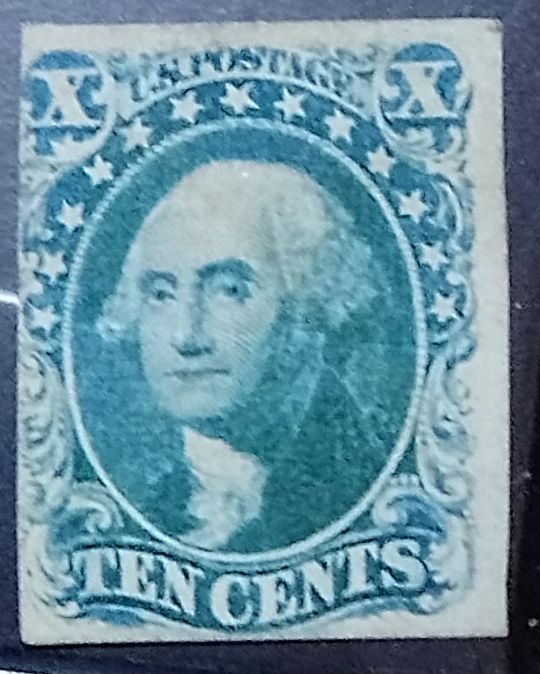 |
|
Send note to Staff
|
|
|
Rest in Peace
United States
920 Posts |
|
|
Naofrago it is either a Scott 14 or 15. Without a clearer image I'd rather wait to narrow it further. Nice looking stamp though. Is the color really that blueish? |
|
Send note to Staff
|
|
|
Valued Member
France
180 Posts |
|
|
Hi caper123,yes is a bluish green,and I had for sale on ebay but I thougt that was a #16,that is wy I asked for help |
|
Send note to Staff
|
|
|
Bedrock Of The Community
12781 Posts |
|
|
Replies: 3,825 / Views: 255,685 |
|




 Posted 04/14/2022 9:00 pm