Stamp Community Family of Web Sites
Thousands of stamps, consistently graded, competitively priced and hundreds of in-depth blog posts to read


Stamp Community Forum
 
Username:
Password:
Save Password
Forgot your Password?

This page may contain links that result in small commissions to keep this free site up and running.

Welcome Guest! Registering and/or logging in will remove the anchor (bottom) ads. It's Free!

Nevermind Me, This Is Just Troubleshooting :)

 
To participate in the forum you must log in or register.
Author Previous TopicReplies: 7 / Views: 1,327Next Topic  
Valued Member
Canada
338 Posts
Posted 03/14/2011   5:41 pm  Show Profile Bookmark this topic Add lux1228 to your friends list Get a Link to this Message


Send note to Staff

Valued Member
Canada
338 Posts
Posted 03/14/2011   5:44 pm  Show Profile Bookmark this reply Add lux1228 to your friends list  Get a Link to this Reply
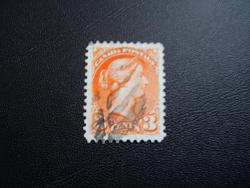
hmmm...messing with the camera and can't find my cords to the scanner :( trying my best...sorry if I'm being bothersome. just needed to see what they look like posted. ergh.
Send note to Staff  Go to Top of Page
Valued Member
United States
302 Posts
Posted 03/14/2011   6:04 pm  Show Profile Bookmark this reply Add panda.bear to your friends list  Get a Link to this Reply
Color and exposure look pretty good. I would crop your image closely to the stamp then resize so the maximum dimension is between 600-800 pixels wide for best effect. Make sure you are using the highest quality setting on your camera. Based on the exif data on your photo it looks like you have a Samsung Digimax V5 or Kenox V5 which both are 5MP and should give you adequate resolution for closeups so make sure your camera is saving at the highest possible resolution. Also, according to the exif data your exposure was taken at f2.7 with a shutter speed of 1/3 second. I would try if possible to move your light source closer or possibly using a brighter light - this will enable you to take photos with less shutter lag which should reduce any motion blur. Additionally, check to make sure your camera does not have any sharpening or color enhancement setting enabled as often they can produce garish images.
Send note to Staff  Go to Top of Page
Valued Member
Canada
338 Posts
Posted 03/14/2011   6:21 pm  Show Profile Bookmark this reply Add lux1228 to your friends list  Get a Link to this Reply
@panda bear- thank you a million. Samsung V5 on point :) Honestly, I think its awful...but since I now have to buy a new scanner, I'll be playing with the camera in the meantime, hopefully by tonight I'll have something decent to post :/ Sorry
if I'm being bothersome with my inexperience with photography and philately! I'm learning thanks to you all!!
Send note to Staff  Go to Top of Page
Valued Member
United States
302 Posts
Posted 03/14/2011   7:14 pm  Show Profile Bookmark this reply Add panda.bear to your friends list  Get a Link to this Reply
No bother for the input. What type of scanner do you own and why the replacement? While a modern scanner can be had for just a few bags of shells why replace if you have what you need?
Send note to Staff  Go to Top of Page
Valued Member
Canada
338 Posts
Posted 03/14/2011   7:45 pm  Show Profile Bookmark this reply Add lux1228 to your friends list  Get a Link to this Reply
I have an HP scanner 3500c,...but am unable to locate the cords. My storage room is quite unruly at the time, I know its in ther somewhere, but in the meantime, I only have my samusung V5 :(
Send note to Staff  Go to Top of Page
Bedrock Of The Community
Australia
38679 Posts
Posted 03/14/2011   7:56 pm  Show Profile Bookmark this reply Add rod222 to your friends list  Get a Link to this Reply


The correct room for this is "Testing"

Click "all forums" then testing should be at the bottom.
Send note to Staff  Go to Top of Page
Valued Member
Canada
338 Posts
Posted 03/14/2011   8:00 pm  Show Profile Bookmark this reply Add lux1228 to your friends list  Get a Link to this Reply
;) thank you. im still new!
Send note to Staff  Go to Top of Page
  Previous TopicReplies: 7 / Views: 1,327Next Topic  
 
To participate in the forum you must log in or register.

Go to Top of Page

Disclaimer: While a tremendous amount of effort goes into ensuring the accuracy of the information contained in this site, Stamp Community assumes no liability for errors. Copyright 2005 - 2026 Stamp Community Family - All rights reserved worldwide. Use of any images or content on this website without prior written permission of Stamp Community or the original lender is strictly prohibited.
Privacy Policy / Terms of Use    Advertise Here
Stamp Community Forum © 2007 - 2026 Stamp Community Forums
It took 0.29 seconds to lick this stamp. Powered By: Snitz Forums 2000 Version 3.4.05