Building on the
Watermark Extraction Technique, here's the technique I use to extract postmarks.
The success of this method is very dependent on the quality of the cancel and the color of the underlying stamp or letter. Dark colored stamps, or stamps with light cancels will yield lesser results.
All examples shown here were done using an Epson Perfection V350 Photo Scanner with Epson Scan software, and Photoshop CS5.
1. The source -- the stamp used for this example is Deutsches Reich Mi 503B, from the 1933 Wagner Set.

2. Go to the Black and White adjustment.
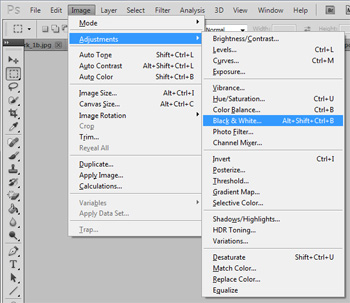
Which gives this:

3. Adjust the sliders to phase-out the colors. For this orange stamp, I adjusted the red and yellow sliders.
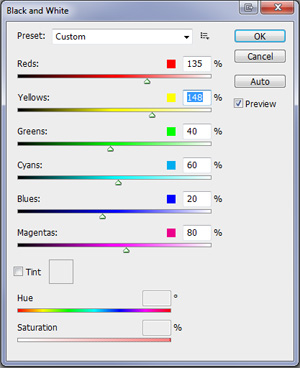
Which gives us this:
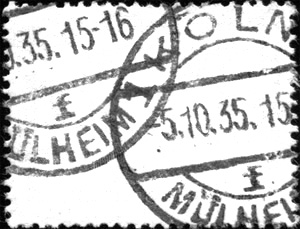
And if you want to darken the cancel a little...
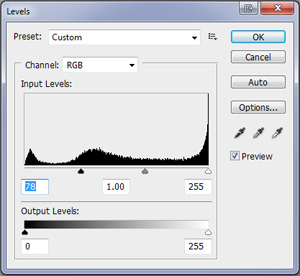
4. Go to the Levels adjustment.
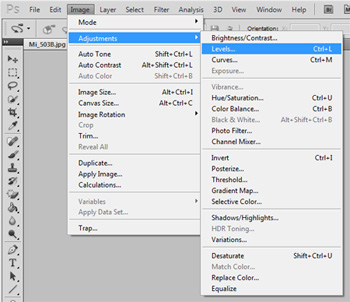
5. Adjust the lower slider to the right to darken the cancel.
6. The end result:
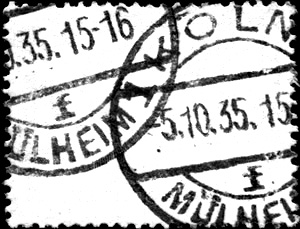
As stated above, the success of the simple Black & White method is very dependent on stamp color. Some colors that are closer in shade to the cancel will also require minor adjustments to Brightness, Levels, or Curves to achieve optimal results.





 Posted 05/16/2011 9:39 pm


