| Author |
 Replies: 22 / Views: 2,852 Replies: 22 / Views: 2,852 |
|
Valued Member
United States
106 Posts |
|
|
I have this overpowering need of keeping track of my collections? I sometimes wonder why it is that I think that I have to keep track of practically *every* stamp that I own (excluding duplicates of course...). I mean, I've bought a few stamp collecting programs that keeps track of inventory but it seems like none of them suit me. Some of them are just too involved and a little cumbersome to use. I ended up creating an excel spreadsheet and that suits me better. I only include those fields that I want to have. And, on top of that, I keep a written checklist for each country. I really begin to wonder why I even have the computerized inventory as I spend more time with the written checklist. I find that written checklist much easier to refer to when I start searching for stamps that I have yet to acquire. Am I the only one that seems to be a little OCD about this?? Maybe professional help (or a longer nap) is the answer.  |
|
Send note to Staff
|
|
|
|
|
Bedrock Of The Community
United States
12128 Posts |
|
|
I keep track of my stamps with an Excel spreadsheet, too. Works fine for me, and as you say, you can include only those fields you feel are needed. I find it helpful as I have tagged each album and/or stockbook that I have so when I am looking for a particular stamp, it is easy to go right the album where it is and not have to go through several books to find a particular stamp or cover.
However, there is a limit to keeping an inventory of every single stamp in your collection, though. I started to do it, and it was just impossible to keep up with. So I basically keep a "to be inventoried" album and/or stockbook and when I get enough stamps to warrant entering them into the spreadsheet, I can do it all at one time.
|
Send note to Staff 
|
|
|
Bedrock Of The Community
Australia
38679 Posts |
|
|
The answer is rather simple, scan your stamps and employ windows explorer as your database. A picture is worth a thousand...... "Agent Ransack" delivers a stamp of choice from 400,000 in about 18 seconds tops. Your employment of text strings is your own choice, for example your threead title had you used "stamp inventories" or something similar would have you able to re-find your post in a trice, the choice you took will probably not be very helpful. A cuban page example 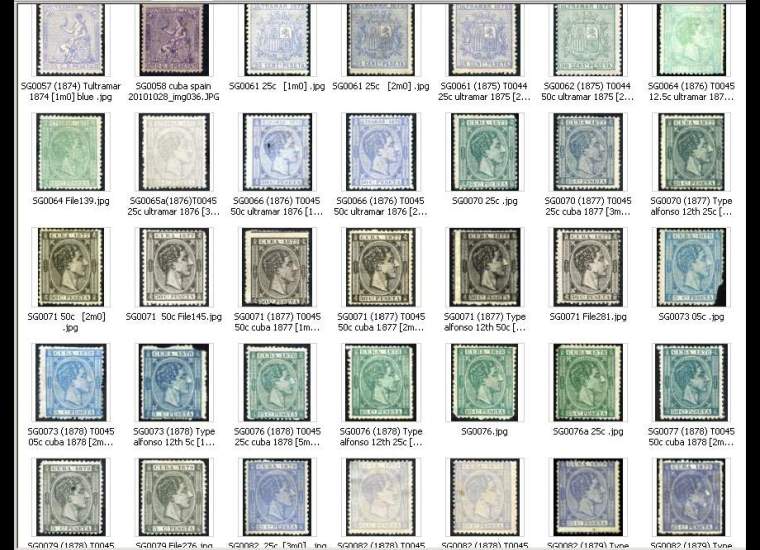 |
|
Send note to Staff
|
|
|
Valued Member
United States
106 Posts |
|
|
Actually Rod, I have scanned a great many of my stamps. I've never actually thought of using explorer though... good idea. I didn't give that much thought to this thread title. And you are correct, with the title I put there is no indication about the topic. But sometimes that's OK too. I guess if I wanted to find this again I could do a search using the term "inventory".
wt1- a "to be inventoried album"... Hmmmm, that gives me something to think about. And I think that I like that idea!
|
|
Send note to Staff
|
|
|
Pillar Of The Community
United States
2941 Posts |
|
|
I tried Excel, then a custom Access database. The problem I had was that I travel a lot for work, and it was difficult to know what I had when I wasn't at home. So, I eventually caved and went with a web-based SQL database. Now I can see what I have from anywhere. I can search by any piece of data I track. And I can generate lists of holes in my collection from any web browser, with direct links to search on ebay and ebay.de. 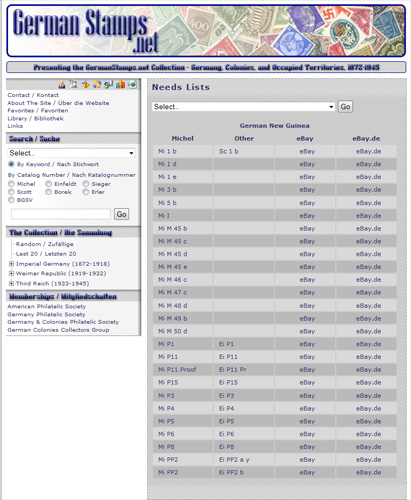 So no, you're not the only OCD one! What's in your written checklists? A list of stamps you're missing? |
|
Send note to Staff
|
|
| Edited by PostmasterGS - 11/07/2011 9:27 pm |
|
|
Bedrock Of The Community
Australia
38679 Posts |
|
|
Quote:
And you are correct, with the title I put there is no indication about the topic Well, it's all just a journey Ron  but I would add, good habits employed early on will save you lots of grief later on. Example of my Explorer Library "A-Azores" how it looks as you add the countries you collect 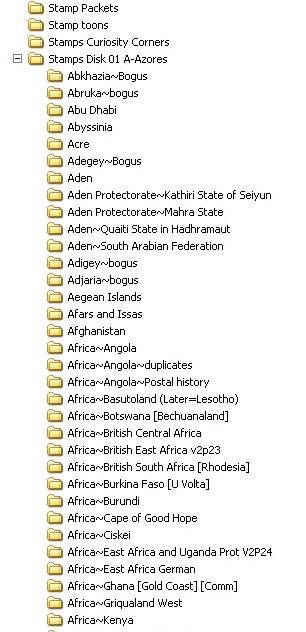 |
|
Send note to Staff
|
|
|
Pillar Of The Community
United States
2963 Posts |
|
|
Quote:
Am I the only one that seems to be a little OCD about this I think philatelists are OCD by nature. The attention to detail required to "specialize" in any area requires an obsessive/compulsive personality. I'm pretty sure Philately is listed in the Diagnostic and Statistical Manual of Mental Disorders. If it's not, then it ought to be! Brian |
|
Send note to Staff
|
|
|
Bedrock Of The Community
Australia
38679 Posts |
|
|
Another advantage of an image database, you can generate an Excel spreadsheet in what, 4 clicks? I could generate a typed excel sheet of 200,000 stamps before you could make a cup of tea. 3rd party image viewer in "details" view 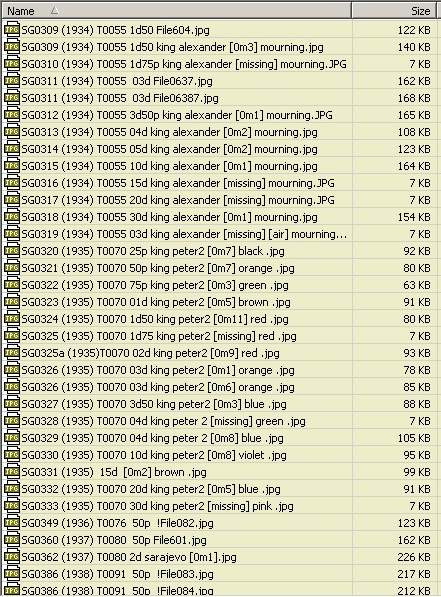 |
|
Send note to Staff
|
|
|
Pillar Of The Community
Australia
4034 Posts |
|
|
Well I am at the other end of knowing where all my stamps are and think that I would like to be like you people.
Then there is all the very happy stamp reunion finds of late that are very exciting.
Also the happiness of finding stamps I did not even know I had.
Maybe I like little surprises but I wish I could find those stamps at times.
Always Happy Stamping. KGV |
|
Send note to Staff
|
|
|
Rest in Peace
United States
1225 Posts |
|
|
I keep a one page Excel spreadsheet identifying just those I'm looking for. Of course, it doesn't list them all as there are a lot I can't/won't be able to, afford. OCD, me, never!
Art |
|
Send note to Staff
|
A well regulated Militia, being necessary to the security of a free State, the right of the people to keep and bear Arms, shall not be infringed. (The exact & entire wording of the 2nd Amendment to the U.S. Constitution) |
|
|
Bedrock Of The Community
United States
12128 Posts |
|
|
I should have explained in my earlier post that I originally started keeping track of stamps on an old stand alone flat file database program -- long before I even had a scanner -- and as I recall it was an old 5.25" disk drive computer back when they first came into home use. So scanning stamps wasn't even under consideration back then.
When the old database and my old disk-based PC became obsolete, I was able to "export" the data into one of the "newer" spreadsheet formats (I think it was Lotus 1-2-3) and then as I migrated into a more efficient laptop and a Microsoft environment, it was easily exported again into an Excel format. So the basic data has been around for awhile.
Say what you will about the old entry level computers ... even with all of their severe limitations that we look at today, I never once had to re-key any of the stamp data, it all easily migrated into the next generation of computers. |
|
Send note to Staff
|
|
|
Pillar Of The Community
United States
978 Posts |
|
|
Hi
I guess I am the only one that uses MS WORD for my stamps. Years ago I developed a set of Visual Basic (VBA) programs that can generate Scott numbers without typing every number individually (i.e; 5-7b generates 5 6 7 7a 7b). I set up the definitions for my countries and let it run. It built a WORD document that I then tweaked manually. I also have a valuation table that contains Scott Numbers and the Mint and Used values. There are a number of programs that allow maintenance. I only have 3 countries so once a year I spend about 4 hours and, with a program, update all the values. At the same time I run a program that goes through the inventory and updates the valuation with what I have. When I get a new stamp I highlight it in the WORD inventory. There are also programs to add new entries to both the inventory and valuation documents.
Jerry B |
|
Send note to Staff
|
|
|
Pillar Of The Community
Australia
687 Posts |
|
|
I think Rod's Explorer method is close to genius. I have often wondered what method you used, Rod, as you often have the information ready at hand in seconds...I can see why now.
When naming folders, Windows doesn't usually allow many non-alphanumeric symbols, from your example I guess that the use of " ~ " will not result in nasty messages?
Thanks for sharing such a great idea!
alex |
|
Send note to Staff
|
|
|
Pillar Of The Community
United States
4106 Posts |
|
|
Bedrock Of The Community
Australia
38679 Posts |
|
|
Alex, I have used the "~" (tilda?) since at least XP without problems,
I was dragged kicking and screaming from windows 98
not sure if I used it there.
A lot of my colleagues don't use Explorer, yet I could not
do without it, it is my major program for flitting around inside
my computer, albeit, I often use ACDSee as a substitute explorer
as it is set up the same way in the folder hiearchy.
In fact, when one does a reintall of XP, explorer is
hidden away under "accesories" IIRC.
The greatest development for me was the "long file name"
boy, did that set me free of naming contraints.
|
|
Send note to Staff
|
|
|
Pillar Of The Community
United States
978 Posts |
|
|
Hi Alex
Since Windows inception one could use a tilde ~ in a file name. MS Office components such as WORD, EXCEL, ACCESS, etc. use the tilde as the first character of an open file name. Open up an office document and in the same folder as the document look at the files that have a name similar to the document name.
You can now name a file using any character you wish, including foreign characters, except the following:
\ / : * ? " < > |
Prior to the ME-XP era you could not use a hyphen - or space in a file name but had to use the underscore _.
Also, a little known fact is that file extensions like .doc, .docx, etc may be what is known as multidotted:
MyDoc.alex.Perf14.docx
The system takes the last entry after the last dot as the file type, in this case docx (WORD Document).
Jerry B
|
|
Send note to Staff
|
|
|
Replies: 22 / Views: 2,852 |
|




 Posted 11/07/2011 8:29 pm


