Stamp Community Family of Web Sites
Thousands of stamps, consistently graded, competitively priced and hundreds of in-depth blog posts to read


Stamp Community Forum
 
Username:
Password:
Save Password
Forgot your Password?

This page may contain links that result in small commissions to keep this free site up and running.

Welcome Guest! Registering and/or logging in will remove the anchor (bottom) ads. It's Free!

I'm Trying To Figure Out Why....

Previous Page
 
To participate in the forum you must log in or register.
Author Previous TopicReplies: 22 / Views: 2,785Next Topic
Page: of 2
Pillar Of The Community
Canada
1394 Posts
Posted 11/08/2011   10:45 am  Show Profile Bookmark this reply Add BlackJag to your friends list  Get a Link to this Reply
rod222 - I also have every Canadian stamp issued scanned and sorted by face value similar to you. Each image then has the description immediately below it.

I have a second set of the ones I still need to acquire and I take printed pages with me to stamp shows, etc. That way I have the image (in colour) with a complete description to differentiate it from similar stamps.

My question is, how do you print a page without it appearing as only 1/2 of a 8.5x11.0? Obviously I want to print it as a full page so the images and descriptions are larger and easier to read. I've found it impossible to simply print a "screen", and have no idea why.
Send note to Staff  Go to Top of Page
Pillar Of The Community
United States
2953 Posts
Posted 11/08/2011   11:59 am  Show Profile Check Rileysan's eBay Listings Bookmark this reply Add Rileysan to your friends list  Get a Link to this Reply

Quote:
I was dragged kicking and screaming from windows 98


This amuses me as I was of the same mind-set.

I used XP until late, last year when I switched to Windows 7. I've been looking for a way to change the interface to look like XP ever since. Oh well ...
Send note to Staff  Go to Top of Page
Valued Member
United States
76 Posts
Posted 11/08/2011   1:46 pm  Show Profile Bookmark this reply Add mrprgrmr to your friends list  Get a Link to this Reply

Quote:
I've been looking for a way to change the interface to look like XP ever since.


Rileysan - A bit off topic but have you tried this... right click on the desktop and select "Personalize". In the box listing all the possible themes, scroll down to the bottom and select "Windows Classic". It won't fix everything but a lot of it will look just like it did before "Aero".
Send note to Staff  Go to Top of Page
Bedrock Of The Community
Australia
38679 Posts
Posted 11/08/2011   10:12 pm  Show Profile Bookmark this reply Add rod222 to your friends list  Get a Link to this Reply
Hi Blackjag,
OK there are many ways to achieve this,
my route is possibly the most difficult
I have ACDSee and I can make a "contact sheet"
of as many stamps as I want.

I can print out on one page my entire collection of Bulgaria
(1,200 stamps) but of course each stamp is not much more than a dot :)
So ramping it down to an A4 sheet, I like to put say
20-30 stamps to a sheet
In ACDSee I just select the 30 stamps of choice and
choose desired columns and rows to get the best effect.

Based on that, I think you can also do that with the FREE Google Picasa
but I havn't fiddled with it as yet.

The last method is to download a free image capture program
called Fastone Capture,
One click to copy the screen
Open the image, crop to desired size and print to an A4 page

With my collection images, I flag the desired stamps
with text string "missing" so when I am off to a stamp show
I sort australia for a sub-set with all stamps with "missing"
up they pop, and I print them out on an A4. Easy peasy.


Send note to Staff  Go to Top of Page
Bedrock Of The Community
Australia
38679 Posts
Posted 11/08/2011   10:16 pm  Show Profile Bookmark this reply Add rod222 to your friends list  Get a Link to this Reply

Quote:
My question is, how do you print a page without it appearing as only 1/2 of a 8.5x11.0? Obviously I want to print it as a full page so the images and descriptions are larger and easier to read. I've found it impossible to simply print a "screen", and have no idea why.


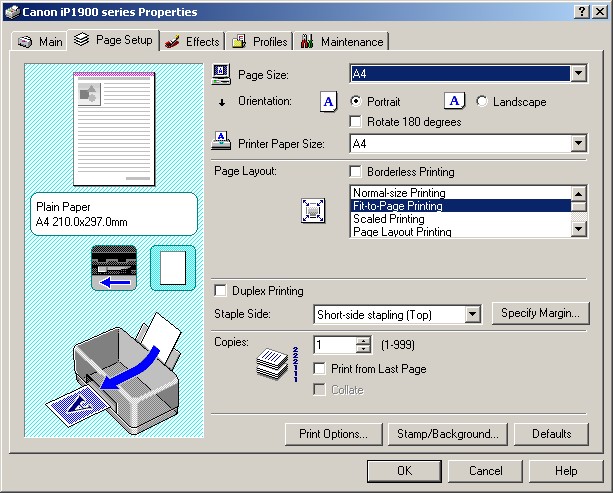
Perhaps your printer is the culprit?

Try opening "settings" and see if you have a choice?
any image I print on a Canon can be printed A4
or any less by manual adjustment, or differing thumbnails.

Perhaps you have yours set for half a page?

Mine is set to "fit to page" printing


Send note to Staff  Go to Top of Page
Edited by rod222 - 11/08/2011 10:21 pm
Pillar Of The Community
Canada
1394 Posts
Posted 11/08/2011   11:59 pm  Show Profile Bookmark this reply Add BlackJag to your friends list  Get a Link to this Reply
rod222 - thanks for all of the suggestions. I'm using an HP5600 and just found that I can increase the size beyond 100%, so problem solved. I don't have the "fit to page printing" setting that you have. I'll also try one or more of the other 3 programs that you've suggested.
Send note to Staff  Go to Top of Page
Valued Member
United Kingdom
277 Posts
Posted 11/09/2011   03:10 am  Show Profile Bookmark this reply Add Maiden to your friends list  Get a Link to this Reply
Iuse an Excel spreadsheet, tho as I'm fairly new at collecting, I'm still tinkering with it to get to where I want it.

Someone mentioned about accessing spreadsheets whilst travelling..I use a web-based service called Dropbox to save my spreadsheets (and other stuff), which means I can access them anywhere there is an internet connection.
Send note to Staff  Go to Top of Page
Page: of 2 Previous TopicReplies: 22 / Views: 2,785Next Topic  
Previous Page
 
To participate in the forum you must log in or register.

Go to Top of Page

Disclaimer: While a tremendous amount of effort goes into ensuring the accuracy of the information contained in this site, Stamp Community assumes no liability for errors. Copyright 2005 - 2026 Stamp Community Family - All rights reserved worldwide. Use of any images or content on this website without prior written permission of Stamp Community or the original lender is strictly prohibited.
Privacy Policy / Terms of Use    Advertise Here
Stamp Community Forum © 2007 - 2026 Stamp Community Forums
It took 0.28 seconds to lick this stamp. Powered By: Snitz Forums 2000 Version 3.4.05
