Stamp Community Family of Web Sites
Thousands of stamps, consistently graded, competitively priced and hundreds of in-depth blog posts to read


Stamp Community Forum
 
Username:
Password:
Save Password
Forgot your Password?

This page may contain links that result in small commissions to keep this free site up and running.

Welcome Guest! Registering and/or logging in will remove the anchor (bottom) ads. It's Free!

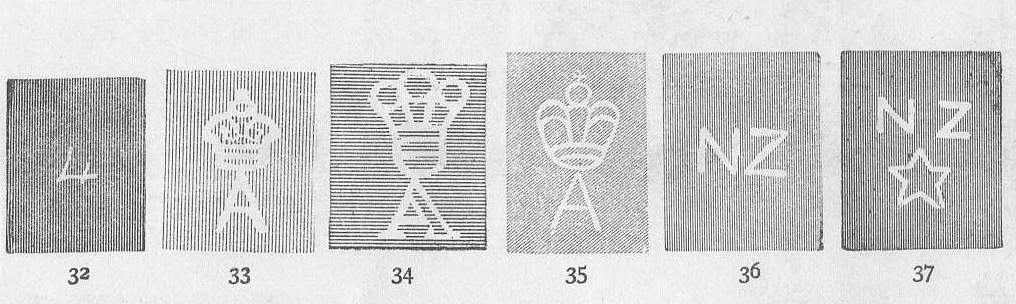
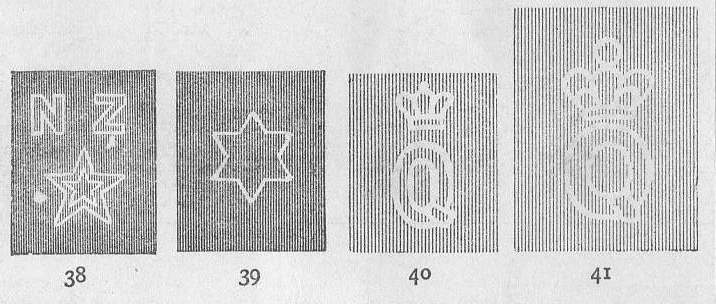
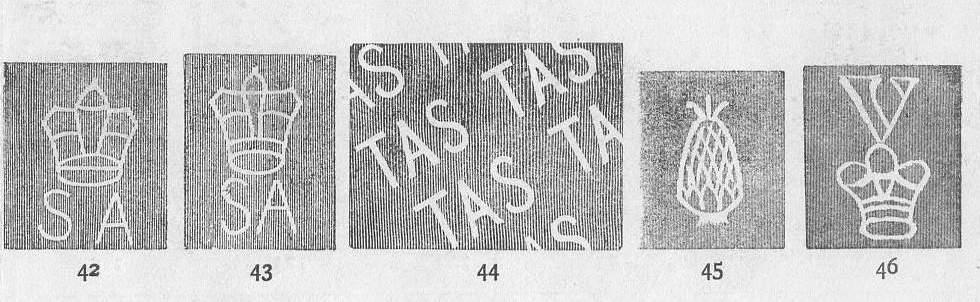
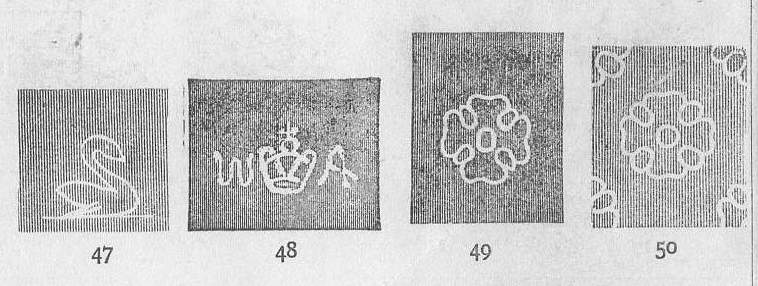
The SCF World Watermark Detector :

 
To participate in the forum you must log in or register.
Author Previous TopicReplies: 13 / Views: 2,024Next Topic  
Bedrock Of The Community
Australia
38679 Posts
Posted 11/19/2011   09:11 am  Show Profile Bookmark this topic Add rod222 to your friends list Get a Link to this Message


Send note to Staff
Edited by rod222 - 11/25/2011 11:16 am

Pillar Of The Community
Canada
4648 Posts
Posted 11/19/2011   1:34 pm  Show Profile Bookmark this reply Add Bujutsu to your friends list  Get a Link to this Reply
Nice Rod

It makes it a lot easier to check out the watermarks and compare to the catalogues. I don't have to go back and forth lol.

Chimo

Bujutsu
Send note to Staff  Go to Top of Page
Pillar Of The Community
United States
2547 Posts
Posted 11/19/2011   2:05 pm  Show Profile Bookmark this reply Add Russ to your friends list  Get a Link to this Reply
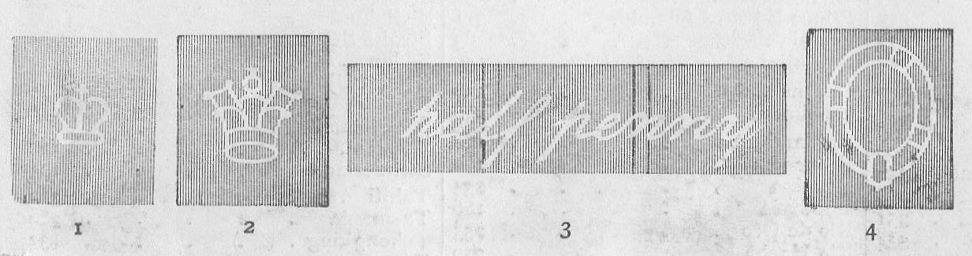
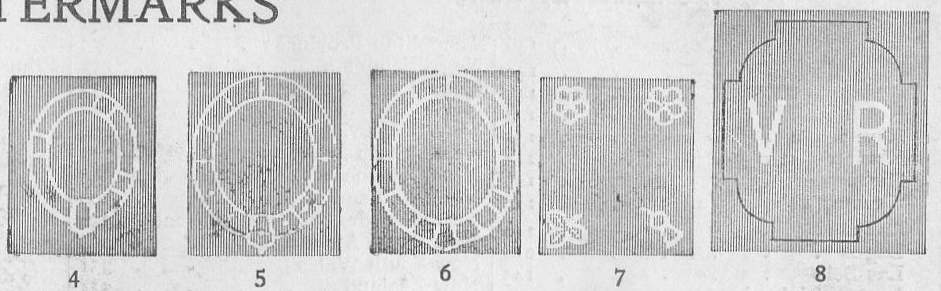
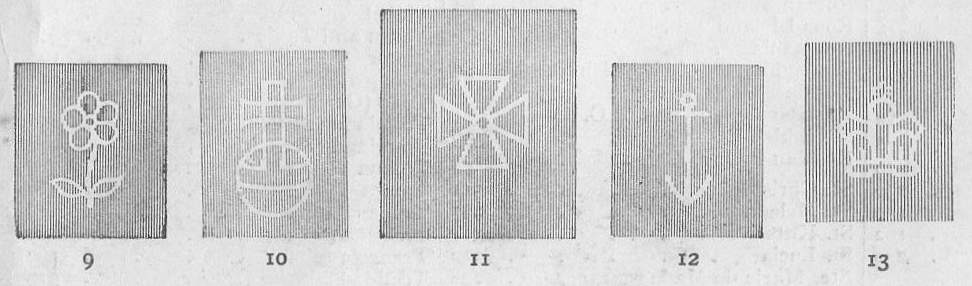
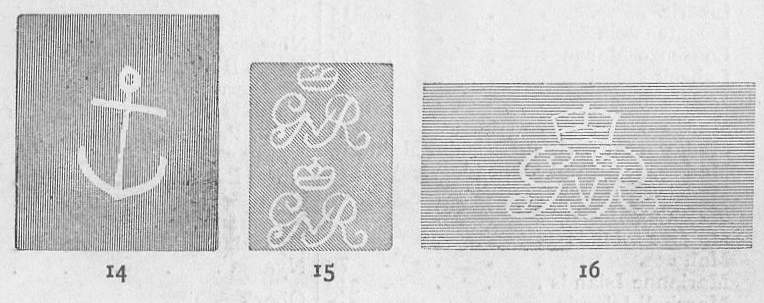
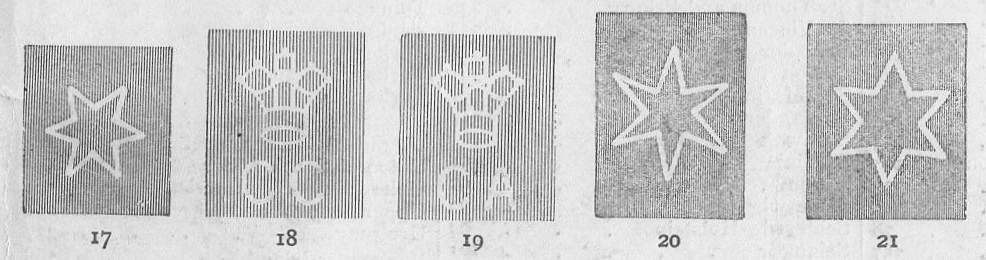
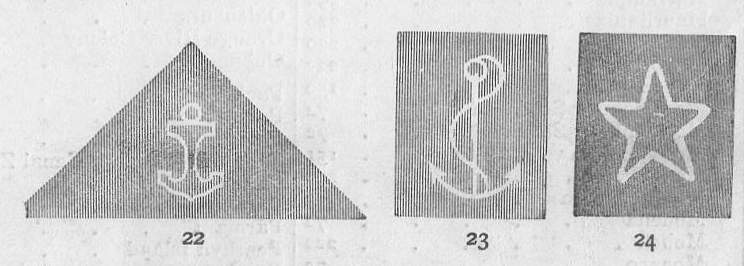
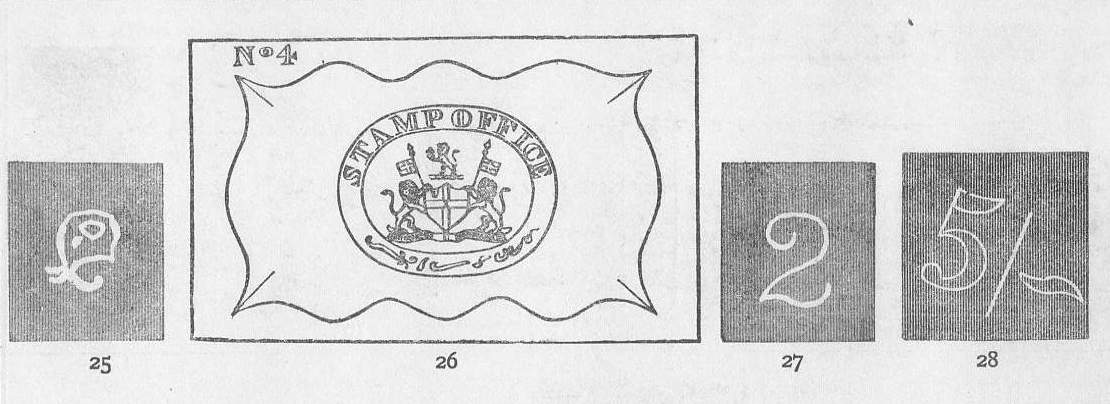
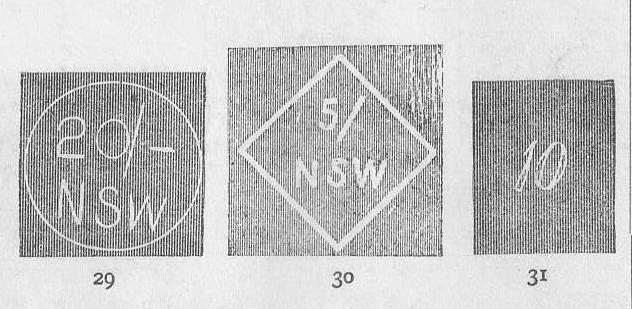
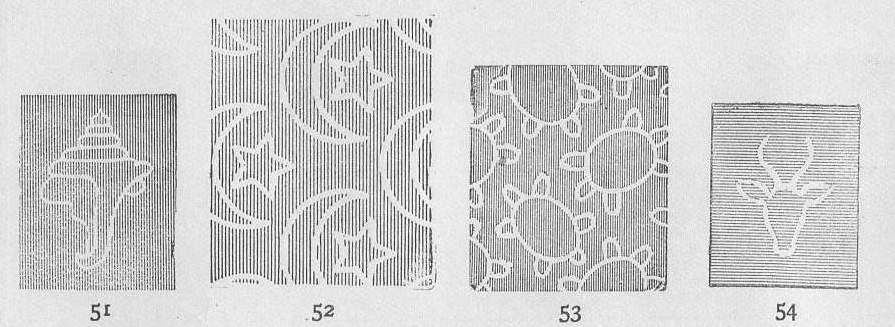
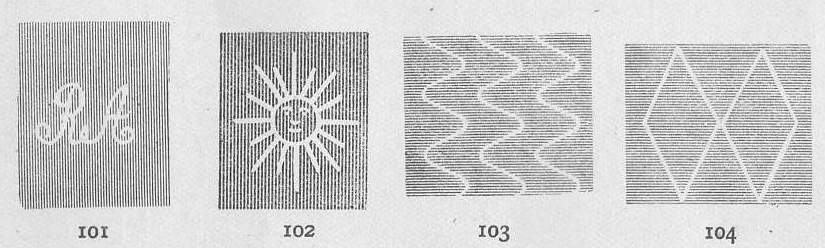
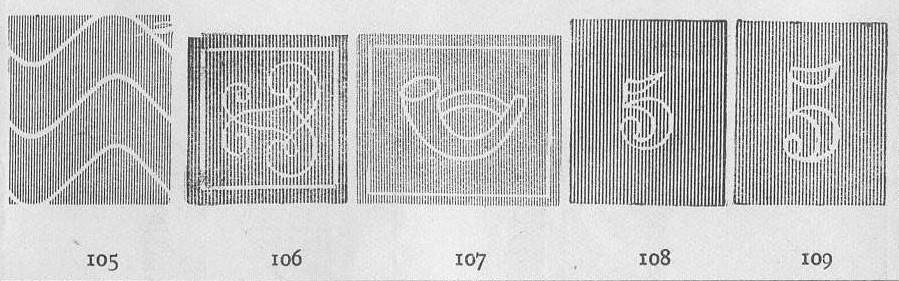
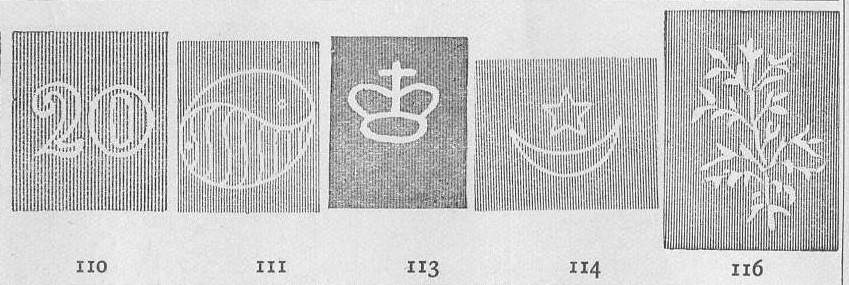
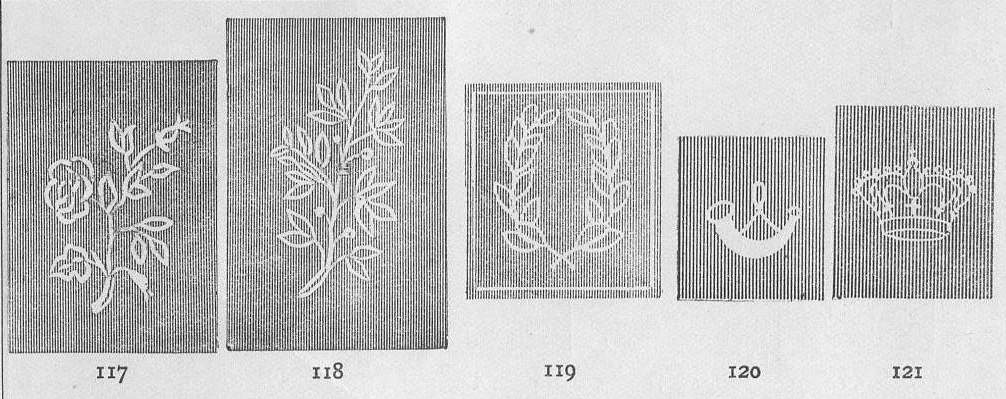
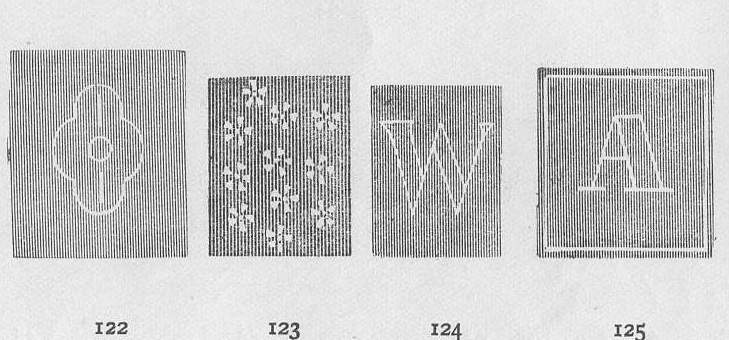
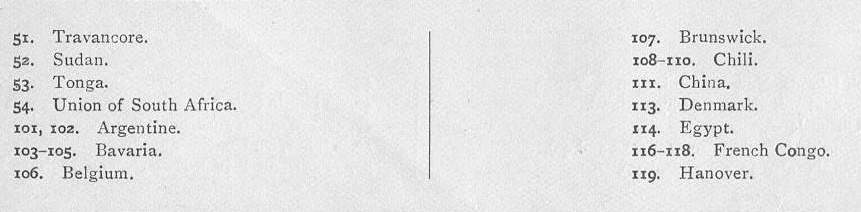
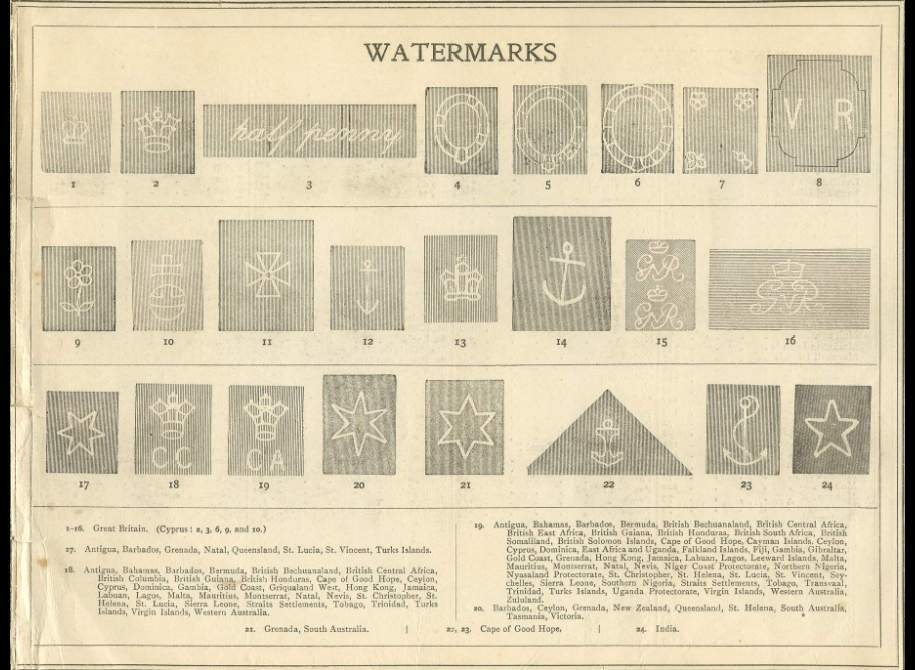
Rod, I assume that the numbers are SG. Scott conversion SG - Scott
1 - 18
2 - 20
3 - 27
4 - 21
5 - 22
6 - 23
7 - 24
8 - 19
9 - 25
10 - 29
11 - 26
12 - 28
13 - 30
14 - 31
15 - 33
16 - 34
17 - 5
18 - 1
19 - 2
20 - 3
21 - 7
22 - 15
23 - 16
24 - 39
Send note to Staff  Go to Top of Page
Pillar Of The Community
Australia
4031 Posts
Posted 11/19/2011   7:29 pm  Show Profile Bookmark this reply Add KGV Collector to your friends list  Get a Link to this Reply
Looks spot on to me Rod.:)

Interesting that Australia is broken up into her States.
History, to the larger part of the 1800's.
Send note to Staff  Go to Top of Page
Bedrock Of The Community
Australia
38679 Posts
Posted 11/19/2011   8:19 pm  Show Profile Bookmark this reply Add rod222 to your friends list  Get a Link to this Reply
I'll add some more soon
Yep, SG numbers from around 1915 I think.
I'll try scanning with other methodology, and if better
shall change the scans,
the backgrounds are ink lines and the scanner is picking up moire
at 200dpi.

How about this?
Is this OK and readable by you guys/gals?

Send note to Staff  Go to Top of Page
Edited by rod222 - 11/19/2011 8:27 pm
Pillar Of The Community
Australia
4031 Posts
Posted 11/19/2011   9:02 pm  Show Profile Bookmark this reply Add KGV Collector to your friends list  Get a Link to this Reply
That ones a bit hard to read.
Can just make it out.
Send note to Staff  Go to Top of Page
Bedrock Of The Community
Australia
38679 Posts
Posted 11/19/2011   9:30 pm  Show Profile Bookmark this reply Add rod222 to your friends list  Get a Link to this Reply
Thanks John,
I'll keep trying.

BTW: are you clicking on the image to expand it?


Send note to Staff  Go to Top of Page
Edited by rod222 - 11/19/2011 9:31 pm
Pillar Of The Community
Australia
4031 Posts
Posted 11/19/2011   10:01 pm  Show Profile Bookmark this reply Add KGV Collector to your friends list  Get a Link to this Reply
Yes Rod.
Can not see it unless I do.

1st image posted I can see it
very clearly as posted.
Send note to Staff  Go to Top of Page
Rest in Peace
Canada
6750 Posts
Posted 11/19/2011   11:16 pm  Show Profile Bookmark this reply Add Puzzler to your friends list  Get a Link to this Reply
I can see both fine, although my screen is set to display a bit darker than normal, a video driver software failure that won't go away. Good for most things though.

I regularly use screen resolution 800 x 600 but I know most folks now, with netter monitors and video cards, use 1024 x 768 or even higher.

I tried both and I like the first better, even with the moire pattern happening as I can read the text better and the images are bigger.

I put the first image in an image editing program and used the sharpen tool to sharpen the image 25%. That makes all the difference in the world. Going higher, say to 50%, makes the background lines go into stripes of black and white.

To get a less sharp image (although it looks grand to me, you can use a darken tool to darken it a bit. This, however, leaves the edges of the watermarks soft and somewhat indistinct.

So, use you front monitor controls to darken your screen a bit, decrease your screen resolution, or just sharpen the image yourself or Rod you could probably do it. I post the first image again, sharpened 25% so you can see the difference.
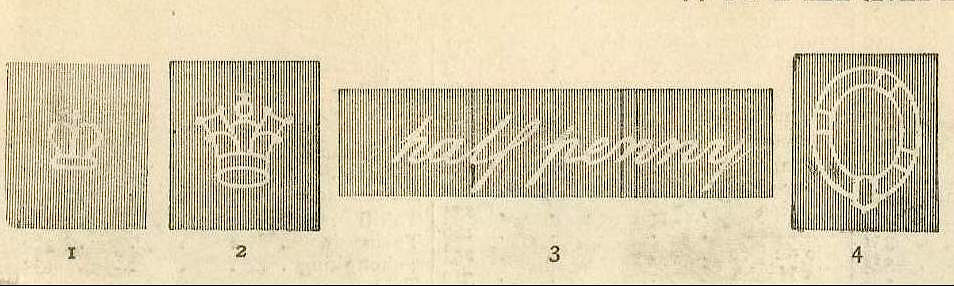


And while reviewing this I noticed that my monitor screen makes the image have lines of dark, more moirey than Rod's original, but only when shrunk to fit my 600 x 800 resolution. When clicked on it is as fine as a hexagon postmark on a hexagon stamp.
Send note to Staff  Go to Top of Page
Bedrock Of The Community
Australia
38679 Posts
Posted 11/20/2011   02:55 am  Show Profile Bookmark this reply Add rod222 to your friends list  Get a Link to this Reply
Cheers Puzzler,
I'll chop up the second page then, as the first
but I am meddling with scanning at the moment
"black and white" etc.
Send note to Staff  Go to Top of Page
Pillar Of The Community
Canada
737 Posts
Posted 11/21/2011   08:48 am  Show Profile Bookmark this reply Add Ryan to your friends list  Get a Link to this Reply
Rodney, try oversampling on your scanning to get rid of the moiré patterns. That is, if your desired target is 200 dpi, scan at 400 dpi, then use your image editor to cut the image size in half. This downsampling adds an interpolation step when calculating the value of each pixel, and this blends the oversampled pixels down into an average. This often removes moiré patterns almost entirely.

Failing that, there are professional-level techniques for removing moiré patterns - a simple Google search with a term like "scanning moire patterns" will bring up plenty of pages.

Ryan
Send note to Staff  Go to Top of Page
Bedrock Of The Community
Australia
38679 Posts
Posted 11/25/2011   10:56 am  Show Profile Bookmark this reply Add rod222 to your friends list  Get a Link to this Reply

Cheers Ryan,
scanning in 8 bit greyscale did the trick,
looks a bit moiry on SCF but expanded image is fine

will try and get all scans up.

Send note to Staff  Go to Top of Page
Pillar Of The Community
Australia
898 Posts
Posted 11/25/2011   11:10 am  Show Profile Bookmark this reply Add finches to your friends list  Get a Link to this Reply
Rod222, you might have some oily/greasy finger marks on your scanner glass in a couple of spots. A little methylated spirits will remove and evaporate.
Send note to Staff  Go to Top of Page
Bedrock Of The Community
Australia
38679 Posts
Posted 11/25/2011   11:20 am  Show Profile Bookmark this reply Add rod222 to your friends list  Get a Link to this Reply
Yeah?
how did you pick that up

Rule 223a subsection 4 of the good stamp husbandry manual:
"Eating fishcakes whilst scanning is not recommended"

More to follow on the morrow.

PS: SG apparently suggests wmk #51
is the most beautiful wmk in all philately.

Send note to Staff  Go to Top of Page
Edited by rod222 - 11/25/2011 11:23 am
  Previous TopicReplies: 13 / Views: 2,024Next Topic  
 
To participate in the forum you must log in or register.

Go to Top of Page

Disclaimer: While a tremendous amount of effort goes into ensuring the accuracy of the information contained in this site, Stamp Community assumes no liability for errors. Copyright 2005 - 2026 Stamp Community Family - All rights reserved worldwide. Use of any images or content on this website without prior written permission of Stamp Community or the original lender is strictly prohibited.
Privacy Policy / Terms of Use    Advertise Here
Stamp Community Forum © 2007 - 2026 Stamp Community Forums
It took 0.34 seconds to lick this stamp. Powered By: Snitz Forums 2000 Version 3.4.05