| Author |
 Replies: 23 / Views: 3,836 Replies: 23 / Views: 3,836 |
|
Valued Member
United States
164 Posts |
|
|
I am thinking of uploading pictures of all my stamps onto my computer. Is a scanner the best option. Is it better then just taking pictures of my stamps one by one. What are the advantages as opposed to just taking pictures? It is certainly faster and easier. Do I get a better image quality? It seems lots of people on SCF use scanners to organize/catalogue their collections. Also what is the best scanner? Price/value, image quality, reliability, build quality, ect. What scanner should I buy. What scanner do you use and why? Thank you all so much for your advice.  |
|
Send note to Staff
|
|
|
|
|
Valued Member
United States
164 Posts |
|
|
Also this is probably a really stupid question. Do scanners damage the stamps in any way. Don't scanners use a strong light when scanning, and couldn't this potentially fade the stamp? I know I'm crazy, but it doesn't hurt to ask. Thanks again. |
Send note to Staff 
|
|
|
Bedrock Of The Community
United States
12128 Posts |
|
|
It's generally accepted that the minimal amount of exposure a stamp gets when scanned should not be detrimental to the stamp itself, and since it's so much faster, that's why the majority of people scan stamps (as opposed to photographing them).
As for the "best" scanner, the question is a broad as there are users. Just as with any other appliance, some people have a preference for a certain brand's reputation, or for the lowest price or for the best software or for the smallest "footprint", so there's no one answer that fits everyone's requirement.
Personally, I have an HP AIO Printer/Scanner/Fax that I bought years ago from Walmart for under $50 that does a decent job and scans from 75 dpi to 2400 dpi. There are much better scanners out there too, and obviously the more feature-laden machines with the faster speeds are reflected in proportionately higher prices.
A lot depends on your individual circumstances, in terms of budget, available space where the "footprint" (size) of the scanner is critical, and whether you're using the machine for only scanning or if it will double as a printer, in which case print quality and consumables (such as ink jet cartridges or toner) will have to be considered. As most computer users know, the printers/scanners can be had for reasonable money, the "profit" the manufacturers count on is for us consumers to go back and buy ink or toner at market prices, which oftentimes can cost more than the machine itself. |
|
Send note to Staff
|
|
|
Valued Member
United States
164 Posts |
|
|
Thanks for the fast reply wt1! I would be using the scanner exclusively to scan images, not as a printer. My budget will depend on what there is to offer, if I need to spend a little more to get better image quality so be it. I was thinking no more then 80 dollars, don't let my budget determine your suggestions, as I am flexible. Anyway so scanning produces better quality images then taking shots with and inexpensive digital camera, right? That may be a stupid question. Would images this clear be possible? Thanks. 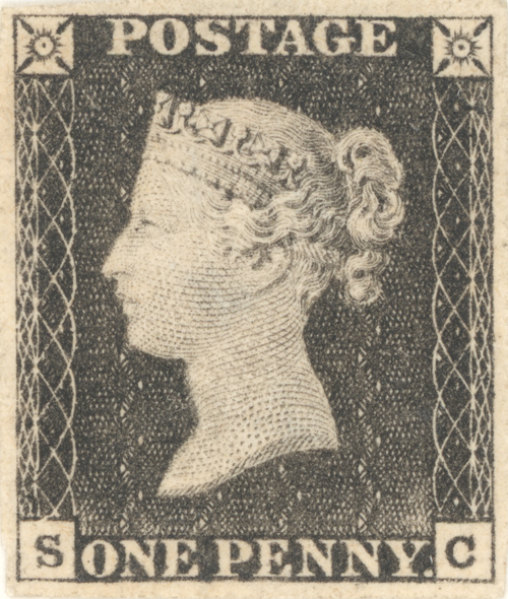 |
|
Send note to Staff
|
|
|
Pillar Of The Community
United States
2941 Posts |
|
|
I prefer Epson flatbeds, as the Epson scanning software is fantastic. It makes it very easy to scan dozens of stamps in a single pass, with each saved as a separate file.
As far as quality, almost any scanner will far exceed the quality you can get from even high-end digital cameras. |
|
Send note to Staff
|
|
|
|
Valued Member
United States
164 Posts |
|
|
Pillar Of The Community
United States
2941 Posts |
|
|
There's not a lot of difference in the models. The extra features in the higher-end models are mostly for photo scanning and restoration, so unless you're going to be doing a lot of that, the lower end models should suffice. I do recommend that you get one that will scan negatives, as that ability comes in handy if you want to detect watermarks or defects. |
|
Send note to Staff
|
|
|
|
Pillar Of The Community
United States
6466 Posts |
|
|
Quote:
I prefer Epson flatbeds, as the Epson scanning software is fantastic. Seconded. I've used Epson scanners for years. I currently use the V500. The current LED technology results in faster scanning than traditional CCD, as there is no warm-up time required. |
|
Send note to Staff
|
|
|
|
Bedrock Of The Community
United States
12128 Posts |
|
|
I'm not endorsing any particular model or store, but tomorrow's Staples ad has a good (50% off?) price of $74.99 for an Epson Workforce 635 AIO wireless printer/scanner/copier. |
|
Send note to Staff
|
|
|
Pillar Of The Community

United States
3046 Posts |
|
|
I would recommend against anything HP if you're going for an all in one. You can get generic refills for pretty much any brand except for HP. |
|
Send note to Staff
|
|
|
Valued Member
United States
164 Posts |
|
|
Valued Member
United States
164 Posts |
|
|
So flatbed epson scanner sounds like a great choice. Any more tips or advice? |
|
Send note to Staff
|
|
|
Pillar Of The Community
USA
646 Posts |
|
|
Quote:
I prefer Epson flatbeds, as the Epson scanning software is fantastic. agreed. I got a used Epson Perfection V100 scanner from a friend in MI a few years ago, and love it. He decided to upgrade to a high tech scanner, and let me have the Epson for the shipping costs to send it to me. best $12.00 I have ever spent. |
|
Send note to Staff
|
|
|
Pillar Of The Community
United States
6664 Posts |
|
|
Valued Member
United States
175 Posts |
|
|
I use an HP but doesn't really matter to me. The thing to also consider is the higher the resolution the more storage space is required. |
|
Send note to Staff
|
|
|
Pillar Of The Community
United States
6664 Posts |
|
|
The storage space shouldn't be a factor as we're talking 1 Mb per picture (JPEG) at 1200 dpi (Roughly) and in this day and age storage is dirt cheap. |
|
Send note to Staff
|
|
|
Replies: 23 / Views: 3,836 |
|




 Posted 02/25/2012 6:42 pm





