| Author |
 Replies: 27 / Views: 6,500 Replies: 27 / Views: 6,500 |
|
Valued Member
United States
396 Posts |
|
|
|
Hi,
What scanner setting should I choose for Best Quality of
Stamps Images. I have Epson v330 scanner. I have read manual
but I thought I would take advice of experts.
thanks
tikithindi
|
|
Send note to Staff
|
|
|
|
|
Pillar Of The Community
Australia
4033 Posts |
|
|
Hi tikithindi I am no rocket scientist when it comes to scanners. But 600 DPI (dots per inch) is the first settings for a great image. When listing a large image on ebay I will drop the scan to 400 DPI to help it load. Most forums want a 600 DPI image to get a clearness to see a small printing flaw for instance. Always Happy Stamping. KGV |
Send note to Staff 
|
|
|
Forum Dad

USA
2059 Posts |
|
|
Increased DPI helps capture detail while scanning, but in reality does nothing for the Internet. Home monitors are all 96 DPI and that's all you'll get regardless of the DPI you scanned it with. You can scan an image at 1200 DPI, then change it to 96 DPI and the file size in KB, and the on-screen size on the internet should not change. The number of dots in the image stays the same. Increased display DPI is for printing, not the internet.
1200 DPI
96 DPI |
|
Send note to Staff
|
|
|
|
Valued Member
United States
76 Posts |
|
|
I have an old computer, and if I try to scan anything at greater than 600 dpi resolution, my computer will crash. And at 600 dpi, the image will take a long time to process.
If your only goal in scanning is to make a picture for display on the internet, low resolutions should be sufficient. However, I've found that if I need to manipulate an image for greater clarity, I might have to go with a higher resolution before using the imaging software's features to improve the image. |
|
Send note to Staff
|
|
|
Pillar Of The Community
United Kingdom
1361 Posts |
|
|
Hmmm... The images Bobby shows do not tell the whole story. Look at the properties of both images. 800x400 108.37kb ??? Here are two others at similar dimensions but scanned at different dpi even dropping down to 300dpi is noticeable so @96dpi it would be unusable for me. I wrote a tutorial a while back that may be useful and has info for Epson scanners  300dpi  600dpi  |
|
Send note to Staff
|
| Edited by AnthonyUK - 04/15/2012 2:27 pm |
|
|
Bedrock Of The Community
United States
12128 Posts |
|
|
200 dpi or 300 dpi works fine for most posts where great detail isn't needed and you can usually compress the file even further before posting on this website.
However, I do find that if you're looking for USPS microprinting or on classic US stamps, the secret marks, I typically have to scan at 1200 dpi to find it, but I seldom save the illustrations at that density because of the great deal of file space it takes up.
Usually 200 or 300 dpi works for most things and is best for saving to your hard drive for archival use. |
|
Send note to Staff
|
|
|
Forum Dad
USA
2059 Posts |
|
|
Quote:
Hmmm... The images Bobby shows do not tell the whole story.
Look at the properties of both images. 800x400 108.37kb ??? Exactly my point. When you are talking about display on a monitor the DPI is irrelevant. One of those is 96 and one is 1200 but there is zero difference in quality or file size. It's only relevant when doing the actual scanning or when printing. Just trying to alleviate the DPI/Monitor misconceptions that abound. A lot of people scan at a lower DPI then convert to a higher one thinking they are accomplishing something. They're not unless they're printing it. |
|
Send note to Staff
|
|
|
|
Pillar Of The Community
Canada
1401 Posts |
|
|
I scan at 600 dpi on my 2002 XanaScan FB620P (Canon) for my own purposes and find that a single stamp will easily upload into this forum without any reduction in DPI or anything else. Of course, larger than single stamp images do require reduction, which I do through this forum's Free Image Optimizer. |
|
Send note to Staff
|
|
|
Pillar Of The Community
Australia
4033 Posts |
|
|
Quote:
You can scan an image at 1200 DPI, then change it to 96 DPI and the file size in KB, and the on-screen size on the internet should not change. The number of dots in the image stays the same. Increased display DPI is for printing, not the internet. So this is what happens when I put my nice clear 600dpi image into photobucket is to get the loading size to fit SCF and in the size change the image quality stays the same? |
|
Send note to Staff
|
|
|
Forum Dad
USA
2059 Posts |
|
|
Pillar Of The Community
Australia
4033 Posts |
|
|
Thanks bobby.
At last I may now know enough about this sort of thing to understand the free computer lessons we have where I live.
KGV. |
|
Send note to Staff
|
|
|
Pillar Of The Community
United Kingdom
1361 Posts |
|
|
Quote:
Exactly my point. When you are talking about display on a monitor the DPI is irrelevant. One of those is 96 and one is 1200 but there is zero difference in quality or file size. It's only relevant when doing the actual scanning or when printing. Just trying to alleviate the DPI/Monitor misconceptions that abound. A lot of people scan at a lower DPI then convert to a higher one thinking they are accomplishing something. They're not unless they're printing it. Sorry Bobby but you are not helping. If there is zero difference then they must be the same so cannot possibly be different DPIs. I'll try to simplify it. Let's say we have an image we want to scan which is 1" x 1" to make it easy. If you scan at 96 dpi your image will have a resolution in pixels of 96 x 96 and at 1200dpi 1200x1200. If that is the case, your coin above would be over 4" in the 96 dpi scan and just 0.33" in the 1200. Doesn't add up does it. Ignore the dpi on a monitor it will just fit the image into the amount of pixels it can display. The dpi onscreen is only relevant for viewing scans to scale e.g. if your screen is 96dpi and you scan at 96dpi your image onscreen will be 1:1 so in the 1" image example would measure 1" on any size screen  |
|
Send note to Staff
|
| Edited by AnthonyUK - 04/16/2012 03:38 am |
|
|
Valued Member
United States
396 Posts |
|
|
Thanks everybody... for the reply
well than now prob I will keep 600 dpi for my inventory. When need to examine
further detail at that time can scan it to higher resolution and see.
With the higher dpi if Printing Size matters at that time spread of pixels are
less. thanks for great information.
tikithindi
|
|
Send note to Staff
|
|
|
Forum Dad
USA
2059 Posts |
|
|
Quote:
If there is zero difference then they must be the same so cannot possibly be different DPIs. Sorry Anthony but you really need to read up on this, you are completely wrong. Do yourself a favor, download those 2 images and check the DPI on them, one is 96 and one is 1200. But both are 400 x 800 and contain 320K pixels. DPI has nothing to do with number of pixels, it has to do with printing quality mostly. After you download them print them at their native DPI (if your printer can) and see what happens. |
|
Send note to Staff
|
|
|
|
Pillar Of The Community
United Kingdom
1361 Posts |
|
|
They are in fact 300 and 1200dpi and are related to dimensions and print size (I suspect neither is correct in your images if you look at the actual print size). What is the actual dimensions of the coin? If it is an inch across and you scan at 1200dpi it will be approx 1200x1200 pixels (dots.) When you print this you need to ensure the dpi is set correctly to ensure the printer knows how to scale this to print it the correct size. from Wikipedia DPI refers to the physical dot density of an image when it is reproduced as a real physical entity, for example printed onto paper, or displayed on a monitor. A digitally stored image has no inherent physical dimensions, measured in inches or centimetres. Some digital file formats record a DPI value, or more commonly a PPI (pixels per inch) value, which is to be used when printing the image. This number lets the printer know the intended size of the image, or in the case of scanned images, the size of the original scanned object. For example, a bitmap image may measure 1,000 × 1,000 pixels, a resolution of 1 megapixels. If it is labeled as 250 PPI, that is an instruction to the printer to print it at a size of 4 × 4 inches. Changing the PPI to 100 in an image editing program would tell the printer to print it at a size of 10×10 inches. However, changing the PPI value would not change the size of the image in pixels which would still be 1,000 × 1,000. An image may also be resampled to change the number of pixels and therefore the size or resolution of the image, but this is quite different from simply setting a new PPI for the file.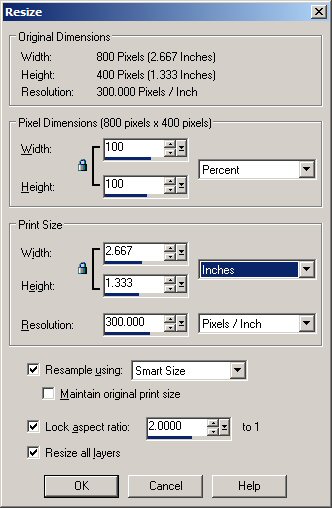 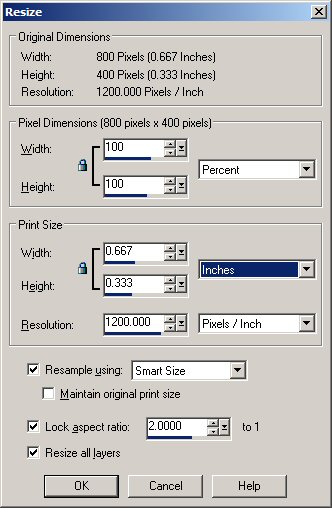 |
|
Send note to Staff
|
| Edited by AnthonyUK - 04/16/2012 10:55 am |
|
|
Forum Dad
USA
2059 Posts |
|
|
I give up. You just don't get it. Your Wikipedia quote proves my point and you don't even realize it. |
|
Send note to Staff
|
|
|
|
Replies: 27 / Views: 6,500 |
|



 Posted 04/15/2012 05:07 am


