Stamp Community Family of Web Sites
Thousands of stamps, consistently graded, competitively priced and hundreds of in-depth blog posts to read


Stamp Community Forum
 
Username:
Password:
Save Password
Forgot your Password?

This page may contain links that result in small commissions to keep this free site up and running.

Welcome Guest! Registering and/or logging in will remove the anchor (bottom) ads. It's Free!

Scanner Setting For Best Quality Image

Previous Page
 
To participate in the forum you must log in or register.
Author Previous TopicReplies: 27 / Views: 6,383Next Topic
Page: of 2
Pillar Of The Community
United Kingdom
1361 Posts
Posted 04/16/2012   11:00 am  Show Profile Bookmark this reply Add AnthonyUK to your friends list  Get a Link to this Reply
Perhaps we are at cross purposes here and your examples are maybe not the best.

All I'll add is that the scanned images shown on the various engravers thread are much clearer and detailed when scanned at higher dpi.
The proof is in the end result.
Send note to Staff  Go to Top of Page
Edited by AnthonyUK - 04/16/2012 11:06 am
Valued Member
Thailand
305 Posts
Posted 04/16/2012   11:09 am  Show Profile Bookmark this reply Add scifi7 to your friends list  Get a Link to this Reply
DPI is only significant at the moment of creation of an image, whether electronic (scan) or physical (print). In between those times, while the image is digital data sloshing around in the ether, the only meaningful measure is pixel dimensions. (Your scanner should tell you the pixel dimensions of an image you are planning to scan, depending on the DPI setting you select.) Online, resolution is irrelevant... until you decide to print the image.
Send note to Staff  Go to Top of Page
Forum Dad
Learn More...
USA
2055 Posts
Posted 04/16/2012   11:33 am  Show Profile Bookmark this reply Add bobby131313 to your friends list  Get a Link to this Reply
Thank you scifi, pretty sure thats what I've been saying...


Quote:
When you are talking about display on a monitor the DPI is irrelevant. One of those is 96 and one is 1200 but there is zero difference in quality or file size. It's only relevant when doing the actual scanning or when printing. Just trying to alleviate the DPI/Monitor misconceptions that abound. A lot of people scan at a lower DPI then convert to a higher one thinking they are accomplishing something. They're not unless they're printing it.
Send note to Staff  Go to Top of Page
Pillar Of The Community
United Kingdom
1361 Posts
Posted 04/16/2012   1:35 pm  Show Profile Bookmark this reply Add AnthonyUK to your friends list  Get a Link to this Reply
The original question was regarding scanning dpi which I hope has been answered.

Bobby - you did say

Quote:
Increased DPI helps capture detail while scanning, but in reality does nothing for the Internet. Home monitors are all 96 DPI and that's all you'll get regardless of the DPI you scanned it with.


Which I may have misinterpreted as there is no point in scanning at anything other than 96 dpi.
Sorry if this has led to confusion and scifi7 did sum it up nicely.
Send note to Staff  Go to Top of Page
Edited by AnthonyUK - 04/16/2012 1:35 pm
Pillar Of The Community
1448 Posts
Posted 04/16/2012   3:03 pm  Show Profile Bookmark this reply Add Jkjblue to your friends list  Get a Link to this Reply

A picture is worth a thousand words...


Scanned @ 1200; size 1912 pixels X 1336 pixels

The native size of this pic (considering the monitor resolution is 96 pixels per inch) is 19.9" X 13.9". If I had a home monitor large enough, I could display at that size. With the monitor I do have, it can be displayed at 15" X 10.5". Impressive!

My Picasa web album maximally exports to SCF at 800 pixels wide, so maximum width here would be 8"+. (SCF might have further restrictions)

Next a close-up...
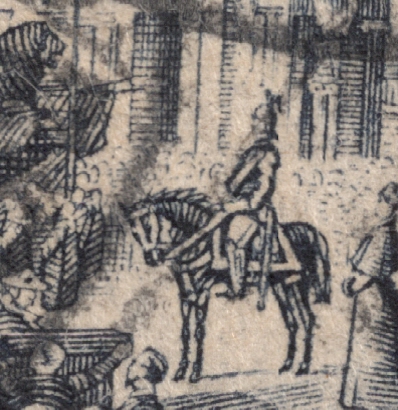

Closeup of the Kaiser on his horse at 1200; size 398 X 410 pixels

This stamp comes in two types- this is Scott 64 Type II. The Horse reins and the Kaiser differ in the two types, so a good close up image is important. Here a 1200 scan shows the maximal size image - 4.1" X 4.3". Excellent for closeup study.


Scanned @ 600, size 936 X 645 pixels

The natural size on my monitor is 9.75" X 6.7" It is O.K. for viewing, but not as impressive as the 1200 scan size.

But it will be the same size on SCF as the 1200 scan because of the Picasa web album export limit of 800 pixels wide (8").(SCF might have further restrictions.)

This is no doubt the reason that 600 scans are popular to upload, as there is no real size or resolution difference noted on the web compared to a 1200 scan in this example of a whole stamp image.

But let's look at a closeup...


600 scan; size 222 X 198 pixels

Here the natural size image is 2.3" X 2.1", O.K., but not great for close-up evaluation. Also, people generally prefer larger images.

Lesson: 1200 scan is superior for closeup stamp images.


What about a lower scan resolution?


200 scan: 313 X 215 pixels

O.K. for showing general design; but unacceptable for fine image, and small too!


Closeup 200 scan: 76 pixels X 73 pixels

Totally unacceptable for closeup evaluation.

Bottom Line:
200 scan: O.K. to show stamp design; unacceptable for evaluation.

600 scan: Generally excellent for whole stamp image on the web.; O.K. for close-up evaluation. If viewing the image from a file on one's own computer, will not be as gloriously large as the 1200 scan.

1200 scan: Excellent for whole stamp image on the web ( May be overkill); Excellent for close-up evaluation. Gloriously large images from a file on one's own computer.


Note" I'm not an expert in this area, nor do I play one.
These are my own opinions based on scanning at various resolutions.
Send note to Staff  Go to Top of Page
Classical era collecting with the Blues
http://bigblue1840-1940.blogspot.com/
Pillar Of The Community
United States
6661 Posts
Posted 04/16/2012   5:20 pm  Show Profile Bookmark this reply Add stallzer to your friends list  Get a Link to this Reply
I scan Stamps @ 1200 DPI and Covers at 600 DPI to reduce the file size. When scanned at a higher resolution I like the detail that can be seen.

Send note to Staff  Go to Top of Page
Valued Member
Thailand
305 Posts
Posted 04/16/2012   9:38 pm  Show Profile Bookmark this reply Add scifi7 to your friends list  Get a Link to this Reply
I am in no way sitting in judgment, but I'd like to declare that everyone here is right. And, let's try and get rid of the mystical bugbear of DPI: it's not arcane code that has a right way or a wrong way to do it, it's just a funny shortcut way of saying how big your final scan will be. I think that scanners use the term DPI as a legacy from the pre-interweb days, when scanning often led straight to printing. Remember that digital cameras use megapixels, which is more sensible in the online world. Jkjblue's summary is a good: high DPI for detail and closeups, low DPI for small-sized images that only give an overview, but I think that is what we are all saying.

tikithindi, I think the best answer is to experiment, and don't worry about whether there is a right or wrong DPI setting. After making some trials, settle on the setting that gives you the image that you want to display on SCF.

Remember: to check whether the output is going to be right for your online image needs, open the scan in your photo/image application, and view it at 100% (very important), then peform 2 checks: can you see the detail that you want, and is the image (or the area that you want to crop) the right size?

Perhaps more important than DPI setting are the processing settings that your scanner might also offer. For example, descreen, auto-colour, auto-tone, and the dreaded sharpen (aka unsharp mask). Maybe I'll re-ignite the debate here, but my advice is to turn all of these off when you scan and do your post-processing in your photo/image application, where you have far greater control. The only exception is that descreen might sometimes be needed, depending on how the stamp itself has been printed, but it should be obvious when it is needed.

And we haven't even mentioned monitors and monitor calibration yet

Happy scanning everyone, be master of your megapixels.
Send note to Staff  Go to Top of Page
Valued Member
United States
396 Posts
Posted 04/17/2012   02:39 am  Show Profile Bookmark this reply Add tikithindi to your friends list  Get a Link to this Reply
I think we should clarify DPI (dots per Inch). Now this term
came use first because of Dot matrix printers.
On Scanning it is actually Ppi (pixel per Inch) but loosely now
ppi is used as dpi.

e.g. 96 dpi 96 dot per inch (here dpi means pixel per inch)
600 dpi 600 per Inch
1200 dpi 1200 per inch and so on
Here Size is Constant per inch. Now in Printing or Enlarging on
Screen you can enlarge or print 1" to --- any size.
But catch is on these enlargements these Fixed pixels
what we scanned either 96,600, 2400 (scale-every inch)
gets spread out pixel spread out. So when ever anybody want
either printout of different sizes if lower dpi(ppi)
after certain size picture of that Scan going to be fuzzy
as if out of focus Photo.
Scan takes pixel count and in metadata that image store in
bit,bytes or Megs space.
Display and print of those images representation... differently.

Higher dpi (ppi) definitely Image will be sharper.
That is the reason Profational Photographer keeps Images in Raw
form. To keep it from there they can reproduce same Image without
Loss of Quality.
Also when sacnning higher dpi (ppi) time taken to scan is much
longer than lower dpi (ppi). to save that time I said comfortable
scanning other wise I would scan at Highest ppi scanner can scan.
(just scanning not image correction etc program driven specs)

No doubt your file size is larger that you reduce it to accommodate
requirements.

tikithindi

tikithindi

Send note to Staff  Go to Top of Page
Pillar Of The Community
Canada
2277 Posts
Posted 04/17/2012   08:35 am  Show Profile Bookmark this reply Add nitrolures to your friends list  Get a Link to this Reply
600 good all around from viewing and saving as file size.
1200 flyspeck , look for errors crop and show small details.
2400 extreme close ups possibly to show re entries, or slight doubbling , also good to send to others for confirmation of varieties. Watch the huge file size and get a second hard drive.
Remember when viewing in most photo editing software you can zoom to 150%-200% without to much distortion at all of the above. KISS= keep it simple silly!
Send note to Staff  Go to Top of Page
Valued Member
United States
396 Posts
Posted 04/17/2012   3:19 pm  Show Profile Bookmark this reply Add tikithindi to your friends list  Get a Link to this Reply
I would correct my blanket statement.
"I would scan at Highest ppi scanner can scan"

What I meant is that different Scanners have different scanning
Capacity. Recent new Scanners have ability to scan at higher
dpi (ppi) So highest possible ppi (keeping megapixel size of Image)
for the storage purpose.
well said Nitrolures......

cheers!
Send note to Staff  Go to Top of Page
Valued Member
Denmark
445 Posts
Posted 04/19/2012   03:24 am  Show Profile Bookmark this reply Add ClassicalStamps to your friends list  Get a Link to this Reply
I'll like to add my 0.002ct to the discussion.

Scanning in 1200dpi gives the best image to work with, as others have said it amount to more pixels.
I like 1200 as well, because it is the closest "fit" if I want to take advantage of the high resolution (2048x1536) display on the iPad3. Seeing your image crystal clear on the iPad in full screen is amazing (hard to go back to 600dpi/lower resolution after that...)

Anyway, the thing most people have against 1200dpi scans are the size of the files. The good news is that as individual stamps have limited shades of color, you can lower the JPEG quality / apply more compresion undetectable. You can easily use 5, often even 3. This cuts filesize almost in half.

Edit: My 1200dpi scans are between 300-400kb each, depending on the size of the stamp.
Send note to Staff  Go to Top of Page
Edited by ClassicalStamps - 04/19/2012 03:27 am
Pillar Of The Community
United Kingdom
1361 Posts
Posted 04/19/2012   10:10 am  Show Profile Bookmark this reply Add AnthonyUK to your friends list  Get a Link to this Reply
I have to agree they look great on the new iPad and also on iPhone4.
The iPhone4 and iPad3 do have great pixel densities though of 326 and 264 PPI respectively.

This topic has raised a number of further question such as what do you want the scan for? Display on a forum or auction site or for achive purposes?

I stand by my view that you should scan at a minimum of 1200dpi if you can or it is technically cumbersome as it is easy to downscale if you need to and you only need to scan one time. I haven't really seen any need to go higher.
Downsizing is easy in online image hosting sites as they almost always offer you various sizes automatically.

Here the link to the tutorial I mentioned - https://goscf.com/t/10675#10675
Send note to Staff  Go to Top of Page
Edited by AnthonyUK - 04/19/2012 10:50 am
Page: of 2 Previous TopicReplies: 27 / Views: 6,383Next Topic  
Previous Page
 
To participate in the forum you must log in or register.

Go to Top of Page

Disclaimer: While a tremendous amount of effort goes into ensuring the accuracy of the information contained in this site, Stamp Community assumes no liability for errors. Copyright 2005 - 2026 Stamp Community Family - All rights reserved worldwide. Use of any images or content on this website without prior written permission of Stamp Community or the original lender is strictly prohibited.
Privacy Policy / Terms of Use    Advertise Here
Stamp Community Forum © 2007 - 2026 Stamp Community Forums
It took 0.34 seconds to lick this stamp. Powered By: Snitz Forums 2000 Version 3.4.05
