| Author |
 Replies: 25 / Views: 4,273 Replies: 25 / Views: 4,273 |
|
Pillar Of The Community
1151 Posts |
|
|
A shop worn stamp I'm sure everyone would agree, do you see anything else? See if you can detect the right and proper issue(s( with this stamp, and please identify the orientation(s(. 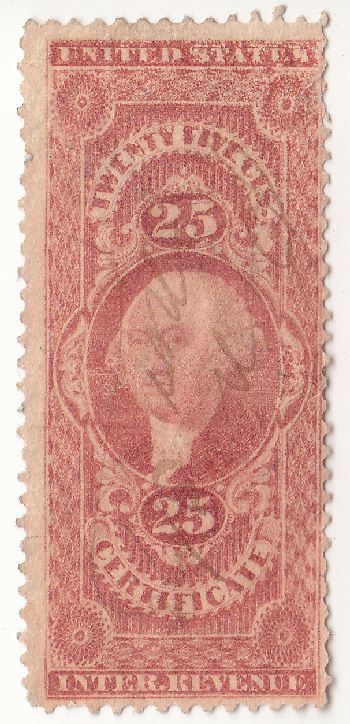 Cheers David (Stampmaster) |
|
Send note to Staff
|
|
|
|
|
Bedrock Of The Community
United States
10812 Posts |
|
|
It's a dry print from a worn plate that might possibly have a double transfer in the word "states". It also has a small diagonal tear in the upper right corner under the s of states. |
Send note to Staff 
|
|
|
Pillar Of The Community
1151 Posts |
|
|
Bedrock Of The Community
United States
10812 Posts |
|
|
Pillar Of The Community
United States
3269 Posts |
|
|
Quote:
but there is more! It also looks like the double transfer mentioned in STATES shows again in the top of the upper numeral 25, across the top of the 5 and that it was origanally shifted downwards, 7th perf of left side is pulled, and another possible tear in the left margin oppisite the C of CERTIFICATE. And of course, the right side perfs are a mess. |
|
Send note to Staff
|
|
|
Bedrock Of The Community
United States
10812 Posts |
|
|
Basically it's a poor example of what in an earlier state with a better print job would be a nice stamp. |
|
Send note to Staff
|
|
|
Pillar Of The Community
United States
6461 Posts |
|
|
Too low resolution to really tell anything for sure. The horizontal line in STATES implies a DT, but we really need higher-resolution images. |
|
Send note to Staff
|
|
|
|
Bedrock Of The Community
United States
10812 Posts |
|
|
Pillar Of The Community
1151 Posts |
|
|
This image I posted in my original posting is the highest resolution I could make it, the stamp just shows like it does.
I've kept the stamp in question in my junk box waiting. Is there anything to be made out of the area between George's left eye and his ear? I've never been about to decide exactly what if anything was going on here.
Outstanding responses!
Cheers
David (Stampmaster) |
|
Send note to Staff
|
|
|
Pillar Of The Community
United States
770 Posts |
|
|
Impossible to tell because of the resolution. Your scan is only 350 pixels wide. Not sure why you can upload a larger image. What's your set up Stampmaster? |
|
Send note to Staff
|
|
|
Pillar Of The Community
United States
770 Posts |
|
|
Pillar Of The Community
1151 Posts |
|
|
southpaw, I'm not sure what you mean by set up. I use the scanner as it was loaded onto my computer, and use it as such. I'll have to ask my daughter the computer expert next time she travels over the mountain pass to see me. I've tried calling her and asking her, but all I get doesn't make sense to me.
Now then, southpaw, if you want to come over to my house and help me with the setup (just kidding), but you could also visit Las Vegas while you were here, its only 5 towns away from me.
Cheers
David (Stampmaster) |
|
Send note to Staff
|
|
|
Pillar Of The Community
United States
3269 Posts |
|
|
David, I'm using a Canon three in one Printer, Fax, Scanner model MX300. When I set it up, I couldn't find the software that came with the unit, so I downloaded the software from the web. That worked, but the maximun resolution I was able to scan an image at was 600 dpi. Not great but serviceable. About a month later I decided to try Google's Picasa 3 as a better solution for image handling.About a week later, while browsing the Picasa options I discovered that Picasa's scanning software setup would allow me to scan at 1200 DPI. Not as high as I would like it to go but will serve better than 600 DPI. You might give that a try. It's been working for me. http://picasa.google.com/ |
|
Send note to Staff
|
|
|
Pillar Of The Community
1151 Posts |
|
|
littleriverphil, thanks for the good information. But I still have to wait for my daughter "The Computer Expert" to down load any thing, I have no idea, I watched my daughter down load one program for me once, and there was a lot of what ifs, and where ifs, etc. I'm not going to get into something unless I fully understand what I'm doing.
Again
Thanks
David (Stampmaster) |
|
Send note to Staff
|
|
|
Pillar Of The Community
United States
770 Posts |
|
|
Hi David. There is a setting in your scanning interface where you can set DPI (dots per inch), more accurately called PPI though (pixels per inch). This is typically done at a pre scan stage where you can constrain a certain area to scan, pick color or B&W, color depth, scan resolution, scan size, etc. With professional scanners there's all kinds of settings, Since stamps are typically very small, set the resolution at the highest value. My scanner, a Canon, goes up to 4800 ppi.
Here are settings I would look for: scan size - 100%, resolution - minimum 600 ppi, color, positive.
Every UI (user interface) is different, but there should be some version of these settings which will get you a decent scan. Once your stamp is scanned, crop it just outside of the perforations, then save the scan as a jpeg with just enough compression to get it down below 200k in file size, the limit for uploading an image to SCF.
If possible, scan your stamps on a black piece of paper or cardboard. Back of a black stock sheet usually works well.
Hopefully this will help. All scanner interfaces I've used have some variation of the above, but I'm not very well versed with current consumer level scanners. |
|
Send note to Staff
|
|
|
Pillar Of The Community
1151 Posts |
|
|
This is a scan of my scanner set up page I think. 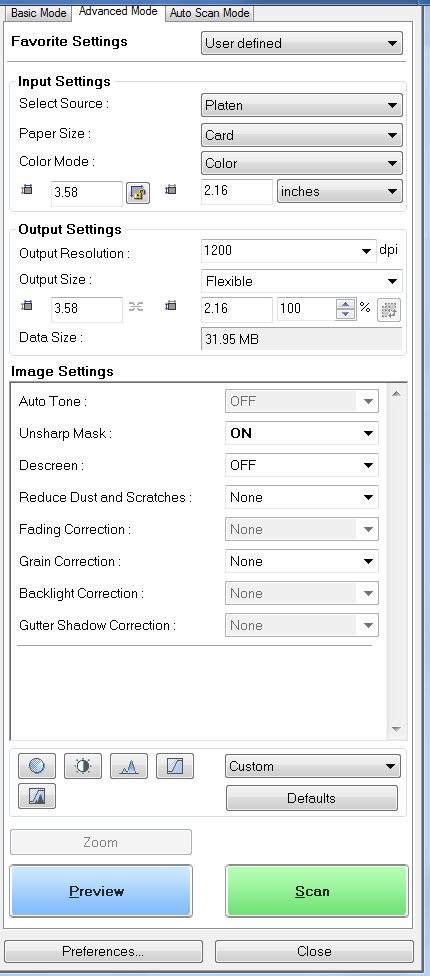 This is the way my daughter set it up, and it works great for me. Is there something I'm missing? Do I need to change something? Cheers David (Stampmaster) |
|
Send note to Staff
|
|
|
Replies: 25 / Views: 4,273 |
|



 Posted 05/31/2015 9:59 pm





