| Author |
 Replies: 18 / Views: 2,942 Replies: 18 / Views: 2,942 |
|
Valued Member
United States
111 Posts |
|
|
|
Here is how I keep track of my collection. When I obtain a stamp in the Scott Catalogue I put a pencil dot to the left of the Mint CV if mint, if unused I put it between the catalogue values and if used to the right of the used CV. If I would like a better copy I circle the stamp number. This makes it easy for me to know if I need the stamp when I'm ready to make a purchase. I also have an inventory program but I haven't been using that the way I should. I'm interested in how everyone else tracks their collections. Someone may have a better method.
|
|
Send note to Staff
|
|
|
|
|
Valued Member
126 Posts |
|
|
I am interested in this topic as well. For the high dollar and few item collections of US stamps I can see using a program with grades, purchase price, etc..... For worldwide collections with volumes of stamps getting put into albums frequenty it's hard to image that would keep up with the inventory process. I have thought that once I hit a wall with a country where it's hard to find hole fillers I would take the time to catalog.
At the moment I have some blank pages (blank paper) at the front of my albums where I make notes by han of any special stamps in the collection
.
I have toyed with three options:
1. photo copy the Scott catalog listing for the country and mark on it like a check list
2. inventory program -- if affordable and has prepopulated info of interest (ideally a reference price) |
Send note to Staff 
|
|
|
Moderator

United States
4788 Posts |
|
|
I guess I'm a bit anal, but I don't like to write in my Catalog. In 2007, I bought a copy of the spiral bound pocket catalog. It looks like this ... 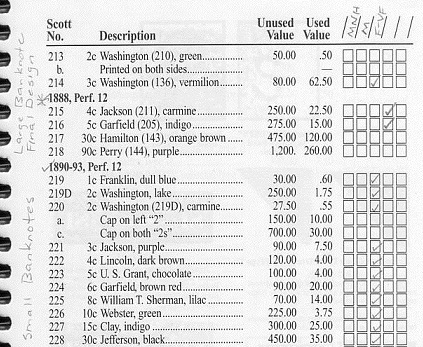 Someone smarter than me can probably tell you the 5 "standard" column headings, but I labeled mine this way: 1. MNH 2. Mint (hinged or other gum disturbance) 3. Used in F-VF condition 4. Used but less than Fair condition 5. Filler/Damaged (I rarely use this column) Of course, I collect U.S. -- I'm not sure about pocket guides for other countries. Caveat: one thing I learned about writing in the pocket guide and Scott Catalogues -- the pages are "slick" meaning pencils don't work very well. But I hate using ink because it smears. Also with ink, I can't erase when I "upgrade" my stamps. Great topic, ironhelm. I anxiously await answers from the others. Kirk |
|
Send note to Staff
|
|
|
Pillar Of The Community
United States
576 Posts |
|
|
I'm way too anal. I prepare a simple spreadsheet for my collections with the first 3 columns being Scott #, Mint(value), Used (value) for wants and the next three columns to the right being for acquired. I move acquisitions from the left columns to the right as I get them and clear the value cell that I do not have. Works for me and has been valuable to have for a combined inventory/wantlist for a number of years. |
|
Send note to Staff
|
|
|
Valued Member
Australia
312 Posts |
|
|
I use the software StampManage for my US collection, and like it a lot. It has the Scott catalogue prepopulated with all the info such as issue place/date, perforation, printing type etc. You select the grade you have the stamp in (VF - NH for example) and it has market values already in (you can change these if you wish.) You can enter in how much you paid, when you bought it, who from etc, all sorts of extra details. Or none if you don't want to. Then you can manage inventory lists, want lists etc. It also has a search ebay and Stampwants function. Balf |
|
Send note to Staff
|
Be yourself. Everyone else is taken. |
|
|
Pillar Of The Community
USA
3315 Posts |
|
|
I also use a spreadsheet for each of my collections. My stamp collections/accumulations are probably 98% accurate, but my covers are not even remotely recorded accurately. |
|
Send note to Staff
|
|
|
Pillar Of The Community
Philippines
505 Posts |
|
|
Hi ironhelm! tracking my stamps just by looking at my main world album and counting the envelope packages which are the stamp stocks or surplus, one envelop for each country. As to the stamps themselves, there is NO tabulation or none of any type of listing. The pics are all in my brain, and if my brain goes, well then  my kids wouldnt have any problem sorting it out since it's just a pile already sorted out per countries! I mean it's ok and good to list and track your collection. I praise those with the interest to do it, but I just cant seem to do it, got swamped with my other seashell, doorbells, doorkeys, coins, rocks etc collections  |
|
Send note to Staff
|
|
|
Moderator
United States
4788 Posts |
|
|
Craig.
Your spreadsheet sounds good. Can you give a little more detail about the right 3 columns -- one for mint, one for used, the other ??
Also, if you purchased a mint stamp, are you saying you move the mint price to the right side and delete values on the left?
Sorry to be dense, I have a lot of information in Excel already and I might be able to adapt it to what you describe.
Kirk
|
|
Send note to Staff
|
|
|
Pillar Of The Community
Canada
3963 Posts |
|
|
Great topic guys. I'm finding I need to keep a list because I'm finding that I sometimes will buys stamps I think I don't have only to find out they are alwready in my album. Once I finish an album I think I'll start making a list of what I'm missing and then cross them out as I get them. I don't need all the different colums cause I'm just interested in filling the spaces of my albums. You guys have inspired me I'll think I'll get right to work on my German collection and then do Canada, US, Great Britain and Australia. Dianne  |
|
Send note to Staff
|
Don't grumble that the roses have thorns, be thankful that the thorns have roses |
|
|
Pillar Of The Community
USA
867 Posts |
|
|
I use the Windows database program that came with my computer. I can make as many columns as I want for the year of the stamp, catalog number, description, condition, etc. It has worked well for me and keeps me from buying stamps I already have.
Using a computer based program is time consuming in the beginning, but has many rewards once everything is entered properly.
Butch |
|
Send note to Staff
|
|
|
Pillar Of The Community
Israel
6191 Posts |
|
|
I lost track of my collection long ago. I may be able to get back on track when I retire. Until then I just hope. For the Cinderellas its difficult anyway ! Quote:
You guys have inspired me I'll think I'll get right to work on my German collection and then do Canada, US, Great Britain and Australia.
Make a list Dianne. I have thousands from those countries, and many of them need a new home. Make a list ! Londonbus1......Needs to make a list.  |
|
Send note to Staff
|
|
|
Pillar Of The Community
United States
576 Posts |
|
|
My spreadsheet is as simple as I could make it when I set it up. It would look much like the following:
(Left side - "Wants") (Right side - "Haves")
Scott # Mint(value) Used(value) Scott # Mint(value) Used (value)
100 .35 .20
Once acquired, the entry becomes:
100 .20
I hope that helps clarify Kirk. |
|
Send note to Staff
|
|
|
Moderator
United States
4788 Posts |
|
|
Pillar Of The Community
USA
3315 Posts |
|
|
Quote:
"Catalog Number" "In Album ~Tab~" "In Stock ~Tab~" "In Stock ~Mint~" "In Stock ~Used~" "Catalog Value ~Tab~" "Catalog Value ~Mint~" "Catalog Value ~Used~" "Collection Value"
NH 1 0 0 0 2.40 0.30 0.20 0.00
H 1a 0 0 0 5.15 0.00
NH 1a 0 0 0 11.00 0.50 0.20 0.00
It's a little difficult to visualize, but here are the column headings for my Israel collection spreadsheet, followed by three rows of data. I would be willing to share this, my German or my US spreadsheets with anyone who would like them. The Israel is different by virtue of it's having both tab and no-tab versions of mint. |
|
Send note to Staff
|
|
|
Pillar Of The Community
Finland
753 Posts |
|
|
I too use Excel / spreadsheet to keep track of what I have. It's simply so much "better" than the available alternatives (at least for now, but hopefully things will change some fine day in future).
|
|
Send note to Staff
|
|
|
|
Pillar Of The Community
Australia
1927 Posts |
|
|
Replies: 18 / Views: 2,942 |
|




 Posted 02/01/2010 6:38 pm


