| Author |
 Replies: 142 / Views: 28,688 Replies: 142 / Views: 28,688 |
|
|
|
Valued Member
Canada
440 Posts |
|
|
Quote:
I'm a little surprised that no one has posted pages with images and text Inside the box. Hi Chuck, Thanks for sharing your solution, it looks great  A few suggestions if I might, and I am only able to make these suggestions due to my familiarity with the AE command set so please don't see it as a criticism. Given the large number of commands and imperfect documentation, it is not always easy to discover what command to use to perform a specific action. To save some typing, instead of three lines to add spacing between stamps: COLOUR_STAMP_BORDER(white) STAMP_ADD (15 33 "" "" "" "") COLOUR_STAMP_BORDER(black) The same effect could be achieved with: STAMP_ADD_BLANK (15 33 ) Also, the STAMP_HEADING command can be used to add a heading above a stamp box; Using the STAMP_ADD_BLANK and STAMP_HEADING commands this is what it looks like: PAGE_TEXT_CENTRE (HN 2 "")
ROW_START_FS (HN 8 0.1 5.0)
STAMP_ADD_IMG (30 44 "Images/1990 wells.jpg" "" "" "" "Bob's 9888" 0.0 40.0)
STAMP_HEADING(HN 12 "1990 Black Heritage \n Ida B.Wells")
STAMP_ADD_BLANK (15 33 )
STAMP_ADD_IMG (24 29 "Images/1990 beach.jpg" "" "from stamp booklet" "" "Bob's 9889" 0.0 25.0)
STAMP_HEADING(HN 12 "1990 Beach Umbrella \n Booklet Issue")
STAMP_ADD_BLANK (15 33 )
STAMP_ADD_IMG (30 44 "Images/1990 supreme.jpg" "" "" "" "Bob's 9890" 0.0 40.0)
STAMP_HEADING(HN 12 "1990 U.S. \n Supreme Court") One other suggestion and the result is exactly the same, but instead of using text to insert vertical spacing on a page PAGE_TEXT_CENTRE (HN 2 "") One could instead use the PAGE_VSPACE command. e.g to insert 6mm PAGE_VSPACE(6.0) The PAGE_VSPACE command is relatively new, so many of the examples included with AE still use PAGE_TEXT_CENTRE to insert vertical spacing. Clive |
Send note to Staff 
|
AlbumEasy - Free software for creating custom stamp album pages ChromaMate - Compare, match, analyse, free colour matching software ImageSleuth - Images, hidden inside images, revealed. A retroReveal alternative PSGSA - The Philatelic Society for Greater Southern Africa |
| Edited by clivel - 01/08/2024 02:06 am |
|
|
Valued Member
United States
25 Posts |
|
|
Clive,
Many thanks for your reply. You are right to point out better ways to do things. In my own defense, I do use Stamp_add_blank and Stamp_heading. The sample I submitted was from a much earlier job and was' to a great extent, copied from a free Album Easy download which I used as a template. I found it easier to leave a lot of the "COLOUR_STAMP_BORDER(white)" and other commands in place rather than go through the whole text and do it the right way.
I have to say the Album Easy is GREAT!!! |
|
Send note to Staff
|
|
|
Valued Member
Canada
77 Posts |
|
|
Thanks all for this thread.
On top of all the nice design, I thought particularly interesting the font "Bohemian Typewriter" |
|
Send note to Staff
|
|
|
Valued Member
United States
10 Posts |
|
|
Looking for one of you eagle eyed people to answer this. My eyes just don't see like they used to.. When developing pages with paragraphs of text, what is your preferred font? I've tried a number of them and I just can't see a difference in a lot of then. I've tried Arial, Times New Roman, Helvatica and a few others but seem to have a similar problem with them all.
It seems that the top of a line of text seems to run into the bottom of the previous line and letters seem jammed together.
Anyone out there played with fonts and come up with a really nice
one? |
|
Send note to Staff
|
|
|
Valued Member
Canada
440 Posts |
|
|
MikeyToo,
I think that it really comes down to whether one prefers serif or sans-serif fonts.
For paragraph text, I mostly use Palatino Linotype, a serif font. This looks good to me but I am not much of a font connoisseur.
If you have a problem with the descenders of a line of text running into the ascenders of the line below, you can use the TEXT_LINE_LEADING command to adjust the leading (inter-line spacing) between lines of text.
e.g
TEXT_LINE_LEADING (0.5) increases the inter-line spacing by 0.5mm
TEXT_LINE_LEADING (-1.5) decrease the inter-line spacing by 1.5mm
TEXT_LINE_LEADING (0.0) restores the default spacing
The TEXT_LINE_LEADING command affects all multiline text that follows until the next TEXT_LINE_LEADING.
Clive
|
|
Send note to Staff
|
AlbumEasy - Free software for creating custom stamp album pages ChromaMate - Compare, match, analyse, free colour matching software ImageSleuth - Images, hidden inside images, revealed. A retroReveal alternative PSGSA - The Philatelic Society for Greater Southern Africa |
|
|
Pillar Of The Community
United States
4520 Posts |
|
|
I do not recall ever seeing a problem with descenders when using the default line spacing with standard fonts and I have experimented with quite a few fonts. I sometimes want to reduce line spacing! |
|
Send note to Staff
|
Al |
| Edited by angore - 03/25/2024 08:49 am |
|
|
New Member
United States
2 Posts |
|
|
Hello AlbumEasy users,
New forum member here. Trying to figure out how to create a rotated box containing a stamp image. Apologies if this is old hat or if this is not an appropriate place to post the question. I'm just getting started with SCF and AlbumEasy.
Thanks,
Tom
|
|
Send note to Staff
|
|
|
Valued Member
Canada
440 Posts |
|
|
Quote:
Trying to figure out how to create a rotated box containing a stamp image. Apologies if this is old hat or if this is not an appropriate place to post the question. I'm just getting started with SCF and AlbumEasy.
Hi Tom, The PAGE_ADD_BOX command provides support for rotated boxes. Unfortunately, however, the current version of AE it does not support images in rotated boxes. Clive |
|
Send note to Staff
|
AlbumEasy - Free software for creating custom stamp album pages ChromaMate - Compare, match, analyse, free colour matching software ImageSleuth - Images, hidden inside images, revealed. A retroReveal alternative PSGSA - The Philatelic Society for Greater Southern Africa |
|
|
Pillar Of The Community
United States
746 Posts |
|
|
Copy the image into MSPaint. Use the "ROTATE" command to turn the image as desired. Save the rotated image to your AE Images directory and use that to insert in the AE frame you specified. 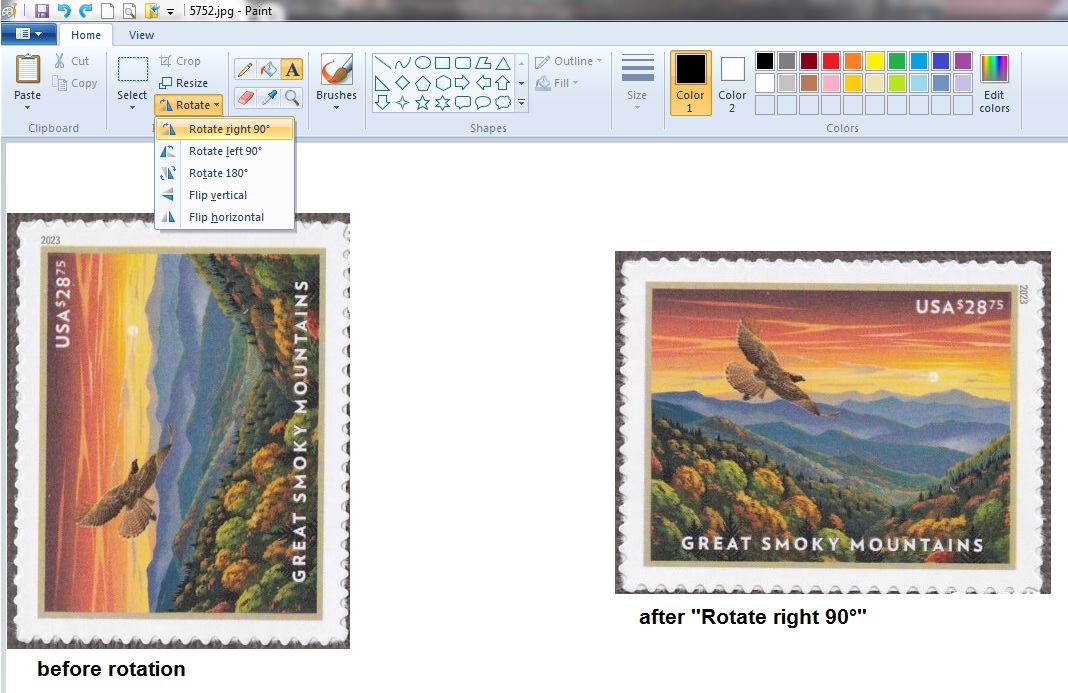 |
|
Send note to Staff
|
|
|
New Member
United States
2 Posts |
|
|
Thanks Clive, I expected as much but I thought I had better check. I will add the image directly to the pdf with Illustrator. |
|
Send note to Staff
|
|
|
Valued Member
United States
10 Posts |
|
|
Rookie time again. I've been working on this for about a week or so now and just can't get it to work. I'm using PAGE_TEXT_PARAGRAPH_START. It works but the first word of the paragraph is always Indented about a half character to the right. I looked at the examples in here and can see no difference in their code and mine. Theirs does not show indentation. I've tried different fonts, (normal, bold, italic) a different padding.
Here is a snippit of my code
PAGE_TEXT_PARAGRAPH_START(HN 10 JUSTIFIED 20 20)
What can you call a hobby which teaches so much—in addition to providing fun and pleasure? Stamp collecting helps instruct the collector in geography, biography, history, culture and art. Stamps are miniature gateways to the world.
Stamp collecting has very few rules. You don't have to buy expensive sneakers or rackets to enjoy it. However, there are a few simple things to remember when collecting stamps.
PAGE_TEXT_PARAGRAPH_END
I'd add a photo but I don't think I've posted enough times to be allowed to do that.
|
|
Send note to Staff
|
|
|
Valued Member
United States
10 Posts |
|
|
There is a rule here about calling people names. Can I call myself one? Dummy that I am, I discovered my solution by accident. I like to use blank lines to delineate different areas of code. I just discovered that a blank line following the paragraph command is considered a space character at the start of the paragraph. Took the blank line out and it works great. I will now go and chain myself in the dungeon until my penance has been served. |
|
Send note to Staff
|
|
|
Valued Member
Canada
440 Posts |
|
|
MikeyToo, no need to beat yourself up about it it is an easy mistake to make. The end of a line in a paragraph, except for the last line, is treated as a space. That way one doesn't need to include really long lines of text to have it formatted correctly. That way, this: PAGE_TEXT_PARAGRAPH_START(HN 10 JUSTIFIED 20 20)
What can you call a hobby which teaches so much—in addition to providing fun and pleasure? Stamp collecting helps instruct the collector in geography, biography, history, culture and art. Stamps are miniature gateways to the world.
PAGE_TEXT_PARAGRAPH_END and this: PAGE_TEXT_PARAGRAPH_START(HN 10 JUSTIFIED 20 20)
What can you call a hobby which teaches so much—in addition to providing fun and pleasure?
Stamp collecting helps instruct the collector in geography, biography, history, culture and art.
Stamps are miniature gateways to the world.
PAGE_TEXT_PARAGRAPH_END will generate the same output Clive |
|
Send note to Staff
|
AlbumEasy - Free software for creating custom stamp album pages ChromaMate - Compare, match, analyse, free colour matching software ImageSleuth - Images, hidden inside images, revealed. A retroReveal alternative PSGSA - The Philatelic Society for Greater Southern Africa |
| Edited by clivel - 05/20/2024 1:27 pm |
|
|
New Member
United States
2 Posts |
|
|
Using albumeasy, I have a stamp set that is 200mm wide. I'd like to have the stamp frame extend past the borders, and not have the borders show inside the box. I've tried several things, creating an empty jpeg larger than the box for example. No luck I still have the border showing inside the box. |
|
Send note to Staff
|
|
|
Valued Member
Canada
440 Posts |
|
|
Hi grumpydog,
If I correctly understand what you are trying to accomplish one possibility would be to hide the box borders.
STAMP_BORDER_STYLE (BLANK) will hide the borders for all succeeding boxes,
STAMP_BORDER_STYLE (SOLID) will turn them back on.
You can also use STAMP_BORDER_STYLE to hide one or more border sides.
eg. to only show the top and bottom borders
STAMP_BORDER_STYLE (SIDES T B )
Hopefully, this helps,
Clive
|
|
Send note to Staff
|
AlbumEasy - Free software for creating custom stamp album pages ChromaMate - Compare, match, analyse, free colour matching software ImageSleuth - Images, hidden inside images, revealed. A retroReveal alternative PSGSA - The Philatelic Society for Greater Southern Africa |
| Edited by clivel - 07/06/2024 8:58 pm |
|
|
Replies: 142 / Views: 28,688 |
|




 Posted 01/08/2024 02:03 am


