Stamp Community Family of Web Sites
Thousands of stamps, consistently graded, competitively priced and hundreds of in-depth blog posts to read


Stamp Community Forum
 
Username:
Password:
Save Password
Forgot your Password?

This page may contain links that result in small commissions to keep this free site up and running.

Welcome Guest! Registering and/or logging in will remove the anchor (bottom) ads. It's Free!

Cataloguing Post Cards With Stamps On Back

Next Page    
 
To participate in the forum you must log in or register.
Author Previous TopicReplies: 45 / Views: 5,937Next Topic
Page: of 3
Pillar Of The Community
Canada
1084 Posts
Posted 11/20/2010   4:57 pm  Show Profile Bookmark this topic Add cynical to your friends list Get a Link to this Message
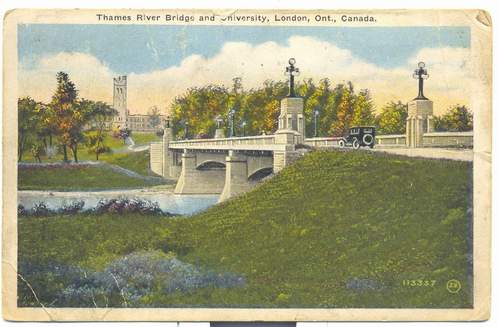
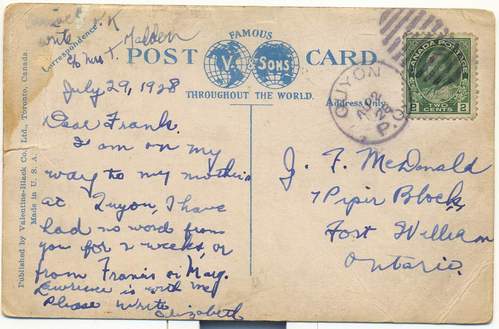
I have a small collection of post cards with stamps on the back. I have asked Bujutsu that if I put some cards on here would he give me some hints as to how to categorize them so that they can be searched alphabetically on a computer. He has graciously said that he would. The first is of the bridge crossing the Thames River as you enter the University of Western Ontario in London, Ontario. I will place the front on first and the stamped back second.


Send note to Staff
Edited by cynical - 12/10/2010 03:33 am

Bedrock Of The Community
Australia
38679 Posts
Posted 11/20/2010   5:32 pm  Show Profile Bookmark this reply Add rod222 to your friends list  Get a Link to this Reply

My route would be a descending order hiearchy.
The file name would read
"Canada postcard bridge quyon 02c"
include whatever pertinent flag info is needed in your collection.

You should be able to retrieve the scan amongst
a million images within 5 seconds.

Another route if your collection is Canada centric,
is to lead the file name with the catalogue number of the stamp.
Send note to Staff  Go to Top of Page
Pillar Of The Community
Canada
1084 Posts
Posted 11/21/2010   1:14 pm  Show Profile Bookmark this reply Add cynical to your friends list  Get a Link to this Reply
Rod: Right now my problem is not naming files in order to search for scanned stamps. That will be my next problem down the road given that in the few days fooling around here I have accumulated a hodge-podge of file names. My old computer is also getting a bit constipated.

I want to know how to describe the picture part of a stamped picture post card in a spreadsheet column that I call NOTES. I am not sure how this will show up but here is a portion of the spreadsheet (see below). The NOTES column is off to the right and on the left I have left off the COUNTRY (i.e., Canada), SCOTT# and ISSUE. The spreadsheet is uni-dimensional in that it works for the stamp part of the post card. I want to describe the picture side of the postcard in meaningful key words in the NOTES column so that down the road I could mentally picture or search for the card amongst other stamped cards documented in that column. One day I might even link it to a scanned database showing the picture. Is there a classification system or protocol to describing post cards? How would an expert card collector describe the above card in a column like mine in say under 50 bits.

https://www.stampcommunity.org/uplo...candata2.JPG
Send note to Staff  Go to Top of Page
Pillar Of The Community
Canada
4648 Posts
Posted 11/21/2010   1:32 pm  Show Profile Bookmark this reply Add Bujutsu to your friends list  Get a Link to this Reply
Hi Cynical and All

I will get back on this topic ASAP. This afternoon we have been invited out to our nextdoor neighbour's place for a couple of drinks and I will tackle this once I am back. I don't have to worry about driving because all we have to do is roll down the hill from their place to ours just kidding.

One thing I can quickly tell you is this - - - the card is a Valentine and Sons card, which is plain to see on the back, but also there is the small number on the front on the L/R corner, which is quite common for the vast majority of their cards.

I will get more thorough on this when I get home.

Chimo

Bujutsu
Send note to Staff  Go to Top of Page
Rest in Peace
Canada
6750 Posts
Posted 11/21/2010   5:01 pm  Show Profile Bookmark this reply Add Puzzler to your friends list  Get a Link to this Reply
with Rod on the starting large and working down.

You could look on ebay and see how the expert sellers describe the card in 55 characters or less so people who are searching (and not just reading the listings by category) would find it.

Postcards are a bit beyond me, I have just concentrated on stamps, and I know from looking at the odd postcard on ebay that they can be described differently.

Sometimes by the manufacturer or producer, other times by subject matter, other times by the stamp of means of postage (registered, paquebot, Railway Post Office, etc).

If all you are interested in is the subject matter, then start with creating beforehand some broad categories for yourself like train, animal, people, building, etc (your own choosing is best) and then add extra words like 'animal dog huskie people child building barn' paying attention to the descending order of things.

This way you will be able to find all people postcards, all train with dog postcards, etc.

With only 50 characters you may have to use abbreviations (and keep a list of them) so you can find the pictures later as once you get a lot the older ones will start to blend together in your mind unless you constantly review them on a daily basis.

I have started to do this on a reduced scale with my personalized stamp scans. They all (most) have the same Scott number and are all one type so must be classified by subject matter. It is easier with them as there is only so much space on a stamp to fit a picture into so the subjects are limited, so I can get away with something like 'pp-dog-poodle-ribbon' of which I have already forgotten the ribbon part so have to rely on looking through and reading all the file names with dog-poodle in them. For now, the odd-balls stand out.
Send note to Staff  Go to Top of Page
Bedrock Of The Community
Australia
38679 Posts
Posted 11/21/2010   6:53 pm  Show Profile Bookmark this reply Add rod222 to your friends list  Get a Link to this Reply

Quote:
I want to know how to describe the picture part of a stamped picture post card in a spreadsheet column that I call NOTES


Cynical, you have arrived at a point which all
collectors of information eventually arrive at, and respectfully
you are pushing the cart with the horse.

Reflect a moment...
You are trying to cram the information you need
in a database or spreadsheet cell !
This is totally counter productive.

You have, all computers have, the biggest database in the
world under their fingertips, it is called
"windows explorer" (or, if you like, any other brand
name file organiser)

Using the hierarchy as in my previous post, you
want "meaningful key words" then have a look
at my hiearchy string...
Surely your first "flag" would be either one of the
hints in the file name.

Lets say for example you want to recall a bridge in canada...

You have a million bridge postcards, in your 10 million
image windows folders.
You type in "bridge" in your text string search and
bingo you get your sub set of 1 million bridge
postcards then you scroll through the list
to find canada.

Ahh! you remember it is the Thames estuary.......

You have 4 files listed
2 (the front / back of the postcard)
1 the wiki description (image)
1 the Microsoft word document 4000 words
on information you want

Allow your database to take advantage of
"a picture paints a thousand words"

Once you get the hang of it, you won't look back
and eventually you will probably ditch all your stamp excell lists
or at least transfer them over to your stamp folder hiearchy

I just did a string search on my 400,000 image folder database for
"thames"
I had 3..

A gb decimal stamp
a commercial overprint
(which it appears I have filed incorrectly under Germany)
and a GB meter strip with Thames.

That's how easy it can be, the only discipline
is the patience to name each scan or document file
with appropriate "flags"

Hope this may be some consideration for you.



Send note to Staff  Go to Top of Page
Bedrock Of The Community
Australia
38679 Posts
Posted 11/21/2010   6:57 pm  Show Profile Bookmark this reply Add rod222 to your friends list  Get a Link to this Reply

The image on the postcard
does that bridge still exist? I cannot find any mention
of it on wiki.
Maybe it has been renamed?

Send note to Staff  Go to Top of Page
Rest in Peace
Canada
6750 Posts
Posted 11/21/2010   7:05 pm  Show Profile Bookmark this reply Add Puzzler to your friends list  Get a Link to this Reply
Rod,
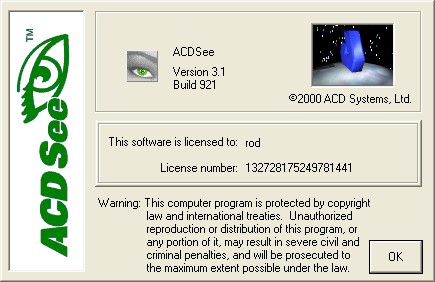
I know you use ASCSee of some version. Can you tell me what version of which software package you have from them? Thanks.
Doug
Send note to Staff  Go to Top of Page
Bedrock Of The Community
Australia
38679 Posts
Posted 11/21/2010   7:34 pm  Show Profile Bookmark this reply Add rod222 to your friends list  Get a Link to this Reply
The FREE version Doug
V3.1 IIRC

Hang on, i'll drop an image for you

Send note to Staff  Go to Top of Page
Bedrock Of The Community
Australia
38679 Posts
Posted 11/21/2010   7:39 pm  Show Profile Bookmark this reply Add rod222 to your friends list  Get a Link to this Reply
BTW I find it bloat free and very snappy,
the downside is when you reach half a million images
it tends to choke a bit, and can hamper memory
esp with the scanner.
One has to "optimise the database" every couple of weeks
which only takes a few seconds.
But when the scanner jams with loss of memory it can be a pain.
Send note to Staff  Go to Top of Page
Pillar Of The Community
United States
527 Posts
Posted 11/21/2010   7:54 pm  Show Profile Bookmark this reply Add fredcdobbs to your friends list  Get a Link to this Reply

Quote:
I have a small collection of post cards with stamps on the back.
That is so weird, I have a small collection of post cards with pictures on the back.
Send note to Staff  Go to Top of Page
Edited by fredcdobbs - 11/21/2010 7:55 pm
Pillar Of The Community
Canada
1084 Posts
Posted 11/22/2010   09:33 am  Show Profile Bookmark this reply Add cynical to your friends list  Get a Link to this Reply
Rod and Puzzler: thanks for the time and effort that you put in to your responses. Last night I read both about four time to make sure I got it all. My use of the spreadsheet format goes back to the DOS days, in fact my stamp files reside in my old 256 desktop with Windows 98, as does my free version of ACDSee 3.1, which as you say is quite snappy. Tried other somewhat bloated programs but always went back to my ACDSEE.

Question Rob: using one of the three examples you gave me, would you point out where reference to the physical location of the stamp, or whatever, is placed (should I ever morph myself upwards in the technological hierarchy).

Fred: I saw that after I posted but didn't correct it. It reminded me of a time when I was being ferried around in a helicopter. I inadvertently told the pilot to turn east when I meant west. Noticing we were going in the opposite direction to where I wanted to go I pointed out that I wanted to go the other way. His response was "Oh, you mean the other east".
Send note to Staff  Go to Top of Page
Bedrock Of The Community
Australia
38679 Posts
Posted 11/22/2010   10:20 am  Show Profile Bookmark this reply Add rod222 to your friends list  Get a Link to this Reply

Quote:
where reference to the physical location of


Cynical it's a simple route.
(but only good if you can use explorer or ACDSee)

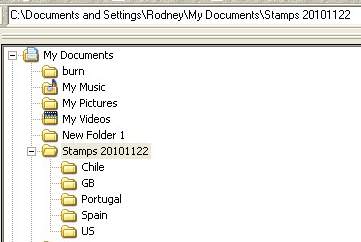
Open a new Folder, call it "Stamps" and todays date

= Stamps 20101122

Now just dump <every> scan in that folder.

Say you have 5 postcard scans in that folder
1=spain 1.jpg
2=GB 1.jpg
3=portugal 1 .jpg
4=US 1 .jpg
5=chile 1.jpg

Under stamps make 5 new folders

1=spain
2=GB
3=portugal
4=US
5=chile

Then just right click and slide each postcard
to its correct folder
You're finished :)

It took me about 45 seconds to do it on my computer.

If you direct your scanner to dump all scans to
Stamps 20101122
You know immediately know where all your scans are,
and you can right click and slide them to the
correct country (or whatever)

When you search, you search your using your text string
to Stamps 20101122 and it will auto search all the
lower folders.

easy peasy.
Take it slowly, once you get all your scans in the parent folder
(stamps 20101122) you are home.


Send note to Staff  Go to Top of Page
Moderator
Learn More...
United States
4788 Posts
Posted 11/22/2010   10:37 am  Show Profile Bookmark this reply Add kirks to your friends list  Get a Link to this Reply
Rod:

I used ACDSee for years, but last time I had to re-format and re-install everything, I didn't reinstall (I still have the SETUP routine on a disk somewhere). I don't do quite as much with graphics as I used to, so I haven't really had a need lately.

Correct me if I'm wrong, but the older, free versions are no longer available on the official website.

However, you can find v3.1 here http://www.oldapps.com/acdsee.php?old_acdsee=8

Kirk
Send note to Staff  Go to Top of Page
Bedrock Of The Community
Australia
38679 Posts
Posted 11/22/2010   11:02 am  Show Profile Bookmark this reply Add rod222 to your friends list  Get a Link to this Reply
Hi Kirk,
how I came by this version I have is lost in
the chicanery of ACDSee.
I used 3.1 for years, then like you, I had
to do a re install of Windows.

I have no idea what happened but I couldn't load
any ACDSee version at all after the reinstall,
my computer would reject right at the "finish" stage.

I actually bought another genuine late model
version that aborted.

I ended up buying a new Windows XP install
and loaded my old version 3.1 (i think)

I use ACDSee as my file manager of choice,
I use it for absolutely everything, I load
MSWord, EXCEL, and all my subsidiary files
through the ACDSee interface.

I play all my youtube, audio ..yep
just about everything through it.

Once upon a time, I had a way of searching
(creating a subset) of images using ACDSee
searching my <Entire> hardrive,
I have lost that skill, and forgot just
how I did it, I still cannot find it. :(
That really irks me.

Thanks for supplying that link, Kirk, I would strongly suggest
readers uninstall any version of ACDSee properly,
before installing a later, or earlier version.
If you load on top of an existing version
it may compromise your system.


Send note to Staff  Go to Top of Page
Pillar Of The Community
Canada
1084 Posts
Posted 11/22/2010   11:30 am  Show Profile Bookmark this reply Add cynical to your friends list  Get a Link to this Reply
Rod: regarding whether or not the bridge is still there - I don't know for sure as the last and only time I was over it was in 1961. I went to Google Maps and zeroed in on London, Ontario and the University of Western Ontario and the same bridge appeared to be there. There appeared to be shadows of the columns that are located at either end. Probably see it better on Google Earth by tipping the image.

Thanks for that info, as well as the stuff re ACDSee. I had no idea you could do all that stuff with it. I think my copy came free on the disk that came either with my old printer or with my HP scanner.
Send note to Staff  Go to Top of Page
Page: of 3 Previous TopicReplies: 45 / Views: 5,937Next Topic  
Next Page
 
To participate in the forum you must log in or register.

Go to Top of Page

Disclaimer: While a tremendous amount of effort goes into ensuring the accuracy of the information contained in this site, Stamp Community assumes no liability for errors. Copyright 2005 - 2026 Stamp Community Family - All rights reserved worldwide. Use of any images or content on this website without prior written permission of Stamp Community or the original lender is strictly prohibited.
Privacy Policy / Terms of Use    Advertise Here
Stamp Community Forum © 2007 - 2026 Stamp Community Forums
It took 0.29 seconds to lick this stamp. Powered By: Snitz Forums 2000 Version 3.4.05