|
This page may contain links that result in small commissions to keep this free site up and running.

Welcome Guest! Registering and/or logging in will remove the anchor (bottom) ads. It's Free!
To participate in the forum you must log in or register.
| Author |
 Replies: 32 / Views: 7,632 Replies: 32 / Views: 7,632 |
|
|
|
Pillar Of The Community
United States
822 Posts |
|
|
That would be really cool if there was a program for the public to do color ID from a scanner. |
Send note to Staff 
|
Member of the Central Oregon Stamp Club.
Redmond, OR 97756 Mailer's Postmark Permit #1
APS 239403 |
|
|
Moderator

United States
12330 Posts |
|
|
Wert, Let's look at this issue without any technology for a minute. You and I agree to identify the color of the same stamp and we will both use the Pantone COLOR BRIDGE® Coated chart. ( http://www.pantone.com/pages/produc...id=1000&ca=1). We each go out and buy a fresh, new one (new so that we can be sure that have not aged and color changed over time). You match the color you see with a specific shade and then send me the stamp. I then match it to what I feel is the closest match. Chances are fairly good that we will both be on the same color chart 'page' but chances that we both select the exact same shade are not that high. First, lighting makes a huge difference is matching colors. And then of course our color vision might not be the same. So how can we sync up and eliminate these variables? Pantone has a answer in its CAPSURE™ product ( http://www.pantone.com/pages/produc...id=1032&ca=1). This device removes these variables. We now have no dependencies upon lighting, human eyes, graphics controllers, monitors, or software. The device is embedded, as long as we both use the same device we can match a color correctly each time. (Even if you have your connected to a Linux PC and I have one connected to a Window tablet.) Moving on to your idea; I have little knowledge of which manufacturer the various local paint companies use and how they may differ between one another. Color comparator equipment is manufactured by many companies (Thomas Scientific, Fisher Scientific, etc.). But IF you local paint store and my local paint store have the exact same color comparators, then yes your idea would work. don |
|
Send note to Staff
|
|
|
Moderator
United States
12330 Posts |
|
|
Quote:
That would be really cool if there was a program for the public to do color ID from a scanner. I believe there is free software available on Sourceforge.net that will generate an ICC color profile but the key to doing this is that you start with a "known" color reference chart. You would scan this, then calibrate your monitor and printer to match to the correct shade. Pantone also has some free software tools to help match to their color standards. And lastly, check with your scanner manufacturer to see if they have any calibration tools. don |
|
Send note to Staff
|
|
|
Pillar Of The Community
Canada
5821 Posts |
|
|
There have been many threads on SCF about scanners, scanning and scanning techniques in the past including these two https://goscf.com/t/10659&whichpage...ing,problemshttps://goscf.com/t/30390&whichpage=1but it's always good to find out new ways to make better scans. Wert, I've tried most of the stuff you mentioned and basically IMO the best results come with the stamp directly on glass and lid open. Only problem is that mint stamps curl and therefore this causes the scan to have grey areas where the stamp is not pressed flat to the glass. Also I found that the heat from the scanner light makes them curl even more. Plus its hard to keep a bunch of stamps lined up perfectly on the glass compared to placing them straight in a Hagner. And yes I know about the Picassa straightening tool, which I use sometimes but not often. The most important thing I believe is the type/make of scanner. IMO Epson produces the best scanners, especially the V500 V550, V600. Scans from those are about as true to real colour as can be plus one can see the actual texture of the stamp paper and on engraved stamps the ridges jump right out at you. Perfect example are scans from nethryk and revenuecollector both use a Epson V500 I believe. |
|
Send note to Staff
|
|
|
Pillar Of The Community
Guatemala
1501 Posts |
|
|
Valued Member
Canada
107 Posts |
|
|
I don't think it is possible to make statements about scanning results because of the many variables mentioned already here: You scan your stamp with your preferred scanner and view it on your monitor, which may not be properly calibrated, and tweak it until the final result looks, to your eye, to be an accurate representation of the stamp's colour. Then you send it to someone else to look at, who may be using a monitor that is accurately calibrated (or worse than yours), using software operating with a different colour space or gamma setting. What's critical, and has been said here by others, is to have a system that removes all those variables. Sometimes when I scan things I will place the closest colour chip from my SG colour chart beside the stamp, so another viewer can compare how that "known" colour looks on his or her monitor and compared to his or her SG colour chart. As for software, I use a dozen or more apps for photo work (not Photoshop as it is overkill for me and too expensive) and there are many more that will easily handle these basic functions, and some are free. You only have to look at ebay listings for the same stamp to see how much variation there can be - particularly frustrating when you are looking for an elusive shade. |
|
Send note to Staff
|
|
|
Rest in Peace
7742 Posts |
|
|
Quote:
Overall, the third one looks best. quigngt the only trouble is the stamp looks fantastic but is not the true colour/shade or darkness of the actual stamp...Look at the example below...You would say WOW Wert, you stamp looks great, but the true colour is the one with the lid closed and not open..That is deceiving to some people, but make it look good..So as 51studebaker says, I would use enhancing software to lighten it up, but still it is deceiving.. LID OPEN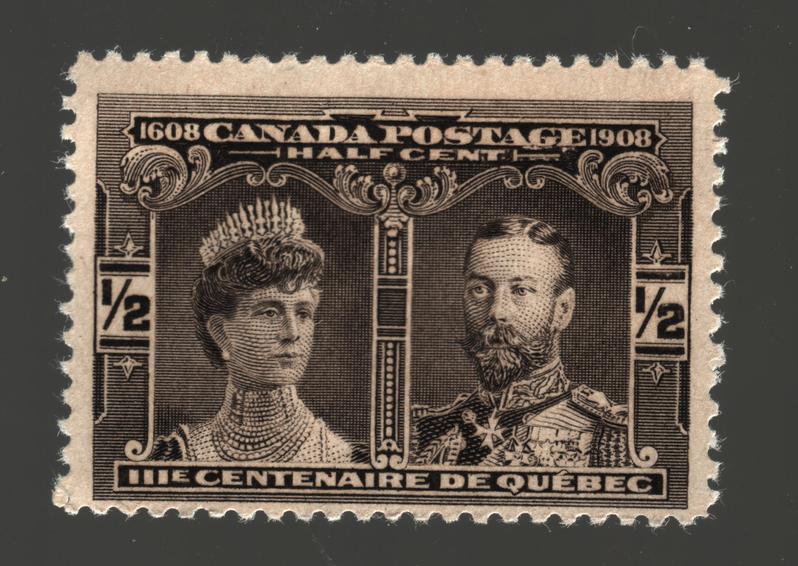 LID CLOSED LID CLOSED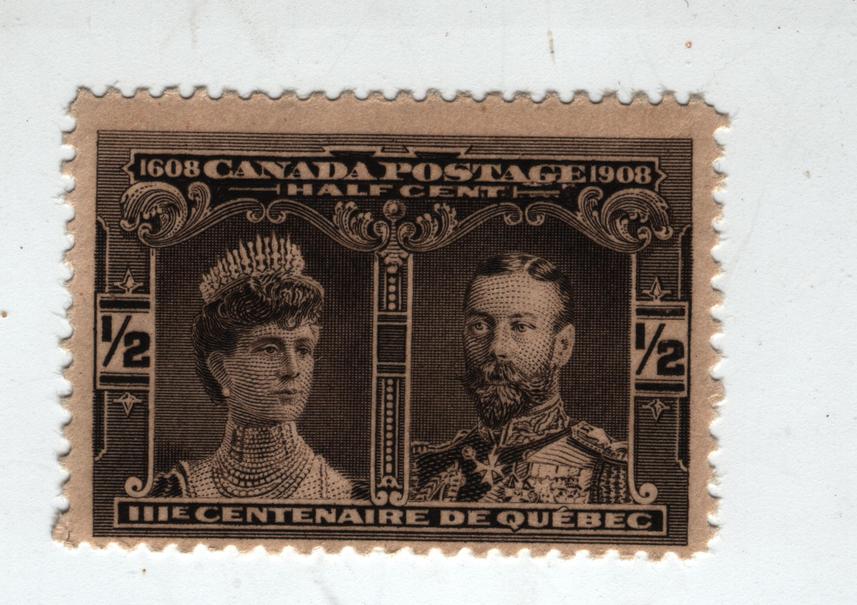 |
|
Send note to Staff
|
|
|
Moderator
United States
12330 Posts |
|
|
Wert,
Your scanner CCD array detects the light that is emitted from the scanner lamp which is reflected off the stamp being scanned. But the real delta between the 'lid open' and 'lid closed' state is found in the scanner algorithm software. It is in this software that your scanner will try to average the light levels (including ambient light) in its calculations.
So it would be correct to say that the scanner will produce the most accurate scans with the lid closed. This make sense if you think about it, a scanner manufactured cannot control ambient light. This is why they bother with the extra cost of putting 'lids' on scanners.
And of course be aware that the light source of your scanner also changes over time, the bulbs will lose intensity. This is why the manufacturer recommends that you calibrate every few months.
So much of the imaging we all do comes down to the software. This point cannot be made enough when we start talking about details (subtle color shades, small hairlines, faults, etc.); if we are relying upon images it is important to know how the image has been generated. The more 'layers' of software that have been applied to an image, the more uncertain our opinion about the actual stamp should become.
But if the desire is to simply generate the 'prettiest' stamp image possible, throw whatever imaging filters you have at it and see how good you can make it!
don
|
|
Send note to Staff
|
|
|
Rest in Peace
7742 Posts |
|
|
True...Very true..My scanner is older, and that why I rely on software to produce a product that allows me to do analysis/flyspeck or whatever else the stamp commands me to do to get the information I am looking for...The lid closed scan is closer to the actual colour/shade of the stamp as it sits in front of me...Not pretty, but to me software is to anaysis, not to produce a pretty product..I never sell stamps, but if I did, I could well imagine I would use all available techniques to enhance my stamp for sale..I dont like that though...I should really invest in a new scanner. |
|
Send note to Staff
|
|
|
Pillar Of The Community
United States
1106 Posts |
|
|
Probably a naïve question, but would a digital microscope have the same color issues? I think they use a CCD array too. Dan  |
|
Send note to Staff
|
Experienced stamps need a home too. I'd rather have an example that is imperfect than no example.
I collect for enjoyment, not investment.
APS Member #223433
Postmark Collectors Club Member #6333
Meter Stamp Society Member #1409 |
|
|
Rest in Peace
7742 Posts |
|
|
danstamps54...A USB microscope is built I would imagine to the same standards as the next one..Surrounding light in your house could effect it...Removing the front plastic covering affects it as I found out and of course the settings in the software program you use..Contrast, tint, etc...All these things make your picture capture and my picture capture have different results.. |
|
Send note to Staff
|
|
|
Rest in Peace
United States
4052 Posts |
|
|
What is missing from all this is are the 'black balance' and 'white balance' algorithms.
You enshroud the sensor in 'complete' darkness - in a camera, you might just place your hand over the lens - and the signal (well, noise, really) from each pixel is, to coin a phrase, The New Black (digital zero).
Next, you show the sensor a target you know to be white and, from that point, the signal in every pixel in every image is weighted to that pixel's version of white.
The problem is that, in any consumer-level scanner, this is all done once, by a robot, at the factory ... if it is done at all.
Even if this sort of end-to-end testing is done, and done correctly, back at the factory - they might just decide to trust the sensor & the source out-of-the-box, or test them separately, before assembly - we know that the sensor ages, the source ages, etc, so the results will vary over time.
Unless, of course, there is some sort of dynamic white balancing built into your scanner. There might be an algorithm that looks at the nice white background, attached to the lid, to use as a white reference. (That would explain the funny color variations when scanning against a white vs black background, or when the white background is removed by opening the lid.) Alternately, there might be an optical setup that diverts a small part of the source illumination to a tiny reference target deep inside the bowels of your U$D 120 scanner, allowing for continuous white balancing.
Or, most likely, every scanner gives a different color result ... and that is *before* any image processing algorithm is applied by whatever software you run ... and that is before this is all badly skewed by the type of monitor, and its age, and its quality, on which the image is viewed.
The digital color business is a tough business.
Cheers,
/s/ ikeyPikey |
|
Send note to Staff
|
|
|
Rest in Peace
7742 Posts |
|
|
ikeyPikey...The only trouble is you and me and everyone else has a different scanner..Big problem..Not only that, when you and me (and everyone else) sets the white balance, etc. etc....We do not set our scanners exactly the same....Guess we all need to buy the same scanners to even hope we can get close to conformity...BUT THERE IS OUR MONITORS...  |
|
Send note to Staff
|
|
|
Bedrock Of The Community
Australia
38679 Posts |
|
|
I'd like to assist an Australian military history author, on Australians involved in the Spanish Civil War.
I have an expensive Philatelic catalogue of the Civil War, with a suspect glued spine, which I do not wish to risk on the flat scanner platen.
Anyone have any suggestions? are hand held scanners suitable? expensive?
Thanks
|
|
Send note to Staff
|
|
|
Pillar Of The Community
1448 Posts |
|
|
Replies: 32 / Views: 7,632 |
|
|
To participate in the forum you must log in or register. | |
 US Scott #rb11 Fake Or Facsimile? Scott #498 (1917-1919) Avatar Change Request 2023 Freedem Stamp. Is This Stamp Fake? Transvaal Postal History Help Earliest Stamp With In-Design Date? My First Stamps Help Newbie.help With Stamp Identification (J29) Inherited These Stamps, Are They Genuine? APS Membership Discount Metropex Stamp Show: Roseville, Minnesota October 23-24 Weird Covers, 1885,1886, And 1982 For Users Of Two-Post Blue International Albums What Is Your Experience With Binders. New Member Posting Image Of Avatar, Front And Back Of U2 Cut Square, Market Value Or References? Working On An Offline Collection George Washington 3 Cent 1861 With Print On The Back Hello From The Netherlands - New Member Then And Now, From Old Postcards New Member Wanting To Add An Avatar Sparks Auction Fees? 163 VF Nyfm Vertically Ribbed 163 XF Quartered Cork, Labeled Jumbo 136 VF Quadruple Split H Grill Nashville Philatelic Society-Your Invitation To Our Auction Night Meeting Monday, October 26, 2026 Nashville Philatelic Society-Your Invitation To Our Meeting Monday, October 19, 2026 US Scott #rb11 Fake Or Facsimile? Scott #498 (1917-1919) Avatar Change Request 2023 Freedem Stamp. Is This Stamp Fake? Transvaal Postal History Help Earliest Stamp With In-Design Date? My First Stamps Help Newbie.help With Stamp Identification (J29) Inherited These Stamps, Are They Genuine? APS Membership Discount Metropex Stamp Show: Roseville, Minnesota October 23-24 Weird Covers, 1885,1886, And 1982 For Users Of Two-Post Blue International Albums What Is Your Experience With Binders. New Member Posting Image Of Avatar, Front And Back Of U2 Cut Square, Market Value Or References? Working On An Offline Collection George Washington 3 Cent 1861 With Print On The Back Hello From The Netherlands - New Member Then And Now, From Old Postcards New Member Wanting To Add An Avatar Sparks Auction Fees? 163 VF Nyfm Vertically Ribbed 163 XF Quartered Cork, Labeled Jumbo 136 VF Quadruple Split H Grill Nashville Philatelic Society-Your Invitation To Our Auction Night Meeting Monday, October 26, 2026 Nashville Philatelic Society-Your Invitation To Our Meeting Monday, October 19, 2026
US Scott #rb11 Fake Or Facsimile? 2023 Freedem Stamp. Is This Stamp Fake? The End Of The Chicago Philatelic Powerhouse . Women In Our Society: Women's Rights, Empowerment, And Social Progress APS Membership Discount Scott #498 (1917-1919) Help With China Stamps Transvaal Postal History Help Pushing 330,000 All Different Worldwide Stamps In One Collection . Avatar Change Request Inherited These Stamps, Are They Genuine? George Washington 3 Cent 1861 With Print On The Back Scientists Share With US Your Table Tennis Stamps Coat Of Arms Working On An Offline Collection Frogs And Toads On Stamps, Covers And Postmarks. Springback Album..what Is That? Barcelona & Catalonia Cinderellas Stamp Comic - Laugh Of The Day Metropex Stamp Show: Roseville, Minnesota October 23-24 Show Your 1851-61 Era Cancellations And Postal Markings Let's See Your Territorial Covers! Earliest Stamp With In-Design Date? Venues For Art And Culture: Museums, Theatres, Galleries, Concert Halls, Etc.
Disclaimer: While a tremendous amount of effort goes into ensuring the accuracy of the information contained in this site, Stamp Community assumes no liability for errors. Copyright 2005 - 2026 Stamp Community Family - All rights reserved worldwide. Use of any images or content on this website without prior written permission of Stamp Community or the original lender is strictly prohibited.
Privacy Policy / Terms of Use Advertise Here |
| Stamp Community Forum |
© 2007 - 2026 Stamp Community Forums |
| It took 0.25 seconds to lick this stamp. |
 |
|
|
|


 Posted 05/15/2014 12:04 pm


