| Author |
 Replies: 12 / Views: 2,502 Replies: 12 / Views: 2,502 |
|
|
Rest in Peace
7742 Posts |
|
|
Hi guys...I have used this software called PIXLR OUCH UP on my Linux machine, but is also available now for Windows people..Try it, you can crop stamps..adjust stamp colours..etc...And it is as always with open source software..FREE. Robert https://chrome.google.com/webstore/...bfljnmbaleigSee example below... 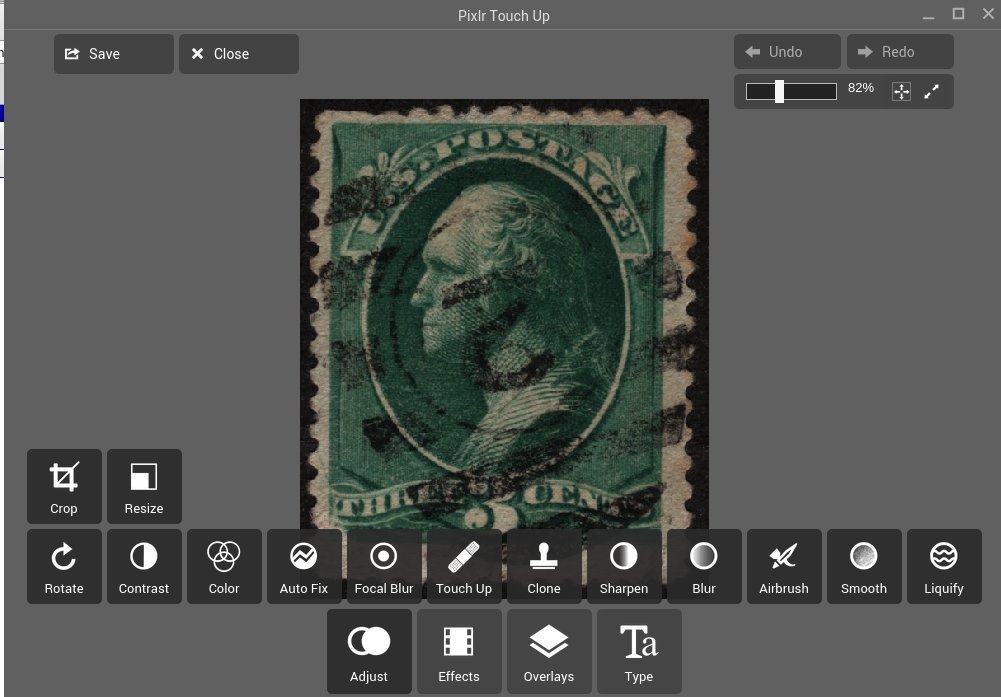 |
|
Send note to Staff
|
| Edited by wert - 11/25/2014 10:21 am |
|
|
|
|
Valued Member
7 Posts |
|
|
does it have any special features solely for stamps ?or just general pics ? |
Send note to Staff 
|
|
|
Moderator

United States
12330 Posts |
|
|
StampIrans
No special stamp features.
Cons
Requires Chrome browser to be installed first. You will then forever need to be concerned that your browser version is in sync with this browser addin. Will slow browser load times. Many folks simply want their browsers to be browsers and not the primary interface for applications. Has no special features or abilities that every other free graphics apps has.
Works only with limited file types (only opens JPEG, PNG, BMP and PSD). Very limited 'save' features.
Pros
"Free". Interface is clean and intuitive.
My recommendation. If you are looking for a graphics app that you will be using regularly, there are tons of better choices. On the other hand, if you simply want to play around or only need a graphics app once every other month, this one may work for you.
Don
|
|
Send note to Staff
|
|
|
Valued Member
139 Posts |
|
|
PIXLR OUCH UP as noted is a Chrome addon - which is OK if you use Chrome (about 30% do). If it's like Firefox apps they need to be updated every time the browser updates.
I have been involved in graphics & design for a long time so Photoshop & Fireworks are my main tools but they require a lot more knowledge and $$$.
To "correct" photos quickly I use Irfanview (probably the most downloaded graphics utility) - it can handle & save in just about any format including pdf. There are a lot of others out there (free) for Linux, Win. & Mac. Most developers of them seem to spend their efforts in adding themes and effects instead of functionality.
I don't do much "color correcting" as I run an excellent app for my scanner that once it is calibrated, it duplicates colors perfectly 99% of the time without any need for further adjustments. Irfanview does the rest including small rotation adjustments.
|
|
Send note to Staff
|
|
|
Pillar Of The Community

United States
856 Posts |
|
|
I agree with nl1947 regarding Irfanview. It's not as sophisticated as Photoshop, but I have used it for years for almost every kind of photo editing, resizing, etc. It's easy to use and has many features. And it's FREE.  |
|
Send note to Staff
|
|
|
Rest in Peace
Canada
5701 Posts |
|
|
Quote:
I don't do much "color correcting" as I run an excellent app for my scanner that once it is calibrated, it duplicates colors perfectly 99% of the time without any need for further adjustments What is that app? I am interested. |
|
Send note to Staff
|
|
|
|
Moderator
United States
12330 Posts |
|
|
VueScan Professional is a good scanner app for Windows. First, it has its own drivers and does not reply upon TWAIN. This has saved my butt several times when a newer operating system was released but the user wanted to retain their older scanner (but no TWAIN driver is available).
But beyond that, it also has a great batch mode which allow you to crank out scans very very, quickly. You can set the scan area, outputted resolution and just hit 'enter' scan after scan. You can configure the output file naming convention to use sequential numbers (1.jpg, 2.jpg, etc). Using this method I can scan an entire stamp album in a few minutes.
Don
|
|
Send note to Staff
|
|
|
Valued Member
139 Posts |
|
|
Hello BeeSee
A quick note on flatbed scanners - they can cost up to $2M
For the cost, the Epson perfections do an excellent job with color ($150 - $500)
If you don't do high end photography & just want to scan stamps & similar items, I think the Canon LIDE series are fine.
I have one (LIDE 210) - $59 at Future Shop. It also runs the power off the USB. I do stamp scans at 600DPI but can go to 4800.
As for software - Viewscan, a family product since 1991. Updates continuously (I switched to the Pro version that gives you lifetime updates!). $30 for the standard, $79 for the Pro. It is compatible with over 2500 scanners.
Once you do some calibrations with a variety of stamp colors at the same time, it will auto adjust after that. Also it can handle older scanners that a lot of companies don't update drivers or OS. Not much it cannot do. Saves to jpeg, tiff & pdf. I have not tried the OCR feature as I have Omnipage.
|
|
Send note to Staff
|
|
|
Valued Member
139 Posts |
|
|
I should have noted for those who are Windows Adverse, ViewScan Works on Windows, Mac, and Linux |
|
Send note to Staff
|
|
|
Pillar Of The Community
United States
3046 Posts |
|
|
VueScan is a pricey, but outstanding piece of software. Just scan something with it, and then the software that came with your scanner, and you'll be shocked at how much better the ViewScan stuff looks. http://www.hamrick.com |
|
Send note to Staff
|
|
|
|
Pillar Of The Community
United States
2055 Posts |
|
|
I only have an extremely rudimentary knowledge of image editing software. Are there any programs out there than can highlight an overprint and then lift just that overprint off the rest of the image so you can look at it clearly and in more detail? I collect Germany and there are countless overprinted and surcharged issues, many of them quite valuable and quite prone to fakery. Being able to capture an overprint like that to examine it more clearly could be a pretty valuable tool. This is assuming of course that it can separate out 100% of the overprint with none of the surrounding stamp. Some of the things to look for are very subtle so accuracy would be very important. |
|
Send note to Staff
|
|
|
Valued Member
139 Posts |
|
|
Quote:
Are there any programs out there than can highlight an overprint and then lift just that overprint off the rest of the image That would be some very sophisticated software. There is "masking" software that can remove an item and fill in the empty space But with a decent scanner & software like the one mentioned in this thread you can get good magnification results. This image is a scan at 4800DPI of a 3mm overprint. 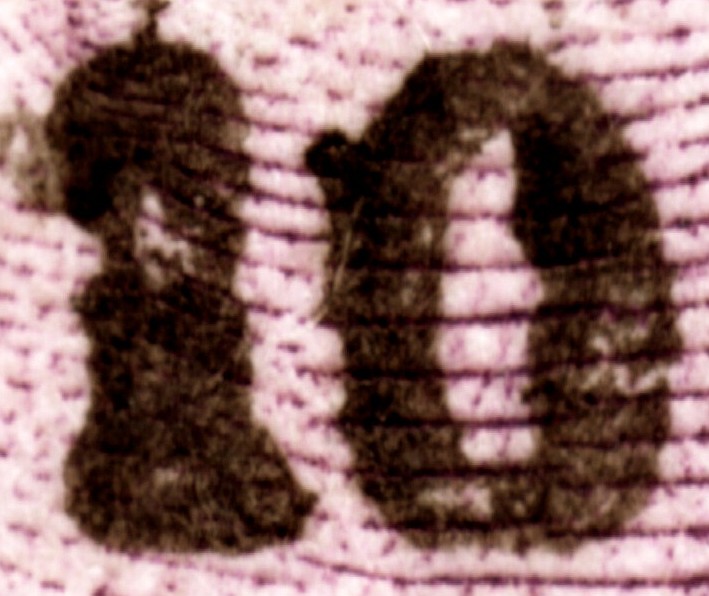 |
|
Send note to Staff
|
|
|
Pillar Of The Community
United States
2055 Posts |
|
|
Thanks. Of course any image manipulation that would allow for more detailed views of the overprint would be helpful, whether it lifts it off the rest of the image or not. |
|
Send note to Staff
|
|
| |
Replies: 12 / Views: 2,502 |
|




 Posted 11/25/2014 10:17 am


