| Author |
 Replies: 17 / Views: 5,071 Replies: 17 / Views: 5,071 |
|
Valued Member
United States
206 Posts |
|
|
|
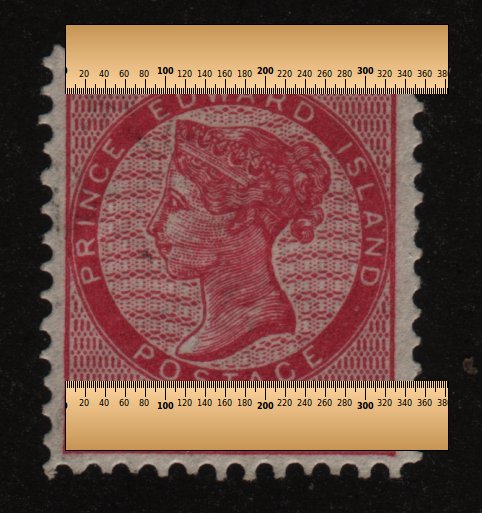
I am starting to get into collecting Israel Doar Ivri plate blocks. One of the big differences between various printings is the distance between two points on a stamp. Is there any tool that someone knows of that will let me take measurements between various points on a scan of an image? Need it to be relatively accurate at millimeter scale. Thanks.
|
|
Send note to Staff
|
|
|
|
|
Moderator

United States
12330 Posts |
|
|
Rest in Peace
7742 Posts |
|
|
Valued Member
United States
56 Posts |
|
|
Pillar Of The Community
Australia
554 Posts |
|
|
I don't know about the specifics of the stamps mentioned, but I have cases where the measurement has to be accurate to the one-tenth of a millimetre, (Polish 1919 "Krakow" & "Gniezno" issues) a simple ruler won't work in this instance |
Send note to Staff 
|
| Edited by YeaPolska - 12/06/2014 02:53 am |
|
|
Moderator
United States
12330 Posts |
|
|
Lets put one thing to bed. The 'free' apps are usually not really free. Most expect donations and if you use them you really should donate if you want the software to move forward (with bug fixes and updates as new operating systems come out).
Other times, the free versions come with some kind of downside. They may not be as full featured or otherwise be crippled in some way. Others might have ways that generate ads of other income producing things for the author.
Some of this is common sense. How could some manufacturers charge for a product if the marketplace was full of truly free apps? Always be aware that you can find 'free' apps to do many things. These may fit the bill if you are doing something only once or twice a month. But if you are doing something often, it may be false economy to go with 'free' software.
So when looking for apps which can do what you are looking for, the first consideration should be how often you anticipate using the software.
Don |
|
Send note to Staff
|
|
|
Rest in Peace
7742 Posts |
|
|
Don...Dont mislead the the guys on this post by suggesting that ALL free and or open source software has a downside to every one they might download...I have always run Linux and there are approximately 37,000 programs/add ons that I can use at my desire for FREE...These programs are FULLY functional...Yes I agree with you that all should donate to help the cause, but let the people out there know some of these sites biggest income is not from people like me and you...It is from companies wanting to get space on their website because of the number of hits per day they receive...Below is a part list of software that is FREE and fully functional..
1 - LibreOffce (not windows office)
2 - Gimp (not photo shop)
3 - Oklur (not adobe)
etc...etc.
All these are completely free...Let the guys on this website knowing they are smart enough to recognize what is good and what is bad, choose what is helpful for their needs.
Sorry Don my friend, you are wrong on some of your thinking, but I still consider you a friend. |
|
Send note to Staff
|
|
|
Moderator
United States
12330 Posts |
|
|
Robert, Stop, read what I posted. I never said 'ALL'. Secondly, you are looking at this from a limited perspective. Total cost of ownership is something that I spent quite a bit of time on and I am not wrong. (If I am wrong then I am joined by hundreds of other IS/IT professionals.) For example, read this article Why free software really isn't (and shouldn't be) free at TechRepublic http://www.techrepublic.com/blog/te...dnt-be-free/You can also Google total cost of ownership and find many online white paper and discussions about 'free' software. But I will restate the point of my post. When deciding on a new piece of software people should weight how much they will be using it. If it is something that they might only use once of twice a month, then 'free' software might be a solution. But if they are going to invest a lot of time and really 'live' with the product on a daily basis, then they should consider the commercial products too. Don |
|
Send note to Staff
|
|
|
Rest in Peace
7742 Posts |
|
|
No more arguments from me Don...I will say you are 100% right and I am 100% wrong..Enjoy your day...  Robert |
|
Send note to Staff
|
|
|
Rest in Peace
Canada
5701 Posts |
|
|
Don, thanks for the link to those calipers! That is just what I have been looking for to measure the perforations on my Canadian Small Queens.
I downloaded the trial version and it is very user-friendly. I will continue to test it and find the $29 very reasonable.
The key to using it is calibration. My scanner is not extremely accurate, the image size varies depending on where the stamp is positioned on my scanner. |
|
Send note to Staff
|
|
|
|
Rest in Peace
Canada
5701 Posts |
|
|
Wert - have you tried any that you linked to? If so, what do you recommend? |
|
Send note to Staff
|
|
|
|
Rest in Peace
7742 Posts |
|
|
Pillar Of The Community
1545 Posts |
|
|
Pardon me but what good are the calipers if the scan isn't the exact size as the original? It's like the Kansas/Nebraska overprints. There is supposed to be a precise measurement from tip to tip of the "Kans." and "Nebr.". But if the scan isn't representative in size to the original, what good would the calipers do?   .  ? -IBFS |
|
Send note to Staff
|
All science is either Physics or Stamp Collecting. -- Ernest Rutherford |
|
|
Rest in Peace
7742 Posts |
|
|
Moderator
United States
12330 Posts |
|
|
IBS,
When taking screen measurements, the scanned image has to be 100% scale. Most of the better tools account for this by allowing the user to enter in the image resolution and/or tweaking the zoom level. But you are correct, you cannot enlarge an image to 200% and then use one of these tools to determine the 'real life' measurement, it has to be to scale.
Don |
|
Send note to Staff
|
|
|
Rest in Peace
Canada
5701 Posts |
|
|
Yes the tool has to be calibrated to suit the image inaccuracies. Screen calipers allows that.
|
|
Send note to Staff
|
|
|
|
Replies: 17 / Views: 5,071 |
|



 Posted 12/05/2014 11:35 am