| Author |
 Replies: 253 / Views: 62,600 Replies: 253 / Views: 62,600 |
|
|
|
Pillar Of The Community
2013 Posts |
|
|
I can also use InDesign of Adobe, but Adobe is such a p... in the a.. company; ADOBE InDesign can't open ADOBE PDF without a third party apps you have to pay $ 100 and InmDesign is not cheap. But I say it because I and many office have Adobe product so.. the name of the plug in is PDF2ID |
Send note to Staff 
|
|
|
Pillar Of The Community
2013 Posts |
|
|
If the demand is there it may be interesting to ask Mario @ EzStamps to add HTML export to AlbumGen, with EzStamps you can add the photo of your stamps, keep an inventory of it , and event add a location, to know where is the actual stamp. Then you just fire AmbumGen and inport your stamps. Very easy to use. |
|
Send note to Staff
|
|
|
Pillar Of The Community
Norway
1661 Posts |
|
|
Hmmm - thanks! That is an interesting suggestion. The EZ stamp + albumgen + modification to use your own images on the album pages. That would potentially be a 'complete' system both for cataloging, inventory, digital storage and digital collection - only the actual storage remains, for which one could choose to print the albumgenpages - or stockbook....
My primary concern with that is that EZ does not yet provide complete WW coverage- or am I wrong?
And does anybody know if EZstamps inventory allow for adding varieties not listed in Scott? |
|
Send note to Staff
|
|
|
Pillar Of The Community
2013 Posts |
|
|
Yes EZStamp cover the world,466 countries, the data base include already 474145 stamps, and since EZStamps is Scott licensed, they include the scott # and 5 millions market value , you can add new one if you like or they have a field to add another catalog, and you get also over 317000 stamps photos , cost me about $ 400 for all the countries and photos + AlbumGen ...it's not free but you have for your money
|
|
Send note to Staff
|
| Edited by area66 - 03/23/2015 2:51 pm |
|
|
Pillar Of The Community
Norway
1661 Posts |
|
|
 OK, I had not expected that - quite flexible then. Thanks a lot area66, this is getting interesting. Then again - for the purpose of enjoying and having the full benefit of making your own pages/digital collection, it should also be possible to custom make those pages, e.g add illustrations, background pictures, textboxes etc - like you area66 is doing on the Steiner pages. Does anybody knows if this would be possible in the Albumgen software? If not, may the pages be edited in libreoffice like the Steiner pages? |
|
Send note to Staff
|
|
|
Pillar Of The Community
2013 Posts |
|
|
As far as I know, AlbumGen don't have function to add images as I do with OpenOffice. AlbumGen file format is not compatible with LibreOffice and AlbumGen don't have the posibility to save or export in PDF. |
|
Send note to Staff
|
| Edited by area66 - 03/23/2015 2:56 pm |
|
|
Pillar Of The Community
Norway
1661 Posts |
|
|
Valued Member
United States
262 Posts |
|
|
Blaamand
If you want to use Steiner pages as the basis for your album pages, you can still consider the PowerPoint route. It is easy to take a snapshot of a PDF page (e.g. a Steiner page) and paste the image onto a blank PowerPoint page. Then, send the image the back, and draw or paste whatever you want (box, triangle, image, text) over it in any colors you like. It is so easy to make the page look exactly how you want with this. If one doesn't want to do a digital album, simply print it out in the same way you would a Steiner page.
|
|
Send note to Staff
|
|
|
Valued Member

United States
447 Posts |
|
|
DCStamps, you make a terrific suggestion. I have never used the digital page design/printing tools, but I have designed great looking color pages using Microsoft Office tools. Windows also allows you to send an image to background and insert text box, jpeg photo, table, etc to overprint. Excellent point!
Dan Carazo
Syosset, NY
|
|
Send note to Staff
|
|
|
Valued Member
United States
447 Posts |
|
|
This subject offers several different tangents depending on our interests/needs:
1. Digital page layout design tools to allow collectors to self-express how we prefer to
display our actual stamps (this may interest me in future since I did graphic design for many years)
2. Compiling a digital stamp collection record for insurance coverage (I will want to do this as soon as I mount my US collection in my new album)
3. Creating totally digital stamp pages for shared online experience (personally I have no interest in this, I want to see and admire my real paper engraved stamps, but obviously some really like having a "virtual" album!)
Thanks for enlightening me further!
Dan
|
|
Send note to Staff
|
|
|
Valued Member
United States
262 Posts |
|
|
Hi dcaraz1949
First of all, I also like to study my stamps to better appreciate and understand them. I just store them in stockbooks rather than hinged to paper pages. However there are several reasons I exclusively organize my stamps in digital albums. Especially as my area is specialized (dead "countries") and there are no commercial albums available.
I put together an explanation of why I exclusively use digital albums, so let me provide you my reasoning. If you don't agree, no worries, there is of course no right or wrong. Also, as my eyes get a little older, it is much easier for me to see the detail on the computer.
Here is my reasoning why I exclusively do digital albums.
1.Organizing my Collection – like most collectors I use an album to organize my stamps, I just do it digitally, which allows me to organize my collection my way, completely customize my album, and allows me to easily make changes to the pages as I add additional materials or learn more about my stamps.
2.Safety and Protection of my Collection – I have always am apprehensive when hinging, or removing hinges from stamps, especially if the stamp has gum. As I am routinely adding new materials to my collection or finding out new things about my stamps, I find myself often changing or updating my pages.
I cringe just thinking about removing all of the stamps from an old page and re-hinging them on a new page every time I make changes. Also, I don't know how many times I have bought some album pages at a show or an auction only to find some of the stamps falling off or sliding around as pages are handled. Using digital albums allows me to avoid the problem altogether, keeping my stamps safely in a stock book avoiding potential over handling of the stamps.
3.Sharing and displaying my collection – If you want to share your collection with others who might not come to your home, there are only limited things you can do. A) You can drag your stamps and albums to a stamp club, B) create displays for stamp shows, or C) find a way to display your collection online (website, forums, etc.). To me, C was a no brainer. Digital Albums are probably the best way to share my collection to a wider (worldwide) audience. That is why I created DCStamps.com.
4.Documenting special aspects of my collection – To me, this is one of the most exciting aspects of creating Digital Albums, as I can fully customize the albums to MY stamps. If I have different varieties of an issue, I can create the album to display them properly. If there is something on the back of a stamp that I want to display (experts mark, grill, etc), I can easily display both sides of the stamp in the album. If there are specific varieties which require a close up to show the differences, I can put a close up view in the album. If I have a forgery, I can display the genuine next to the forgery and display the difference between the two. If postmarks are important, I can make spaces for the various postmarks. If I collect topically, I can display my chosen topic any way I please … and the list goes on and on.
5.Functioning as a visual "want list" at stamp shows - I find Digital Albums as a great tool at stamp shows, as I load up the PDF's of my album pages to my IPAD and take it to a show. As I am a visual person, looking at my actual album pages is much easer than looking at a list of Scott #s when I am determining my needs. This is especially useful if catalogue #s are not listed with the stamps for sale. As an FYI, I still use a paper want list for those countries I have yet to create a digital album.
Although these might not fit your needs, hopefully it gives you some indication why I am sold on Digital Albums.
Michael
|
|
Send note to Staff
|
| Edited by DCStamps - 03/23/2015 8:42 pm |
|
|
Pillar Of The Community
Norway
1661 Posts |
|
|
dcaraz1949 - I am glad you like the concept - welcome to the party! DCCtamps - Thank you for your kind suggestion, absolutely a very valid input! Making snapchot from Steiner into PP seems like a time-saving solution for making digital albumpages without needing to create everything from scratch. This will easily provide correct frame sizes, text etc. I had already tested and found it to be a semi-solution - 'semi' because the snapshot also caused some restrictions. Well, I did not manage to come around it anyway... For instance: edit the font and text etc from the Steiner pages, and I did not manage to let a background illustration be visible behind the frames, as the 'white' of the snapshot will block any background picture. As an example, I would like my custom pages to appear something like this (example is all made PP, without stamp scans this time so as not to annoy anyone in here  ). 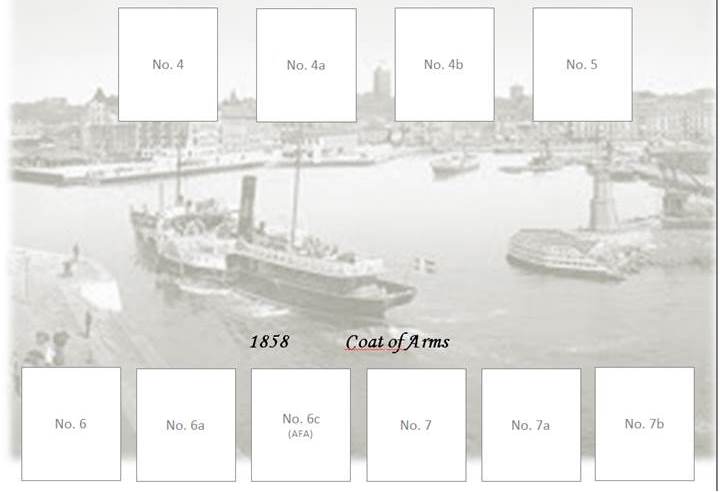 Anybody knows if it could be possible to let a background picture be visible through a snapshot? Regardless, the Steiner-pdf-snapshot suggestion is clever, will work on that!  |
|
Send note to Staff
|
|
|
Valued Member
United States
262 Posts |
|
|
Blaamand I know there is a transparent mode in Powerpoint, but couldn't make it work the way I wanted, so I am going to show you a solution (although probably not the one you wanted). 1. Cut and paste the pdf page onto the Powerpoint page. You will need to play around with this to be sure that it pastes in a 1:1 size format. 2. Using the rectangle tool, draw boxes (like tracing) exactly the same size and location as the boxes on the pdf image. Each box should be color filled with white (or any color you want it to be). 3. Insert any text you want on the page using the text box tool. 4. Delete the pdf image. 5. Paste your desired background image and send it to back. 6. Now that you have the blank page, you can print it out for a paper album page our paste your stamp scan images for a digital page. 7. Also, you can easily modify the page to fit your stamps. (something you couldn't do with just the pdf image.) For example, if you have selvage on a stamp, or stamp multiples you can make the boxes fit your stamps. Here is an example from my Saxony Album. 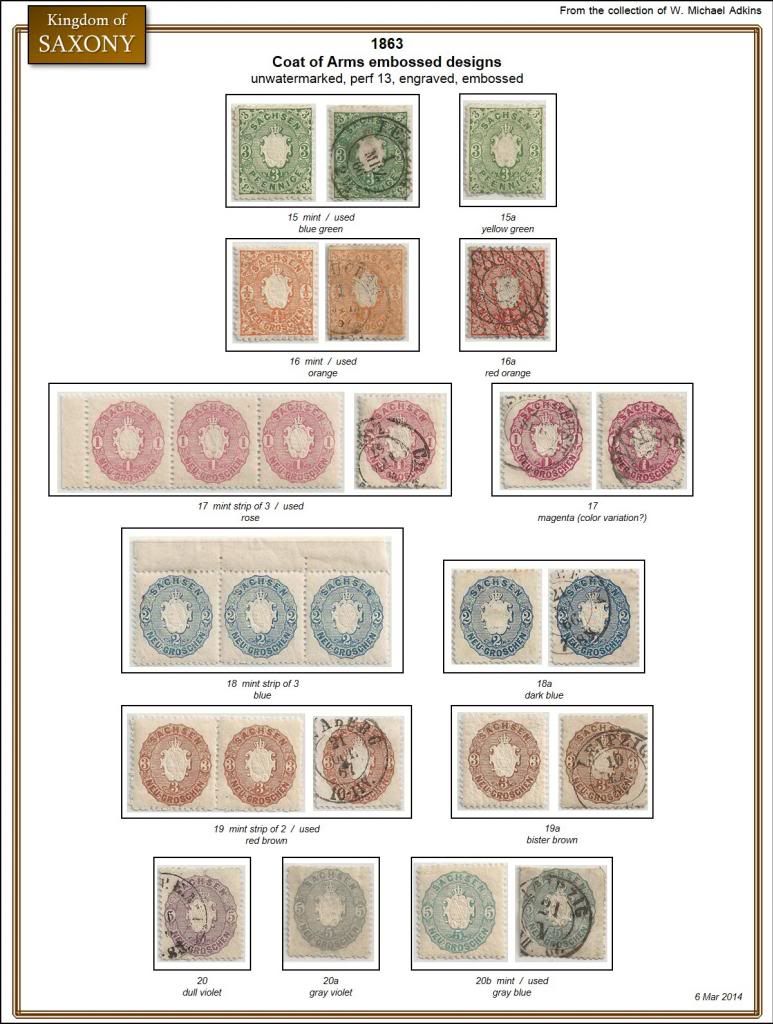 |
|
Send note to Staff
|
|
|
Pillar Of The Community
Norway
1661 Posts |
|
|
DCStamps - Another helpful idea, thanks. Still requires quite some 'manual intervention' tough, copying each frame. Naturally the great benefit would be that one have access to the correct size of the frames.
Please let me know if you find out about that transparent mode - that would be the ideal solution!!
No need to say - your digital collection from Saxony looks fantastic! Had already seen it on the web, but I still enjoy to see it again. Keep on sharing your nice stuff!! |
|
Send note to Staff
|
|
|
Valued Member
United States
262 Posts |
|
|
Blaamand said: Quote:
.... your digital collection from Saxony .... Just to be ultra clear - the collection is real, the album page is digital.  Don't want anyone to be confused. |
|
Send note to Staff
|
| Edited by DCStamps - 03/24/2015 11:36 am |
|
|
Replies: 253 / Views: 62,600 |
|




 Posted 03/23/2015 09:40 am


