| Author |
 Replies: 42 / Views: 9,309 Replies: 42 / Views: 9,309 |
|
|
|
Rest in Peace
United States
4052 Posts |
|
|
Quote:
... What happens if you try to print a photograph of a 1200 DPI scan ... I am not certain what this means. Q/ After taking a photograph (digital, chemical) of the printed scan? Q/ Printing onto 'photograph' paper, eg, an emulsion-layered medium? Cheers, /s/ ikeyPikey |
Send note to Staff 
|
|
|
Pillar Of The Community
United States
1624 Posts |
|
|
Printing the digital file of the scan you took onto inkjet paper. A printer head can't lay down 1.4 million dots per inch which is necessary with a DPI of 1200. |
|
Send note to Staff
|
|
|
Rest in Peace
United States
4052 Posts |
|
|
Quote:
... Printing the digital file of the scan you took onto inkjet paper ... Unlike screens, which have distinct pixels, paper is made of fibers, and the fibers are absorbing droplets. Q/ When you print a 200 dpi scan via inkjet printer to inkjet paper, do you see - under magnification - 200 dpi? Or, do you get a pleasing continuous effect, much as in an emulsion? Q/ When you scan that print, at any resolution, do you get your dots back? I'm thinking that the inkjet spray does a nice job of de-dotting your dpi unless the original scan was at a very low resolution. Cheers, /s/ ikeyPikey |
|
Send note to Staff
|
|
|
Pillar Of The Community
United States
2830 Posts |
|
|
My personal thought process around scanning stamps relates to things I want to do digitally, e.g. zoom into an area where there is a flaw or other feature of interest and still have high resolution- while working on a computer. Printing stuff isn't part of the equation. |
|
Send note to Staff
|
|
|
Pillar Of The Community
United States
6469 Posts |
|
|
Those stating that "anything over XXX dpi is overkill" are assuming that you would only ever want to view or print the image at 100% of original size, which is a false assumption. If I want to showcase a particular plate variety or print anomaly, I might very well want to print it at 8.5x11 size in order for people to be able to view it easily.
Barring added distortion or decrease in clarity, there's no such thing as resolution "overkill" especially for archival or research purposes. |
|
Send note to Staff
|
|
|
|
Pillar Of The Community
United States
4183 Posts |
|
|
Quote:
Those stating that "anything over XXX dpi is overkill" are assuming that you would only ever want to view or print the image at 100% of original size, which is a false assumption Past a certain dpi, which will vary from scanner to scanner, you will start to get distortions. I have seen chromatic aberrations (color distortions) at the edges of features on high dpi scans. I call that overkill. |
|
Send note to Staff
|
|
|
Rest in Peace
United States
4052 Posts |
|
|
Quote:
... I have seen chromatic aberrations (color distortions) at the edges of features on high dpi scans ... I cannot help but think that this is more an issue for the scanner optics than the resolution at which an object is scanned. It is worth remembering that the sensors are sold with more pixels than they use - eg, a 1000*1000 pixel sensor might be, in fact, 1008*1008. Any optical errors should be, therefor, out amongst the dark pixels, and not fall on those pixels that are actually in use. Cheers, /s/ ikeyPikey (who has read a few too many image sensor specs) |
|
Send note to Staff
|
| Edited by ikeyPikey - 09/07/2015 10:11 pm |
|
|
Pillar Of The Community
United States
1624 Posts |
|
|
Quote:
Unlike screens, which have distinct pixels, paper is made of fibers, and the fibers are absorbing droplets.
Q/ When you print a 200 dpi scan via inkjet printer to inkjet paper, do you see - under magnification - 200 dpi?
Or, do you get a pleasing continuous effect, much as in an emulsion?
Q/ When you scan that print, at any resolution, do you get your dots back?
I'm thinking that the inkjet spray does a nice job of de-dotting your dpi unless the original scan was at a very low resolution.
Cheers,
/s/ ikeyPikey Depending on your eyesight the answer is yes. If you use a decent quality lighted 8x magnifier and do not enlarge the original image (life size) you'll see what it would look like if it were printed 8 times larger. It won't be very good at all because as you increase the size the same dot has to cover 8 times more area and the DPI will drop. You never want to increase the resolution in a photo program as the compression will show in your final print. Remember Ansel Adams use to work with 8x10 inch negatives. When he would make a 16x20 he was only magnifying two times while a 35mm negative had to enlarge 8 times. You know the quality difference. If money were no object I would use the new Canon SLR that is 50 megapixels and photograph the stamp with a lifesize macro. When you enlarge the 24mmx36mm file 20 times (optics in photo lenses are superior to scanners) you'll be able to see a lot more information testing the limits of the paper or the monitor. There was a college class on this at SDSU in San Diego that I took. Wish I still had the book. |
|
Send note to Staff
|
|
|
Pillar Of The Community
United States
1624 Posts |
|
|
Quote:
Those stating that "anything over XXX dpi is overkill" are assuming that you would only ever want to view or print the image at 100% of original size, which is a false assumption. If I want to showcase a particular plate variety or print anomaly, I might very well want to print it at 8.5x11 size in order for people to be able to view it easily.
Barring added distortion or decrease in clarity, there's no such thing as resolution "overkill" especially for archival or research purposes. Some of what you're seeing is the inferior scanner at work. |
|
Send note to Staff
|
|
|
Pillar Of The Community
United States
1414 Posts |
|
|
I routinely scan at 1600 or 2400 DPI to match flat plate coil edges. A resolution of 1200 DPI is more or less the minimum needed to achieve accuracy to within 1/1000 of an inch. I use that benchmark for validating coil edges. If the edges match within 1/1000 of an inch they should be OK. If they are "off" by more than a couple of thousands of an inch, the coil is likely to be no good. Of course, exceptions may occur under certain circumstances that are documented elsewhere (too long for this post).
I also use high resolution scans for cancel and overprint overlay matching as well as perforation matching.
Clark
Correction: Tolerance is 0.001 inch, not 0.0005. |
|
Send note to Staff
|
| Edited by cfrphoto - 09/08/2015 10:55 am |
|
|
Pillar Of The Community
United States
2830 Posts |
|
|
Valued Member
United States
334 Posts |
|
|
I scanned some of my personalized stamps from Zazzle, to list them on ebay. 1200dpi from an HP scanner, to a Mac. Then emailed and opened on a Windows computer, for additional tweaks (different software). No matter how I tried to optimize or adjust the colors, they come nowhere near the quality of the stamps colors in reality, or nowhere near the colors shown for reference on the Zazzle website. You can have a look at them in my profile, if you want. Does it matter if I crop, copy on clipboard, open from clipboard, save as jpeg at Best resolution? The file is less than 12MB, in the end, but the colors are still...different. Any advice of improving the colors? Thank you! 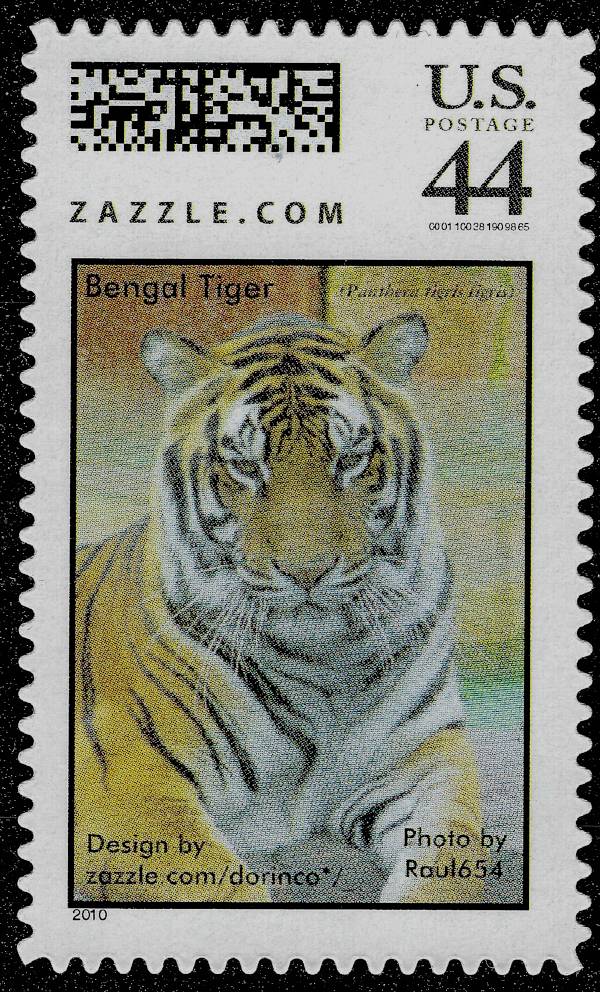 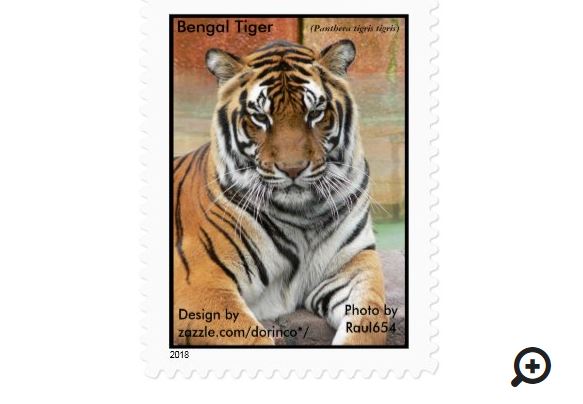 |
|
Send note to Staff
|
| Edited by DC3 - 08/16/2020 10:52 am |
|
|
Pillar Of The Community

United States
1837 Posts |
|
|
I concur with cfrphoto. Higher resolution scans are extremely valuable when picking out minute details such as needed on flat plate coils. All my ebay sales are scanned at 1200 dpi. I believe it gives the buyer a much clearer view of perfs and subtle design issues like identifying 2c Washington types from the early 20th century. |
|
Send note to Staff
|
|
|
Moderator

United States
12330 Posts |
|
|
rlsny,
When I look at your listings they look fuzzy and I cannot pick out much detail. I am running Windows XP and my monitor is an old CRT with a 800x600 resolution. So I tried my wife's smart phone but I still cannot see any detail on the 3" screen.
Don
(Just kidding of course, but you get my point) |
|
Send note to Staff
|
|
|
Pillar Of The Community
United States
4512 Posts |
|
|
I have scanned actual USPS stamps and they looked rough when enlarged. They were not printed as well as the enlarged publicity photos since colors were solid in publicity but had the screened effect in the actual stamp. |
|
Send note to Staff
|
Al |
| Edited by angore - 08/16/2020 12:38 pm |
|
|
Replies: 42 / Views: 9,309 |
|




 Posted 09/07/2015 2:32 pm





