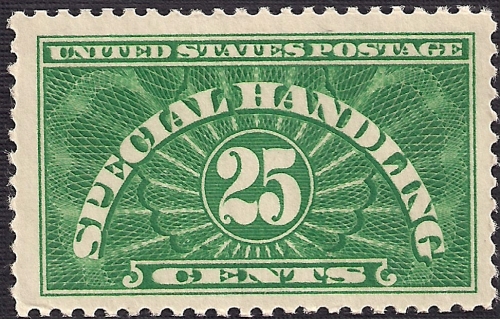
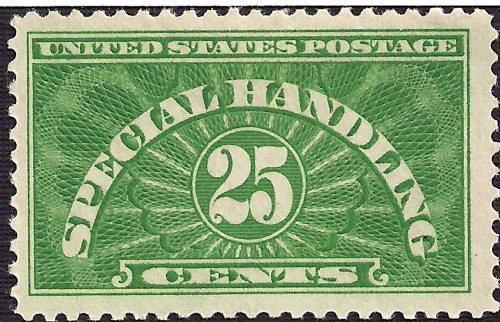
Hobsun,
You're welcome. Give me some time to think about how to best present this complicated topic to you in a succinct and helpful manner.
Well, I failed on the succinct part but hopefully kept the jargon to a tolerable level.
The end goal of computer based color identification is to allow for anyone with a scanner to be able to identify the color of a stamp. The actual identification part will most likely be done using a specially written software program that analyzes a calibrated image of a stamp.
When a scan is taken, a raster image file is created where each pixel is represented by 3 numerical values. One each for red, green, and blue. These numbers by themselves mean nothing. When they are put into the context of a color space (reference #1 at bottom of page), they can be used by a computer to represent a defined color. This is then used by a computer to do things such as instruct the hardware of a monitor to display a certain color. So far I have found that the sRGB color space can represent all of the stamp colors that I have sampled which helps to simplify things.
The difficulty of using computers to sample and display colors accurately is due to the variations in material properties of the real world. Engineers and scientists have gone to great lengths to give us the stability of imaging and display devices which we enjoy today. Consumer grade computing equipment has finally become sufficient and affordable for widespread use. We now need only to adapt our home computers for use in shade identification.
The first step is accurately sampling the color of a stamp. This is possible with modern scanners if they are color calibrated. Calibration allows for the utilization of the concept of an absolute color space:
"A color space in which colors are unambiguous, that is, where the interpretations of colors in the space are colorimetrically defined without reference to external factors."(#2)
The scan needs to be taken with 16-bit sampling. 8-bit is adequate for representing and displaying color, but does not allow for the calibration process of consumer scanners. To retain all of the color information, the image file format must be not compressed. TIFF files are adequate for this.
Unfortunately not many image editing programs support 16-bit images and the ability to apply and convert color profiles. Higher level versions of Adobe Photoshop work. There are some others that are free which I'll provide links to if asked for.
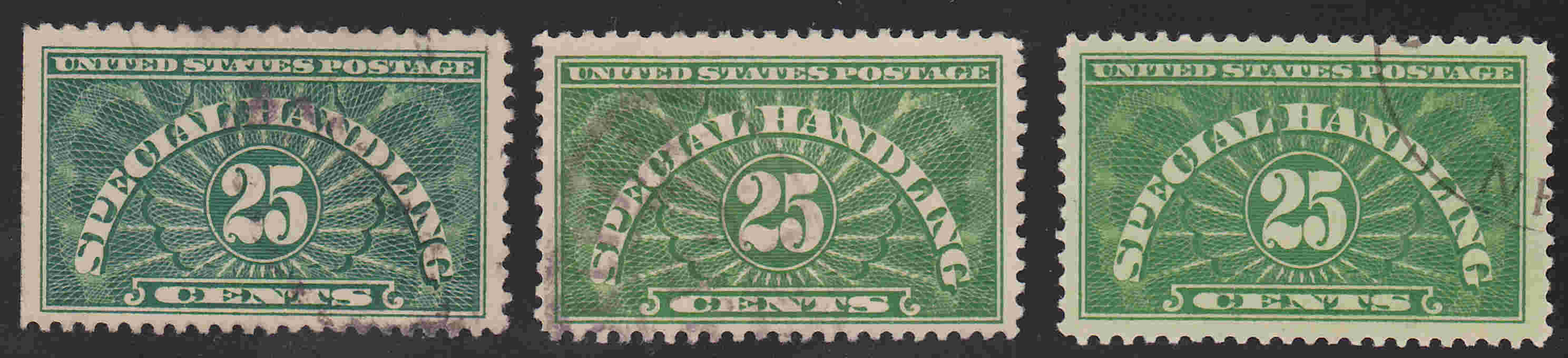
At this point the color of an imaged stamp can be compared to another one created by any suitable hardware. Two images displayed next to each other on any decent monitor will show differences and similarities that are close to what would be seen by observing them physically next to each other.
The displayed images won't necessarily appear exactly as their color in the real world. Things like metamerism and monitor calibration will affect the displayed colors.(#3) However, one can display their stamp alongside a reference file of known stamp shades and be able to get a very good idea of what color theirs is.
Comparing a stamp physically set next to an image displayed on any monitor will not provide an accurate comparison. Monitor calibration does improve this, but does not eliminate the deficiencies of computing equipment to display color exactly as in the real world.
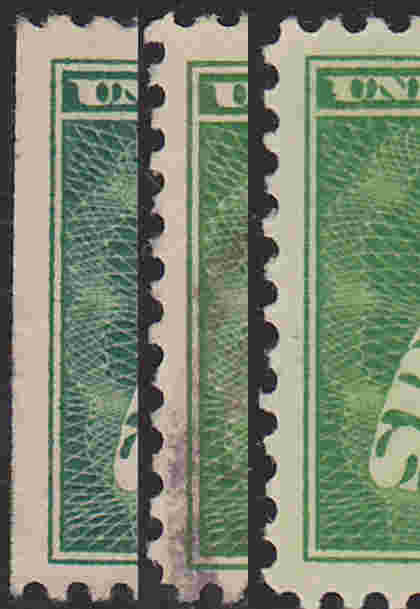
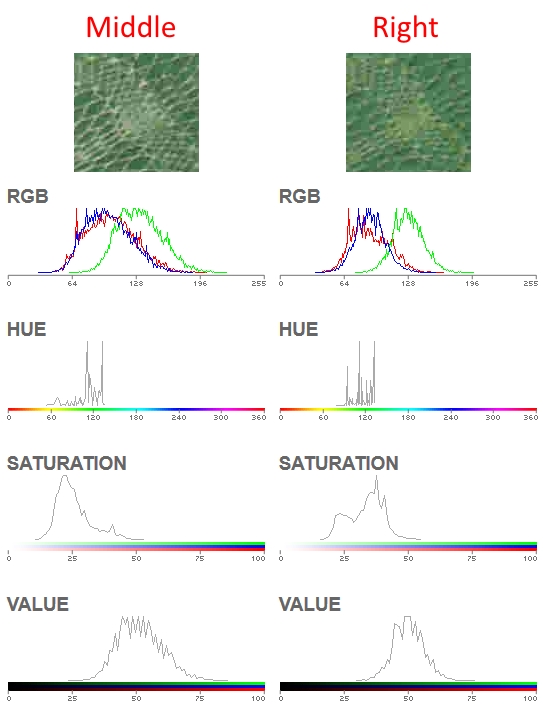
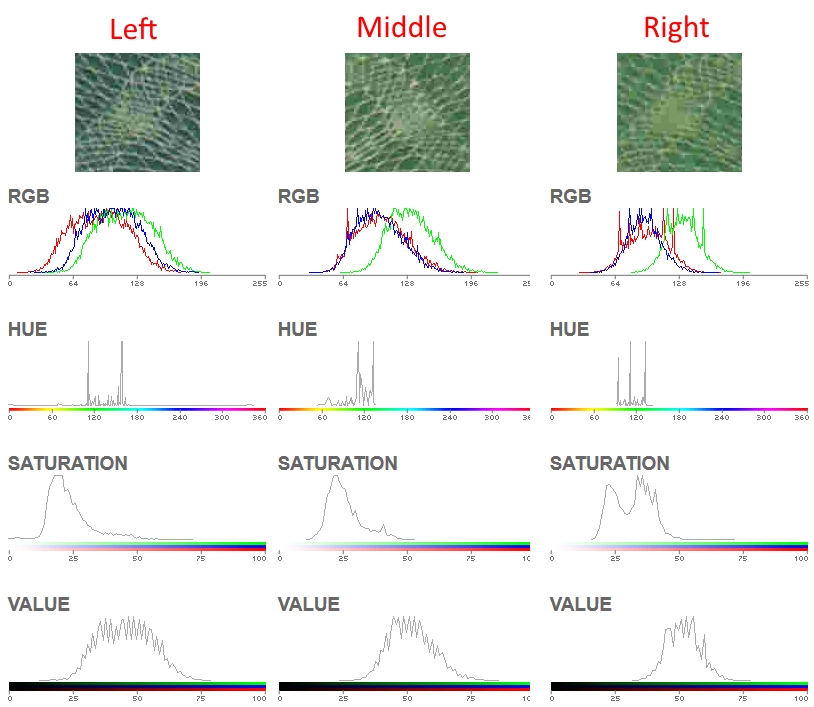
Comparing colors on a monitor is not ideal. Many people have deficiencies in color perception.(#4) Professional grade monitors and their calibration is expensive and still won't display color perfectly. Things like comparing histograms can aid in human based comparisons. Analysis methods such as using statistical algorithms removes the human variable.
Stamps are not actually identified by an exact color. They are put into categories. The color of a U.S. classic stamps is actually a combination of many different pigment particles of varying color and size. 9600 dpi is close to one ink particle per pixel. The 1861 3c stamp color expert Jack Daley bases his shade categorization on enhanced 9600 dpi scans by identifying such patterns by eye.
Computer software can be utilized to find and identify patterns in those variations. I am in the process of sampling as many stamps as possible that have been categorized by color experts. Though I am not the ideal person to develop analysis methods, I do try to find patterns and will share all of my leg work in collecting data with any who want to help.
Much needs to be done but the end goal of shade categorization being accessible by everyone with a suitable scanner is now technologically possible. When enough data has been collected for each stamp issue, then analysis methods must be developed to quantify meaningful patterns in the data. Then experts need to agree on category thresholds and how these computerized methods will fit into expertisation.
Here's the most comprehensive paper I have found:
Philatelic Shade Discrimination Based on Measured Color. David L. Herendeen, James A. Allen, Thomas Lera
http://postalmuseum.si.edu/research...orimetry.pdfHere's some previous SCF threads:
https://goscf.com/t/44832https://goscf.com/t/42317Here's a web based Image Color Summarizer:
http://mkweb.bcgsc.ca/color_summarizer/?analyzeChoose the "Precision: extreme" option.
Here's a link to an accurate yet affordable scanner calibration target:
http://www.targets.coloraid.de/Choose: R1 - IT 8.7/2 Reflective Scanner Target on Kodak Professional paper (incl. CD)
Shipping took about a week to me in the US from Germany and he even used some lovely stamps. Scroll down on the page for ordering information.
Calibrating a scanner with just this target is not simple, but I can provide instructions for a free method. There are alternatives that are easy but cost in the hundreds of dollars for a target and software package.
References:
1.
https://en.wikipedia.org/wiki/Color_space2.
https://en.wikipedia.org/wiki/Color_management3.
https://en.wikipedia.org/wiki/Metam..._%28color%294.
http://www.xrite.com/online-color-test-challenge





 Posted 11/02/2015 4:21 pm