| Author |
 Replies: 205 / Views: 22,782 Replies: 205 / Views: 22,782 |
|
|
|
Pillar Of The Community
United States
6756 Posts |
|
|
Thanks for a fantastic update! As well as the quick tweaks! Quote:
And WRT switching versions, you can have both installed at once, so you can ease into the new version! Yes, I still have both old and new installed. No problems running both. In fact, I still keep v1.01 around for nostalgia, although I didn't install that one when I switched to my current laptop. |
Send note to Staff 
|
|
|
Bedrock Of The Community
Australia
38679 Posts |
|
|
Postmaster,
my "batch from image" files continue to be overwritten,
what may I be doing incorrectly? or?
Congratulations, on the program otherwise, I like the look and the feel.
(32 bit version windows)
Observation.
The new Version does not automatically add a desktop shortcut. |
|
Send note to Staff
|
| Edited by rod222 - 05/31/2020 04:36 am |
|
|
Pillar Of The Community
United States
2941 Posts |
|
|
Rod,
Can you post a screenshot of what your settings are when you run it, or email to me? And you are on v1.21, correct?
I'll fix the desktop shortcut in the next release. I must have forgotten to check a box in the installer setup. |
|
Send note to Staff
|
|
| Edited by PostmasterGS - 05/31/2020 04:41 am |
|
|
Bedrock Of The Community
Australia
38679 Posts |
|
|
Can do Postmaster, (Hope I am not being a pain) When I installed, it would not allow me, due to previous version, so I named the target folder PMGSstampfix2, or similar (I just added the 2) If that helps.  |
|
Send note to Staff
|
| Edited by rod222 - 05/31/2020 04:59 am |
|
|
Pillar Of The Community
United States
2941 Posts |
|
|
Bedrock Of The Community
Australia
38679 Posts |
|
|
Pillar Of The Community
United States
2941 Posts |
|
|
OK. I didn't take into account that you're adding a prefix. Let me take a look at the code. |
|
Send note to Staff
|
|
|
|
Bedrock Of The Community
Australia
38679 Posts |
|
|
Quote:
OK. I didn't take into account that you're adding a prefix. Would that be suffix? otherwise not understood. I can ditch the previous version, and re-install, if that helps I like the new setup, a lot. |
|
Send note to Staff
|
| Edited by rod222 - 05/31/2020 05:09 am |
|
|
Pillar Of The Community
United States
2941 Posts |
|
|
Rod,
The problem's not on your end. I wrote the filename incrementing feature without thinking about the use of prefixes and suffixes, and the incrementing only works with purely numeric filenames. So right now, if you add a prefix or suffix, it works like it always did -- overwriting files with matching names.
I'm going back in to write something that tests for the existence of a matching filename, then if found, automatically adds something like "-copy" or "-2" to the end.
The long-term solution is a full set of naming options you can set, so you can increment with non-numeric characters in the filename. That'll probably be my next major addition.
In the meantime, the incrementing works as long as you don't add a prefix or suffix. I'll probably have a fix for the naming with prefixes and suffixes by tomorrow, Japan-time. |
|
Send note to Staff
|
|
| Edited by PostmasterGS - 05/31/2020 05:28 am |
|
|
Bedrock Of The Community
Australia
38679 Posts |
|
|
In your own time Postmaster.
Nice to hear we are ironing out some issues.
We appreciate all your hard work.
|
|
Send note to Staff
|
|
|
Bedrock Of The Community
Australia
38679 Posts |
|
|
Not that I would have the faintest idea on coding, but I look at the Simple ACDSee renaming, By adding a hatch suffix at the end, one can enumerate multiple renames. For example Just use the batch image file name, and add ## as a suffix starting at 01 Stampfix batch image can never be more than say 40, and the orig batch image name remains. But what do I know  |
|
Send note to Staff
|
|
|
Bedrock Of The Community
Australia
38679 Posts |
|
|
Observations. I thought, why not just re format my scanner, so that files generated, do not have a prefix? Epson refuses to process without a prefix OK, I tried a numeral prefix, Epson allowed that, but Stampfix still overwrote. Just added here, in case it may be of help.  |
|
Send note to Staff
|
|
|
Pillar Of The Community
United States
2941 Posts |
|
|
Sorry to drop new versions this close together, but Rod found a bug in the new batch file renaming. What can I say -- he's got a gift! So, here's v1.22In v1.21, I introduced a new automated filenaming for when you are doing batch processing using the "Batch from Image" / "Extract to File" process. In doing so, I failed to account for prefixes and suffixes. In v1.22, if not using a prefix or suffix, it works as before. It simply finds the highest all-numeral filename, and iterates up from there. If using a prefix and/or a suffix, it checks to see if the filename already exists, and if so, it adds a "-X" to the filename, with X starting at 2 and running upward as necessary to achieve a unique filename. 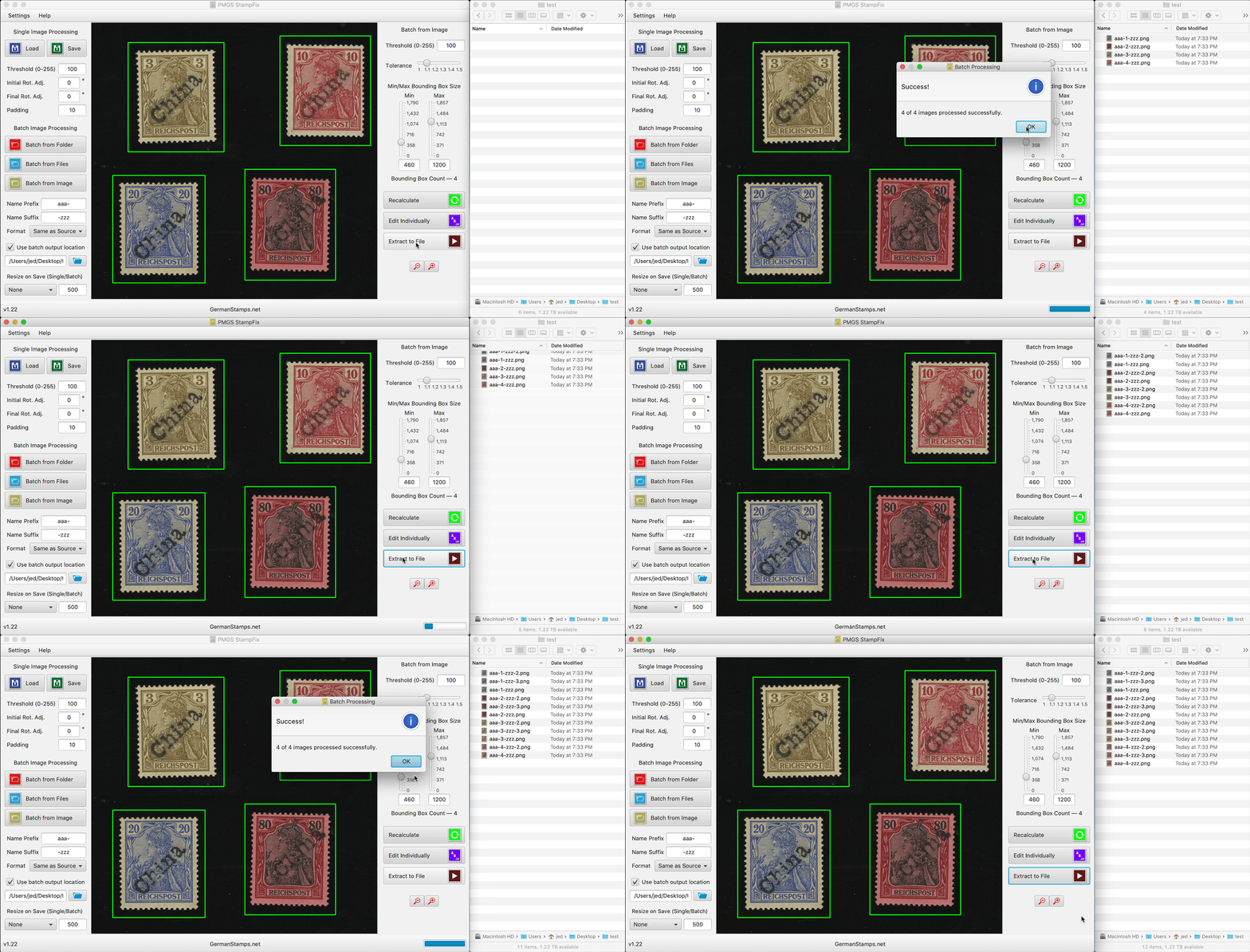 I think for the next major version, I'm going to try to include addition options to customize the auto-naming so you have a lot more control over it. |
|
Send note to Staff
|
|
|
|
Bedrock Of The Community
Australia
38679 Posts |
|
|
There are still good people out there, how refreshing ! This is my Version 6 ACDSee ebay purchase, Message from the vendor............. (PS I still purchased) (In my "RodWorld" everyone would be like this) Hi Rodney Thank you for your purchase. Before I package this, you realise this is a vintage program and not current, are you sure it will work with your computer? Please let me know that you are still happy to receive this. Kind regards, Anastasia |
|
Send note to Staff
|
| Edited by rod222 - 05/31/2020 07:53 am |
|
|
Bedrock Of The Community
Australia
38679 Posts |
|
|
Road tested v1.22,
once a convoluted and onerous task prior to "Stampfix"
is now a streamlined and efficient process.
A delight to use, and an important addition to my Philatelic arsenal.
Well done Postmaster.
Observation:
I had a "pop up" ..."This program is not often downloaded, it may be dangerous"
Of course I was not worried, but it may deter others.
I do not often get those pop ups, and know not, from whence they come.
As I use this program just about every day, I have slid it down to my lower "Task Bar"
|
|
Send note to Staff
|
| Edited by rod222 - 05/31/2020 10:47 pm |
|
|
Replies: 205 / Views: 22,782 |
|



 Posted 05/31/2020 03:29 am


