| Author |
 Replies: 28 / Views: 4,600 Replies: 28 / Views: 4,600 |
|
|
|
Pillar Of The Community
Australia
1042 Posts |
|
|
Valued Member
United States
118 Posts |
|
|
Being seeing this alot as well in the last week or so. I have firefox,so it isn't just an IE problem. |
Send note to Staff 
|
|
|
Pillar Of The Community
United States
8956 Posts |
|
|
I have encountered it two or three times on Google as well but it is highly intermittent
Peter |
|
Send note to Staff
|
|
|
Pillar Of The Community
Australia
1042 Posts |
|
|
I sent ebay a screen shot of a scheduled one that produced the same error. They replied telling me how to view a scheduled item. What a useless answer from them I told them I am a top rated seller I know how to view an item and sent them a strong message complaint and they have not replied. I think we all have to complain about this error it must have happened 20+ times yesterday on active and scheduled listings. Not only that but also on other sellers listings. I am sure this will stop members from bidding if they encounter item removed when it isn't. ebay need to fix the issue. |
|
Send note to Staff
|
|
|
Pillar Of The Community
United States
1820 Posts |
|
|
Regarding Problem #2, could this be due to the insertion of "sponsored items" onto every page of search results? See the two "sponsored" advertising cards in the attached photo, each with 16 days remaining appearing on a page of US Postal History cover listings with less than 5 minutes left. 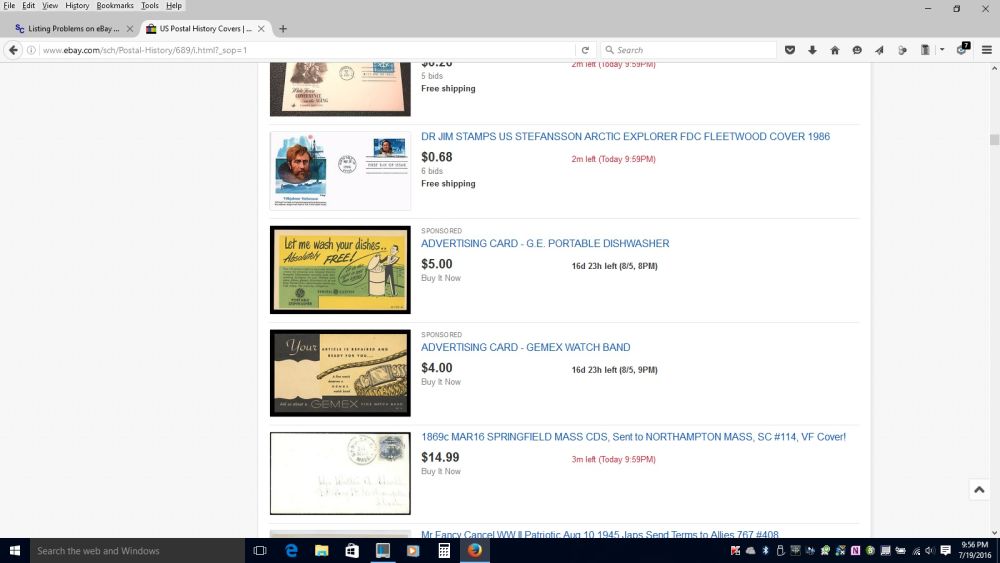 |
|
Send note to Staff
|
|
|
Pillar Of The Community
Australia
1042 Posts |
|
|
The insertion of "sponsored items" would not be helping. Whilst some people may have a high end pc with a big monitor and lots of PC memory, others may not. I would not like to try using ebay on a mobile device with those insertions of "sponsored items" boxes flashing all over the screen. They come from the ebay bell next to the shopping cart. In my view the worst addition ebay has added to the shopping experience. I was once bidding on a stamp in the last minute and could not bid due to all the reminders flashing on screen. I wonder how many other ebay users dislike the little ebay bell and its reminder drop down boxes? |
|
Send note to Staff
|
|
|
Forum Dad

USA
2059 Posts |
|
|
Pillar Of The Community
United States
1820 Posts |
|
|
These "sponsored items" are not notifications or reminders. They just appear in search results often (every page in some cases). I assume the lister pays extra to have this happen. I don't know if it is user-specific based on search history, but for me anyway every time I navigate to US -> Covers -> Postal History, these two advertising cards appear on every page of the results, no matter how I sort them (Best Match, Newly Listed, etc.). This has been going on for a few weeks. |
|
Send note to Staff
|
|
|
Pillar Of The Community
United States
1414 Posts |
|
|
I received complaints about original issue from two bidders last night. The problem seems intermittent and affects all browsers. I believe it is caused by a poorly handled timeout from some server involved in search. The least ebay could do is to advise users to try the search again. This problem has been reported on July 15th on the eCommerceBytes EKG web page: http://www.ecommercebytes.com/C/S/SFifteen other users confirm the issue. I opened a case with ebay today. I am not sure if they can fix it or not. If not, it is time for the Wall Street Journal to pick up the issue. I would imagine that ebay stock could take quite a hit if it becomes known that potential buyers cannot always bid because the listing has "temporarily" disappeared. |
|
Send note to Staff
|
|
|
Pillar Of The Community
Australia
1042 Posts |
|
|
I think this is affecting all ebay users regardless of what browsers or device they use ebay on. ebay needs this fixed and should advise everyone so they know whats going on. They need to dump the ebay bell next to the shopping cart. Too many pop up boxes on screens must be causing issues for many ebay users. I wonder how many sales I lost because potential buyers though the item was removed? The more of us that raise the complaint on this issue the better chance they will act. |
|
Send note to Staff
|
|
|
Pillar Of The Community
United States
1510 Posts |
|
|
This is getting serious! I just lost a item because that #*%#* not available prompt came up while bidding with still 2 minutes to go. By the time I exited IE and switched to Firefox and found the item, time ran out and I lost the item!  Curse you ebay!   |
|
Send note to Staff
|
| Edited by Timm - 07/29/2016 7:21 pm |
|
|
Pillar Of The Community
Australia
1042 Posts |
|
|
It was working well all week for me since I complained to ebay but the error reoccured today so I cleared all cache and hope for the best |
|
Send note to Staff
|
|
|
Pillar Of The Community
United States
1414 Posts |
|
|
Call ebay support early and often. Ask them to nullify the sale and sell it to you for the next higher bid. I am sure they won't but it might get their attention. In any case http://item.ebay.com/361656765317 (substitute the ebay item number of interest). I also notice that the slow loading ad page freeze bug is back. It is now affecting Microsoft Edge. |
|
Send note to Staff
|
|
|
Replies: 28 / Views: 4,600 |
|



 Posted 07/18/2016 10:27 pm


