| Author |
 Replies: 109 / Views: 34,862 Replies: 109 / Views: 34,862 |
|
|
|
Pillar Of The Community
United States
8956 Posts |
|
|
Rik, it does not cost a cent to scan. So why not try the above suggestions? And see what you like!
I use a black (matte) sheet of paper because the black background looks best on stamps, but other colors are sometimes required.
Peter |
Send note to Staff 
|
|
|
Valued Member
Netherlands
230 Posts |
|
|
You only use a black sheet of paper to scan? I am going to try your method, first of all because it saves me some money.  I'll let you and the others know if I can get a good scan. I'm now off to experiment some with black paper and my scanner! Thanks all, for all the tips and effort! Greetings, Rik |
|
Send note to Staff
|
|
|
Pillar Of The Community
United States
898 Posts |
|
|
Hi, Rik!
Yes, it was just black paper, although I found a thicker black paper (like the weight of cover stock) worked a little bit better. It won't be perfectly black, because of the reflection of the scanner light, but it was more than adequate. (And the black stockpages don't scan perfectly black, either.)
Good luck with this!
-- Dave |
|
Send note to Staff
|
|
|
|
Pillar Of The Community
United States
1624 Posts |
|
|
Pillar Of The Community
United States
6483 Posts |
|
|
I'm with Philatarium on always putting the stamp or cover directly on the glass rather than scanning through mounts or Vario pages. The clear plastic does indeed add distortion and chromatic aberration.
Black paper usually has too much surface texture to be a good background, in my opinion. Instead, the BACK of Lighthouse plastic stock card makes an excellent background: it's matte with little texture, and is a darker black than virtually all black paper. I've mounted one to a wooden block and scan with the lid up and the block on top of the stamp, the weight of the block making sure it is perfectly flat against the glass. Most scanner lids are cushioned and white, neither of which make for a good scanning solution. The only thing you need to be wary of is to not have any direct lighting above the scanner.
It's a workflow that has served me well for a decade plus. |
|
Send note to Staff
|
|
|
|
Rest in Peace
Netherlands
963 Posts |
|
|
Rik, Using mounts you may get Newton rings: 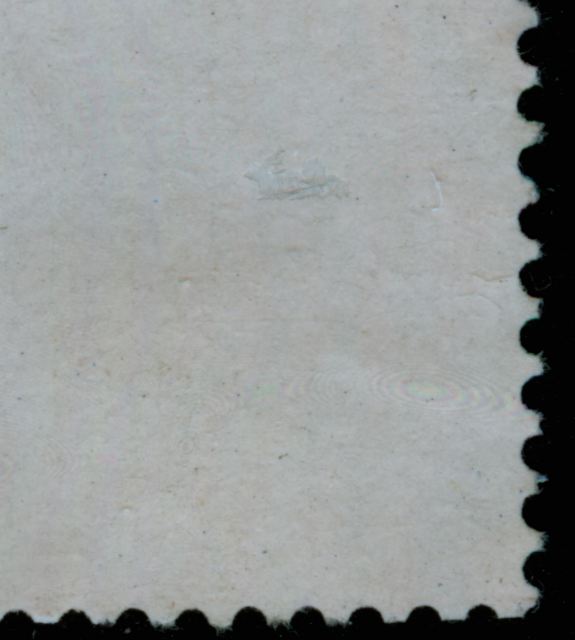 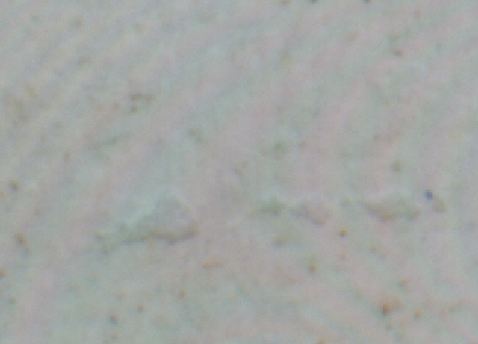 The scans were made to show the use of coated paper with the gum coated! Here and there the coating got damaged a bit! Making the stamp perfect for showing this phenomenon. groetjes, Rein |
|
Send note to Staff
|
|
|
Moderator

United States
12330 Posts |
|
|
Quote:
...scan with the lid up and the block on top of the stamp, the weight of the block making sure it is perfectly flat against the glass. Most scanner lids are cushioned and white, neither of which make for a good scanning solution. The only thing you need to be wary of is to not have any direct lighting above the scanner... Dan, Respectfully disagree. When scanning, the CCD array determines the amount of light being emitted from the lamp and the reflected light from what is being scanned. The scanning software uses averaging algorithms and its calculations expects the lid to be closed. In fact, the manufacturers calibrate the scanner and the software to work specifically with the exact color of the underside of the scanner lid as a reference point. It is also not expecting ambient light entering the scanning area. I know of no scanner manufacturer who says it is acceptable to scan with the lid open. If a user leaves the lid open, or switches the background color of the lid, the scans will not be as accurate as they would be if the lid is closed. You can test this by scanning with different color lid backgrounds. It is possible to recalibrate some scanners with different color lid backgrounds but depending on the software you might have to reload the calibration each time you do a scan. And of course the lid helps keep the platen clean and dust free. Obviously if the scanner manufacturers didn't feel a lid was necessary they would save money and not include it. Don |
|
Send note to Staff
|
|
|
Pillar Of The Community
United States
6483 Posts |
|
|
Don,
We can agree to disagree. The method I utilize produces excellent results. I am not saying it is THE preferred method, but it is what works for me. The proof is in the images themselves.
Then again, I don't just use VueScan Pro defaults. I dial in each profile based upon my scanning method and have different profiles for lid up black bakground, lid down (documents), different types of sales cards or pages, etc.
The room I scan in is fairly dark (no windows) with little ambient light, which is likely why I don't see the level of interference to which you are referring.
Also, the averaging you are referring to depends on the area of the scan bed you have highlighted in the scanning software when you scan. The larger the area, the greater impact of ambient lighting, as averages are taken across a larger area. However, when I scan, I highlight only the stamp and a small area of solid black around it before making the final scan, so the impact of ambient light is reduced. In other words, I can skew the end result of the scan by varying how large or small a cropped area I select; if it is too large around the stamp, the contrast/brightness get thrown out of whack. You would see the same thing with the lid down if you were scanning the stamp on a black background and you included large expanses of the scanner's white lid in your scan region. It throws the averaging off.
Regardless of lid up or lid down, if you constrain the scanning area tightly you will get better results, and is why scanning stamps individually can frequently produce better results than throwing a whole page of stamps on the scan bed, scanning them all in one pass, and then cropping out individual stamps. I always scan stamps individually, if I can. |
|
Send note to Staff
|
|
|
|
Moderator
United States
12330 Posts |
|
|
I think we are mostly in agreement, the images that result with different lid configurations are probably good enough for most people and applications. The previous testing I have done were with a photograph (not a stamp) and different lid configurations. The resulting scans were then cropped down to just the photo and analyzed by a computer for exact color percentage content. When the results were numerically striking with significant deltas between them but when simply looking at the scans themselves the differences were hardly noticeable. (Our client, a medical device manufacturer, found the deltas extremely critical for their application since colors accuracy was paramount.) So for the majority of consumer situations, like scanning a stamp for an ebay listing or website, the lid configuration probably is not critical. I posted only for the sake of accuracy. I would add that constraining the scanned area does not affect the CCD and averaging algorithms, it still calculates across the entire width of the platen. (At least a few years ago when we tested several different scanner models and software.) But I do agree that scanning a single stamp and constraining the scan to the middle of the platen is a good idea. Don |
|
Send note to Staff
|
|
|
Pillar Of The Community
United States
6483 Posts |
|
|
Quote:
I would add that constraining the scanned area does not affect the CCD and averaging algorithms, it still calculates across the entire width of the platen. (At least a few years ago when we tested several different scanner models and software.) It does with the Epson V500 or V550 and Hamrick Vuescan Pro. I can do a scan preview (which scans the entire bed), and by then adjusting the cropped area, change the color/brightness/contrast of the final scan even if I make no profile changes. You can see the changes in the preview window before the final scan is saved. That is likely by design though, as Vuescan doesn't rescan based on color/filter/brightness/contrast changes; it scans a raw image and then applies output profiles after the fact at the time of save, so you can do a scan and then see the results of making any filter, profile, and cropping changes prior to save. It ultimately is more flexible than rescanning after every tweak. At any rate, I can see markedly different results that averaging does based upon the size and position of constrained area in the scan preview. It changes on the fly. |
|
Send note to Staff
|
|
|
|
Pillar Of The Community
United States
1341 Posts |
|
|
I got my scanner working yesterday. I put a dozen stamps on the scanner and was looking at the settings. I set it to 200% and 1200 dpi. The scan took 15 minutes and gave me images so large that the individual stamps would not fit on my 55" TV in actual size. I put it back to 100% at 600 dpi and got beautiful images. |
|
Send note to Staff
|
|
|
Pillar Of The Community
United States
6483 Posts |
|
|
Yeah, 200% and 1200dpi is WAY overkill, as the result would effectively be 2400dpi. I personally would ALWAYS leave the percent at 100% (as depending on how the software maker implements the percentage function, it may be digital adjustments, which you don't want). Instead, if you want to change the size of the scan, change the dpi at scan time.
Another thing to keep in mind is if you are adjusting/resizing in Photoshop/Gimp/whatever after scanning, you NEVER want to be enlarging, only reducing. Overscan and size down, never the reverse. No software can actually create image data; it's just interpolating surrounding pixels. |
|
Send note to Staff
|
|
|
|
Pillar Of The Community
United States
4523 Posts |
|
|
I merged my booklets and sheets into one set of albums using vario sheet and sheet protectors. I will be added backings in the sheet protectors. I will likely print a custom sheet with the issue description. By using sheet protectors I do not need to worry about the 3 punch margin so get more working area. |
|
Send note to Staff
|
Al |
|
|
Pillar Of The Community
United Kingdom
1361 Posts |
|
|
I sometimes use an additional sheet of glass to keep the stamps flat and also have a sheet of black card stuck to my scanner lid. |
|
Send note to Staff
|
|
|
Pillar Of The Community
United States
4523 Posts |
|
|
Good idea. If the black background is more than a few milimeters behind then it would also be slightly out of focus. |
|
Send note to Staff
|
Al |
|
|
Replies: 109 / Views: 34,862 |
|



 Posted 10/26/2016 09:45 am





