| Author |
 Replies: 109 / Views: 34,861 Replies: 109 / Views: 34,861 |
|
Valued Member
Netherlands
230 Posts |
|
|
Hello everyone, I have a little question. I want to sell some stamps. But how do I make pictures of my stamps? I have tried to make some close-up macro photo's. That gives me some blurry stamp pictures. Is it maybe an option to scan the stamps? And how do I get more stamps on one page under my scanner? Maybe on such a cardboard page with strips, like these:  Have a nice day! Greetings, Rik |
|
Send note to Staff
|
|
|
|
|
Pillar Of The Community
United Kingdom
8636 Posts |
|
|
Photographs from mobile telephones are of very little use for showing anything other than an album. You should get some stock pages - which are usually a little larger than A4 - and scan those. |
Send note to Staff 
|
|
|
Pillar Of The Community
United Kingdom
1255 Posts |
|
|
Rik
Set your scanner to minimum 400dpi, or better. You can scan the stock cards as Geoff has mentioned then crop the image with a photo-editing package. You can save the images in JPEG format if you're prepared for some image compression, or TIFF for large, high quality images. Use the forum's image optimiser when uploading big images. It works very well.
Many forum users scan their collections and store them digitally.
Hope this helps. Gr, Tim |
|
Send note to Staff
|
|
|
Valued Member
Netherlands
230 Posts |
|
|
Valued Member
United States
333 Posts |
|
|
Much of the equipment we buy over here is made in Germany. Check Prinz and Lichturm (Lighthouse), for example.
Don |
|
Send note to Staff
|
|
|
Pillar Of The Community
United States
507 Posts |
|
|
What is the collective's experiences with scanning stamps in Vario stock pages? |
|
Send note to Staff
|
|
|
Valued Member
Netherlands
230 Posts |
|
|
Valued Member
5 Posts |
|
|
Pillar Of The Community

United States
856 Posts |
|
|
Photos don't work at all if you want a detailed image. I use a Canon flatbed scanner -- the CanoScan LiDE 600F to be specific. I think it cost less than $100. I scan at 600 d.p.i. and use a great, FREE photo-editing program called IrfanView to crop, resize, straighten, sometimes sharpen, and many other things. There are higher-powered scanners and more expensive editing programs (like Photoshop) but this works fine for me. I am a total amateur at scanning and creating stamp images, but it's a snap after you've done it a couple of times. Here's one where I was seeking opinions on the color of the cancel and was asked to post an image of just the cancel. You could not do this with a camera. 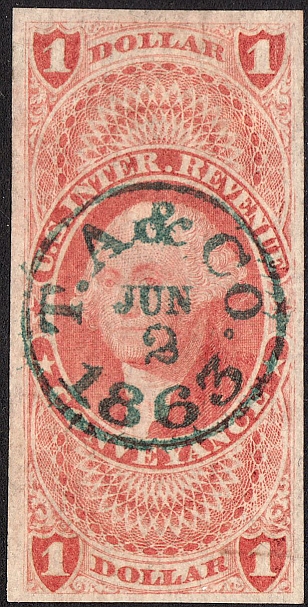 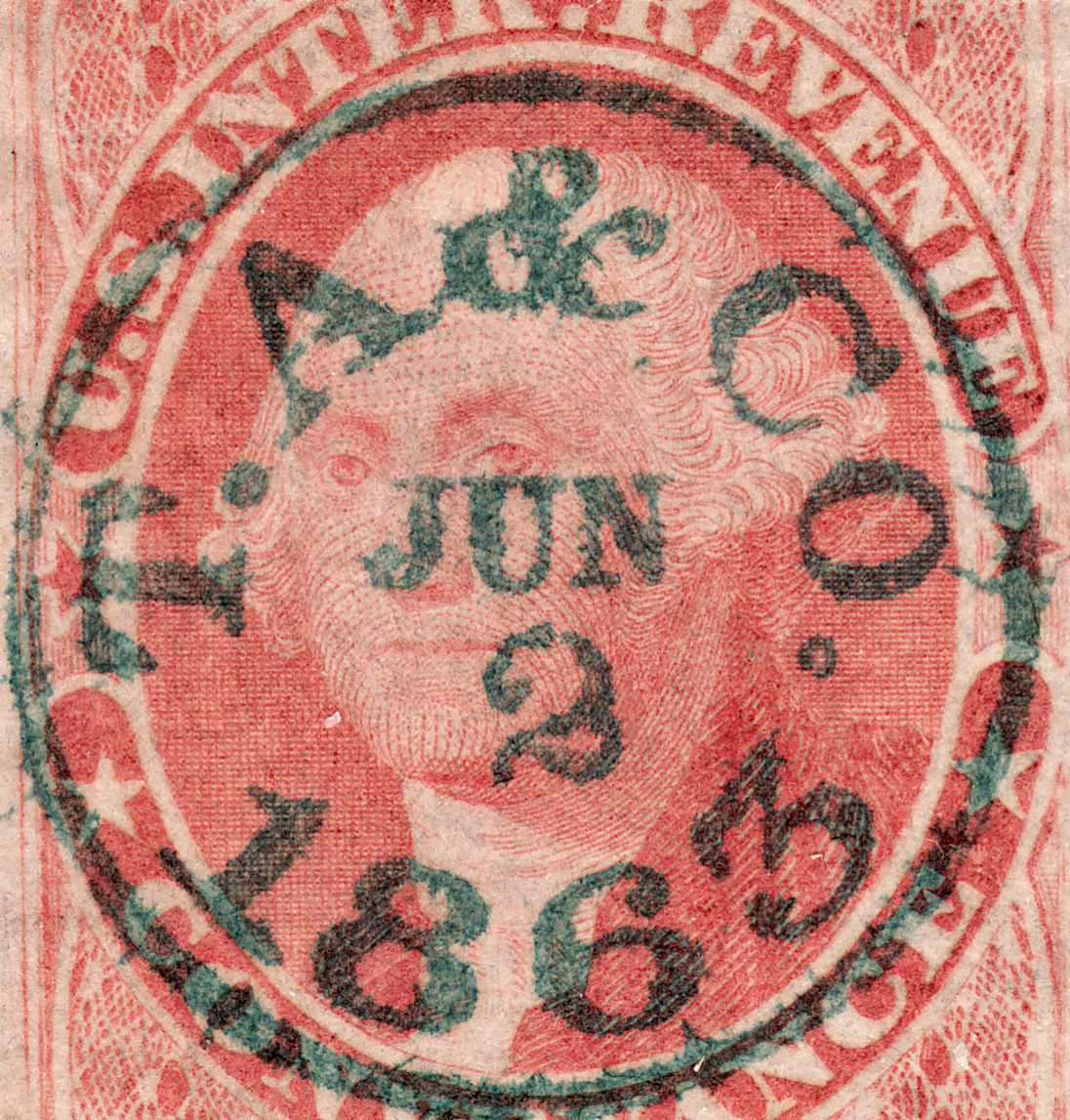 |
|
Send note to Staff
|
| Edited by rustyc - 10/22/2016 11:31 am |
|
|
Valued Member
Netherlands
230 Posts |
|
|
Thanks all for the replies.
I have an all-in-one printer from Epson, so I can scan with that device.
Then, I only need some a4 (black?) pages to put the stamps in.
And then I place that on my scanner and I can make scans of my stamps, right?
Thanks again,
Rik |
|
Send note to Staff
|
|
|
Bedrock Of The Community
Australia
38679 Posts |
|
|
Hi Rik,
Yes, you need the black pages with the clear plastic holding strips.
Commonly referred to as "Hagners" (about a $1 a page)
$13 for a packet of 10
Varying pocket sizes.
Place your stamps under the clear holding strip,
place the Hagner face down on the scanner platen and scan.
If you have an Epson, see if it has "Carousel" option on the scanner.
When you open the scanner software, under "preview"
you may see "Marquee"
If this is so, use the mouse to draw a square around each stamp,
select "all" and the dpi (600) then hit scan.
It will scan up to 30 stamps, one after another, or you can just scan the whole page in one pass.
|
|
Send note to Staff
|
|
|
Moderator

United States
12330 Posts |
|
|
A few things that have not been mentioned...
- Cameras are difficult to use to image stamps. This is because of hand shake on close-ups and the need to be 'squarely' positioned above the stamp to remove distortion. If you are serious about imaging stamp you will want to use a scanner.
- If you use a scanner, always scan with the lid closed.
- Avoid using software to manipulate the image since this then introduces un-natural modifications that, while making the image look better, changes what the stamp might actually look like in reality. This is especially true if you are posting for selling or for color determination.
- If color determination is the objective; scan the stamp together with other stamps so a relative comparison can be done.
- Consider purchasing a good quality scanner application like VueScan Professional if you plan on scanning a lot of stamps. These apps are far superior to the 'free' scan applets that come bundled with the scanner. They can perform batch scanning tasks which will save you large amounts of time. They also support using calibrated profiles so that your images stay consistent over time.
- Be aware of the optical resolution limits of the scanner. Avoid using software derived higher resolutions (which are marketed by the manufacturers) and are slow and introduce software manipulation of the image.
- For highest accuracy images avoid positioning stamps around edges of the platen glass; instead try to keep stamps in middle of the platen.
Don |
|
Send note to Staff
|
|
|
Valued Member
Netherlands
230 Posts |
|
|
Thank you both for the very useful replies.
I am going to buy some of these black a4 pages soon.
I'll show you here on the forums when I made my first scans.
Greetings, Rik |
|
Send note to Staff
|
Thank you for reading my post.
-- Ricky93 |
|
|
Pillar Of The Community
United States
898 Posts |
|
|
Rik, for what it's worth, I stopped using the black stocksheets (Hagners, etc), as I felt the plastic slightly distorted or, at the very least, dulled the images.
So, for the last several years, I have been putting the stamps directly on the scanner glass (using stamp tongs). I have black paper taped to the scanner lid in order to get the black background that I prefer for stamps.
Yes, this method is a little more tedious than using the stock sheets (although, when I did use stock sheets, I obsessed about trying to keep the stamps straightened and aligned). I don't worry much about the stamps being carefully aligned on the glass, as I take care of the image straightening in Photoshop (or Photoshop Elements) afterward.
I just wanted to share another perspective.
Good luck to you! |
|
Send note to Staff
|
|
|
|
Pillar Of The Community
United States
8956 Posts |
|
|
Goedenavond Rik! Philarium is doing it the same way I have been scanning for years. To me that seems to give the sharpest possible picture.
Peter |
|
Send note to Staff
|
|
|
Valued Member
Netherlands
230 Posts |
|
|
Okay, thank you for the valuable information.
I didn't knew that black paper was an other option.
But those black hangers, are they good enough to make "normal" resolution scans (about 400~600 dpi)?
Or do I need an other solution for those scans? |
|
Send note to Staff
|
|
|
Replies: 109 / Views: 34,861 |
|




 Posted 10/21/2016 09:08 am


