Stamp Community Family of Web Sites
Thousands of stamps, consistently graded, competitively priced and hundreds of in-depth blog posts to read


Stamp Community Forum
 
Username:
Password:
Save Password
Forgot your Password?

This page may contain links that result in small commissions to keep this free site up and running.

Welcome Guest! Registering and/or logging in will remove the anchor (bottom) ads. It's Free!

Why Web Developers Lose Their Hair...reward To Anyone Who Solves This

 
To participate in the forum you must log in or register.
Author Previous TopicReplies: 9 / Views: 2,103Next Topic  
Moderator
Learn More...
United States
12330 Posts
Posted 01/15/2017   4:23 pm  Show Profile Bookmark this topic Add 51studebaker to your friends list Get a Link to this Message
I spent a bit of time working on building a stamp border using CSS. CSS is Cascading Style Sheets. It describes how HTML elements (like a image or box) are to be displayed on screen. The idea is that once you write the CSS code, it can be applied to anything on the page and/or any other page.

And when you click on web page, the code is sent to your browser, your browser reads the code, and then your browser generates the page you see. The trouble is that not every browser (or browser version) will read the code and generate the page the same way!

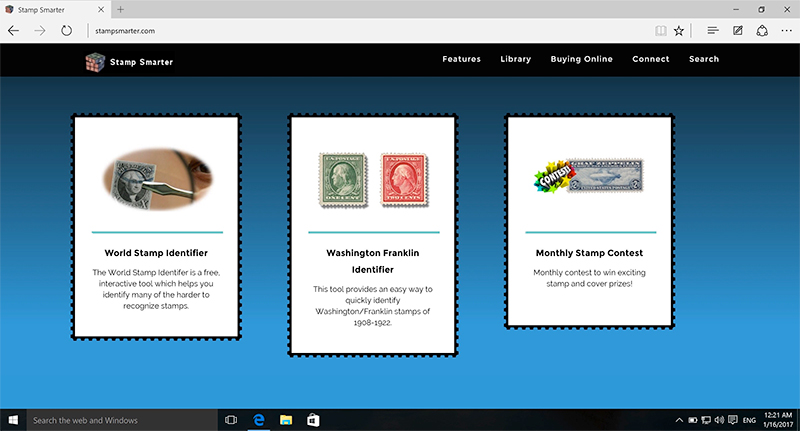
So on the opening page of Stamp Smarter, the new stamp border CSS can be seen as below (black perfs bordering the white boxes).



This code frames the element (image or box) and resizes properly in Internet Explorer (version 9, 10., 11), FireFox (last 3 versions) and Chrome (last three versions) . But when I run it under Edge, it does this…



Oddly it doesn't work at all on the upper white boxes yet manages to generate only the bottom border on the lower boxes!?! Huh? I have searched, done discovery, and tested for three days and cannot figure out a solution for this. Grrrr.

If anyone knows a solution, here is the CSS code. (Reward to anyone who solves this!)
.don_border_new2 {
    border-width: 15px;
    border-image-outset: 8px;
    border-image: url(../img/border2.png) 8 / 8px  round;
    -webkit-border-image: url(../img/border2.png) 8 / 8px round;
    -moz-border-image: url(../img/border2.png) 8 / 8px round;
    -o-border-image: url(../img/border2.png) 8  round;
}


The lesson here is that next time you run into something weird on a webpage, don't be too quick to blame the developer/company. While there are standards which browser are supposed to adhere to, there is enough variance to cause some incredible headaches.
Don
Send note to Staff

Pillar Of The Community
United States
2941 Posts
Posted 01/15/2017   5:26 pm  Show Profile Bookmark this reply Add PostmasterGS to your friends list  Get a Link to this Reply
It's at times like these that this is appropriate...

Send note to Staff  Go to Top of Page
Presenting the GermanStamps.net Collection - Germany, Colonies, & Occupied Territories, 1872-1945
Moderator
Learn More...
United States
4788 Posts
Posted 01/15/2017   7:13 pm  Show Profile Bookmark this reply Add kirks to your friends list  Get a Link to this Reply
Yeah, this would definitely be more appropriate on a CODER'S forum
Send note to Staff  Go to Top of Page
Pillar Of The Community
United States
2941 Posts
Posted 01/16/2017   01:29 am  Show Profile Bookmark this reply Add PostmasterGS to your friends list  Get a Link to this Reply
Don,

I'm assuming you found the problem? Finally got to a real computer, and it looks fine on mine. Microsoft Edge 20.10240.16384.0, Windows 10 (build 10240) on a MacBook Pro.

Send note to Staff  Go to Top of Page
Presenting the GermanStamps.net Collection - Germany, Colonies, & Occupied Territories, 1872-1945
Pillar Of The Community
Finland
753 Posts
Posted 01/16/2017   01:42 am  Show Profile Bookmark this reply Add scb to your friends list  Get a Link to this Reply
Try adding border: 1px solid to that specific ruleset.

Add least it does the trick for on my Edge (Win10 + Microsoft Edge 38.14393.0.0) when in dev-console ;)


Edit... Oops. You've already defined border-width in original style, but it seems to be overridden (overlined). Likely there is some cascade process resulting in border being set to 0 on 'higher' level.

edit2... and confirmed the override (in computed panel it states border-style is set to none). Just adding border-style:solid (and nothing else) should do the trick


-k-
(and yes, I did my thesis on CSS stylesheets)


Send note to Staff  Go to Top of Page
Collecting the world 1840 to date one stamp at a time.
Author & owner of Stamp Collecting Blog
Edited by scb - 01/16/2017 02:00 am
Pillar Of The Community
United States
978 Posts
Posted 01/16/2017   05:16 am  Show Profile Bookmark this reply Add jbcev80 to your friends list  Get a Link to this Reply
Hi Don

I am not an HTML/XML person, but I know the frustration. I had a problem in a VB.NET application for a week that drove me nuts. I had tons of code trying to fix the error but nothing worked. Finally found an obscure reference to the problem on the internet. Turns out it was a Microsoft bug that MS decided, evidently, wasn't worth fixing. The fix turned out to be 2 lines of code.

A friend used to say that bald spots is a developer's occupational hazard

Jerry B
Send note to Staff  Go to Top of Page
Pillar Of The Community
1328 Posts
Posted 01/29/2017   01:57 am  Show Profile Bookmark this reply Add DrewM to your friends list  Get a Link to this Reply
"This would definitely be more appropriate on a CODER'S forum." No need to police posts, I think, especially since a certain number of collectors make their own pages, would like to hear about page layout solutions (if there is one) and also problems, and so on. In any case, it's easy to skip a post you're not interested in. I do it all the time!
Send note to Staff  Go to Top of Page
Moderator
Learn More...
United States
4788 Posts
Posted 01/29/2017   08:37 am  Show Profile Bookmark this reply Add kirks to your friends list  Get a Link to this Reply
Drew:

It was not my intent to "police" the thread; although it is a great job description for the Moderator label you see next to my name.

Don, the OP, and I are both moderators, so he knows my intent was not to offend. I just meant it was a difficult question.

I'm sorry I wasn't clear or offended anyone.

Kirk
Send note to Staff  Go to Top of Page
Moderator
Learn More...
United States
12330 Posts
Posted 01/29/2017   09:09 am  Show Profile Bookmark this reply Add 51studebaker to your friends list  Get a Link to this Reply
Update
scb's advice was excellent (thank you!) and I managed to improve the code but there is still multiple issues between the various browsers. It turns out that IE 11 running on Windows 7 handles some web pages differently than IE 11 running on Windows 10 for Pete's sake!

While I know code details are not of interest to many stamp collectors I felt the thread worthy on two levels. First, the 'techy' stamp collectors form a loose sub-community and we really do not have our own website or forum. Second, there is value in non-'techy' folks being aware of the challenges in web site development. Just imagine what it would take to properly test a web page/website under the huge number of possible combinations of browsers, browser versions, plug-ins, and operating systems; it numbers in the thousands.
Don
Send note to Staff  Go to Top of Page
Pillar Of The Community
Finland
753 Posts
Posted 01/29/2017   09:34 am  Show Profile Bookmark this reply Add scb to your friends list  Get a Link to this Reply
Don... If thinking the various (remaining) issues with StampSmarters CSS, this is how I'd start fixing them: https://www.labnol.org/internet/rem...d-css/28635/
I know its not easy nor fast, but it will prevent further hair loss ;)

-k-
Send note to Staff  Go to Top of Page
Collecting the world 1840 to date one stamp at a time.
Author & owner of Stamp Collecting Blog
  Previous TopicReplies: 9 / Views: 2,103Next Topic  
 
To participate in the forum you must log in or register.

Go to Top of Page

Disclaimer: While a tremendous amount of effort goes into ensuring the accuracy of the information contained in this site, Stamp Community assumes no liability for errors. Copyright 2005 - 2026 Stamp Community Family - All rights reserved worldwide. Use of any images or content on this website without prior written permission of Stamp Community or the original lender is strictly prohibited.
Privacy Policy / Terms of Use    Advertise Here
Stamp Community Forum © 2007 - 2026 Stamp Community Forums
It took 0.19 seconds to lick this stamp. Powered By: Snitz Forums 2000 Version 3.4.05