Stamp Community Family of Web Sites
Thousands of stamps, consistently graded, competitively priced and hundreds of in-depth blog posts to read


Stamp Community Forum
 
Username:
Password:
Save Password
Forgot your Password?

This page may contain links that result in small commissions to keep this free site up and running.

Welcome Guest! Registering and/or logging in will remove the anchor (bottom) ads. It's Free!

Ebay Changes Internet Explorer Settings

 
To participate in the forum you must log in or register.
Author Previous TopicReplies: 9 / Views: 2,669Next Topic  
Valued Member
United States
97 Posts
Posted 01/19/2017   3:47 pm  Show Profile Bookmark this topic Add Alan B to your friends list Get a Link to this Message
I was having a problem with my Internet Explorer, i.e. on occasions it couldn't find any websites. I consulted with my tech guy and he found a setting under Options/Advanced Settings that wasn't properly checked. When it happened again, I remembered I had just had problems deleting an ebay email I had received (deleting it locked up my email software - not the first time), and I wondered if there was a causal relationship. The next time I received an ebay email (advertisement), I checked the setting, went back and deleted the email (sure enough it locked up my email software) and then went back and looked at the setting. Sure enough it had changed! ebay was effing with my system. I reported it to ebay, who, of course, said it couldn't be them, I needed to check with my Internet software provider (Microsoft). To say the least, I have changed my settings on my ebay account so they cannot send me any html emails - only text. This may be a Explorer version 10 problem, but still.
Send note to Staff

Moderator
Learn More...
United States
12330 Posts
Posted 01/19/2017   4:03 pm  Show Profile Bookmark this reply Add 51studebaker to your friends list  Get a Link to this Reply
It is nothing that ebay is doing. It is much more likely that it is malware. IE 10 went 'end of life' on January 12, 2016 and note that older browsers are very vulnerable to malware.
But no website or email should ever change your browser configuration without all kinds of bells and whistles going off. If ebay tried to do this they would come under huge adverse publicity. There is a good chance that the email in question is not really from ebay. You might want to take further precautions (change passwords, scan computer etc.)
Don
Send note to Staff  Go to Top of Page
Valued Member
United States
97 Posts
Posted 01/19/2017   4:13 pm  Show Profile Bookmark this reply Add Alan B to your friends list  Get a Link to this Reply
Don,

I hope I wasn't implying that the change was deliberate, but rather some sort of unintended interaction between the email and the software. As far as I.E 10 goes, my tech guys won't even touch the new Microsoft software - what is it - Edge? They say it's still buggy and causes problems.

Alan
Send note to Staff  Go to Top of Page
Moderator
Learn More...
United States
12330 Posts
Posted 01/19/2017   4:20 pm  Show Profile Bookmark this reply Add 51studebaker to your friends list  Get a Link to this Reply
Alan,
Understood. But no email should ever change any browser config. And a properly configured computer would never allow a browser config change without warnings popping up.

I see you are running Windows 7, you really should upgrade to IE 11 (Edge only runs on Windows 10.) Staying with IE 10 is trouble and it is also slower than IE 11.
I am concerned that you clicked on this email and that it appears something changed. Phishing emails can be very tricky, I got one the other day which almost fooled me. It looked like an legitimate UPS email but the links, while appearing in the emails to be correct, where actual spoofed to some domain in eastern Europe.

But it certainly is not ebay doing this, either intentional or unintentionally. But when a browser goes end of life, no security updates are provided and it becomes a petri dish.
Don

Edit: if you want to forward the email to me I can take a look at it and see what the heck it is doing.
Send note to Staff  Go to Top of Page
Pillar Of The Community
Learn More...
United States
1773 Posts
Posted 01/19/2017   5:38 pm  Show Profile Check KRelyea's eBay Listings Bookmark this reply Add KRelyea to your friends list  Get a Link to this Reply
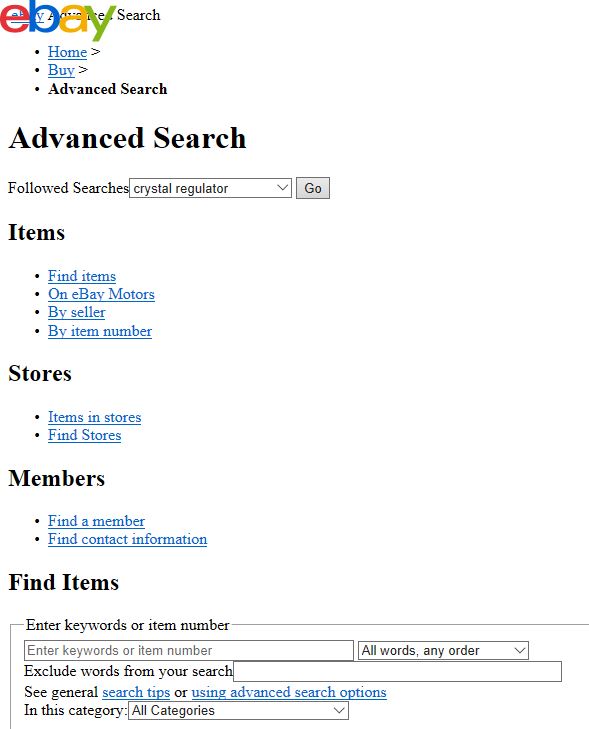
Recently ebay has been giving me strange unformatted results for certain actions. An example when I clicked on "Advanced Search" is shown below;


I asked ebay about it and they knew nothing but suggested I try another browser and clear my cache. I did but still get the same result on Chrome or Edge. Sometimes the odd looking form works and sometimes it doesn't.
Send note to Staff  Go to Top of Page
Moderator
Learn More...
United States
12330 Posts
Posted 01/19/2017   5:46 pm  Show Profile Bookmark this reply Add 51studebaker to your friends list  Get a Link to this Reply
That is exactly what a web page looks like when the CSS (Cascading Style Sheets) is not loading. For some reason(s) your browser is not loading it properly.
Don
Send note to Staff  Go to Top of Page
Pillar Of The Community
Learn More...
United States
1773 Posts
Posted 01/19/2017   9:50 pm  Show Profile Check KRelyea's eBay Listings Bookmark this reply Add KRelyea to your friends list  Get a Link to this Reply
I wonder why only a few pages are impacted?
Send note to Staff  Go to Top of Page
Pillar Of The Community
United States
1414 Posts
Posted 01/19/2017   10:20 pm  Show Profile Bookmark this reply Add cfrphoto to your friends list  Get a Link to this Reply
While it is uncommon for ebay CSS to fail to load, it does happen all too frequently when the ebay site is busy. As it is, some ebay pages take too long to load. It makes me wonder if ebay encourages slow loading ads that will lock up the browser until they load to keep traffic at manageable levels. Also, I haven't seen this problem nearly as often after switching to Microsoft Edge.

The only thing that saves Microsoft Internet Explorer 10 is that it will ask for permission to restart a web session after a drive by attack. I notice that IE 11 is also vulnerable to some types of exploits that can change some browser startup settings. I had not seen any problems with opening emails affecting settings, but I suppose it is still possible in IE 10 if some security updates are missing. It is safer to use a dedicated email program like Outlook. Suspect emails should be moved to the spam folder before opening to suppress any active content. In any case, the fix is not to use Internet Explorer except when absolutely necessary. Because Microsoft Edge does fails to ask permission before restarting sessions after a browser takedown, it may be necessary to disconnect from the Internet before restarting the browser to get rid of a session that hides bowser controls.

The moral of the story? Have Google Chrome available for certain web sites and don't ever use Firefox. Ads on some newspaper sites like the LA times are so aggressive, that using Google Chrome is advised to suppress hostile screen takeover attempts. Some sites are so out of date that they don't support Microsoft Edge or HTML5.
Send note to Staff  Go to Top of Page
Edited by cfrphoto - 01/19/2017 10:23 pm
Moderator
Learn More...
United States
12330 Posts
Posted 01/20/2017   04:09 am  Show Profile Bookmark this reply Add 51studebaker to your friends list  Get a Link to this Reply
I've stopped recommending browsers. They all suck. They all start out ok but all of them eventually have problems. To be fair, many of the problems are actually brought on by us, the users. We tend to add plugins and extensions which break things and/or slow things down a lot. And when you consider the potential number of combinations (between browsers, browser version, operating system, security patches, extensions, etc.) trying to troubleshoot and understand the issues is maddeningly complex.

And CSS issues? Chrome drives me crazy. Virtually every other browser will properly regenerate a web page after a webpage CSS update. But not Chrome, Chrome retains the old CSS in its cache even when you force a page refresh. You have to manually clear its cache every time you make a CSS change when developing.
Don
Send note to Staff  Go to Top of Page
Pillar Of The Community
721 Posts
Posted 01/20/2017   10:37 am  Show Profile Check wheelman's eBay Listings Bookmark this reply Add wheelman to your friends list  Get a Link to this Reply
I recently purchased one of the high visibility computer protection programs that is frequently on TV. It has blocked soooo many ads and attempts to infiltrate my system. Amazing. ebay in particular will rack up 8 - 10 attempts every time I log on.
Send note to Staff  Go to Top of Page
  Previous TopicReplies: 9 / Views: 2,669Next Topic  
 
To participate in the forum you must log in or register.

Go to Top of Page

Disclaimer: While a tremendous amount of effort goes into ensuring the accuracy of the information contained in this site, Stamp Community assumes no liability for errors. Copyright 2005 - 2026 Stamp Community Family - All rights reserved worldwide. Use of any images or content on this website without prior written permission of Stamp Community or the original lender is strictly prohibited.
Privacy Policy / Terms of Use    Advertise Here
Stamp Community Forum © 2007 - 2026 Stamp Community Forums
It took 0.19 seconds to lick this stamp. Powered By: Snitz Forums 2000 Version 3.4.05