Quadrille pages are incredibly easy to make in AlbumEasy (with the latest version).
This code, which is 14 lines long, gets the job done (for any size page) in less than 2 minutes:
ALBUM_PAGES_SIZE     (215.9 279.4) #Set the page to US Letter (8.5 x 11)
ALBUM_PAGES_MARGINS  (22.0 10.0 10.0 10.0) #Adjustable (of course)
ALBUM_PAGES_BORDER   (0.7 0.15 0.0 0.55) #Makes Steiner Clone
ALBUM_PAGES_SPACING  (6.0 4.0)
ROW_ALIGN_BOTTOM
PAGE_START
PAGE_TEXT_CENTRE (HN 12 "\nGREENLAND")
PAGE_TEXT_CENTRE (HN 10 "THULE LOCAL POST")
PAGE_TEXT_CENTRE (HN 10 "1979 Souvenir Sheet\nDanish Red Cross\nCliche #6")
TEXT_CHAR_SPACING(0.15)
PAGE_VSPACE(1)
COLOUR_PAGE_QUADRILLE(gray)
#PAGE_QUADRILLE(0.1 10.0 10.0 CENTRE 0.75 150.0 200.0 1.0 5)
PAGE_QUADRILLE(0.0 6.0 6.0)
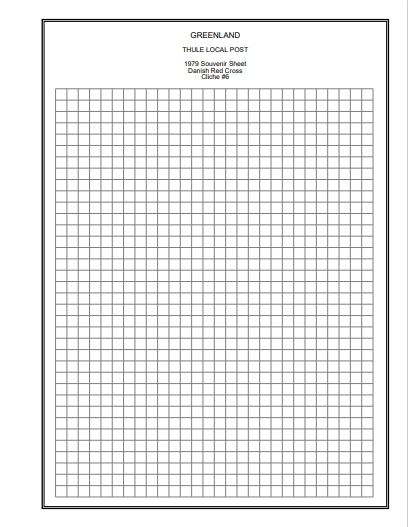
And produces the following PDF ready for printing (size reduced, of course):
John





 Posted 01/15/2023 9:41 pm


