| Author |
 Replies: 19 / Views: 3,612 Replies: 19 / Views: 3,612 |
|
Moderator

United States
4788 Posts |
|
|
|
Recently, I saw a forum thread with an interesting topic/question get "hijacked" by a discussion about the CENTS symbol. No one was to blame; it just came up and there was confusion. As you know it happens sometimes.
For the record, here are a few currency symbols and how to generate them using the ALT key and numeric codes.
¢ ALT+0162 CENTS
£ ALT+0163 POUND
€ ALT+0128 EURO
¥ ALT+0165 YEN
Kirk
|
|
Send note to Staff
|
|
|
|
|
Pillar Of The Community
United States
3305 Posts |
|
|
Pillar Of The Community
United States
1497 Posts |
|
|
Need to use the numeric key pad when typing the numbers (while pressing the ALT key), with the "num lock" light illuminated.
Robert |
Send note to Staff 
|
|
|
Pillar Of The Community
United States
3305 Posts |
|
|
Pillar Of The Community
United States
3305 Posts |
|
|
Moderator
United States
12330 Posts |
|
|
Works fine on my Windows Edge laptop, but it has a numeric keypad. LittleRiverphil, what brand/model is your laptop?
Don |
|
Send note to Staff
|
|
|
Pillar Of The Community
United States
3305 Posts |
|
|
Dell Isspiron 15 7000 series I've now swithed to Internet Explorer.
No difference. |
|
Send note to Staff
|
| Edited by littleriverphil - 10/05/2017 10:51 am |
|
|
Pillar Of The Community
United States
3305 Posts |
|
|
Wouldn't it be simple to add the needed symbols in with the various smileys, we could copy the one we need and paste it in place. Seems simple.
|
|
Send note to Staff
|
|
|
Moderator
United States
12330 Posts |
|
|
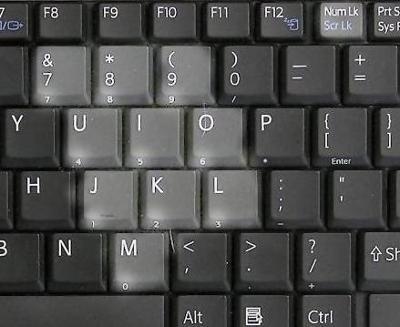 - Enable Num Lk . You may need to simultaneously press ["FN" and " Scr Lk "] keys. ... - Hold down "Alt" key. Some laptops require you to hold both "Alt" and "FN" keys. - Input Alt code of symbol on Keypad. ... - Release all the keys. Don |
|
Send note to Staff
|
|
|
Pillar Of The Community
United States
3305 Posts |
|
|
Nope. Sorry didn't get that keyboard either. (Duh, other side of space bar Don! (my name too) Odd, I'll continue to type cent. That also doesn't work. As soon a I press ALT the key board is unresponsive. |
|
Send note to Staff
|
| Edited by littleriverphil - 10/05/2017 11:55 am |
|
|
Pillar Of The Community
United States
4520 Posts |
|
|
I use the cent sign a lot but also alt-0188, alt-0189, alt-190 for ¼, ½. and ¾. |
|
Send note to Staff
|
Al |
|
|
Rest in Peace
720 Posts |
|
|
£ ¥ $€I have no problem generating these symbols. Of course, it probably helps that I'm on an iMac.  |
|
Send note to Staff
|
|
|
Valued Member
United States
367 Posts |
|
|
Keep in mine that characters on this discussion board are limited to those in the Windows-1252 character set. A list of these characters can be found at https://en.wikipedia.org/wiki/Windows-1252. Strangely, if I use a character not in Windows-1252, it will look OK when I preview a message, but not when I post it for real. For example, the name #1056;#1086;#1089;#1089;#1080;#769;#1103;, which is the of Russia in Cyrillic. Personally, I use the Windows "Character Map" program to paste non-ASCII characters into my messages. |
|
Send note to Staff
|
|
|
Rest in Peace
Canada
5701 Posts |
|
|
¥€H I got it!
But it does not show in "preview" |
|
Send note to Staff
|
|
| Edited by BeeSee - 10/05/2017 3:54 pm |
|
|
Pillar Of The Community
United States
2782 Posts |
|
|
Since I create my auction listings in a word processing program I just use CTRL-M and it brings up a palate to choose a wide Variety of different characters - ¼ ½ ¾ ß àáâãäåæçèéêëìíîïðñòóôõöøùúûüý¢£¥ which can then be copy and pasted just about anywhere. |
|
Send note to Staff
|
|
|
Moderator
United States
12330 Posts |
|
|
Generating different language characters found on stamp is difficult since you typically have to 'remap' or change your keyboard layout to a different language (fun to do on a co-workers computer on April's Fools Day). But at any time you can go to Stamp Smarter and at the bottom of any page is the 'World Stamp Identifier'. Click on it and then click on the 'Universal Search' button. http://www.stampsmarter.com/Then click on the keyboard icon to bring up a virtual keyboard as shown below... 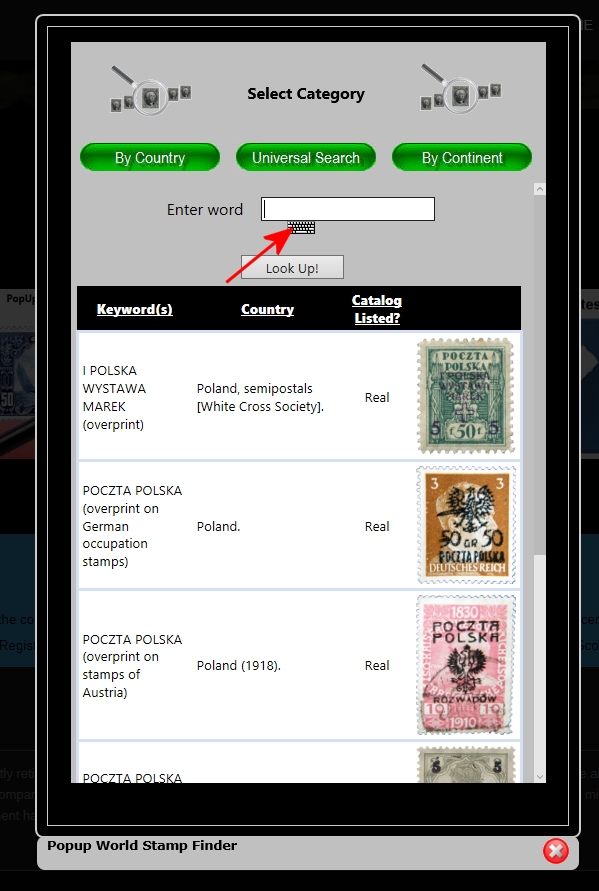 The pop-up keyboard supports 15-20 different languages, select the language you want (you can also increase or decease the keyboard size) as shown here 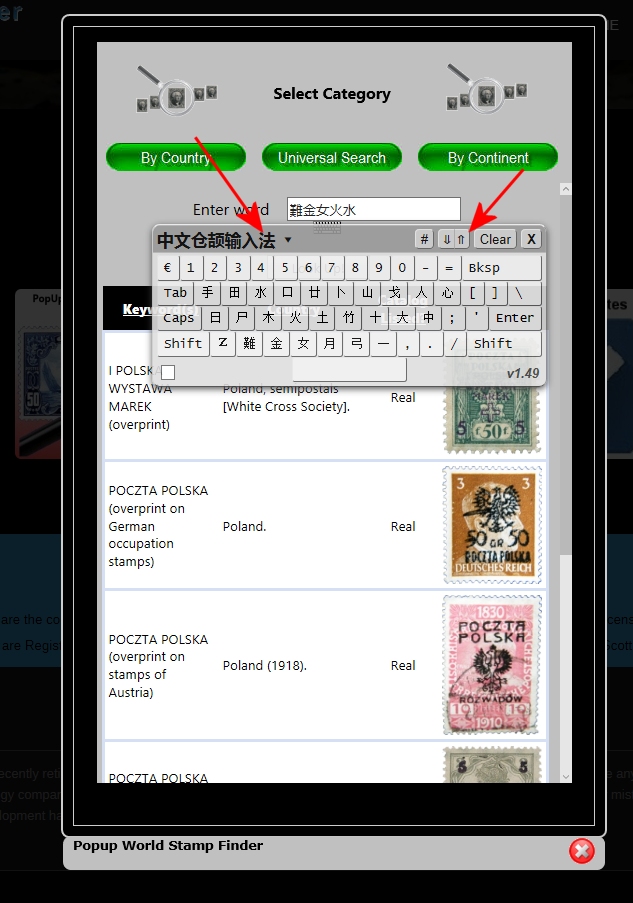 Click on the characters you want and then 'copy and paste' them into Word or other app that accepts these characters. Note this forum's editor does not support foreign characters. Don |
|
Send note to Staff
|
|
|
Replies: 19 / Views: 3,612 |
|




 Posted 10/05/2017 08:28 am


