Stamp Community Family of Web Sites
Thousands of stamps, consistently graded, competitively priced and hundreds of in-depth blog posts to read


Stamp Community Forum
 
Username:
Password:
Save Password
Forgot your Password?

This page may contain links that result in small commissions to keep this free site up and running.

Welcome Guest! Registering and/or logging in will remove the anchor (bottom) ads. It's Free!

Printer For Steiner Pages

 
To participate in the forum you must log in or register.
Author Previous TopicReplies: 6 / Views: 1,772Next Topic  
Valued Member
United States
75 Posts
Posted 02/11/2018   9:15 pm  Show Profile Bookmark this topic Add BrotherSquint to your friends list Get a Link to this Message
Like many on this forum I've been searching the web for a printer that can print Steiner Pages from Stamp Album Web on 110# index stock. After a search I found information on the thickness of the paper (http://www.paper-paper.com/weight.html) which seems to be a major factor in whether or not a printer can handle the paper. I searched office supply stores, talked to sales persons, questioned factory representatives from HP, chatted with product reps online and searched the websites of all the major printer brands. Just when I was about to give up on finding a printer that would handle the .216 mil spec index stock measures, I found the Epson 88+ which is built to handle paper up to .27 mils thick. I popped for the $109 and after the grand unboxing and set up it printed the first 115 pages like a champ. It's not fancy- no wireless, bluetooth, air print, touchscreens, scanners or anything else, but if you're looking for something that can handle printing heavyweight paper, I'd give this printer my highest recommendation.
Send note to Staff

Pillar Of The Community
United States
1510 Posts
Posted 02/12/2018   12:21 am  Show Profile Bookmark this reply Add Timm to your friends list  Get a Link to this Reply
I've used my old HP F4480 to print Steiner pages to print almost 10,000 pages with very few problems. The most time consuming is that I feed it one page at a time. As one page is about to come out I start inserting the next page.
The printer at the time cost me 50 bucks and a couple million bucks for the *^#@* ink.
Send note to Staff  Go to Top of Page
Pillar Of The Community
Learn More...
United States
4424 Posts
Posted 02/12/2018   06:50 am  Show Profile Bookmark this reply Add angore to your friends list  Get a Link to this Reply
If you are doing a lot of printing especially monochrome, then go with a laser. The toner has no expiration (does not dry out) and heads do not clog.
Send note to Staff  Go to Top of Page
Al
Moderator
Learn More...
United States
12330 Posts
Posted 02/12/2018   07:24 am  Show Profile Bookmark this reply Add 51studebaker to your friends list  Get a Link to this Reply
Years ago printer manufacturers figured out that the real money was in the consumables. They began lowering the cost of the printers (some to levels of break-even or even loss leaders) and concentrated on the much more profitable after market consumables.

I am with Al, unless I had a specific reason to buy an ink-jet (like photo-quality or other specialty printing), I would avoid them like the plague. Laser printers are far less headaches and lower cost over the life time of the printer.

I recommend buying a refurbished workhorse laser printer; one designed for company or group use and not one designed for personal use. There is significant differences between these including cost. My current home color laser printer is a beast, it weighs over 90 pounds and takes a lot of real estate; it was also a $2600 printer when it came out in 2002. But I purchased a refurb for less than $300 in 2005 and it has been printing daily ever since without any issues. Like most workplace printers, this thing has never missed a beat, handles all kinds of paper sizes and weights and has all kinds of features. And because of they are targeted to the business environment, the manufacturers tend to keep the drivers and updates going for many, many years.

Considering a 'planned obsolescence' consumer printer which requires constant purchase of consumables, losing driver support within a year or two, and delivers less than ideal printouts was a decision that made buying a high quality refurbished printer an easy choice for me.
Don
Send note to Staff  Go to Top of Page
Pillar Of The Community
Learn More...
United States
4424 Posts
Posted 02/12/2018   09:33 am  Show Profile Bookmark this reply Add angore to your friends list  Get a Link to this Reply
My ancient Brother HL-1650 still works. It is not "smart" so never complains. I change supplies when I think I need it.

I recently purchased an HP Color Laserjet but unfortunately it is smart. It likes to tell you have genuine cartridges, complains if a cartridge gets to low, etc. It will not let you decide for yourself. I have printed many pages on "Very low toner". On colors, it will switch the color to black when it gets low.

I use the Brother for routine but prefer album pages printed by HP (prints a little better even in monochrome and feeds paper better - less curl).
Send note to Staff  Go to Top of Page
Al
Edited by angore - 02/12/2018 09:35 am
Pillar Of The Community
United States
1624 Posts
Posted 02/12/2018   10:52 am  Show Profile Bookmark this reply Add sdtom to your friends list  Get a Link to this Reply
I sort of solved the problem with my Canon printer. I use my Walgreen's points to get my ink cartridges. No I don't print Steiner pages but it does print heavy card stock. Wish I had the room for what Don suggested but room in a one bedroom is a premium.
Send note to Staff  Go to Top of Page
Valued Member
United States
114 Posts
Posted 02/15/2018   12:29 pm  Show Profile Bookmark this reply Add flyinlo to your friends list  Get a Link to this Reply
I agree with Don about buying a commercial printer. After years of buying overpriced printers and ink, feeling ripped off because I couldn't get my $300 printer serviced because it "was a low end printer" I went to several auctions and found a refurbished HP 9050 that I got for $300. It has been three years or so since and thousands of pages later not one issue. My toner still shows 90%, it will knock out 100 double sided pages in less than two minutes, although it has its own zip code. Seriously it does take up allot of room but it handles print jobs for everyone in the house, two high school kids and my wife's volunteer work load without breaking a sweat. I keep several sizes of paper loaded and it automatically chooses the correct size to print on so I don't have to worry about someone printing on the size specific album paper I use.


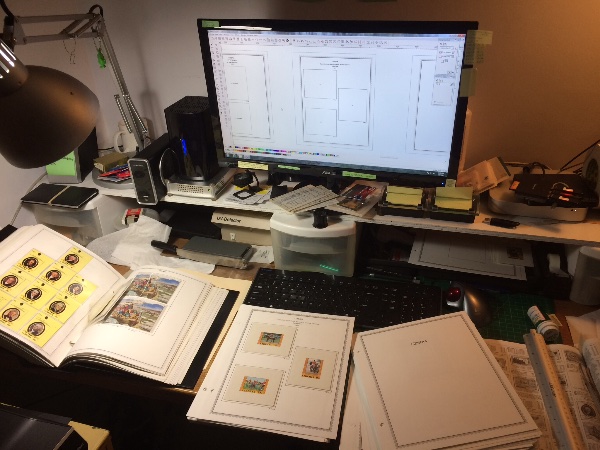
This is a picture of a project I am currently working on
Send note to Staff  Go to Top of Page
  Previous TopicReplies: 6 / Views: 1,772Next Topic  
 
To participate in the forum you must log in or register.

Go to Top of Page

Disclaimer: While a tremendous amount of effort goes into ensuring the accuracy of the information contained in this site, Stamp Community assumes no liability for errors. Copyright 2005 - 2026 Stamp Community Family - All rights reserved worldwide. Use of any images or content on this website without prior written permission of Stamp Community or the original lender is strictly prohibited.
Privacy Policy / Terms of Use    Advertise Here
Stamp Community Forum © 2007 - 2026 Stamp Community Forums
It took 0.16 seconds to lick this stamp. Powered By: Snitz Forums 2000 Version 3.4.05