| Author |
 Replies: 33 / Views: 2,879 Replies: 33 / Views: 2,879 |
|
Bedrock Of The Community
Australia
38679 Posts |
|
|
|
I use them, but don't really understand them.
Looking to purchase a new computer (>$1,000)
I think my power supply is breaking down, my computer occasionally stops without warning (10 years old)
Would like a Desktop tower, that accommodates Win7, 4 USB3 slots, and graphics that can support a very large PDF. (currently opening GB Postmarks PDF, is like pulling teeth, very clunky)
And 2 removable HDD drive stations.
(No gaming requirements)
Any members can suggest any things I may consider, before approaching the sales staff at the shop, like how much memory etc I should seek.
Thank you.
|
|
Send note to Staff
|
| Edited by rod222 - 01/05/2019 10:50 pm |
|
|
|
|
Pillar Of The Community
United States
2941 Posts |
|
|
Rod,
I haven't bought a Windows computer in years, so I won't attempt to make any recommendation other than this -- get as much RAM as you can within your budget. It's easy to add HDD space if you need it later, but more difficult to add RAM, and RAM will do more to assist in reading large PDFs, batch processing scans, etc., than just about anything else. |
Send note to Staff 
|
|
|
|
Valued Member
South Africa
229 Posts |
|
|
Bedrock Of The Community
Australia
38679 Posts |
|
|
Thanks boys, that was helpful.
Perhaps I will consider W10, I am / was hooked on ACDSee 3.5 an old Image program, I have used for 15 years
and MSWorks
I'll have a chat to the IT guys, regarding a non-gamer but with a good graphics card, lots of ram, and a solid state drive.
Most items seem well priced, including the mother board, it's the gaming Graphics card the boosts the price it seems, > $300
and I shan't need that.
Each 8Gb stick of Ram = around $105
|
|
Send note to Staff
|
| Edited by rod222 - 01/06/2019 01:06 am |
|
|
Pillar Of The Community
United States
3224 Posts |
|
|
8 gigB memory is very typical for mid-range (US$400 or so) computers nowadays. The drives in those computers are typically 1 terabyte. So there's your baseline to add to if you want to/need to spend more. What do you have now?
Instead of 4 built-in USB3 ports, consider just getting a hub/dock that would have more slots. If you have need of 4 slots now, you could always use a couple more slots sometime. |
|
Send note to Staff
|
|
|
Bedrock Of The Community
Australia
38679 Posts |
|
|
I only have USB2 on the present box. (I put in an expansion card for USB3, it worked for about 5 days then fizzled) It's a "bitsa" build, salvaged from other broken computers over the past 10 years. I have 2 internal HDD (1 removable) 500Gb and 1 Tb My motive in the past was to keep old, but much loved software ACDSee and MSWorks 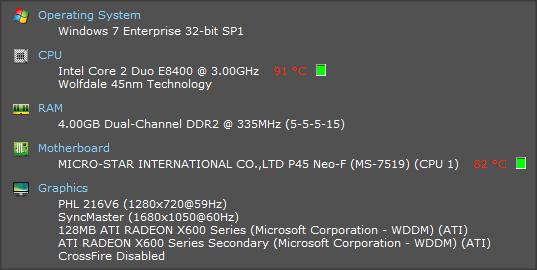 |
|
Send note to Staff
|
| Edited by rod222 - 01/06/2019 01:50 am |
|
|
Pillar Of The Community
United States
3224 Posts |
|
|
The specs for mid-range computers I quoted above should then do a lot for you. I have no problem with PDF size with that. I don't know if you want to anticipate future needs but the problem for me that I anticipate is bandwidth more than speed or memory, depending on where I end up.
I can understand keeping favorites but they seem to eventually mutate into something you don't like or fail to work absolutely.
|
|
Send note to Staff
|
|
|
Moderator

United States
12330 Posts |
|
|
Hi Rod, I use a computer every day, it is an important tool. I do not want to be thinking about it every day; I just need it to be fast, seamless, and solid. I have purchased several hundred computers over the last 15 years; I typically buy Dells. Since I was the guy who every person in my company would call if a their computer 'has an issue'; I value stable, durable computers. I used to build them out myself but this is not as attractive solution as it used to be; package deals abound in the marketplace. (And this comes from a guy whose company used to design and manufacture their own motherboards.) Forget Win7, it is past EOL (End Of Life) in 2015 and Win10 is superior. Some people slam Win10 because it is tricky to 'turn off' automatic updates but the truth is you should just let it call home and update for the best security. If you are hunting for a discount, then consider Dells' online outlet which offers both 'certified refurbished' and 'chip and scratch' units; both come with full Dell warrantees. This inventory changes daily so shop it for a week or two until a machine with your specs comes up. https://www.dell.com/us/dfh/p/?cs=2...s=dfh&~ck=mnHard drives are not about size, the discussion is solid state vs. SATA. If you have very deep pockets, then buy the fastest solid state drives you can find. But at a minimum, you should get a fast, solid state boot drive. A 500GB is about the right size but install less used apps to a second, larger (1TB+) SATA drive. (Always keep every hard drive at less than 50% capacity.) RAM is shared by the video processor in motherboard designs today so I recommend 64GB of RAM. These specs will drive the price point past the $1k mark but will give you a box which will last for 10+ years. If cost savings are required; buy just the solid state drive and re-used your existing 1TB drive and drop the RAM down to 32GB. These are things you can upgrade easily in the future. You might also want to consider a laptop over a tower (this represents a change of perspective for me in the last 10 years, laptops have gotten much more durable). Mated with a good docking station, a kickass desktop monitor, wireless mouse/keyboard and you would never know that you are on a laptop when you sit at your desk. At any time you simply remove the laptop, throw it in your backpack, and take it with you. In any case, I do not recommend cheaping out on the monitor, keyboard and mouse. These are the things that you touch and look at every day. If you save money on the computer, it means it will be a bit slower in booting, opening applications, and doing certain tasks. Is a boot time of 15 seconds worth more to you then a boot time of 40 seconds? Does it matter to you to have you word processor application open in 2 seconds or 7 seconds? Or do you want to look at a second rate screen and be using a cheap Chinese keyboard and mouse every day? External hard drives are the best backup and storage solution; you will want to have at least 6 USB ports including a few that are high speed. Rod, you are a great contributor to our hobby and because of that I am willing to help you more; if you want to send me any online listings of what you are considering I can give you more detailed recommendations and help you through the buying process. Don |
|
Send note to Staff
|
|
|
Bedrock Of The Community
Australia
38679 Posts |
|
|
That's very generous Don. I'm taking on board all the members advice. I will not be getting a laptop though, always a tower for me. I'm going up to the next country town, on the morrow, and I'll get a print out on what the IT fellow advises in my price range, and email it to you. This is what I thought was kinda relative, it looks like a gamer, but with a change of graphics card, I may get it down to the $750 -$800 mark. Not on my want list, just a rough guide to what I thought reasonable. (Albeit adding up another 3 sticks of memory = +$300) Do I really need 32 Gb? that sounds outrageous :) https://shop.netplus.com.au/netpro-...o-ryzen5-pc/PS: some of the PDF's I was finding grindingly slow, were around 400-500 Mb PS: What rating Power Supply do you recommend as a minimum? |
|
Send note to Staff
|
| Edited by rod222 - 01/06/2019 05:12 am |
|
|
Pillar Of The Community
Finland
753 Posts |
|
|
@Rod...
For starters, I agree with Don. Go with Dell machines - they are above all easy to maintain/fix (unlike Acer/Asus etc). That said, do understand that Dell (like most manufacturers) does some good models (like Latitude or Precision), and some crap (like Vostro and most consumer level models).
And forget Windows 7; windows 10 is excellent and you can run pretty much Win 3.x programs in compatibility mold or some tiny tweaks.
But for rest I'll provide a slightly alternative view/advice... Get yourself a used/2nd hand business computer. They are something that has been used for 1-3 years in some major company; usually the only reason they are ditched is because their warranty/maintenance agreement has become voided. They are sold "dead cheap" with 1-2 new years of reseller warranty included. So pricewise they are equal to what you get from supermarket, but technically speaking of far superior build.
For example my current laptop was originally a $3500 (Dell) machine, but I paid $750 for it. It's got 2 drives (500GB new SSD + 1TB original SATA), DVD-RW, 32GB Ram, dozens of ports (4+2 USBs of different types, HDMI, audio etc), and most importantly a pro-quality (serious photography level) 19' display. It had been used for 2 years by graphic artist in major company, and apart of single tiny scratch on the lid it was like brand new.
So shop wisely and ask for opinions; it can safe you from lots of trouble and save money.
-k-
|
|
Send note to Staff
|
|
| Edited by scb - 01/06/2019 05:29 am |
|
|
Pillar Of The Community
Finland
753 Posts |
|
|
And just read you are looking for tower alone. Here's some food for comparison point:
For 500€ I could get (locally) a 2-year old Dell Optiplex tower with
16GB DDR3
480GB SSD (main, brand new) + 500GB HDD drive (original)
Intel Core i5-4570 @ 3.20GHz processor and build in Intel display card
10 USB + dozens more ports of various types
DVD-RW
Windows 10 Home
And for 1100€ I could get 2-year old Dell Precision full tower with
32GB DDR3
480GB SSD (main,brand new) + 500GB HDD drive ((original)
Quad core Intel Xeon E5-1620/3.70Ghz processor, and dedicated Nvidia Quadro DK2200 display card
10 USB + dozens more ports of various types
DVD-RW
Windows 10 Pro
No display, keyboard etc included with above prices. All come with 2 year warranty. I would assume Aussie prices are slightly lower than Finnish prices, so if you are offered anything more costly, then shop around.
-k-
|
|
Send note to Staff
|
|
| Edited by scb - 01/06/2019 05:51 am |
|
|
Bedrock Of The Community
Australia
38679 Posts |
|
|
Cheers -k-
It is interesting to hear the many options put forward.
I would have jumped at your suggestion of used, I have bought the very things, ever since 1980.
However now, I suffer the tyranny of distance, I am a 5 hour drive to the city,
with an $80 dollar fuel bill, meld that with having to purchase that day, probably from an unknown vendor.
It just doesn't stack up anymore for me, but I agree with the premise.
This purchase will probably be my last, so I'll make it a good one if I can, I'll certainly get advice in the local towns and see if second hand are on offer,
but I doubt it. Shops here do not like selling second hand.
Patience is the key, shall see what turns up.
|
|
Send note to Staff
|
|
|
Pillar Of The Community
Finland
753 Posts |
|
|
@Rod... Our situations are not that different (I'm living on the countryside/distance too, LOL).
I would assume Australia has online sellers for used business computers? At least that's how the business runs here (free domestic shipping included).
But true, patience is the key for discovering good deal. Applies to stamps, and especially with computers.
-k- |
|
Send note to Staff
|
|
|
|
Pillar Of The Community
United States
978 Posts |
|
|
G'Day Rodney
Some musings on a new computer.
Like you, I lasted until my XP finally died. I went to the local computer shop with a list of 'specifications'. I also went with windows 7 (I know Don, it's past it's prime). The machine is 're-furbished' as they built it for someone who did not pick it up.
The 'box' I got was half the size of a regular machine. The total price for all the customization was $150usd. I also upgraded from Word2000 to Word2013 since people told me that the 2013 VBA was better than later versions.
In the process I lost my WORD customization (Microsoft removed the features I was using) and now have to write code to simulate them. Also some of my VB.NET library of routines have to be upgraded since I am now on Visual Studio 2017. This doesn't affect you, however.
In general I will say, get ready for a whole new experience. There is a great learning curve.
Jerry B |
|
Send note to Staff
|
|
|
Moderator
United States
12330 Posts |
|
|
There is significant difference between a $1,000 computer and a $2,500 computer. Differences which are much more than the speed of the computer; we are talking overall quality here. (The same logic and justification for buying quality stamps applies to buying a quality computer.)
Consumer grade computers (under $1000) are built to be appliances. In other words use them for 3 years, throw them away, buy another. They use cheap motherboards built with cheap components. I have thrown countless off-shore motherboards away built with cheap capacitors which then vented. Power supplies used with just barely enough margin to run the most basic devices. USB circuits which looked like they were laid out by a 3rd grader. $1000/3 years = $300 per year. Then factor in your time. Consider boot time. Say you boot your computer once a day and the difference between a $700 computer and a $2500 computer is 15 seconds. That is the equivalent of 22 hours per year that you are waiting for your computer to boot. Then calculate the additional time you wait for your applications to start. Then consider the time consumed to transfer your files and applications when you have to fix or upgrade the PC every few years. You also put your files and data at more risk, this also carries a cost.
Quality computers, on the other hand, can run $2500 but will last for 10+ years. $2500/10 years = $250 year. You spend far less time and your files/data are more secure.
I do sometimes recommend cheaper computers. For example, my elderly 80 year old mother who only uses her computer a few times per week and only to access email has a <$700 computer. But for anyone who uses one daily and relies on it for more than just email, my opinion is that it is false economy to buy cheap.
In my opinion on false economy follows for all tools. If you are only using a hand tool (like a drill or saw) once and a while then buy a cheap tool and call it a day. But if you are going to use it every day…spend the money on a good quality tool.
Don
|
|
Send note to Staff
|
|
|
Pillar Of The Community
674 Posts |
|
|
Hi Rod -
I can guess your reply, but I'll say it anyway:
Buy a Mac!
There's no comparison.
And before you reveal your age etc - I switched my Mom to a Mac last year. She was 85. A seamless transition. And I get significantly fewer 'tech' calls from her to help 'fix' it!!
I switched 7 years ago. One of my very few regrets in life - that I didn't switch sooner! |
|
Send note to Staff
|
|
|
Replies: 33 / Views: 2,879 |
|




 Posted 01/05/2019 10:46 pm


