Stamp Community Family of Web Sites
Thousands of stamps, consistently graded, competitively priced and hundreds of in-depth blog posts to read


Stamp Community Forum
 
Username:
Password:
Save Password
Forgot your Password?

This page may contain links that result in small commissions to keep this free site up and running.

Welcome Guest! Registering and/or logging in will remove the anchor (bottom) ads. It's Free!

Deleting 106gb Folder From External Drive.

 
To participate in the forum you must log in or register.
Author Previous TopicReplies: 13 / Views: 667Next Topic  
Bedrock Of The Community
Australia
38679 Posts
Posted 01/19/2019   5:36 pm  Show Profile Bookmark this topic Add rod222 to your friends list Get a Link to this Message

Are there any fast methods to achieve the above?
Using delete, it begins to log files and contents before some time later
asking if the entire folder is needed.
Can take some time.
Any suggestions?
Send note to Staff

Pillar Of The Community
Learn More...
United States
663 Posts
Posted 01/19/2019   5:39 pm  Show Profile Bookmark this reply Add oldguy to your friends list  Get a Link to this Reply
Reformate the drive would probably do the trick.
Send note to Staff  Go to Top of Page
Bedrock Of The Community
Australia
38679 Posts
Posted 01/19/2019   6:23 pm  Show Profile Bookmark this reply Add rod222 to your friends list  Get a Link to this Reply
Thanks Oldguy,
It's a 2 Tb ext HDD, with movies, genealogy, etc etc on it etc.

Send note to Staff  Go to Top of Page
Moderator
Learn More...
United States
12330 Posts
Posted 01/19/2019   6:29 pm  Show Profile Bookmark this reply Add 51studebaker to your friends list  Get a Link to this Reply
Go to command (DOS) prompt (Run|CMD )
Navigate to the folder that you want to delete (with all its files and subfolders).
then type
DEL /F/Q/S *.* > NUL

Don
Send note to Staff  Go to Top of Page
Pillar Of The Community
United States
2941 Posts
Posted 01/19/2019   6:47 pm  Show Profile Bookmark this reply Add PostmasterGS to your friends list  Get a Link to this Reply
Uh oh. Don's giving Rod DOS commands. This is going to end well...


Send note to Staff  Go to Top of Page
Presenting the GermanStamps.net Collection - Germany, Colonies, & Occupied Territories, 1872-1945
Bedrock Of The Community
Australia
38679 Posts
Posted 01/19/2019   6:52 pm  Show Profile Bookmark this reply Add rod222 to your friends list  Get a Link to this Reply

Quote:
Uh oh. Don's giving Rod DOS commands. This is going to end well...


How well you know me Postmaster
It's not going well, already.

I go to "Start" (win7)
search programs
type :run cmd
up comes a navigation pane with a big magnifying glass, then what

Should I be in the black screen DOS?
Send note to Staff  Go to Top of Page
Edited by rod222 - 01/19/2019 6:53 pm
Bedrock Of The Community
Australia
38679 Posts
Posted 01/19/2019   6:57 pm  Show Profile Bookmark this reply Add rod222 to your friends list  Get a Link to this Reply
A few days ago, I had been having trouble with my USB3 card
I read on the internet to go to device manager, and delete ALL USB host controllers then reboot
I closed my eyes, followed instructions
and hoped for the best..........
(Felt completely ignorant)

Worked spectacularly !
Send note to Staff  Go to Top of Page
Pillar Of The Community
United States
2941 Posts
Posted 01/19/2019   7:22 pm  Show Profile Bookmark this reply Add PostmasterGS to your friends list  Get a Link to this Reply
Yes, you'll need to be in the black-screen DOS to run the command Don gave you. If you're not familiar with how to get there or to navigate folders in DOS, see this guide, Method 4 - Using the Command Prompt.
Send note to Staff  Go to Top of Page
Presenting the GermanStamps.net Collection - Germany, Colonies, & Occupied Territories, 1872-1945
Moderator
Learn More...
United States
12330 Posts
Posted 01/19/2019   7:39 pm  Show Profile Bookmark this reply Add 51studebaker to your friends list  Get a Link to this Reply
Rod,
I see you are using Win7. Sorry for delay, I had to go find a Windows7 PC to use.

Press Start button, then in search area just type cmd this will open the DOS window.
Don
Send note to Staff  Go to Top of Page
Bedrock Of The Community
Australia
38679 Posts
Posted 01/19/2019   7:44 pm  Show Profile Bookmark this reply Add rod222 to your friends list  Get a Link to this Reply
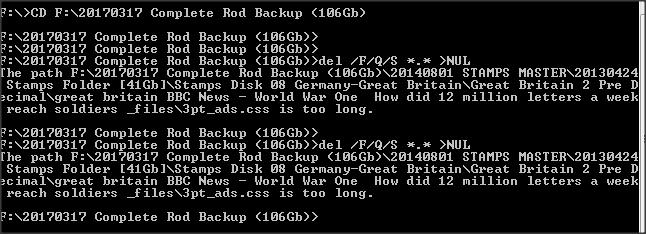
Cheers Don / Postmaster,
This IT stuff is too easy
Got it OK

DOS told me to "Go Away" I had a file that was "too long"
Ah well, back to the old delete....
Send note to Staff  Go to Top of Page
Edited by rod222 - 01/19/2019 7:46 pm
Moderator
Learn More...
United States
12330 Posts
Posted 01/19/2019   8:10 pm  Show Profile Bookmark this reply Add 51studebaker to your friends list  Get a Link to this Reply
You could just delete the entire directory (folder)?

Go back to DOS prompt
Go to root of eternal drive
then type rmdir foldername /s
(where 'foldername' is name of folder you want to delete

Don
Send note to Staff  Go to Top of Page
Rest in Peace
United States
1738 Posts
Posted 01/19/2019   9:19 pm  Show Profile Bookmark this reply Add James Drummond to your friends list  Get a Link to this Reply
Rod,


Rename the folder to something shorter.

Then you can delete it.

Jim
Send note to Staff  Go to Top of Page
Rest in Peace
United States
4052 Posts
Posted 01/19/2019   11:35 pm  Show Profile Bookmark this reply Add ikeyPikey to your friends list  Get a Link to this Reply
.
Download the free trial version of R-Wipe, and tell it to wipe the files (& free space) in that directory.

Cheers,

/s/ ikeyPikey
Send note to Staff  Go to Top of Page
Bedrock Of The Community
Australia
38679 Posts
Posted 01/19/2019   11:41 pm  Show Profile Bookmark this reply Add rod222 to your friends list  Get a Link to this Reply
Excellent assistance !
Thanks again Don, James, Ikey.......
Fabulous Forum.
Send note to Staff  Go to Top of Page
  Previous TopicReplies: 13 / Views: 667Next Topic  
 
To participate in the forum you must log in or register.

Go to Top of Page

Disclaimer: While a tremendous amount of effort goes into ensuring the accuracy of the information contained in this site, Stamp Community assumes no liability for errors. Copyright 2005 - 2026 Stamp Community Family - All rights reserved worldwide. Use of any images or content on this website without prior written permission of Stamp Community or the original lender is strictly prohibited.
Privacy Policy / Terms of Use    Advertise Here
Stamp Community Forum © 2007 - 2026 Stamp Community Forums
It took 0.2 seconds to lick this stamp. Powered By: Snitz Forums 2000 Version 3.4.05


