| Author |
 Replies: 16 / Views: 2,708 Replies: 16 / Views: 2,708 |
|
Valued Member
United States
182 Posts |
|
|
|
My good old Epson all-in-one printer and scanner finally breathed its last after 6 years of faithful service so it is time to get a new one.
I would like to get one that is able to print in colour up to tabloid/A3 size so that a good neighbour of mine who is into printing his own album pages can come by and use it too. At the same time, I would like it to come with a scanner.
So two 'couple-of-hundred-bucks' questions:
1. Should I get a combo unit or would a standalone printer and standalone scanner be better?
2. And recommendation based on your experiences?
Thanks!
|
|
Send note to Staff
|
| Edited by Prexie3c - 01/25/2019 11:17 am |
|
|
|
|
Pillar Of The Community
United States
6483 Posts |
|
|
Which is more important to you, the scanning or the printing? None of the all-in-one units have scan quality anywhere near that of a dedicated flatbed scanner. |
Send note to Staff 
|
|
|
|
Pillar Of The Community
United States
3224 Posts |
|
|
You don't tell us what your overall needs are. Hard to say what is better in that case. And you mean to get an inkjet printer and a flatbed scanner or combo? Some other choices would be a color laserjet printer and a book scanner.
If you liked your Epson (I do not like Epsons), you might stick with them since there will be some familiarity with operations. That said, only 6 years old and it died? How much do you use your printer? |
|
Send note to Staff
|
|
|
Pillar Of The Community
United States
791 Posts |
|
|
I would suggest googling "tabloid scanner printer" and do some comparison shopping.
|
|
Send note to Staff
|
|
|
Bedrock Of The Community
Australia
38679 Posts |
|
|
In a heartbeat.
Stand alone scanner (Preference Epson perfection series)
Then a cheap laser printer Black and white circa $80
or if you have the shekels, a colour laser.
|
|
Send note to Staff
|
|
|
Pillar Of The Community

United States
663 Posts |
|
|
I agree with Rod! Large size flatbed scanner. |
|
Send note to Staff
|
| Edited by oldguy - 01/25/2019 6:31 pm |
|
|
Pillar Of The Community
United States
898 Posts |
|
|
Epson does make a larger scanner/printer that can handle paper up to 11" x 17" or A3 (11.7" × 16.5") for printing, and the scanner glass can handle a page at least that large or perhaps a little larger. I have the Epson Workforce WF-7610, and bought it perhaps 3 years ago. No doubt they're offering a newer model now.
It does a good (very good, in my opinion) job of scanning, but my Epson Perfection V500 Photo does seem to produce a slightly superior image. Since I scan stamps for sale, that's mostly what I use, but I have used the Workforce, too. For really detailed work, I'd definitely use a dedicated scanner. But it all depends on what you want to use it for. I'm glad to have both.
|
|
Send note to Staff
|
|
|
|
Valued Member
51 Posts |
|
|
I have spent forever evaluating wide format printers and just ordered a Canon Pro 10 to print my heavyweight Lighthouse 297x270mm album pages.
My biggest want was the rear feed for the heavier stock of those pages in order to help prevent the larger pages from "skewing" while printing. I had horrible "skewing" problems with my HP Officejet 7610 wide format combo printer, which feeds from a front-load bin.
I do give up two-side feeding, but that was also a skewing problem, so I just manually feed mirrored pages one at a time. By the way, I do practice pages on "cut to size" manilla folder pages, which are very cheap to play with. I don't want to burn up too many of those Lighthouse pages while getting it right.
I use an Epson V600 for scanning and it works well. I am excited to see how this Canon improves over my HP 7610. Of course, that means I am redoing hundreds of album pages |
|
Send note to Staff
|
|
|
Pillar Of The Community
Canada
879 Posts |
|
|
My two cents worth:
I have had stand alone wide-format and all-in-one scanners but found I very rarely needed to scan large documents. When I did, I found I could stitch together standard format images quite acceptably. So go with standard format scanner, preferably Epson Precision.
Re printer functions, one consideration is how long it is likely to be idle. In my experience, Epson printers are far more likely to suffer from clogged print heads than Canon. Also it's worth checking whether the printer you select has readily available print heads. Canon comes up best here, too. Spending $100 on a print Head is better than $200 on a new printer in the event of a badly blocked print head.
Finally, I suspect (no real proof here) that dye-based inks are probably better than pigment-based for stamp collecting applications. The ink is more likely to stay embedded in your album page.
|
|
Send note to Staff
|
|
|
Moderator
United States
12330 Posts |
|
|
itma,
Respectfully disagree, pigment-based inks will last longer than dye based inks. I think that archival quality pigment based inks are available from all the major printer manufacturers like Epson/Canon/HP but get ready for sticker shock. But in my experience many stamp collectors are 'thrifty' and choose to ignore information about costly archival materials.
Don |
|
Send note to Staff
|
|
|
Pillar Of The Community
Canada
879 Posts |
|
|
Quote:
pigment-based inks will last longer than dye based inks I totally agree, but the issue I have with pigment inks is that they seem to accumulate on the surface where dye-based inks will soak more into the paper. (That's my very unscientific view of the problem.) I have found pigment ink to be more liable to rub off onto the facing page as per the image below. Now perhaps it was just a bad case of paper selection - my example was on surfaced paper. 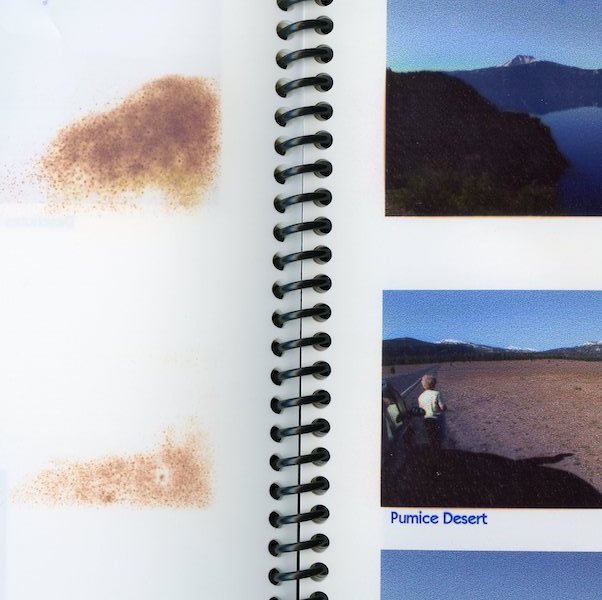 |
|
Send note to Staff
|
|
|
Moderator
United States
12330 Posts |
|
|
Agreed, certain coated surfaces in the paper (often with high clay content) can cause that kind of problem. (But I also agree with your theory about absorption.) I think the take-away here is to match the paper and ink types. HP (perhaps others) have documentation on archival printing and they, of course, recommend their own papers and inks. I think taking it to a large shop with offset printing would be the best archival solution.
Don |
|
Send note to Staff
|
|
|
Valued Member
226 Posts |
|
|
I've had good luck with Hewlett Packard HP printers. Go with one with a built in scanner and prints doubled sided pages. |
|
Send note to Staff
|
|
|
Valued Member
45 Posts |
|
|
I bought an HP Officejet 7740 last year. It's and inkjet type that prints and scans up to 11x17 size. I've been using it to print extra pages for a Scott US album. So far I've been very happy with it. |
|
Send note to Staff
|
|
|
Valued Member
51 Posts |
|
|
WARNING ABOUT CANON PRO SERIES PRINTERS
So, I got my Canon Pixma Pro 10 yesterday.....and it can't print Lighthouse Album pages. Canon can't print on non-Canon papers of specialty sizes, can't print on pages with holes in them, can't print on paPer greater than 120gm (Lighthouse pages are 190gm). |
|
Send note to Staff
|
|
|
Valued Member
United States
182 Posts |
|
|
Hi all, Many thanks for all the wonderful replies and suggestions. I apologise for taking such a long time to reply. I had a bad fall and broke my hip and right arm. I have been in bed most of the time for the past few weeks and my inability to use my right arm (it was in a cast) meant I could only read the wonderful threads on this forum but not reply. Now that the cast is off, I am finally free. In the meantime, the son got me a Canon TS9570. It is an all-in-one printer and scanner, and is able to print up to tabloid size. Once I am fully up and kicking in 2-3 weeks time, I will have a go at my new toy and test it out to my heart's content  |
|
Send note to Staff
|
|
|
Replies: 16 / Views: 2,708 |
|




 Posted 01/25/2019 11:15 am





