| Author |
 Replies: 80 / Views: 16,617 Replies: 80 / Views: 16,617 |
|
|
|
Pillar Of The Community
United Kingdom
8626 Posts |
|
|
Ken - each to his own, but was it really worth abandoning an Yvert album, given the only difference in approach is the incorporation of charity stamps with other issues? Or was the Yvert album also superannuated? |
Send note to Staff 
|
|
|
Pillar Of The Community

United States
1773 Posts |
|
|
I have been building my Scott Specialized France, French Colonies and Italy for 3 years and have $100s of mounts installed let alone stamps. I think the Yverts are excellent but I found it in a box of feeder albums I bought and it's not nearly as complete as my Scott. I may keep it and use it for color varieties. I have another Yvert that is nearly empty and I may sell that one. |
|
Send note to Staff
|
|
|
Pillar Of The Community
United Kingdom
8626 Posts |
|
|
One advantage of Scott in this regard is that its albums and style have remained pretty much unchanged. They may be dull and unresponsive to developments in design and collecting practice (those connected lines of stamps, for instance), but you can always use them. By contrast, Yvert has done a lot of fiddling with its products over the last thirty years, which means that you can find an album from the 1990s that you're comfortable with, but then have difficulties in using it. |
|
Send note to Staff
|
|
|
Valued Member
Canada
439 Posts |
|
|
Quote:
Shown below is my 1st effort with AlbumEasy (I love it); That page looks great KRelyea, thanks for showing it, and I am pleased that you like AlbumEasy :) Clive |
|
Send note to Staff
|
AlbumEasy - Free software for creating custom stamp album pages ChromaMate - Compare, match, analyse, free colour matching software ImageSleuth - Images, hidden inside images, revealed. A retroReveal alternative PSGSA - The Philatelic Society for Greater Southern Africa |
|
|
Pillar Of The Community
United States
1773 Posts |
|
|
Thank you for building AlbumEasy I have at least 100 pages planned and now I can get started on them. After I get a few more developed I'll make them available through your site. |
|
Send note to Staff
|
|
|
Pillar Of The Community
1363 Posts |
|
|
Ken, First of all, those are very nice layouts.
I'm also "heavily invested" in Scott Specialty pages/albums, and I've used much the same system to make up matching pages, meaning pages with Scott Specialty borders that match my existing pages. I've used page layouts from my Steiner files and printed them borderless (you don't want two borders on your pages) onto blank (but bordered) Specialty pages as you seem to be doing. I haven't tried it with AlbumEasy page layouts, though now I'm tempted to try. Of course, it's possible to print whatever layout you want to use onto whatever other paper you want to use with the only limit being the size of paper your printer can handle -- or the size your local copy shop machines can handle.
You apparently took pdf files to your copy shop, but I take actual printed (8.5 x 11") pages to mine. I print them at home after making whatever changes I want in the layouts -- removing the borders, changing the font of the country name, or deleting boxes of stamps I don't want. One small advantage of printing from actual pages is that I can adjust my "original" on the photocopy machine slightly up, down, or sideways to center it better if I need to. You can do that in your files, too, I imagine, but once they're saved and you're at the print shop, I'd guess you can no longer do that. I find it a big help when a page I've just printed is a little too far up, down, or sideways. A page layout or country name can go into the margin of the paper. Or sometimes the country name at the top is too low or too high. I just move the originals up or down slightly to compensate and reprint the page. I might waste a few pages, but I end up with about 95-98% of my pages printed properly. None of this may make sense to someone who doesn't print pages this way, but it's basically just "xeroxing" from printed (or digitized) originals, and we've all done that.
Now I want to try printing AlbumEasy pages and see how they compare in terms of ease of making them and the look of the resulting page layouts (which look to be very good indeed).
A couple of questions:
Ken: "I just copied this page and fiddled with the sizing and then used the insert image function to make the page. Note it's all in French and there is a shadow form the difference in page colors."
What is "insert image function" and how do you use it? Is this just a "copy-paste" function? In Word? In AlbumEasy? The image is a layout you've designed or a layout from existing pages?
"If anyone want my formatting info for the Scott page let me know I'd be happy to share."
Yes, I'd love to have the formatting info for your pages if you can provide this. I can provide you an email address if that helps.
As for the "shadow" you're getting, I don't know of a digital way to eliminate it, so what I do is on the photocopy machine. I just move the "contrast" adjustment down one or two steps which eliminates most of the problem. The result is I don't see much, or any, of the "shadow". I do end up with a less darkly printed page, but it seems generally decent enough.
Cheers!
Drew M |
|
Send note to Staff
|
| Edited by DrewM - 10/27/2020 5:52 pm |
|
|
Pillar Of The Community

United States
1951 Posts |
|
|
uboatnut,
I like the way you group your stamps. That's what is nice about printing your own pages. Very nice.
Jack Kelley |
|
Send note to Staff
|
|
|
Pillar Of The Community
United States
744 Posts |
|
|
Jack: That's what's nice about AlbumEasy - you can put things where YOU want them, rather than where some other album designer put them. You can also add whatever descriptive information you want. AE is definitely worth investing the time in the learning curve. I did work out the AE settings for printing on Scott album pages based on B4 page sizes (very limited default sizes available on non-commercial wide format printers). Basically, I feed the printer Scott pages, but set the printer for B4 and trick it. Alas, I don't have a WF printer. Maybe Santa has a spare he can leave here.  |
|
Send note to Staff
|
|
|
Pillar Of The Community
United States
1773 Posts |
|
|
Drew AlbumEasy has a function to add an image to a page. You could illustrate a stamp box or add an image to illustrate a detail. I cheated a little and made the image so it took up the whole page.
As an interim step I made a frame the same size as the frame on the Specialized pages but on 8 1/2" X 11" paper. I used this to orient the stamp boxes on the page and check the margins and when I was ready I changed the margins and page size and the pdf printed pretty well just a little high. As you said I couldn't change it at the copy store.
I thought I had your email from previous conversations but I don't so I'll try and send you the formatting info via the SCF message system.
|
|
Send note to Staff
|
|
|
Pillar Of The Community
United States
3046 Posts |
|
|
I'm tinkering with AlbumEasy now, since I am home sick and have nothing better to do.
I am trying to use it to duplicate a Mystic Heirloom album page, and I'm not finding what I need in the documentation.
The Mystic Heirloom page has the stamp INSIDE the box, at the bottom, centered. Is there a way to do this in AlbumEasy?
The other things is that that the stamp image is not centered inside the box. It is centered vertically, but not horizontally. And it had a Scott number underneath it. I'm also not seeing a way to do this in AlbumEasy.
I don't expect AlbumEasy to have these features. This is a rather unique layout for a stamp album. I'm just trying to see if I can duplicate it in AlbumEasy. |
|
Send note to Staff
|
|
|
|
Valued Member
Canada
304 Posts |
|
|
I'm sure Clive will respond directly, but I have done exactly what you are trying to do in AlbumEasy. In my case the stamp image is nicely centred in the stamp box. Also adding text below the stamp box is very simple. In the Stamp_Add command there are 3 sets of quotation marks before the end bracket. The first set is for Left text below the stamp box, the 2nd set is for Centre, and the 3rd set is for Right text. You can add multiple lines by inserting the \n between each line of text within the quotation mark(s).
My suggestion would be to view the Examples in the Help section to see which commands do what. |
|
Send note to Staff
|
|
|
Pillar Of The Community
United States
744 Posts |
|
|
To insert an image inside the frame box:
Go to HELP
Select COMMANDS
Select STAMP COMMANDS
Select STAMP_ADD_IMG. Add a stamp box containing an image.
Also see ALBUM_STAMP_IMG_SETTING. This command controls the placement and scaling of images inside stamp boxes
|
|
Send note to Staff
|
| Edited by uboatnut - 12/06/2020 1:16 pm |
|
|
Valued Member
Canada
439 Posts |
|
|
Thanks PMStamp and uboatnut, but think that what Andy is referring to is something like this: 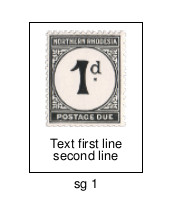 This was created with the soon to be released V4.2 which supports text in addition to images inside stamp boxes. In this example, I placed the text below the image, but it could just as easily be the other way round. V4.2 is more or less complete, only the documentation to finish which unfortunately is something I really tend to procrastinate about. I am going to try and knuckle down and get it done this week. It is possible, however, to do something similar with the current version, although it is a really ugly hack and will require a bit of fiddling to get it to line up properly. To do so, add a row of stamp boxes with the text in, then add a second row of boxes without borders containing the images. Place a PAGE_TEXT command with a negative vertical spacing between the rows of stamps to move the images up into the stamp boxes e.g PAGE_TEXT (HN 1 "" -25.0) Sorry to hear that you are not well Andy, hopefully not the dreaded virus, get well soon. Clive |
|
Send note to Staff
|
AlbumEasy - Free software for creating custom stamp album pages ChromaMate - Compare, match, analyse, free colour matching software ImageSleuth - Images, hidden inside images, revealed. A retroReveal alternative PSGSA - The Philatelic Society for Greater Southern Africa |
|
|
Pillar Of The Community
United States
3046 Posts |
|
|
I need to do this:  As you can see, the image is not centered in the box. And there is text under the image and text at the buttom, but INSIDE the box, not outside the box. |
|
Send note to Staff
|
|
|
|
Pillar Of The Community
United States
3046 Posts |
|
|
I need to put text INSIDE the box, all the way at the bottom. AlbumEasy allows you to design pages the way you would want them laid out. Sadly, Mystic's page aren't laid the way I would think a typical stamp collector would lay them out. |
|
Send note to Staff
|
|
|
|
Replies: 80 / Views: 16,617 |
|



 Posted 10/27/2020 08:57 am


