| Author |
 Replies: 80 / Views: 16,618 Replies: 80 / Views: 16,618 |
|
|
|
Valued Member
United States
69 Posts |
|
|
Could I use this to design pages that could be printed on lighthouse pages?
I'm guessing yes. Probably need to go to print shop.
But definitely intrigued about building a collection of Swedish town cancels and then having them in my lighthouse hingeless album. |
Send note to Staff 
|
|
|
Valued Member
Canada
439 Posts |
|
|
Hi Andy, As from AlbumEasy V4.2, which I am planning on releasing in the next few days, you can combine text and images inside boxes, hopefully, this example is a better illustration than the simplistic single stamp example in my previous post:  This should allow you to recreate the "2000 Commemoratives" sample you posted. Clive |
|
Send note to Staff
|
AlbumEasy - Free software for creating custom stamp album pages ChromaMate - Compare, match, analyse, free colour matching software ImageSleuth - Images, hidden inside images, revealed. A retroReveal alternative PSGSA - The Philatelic Society for Greater Southern Africa |
|
|
Valued Member
Canada
439 Posts |
|
|
hi JRockne, Quote:
Could I use this to design pages that could be printed on lighthouse pages?
I'm guessing yes. Probably need to go to print shop.
Absolutely you can create whatever sized pages you like with AlbumEasy, however, unless you have a printer that can handle the Lighthouse pages you will need to go to a print shop. Clive |
|
Send note to Staff
|
AlbumEasy - Free software for creating custom stamp album pages ChromaMate - Compare, match, analyse, free colour matching software ImageSleuth - Images, hidden inside images, revealed. A retroReveal alternative PSGSA - The Philatelic Society for Greater Southern Africa |
|
|
Valued Member
United States
69 Posts |
|
|
Perfect. Just watched the tutorial. Looking forward to adding a town cancel section to my lighthouse Scandinavian collection. |
|
Send note to Staff
|
|
|
Valued Member
Canada
439 Posts |
|
|
JRockne, Please shout if you have any questions, either via the contact form on my website, or else this forum if you prefer  Clive |
|
Send note to Staff
|
AlbumEasy - Free software for creating custom stamp album pages ChromaMate - Compare, match, analyse, free colour matching software ImageSleuth - Images, hidden inside images, revealed. A retroReveal alternative PSGSA - The Philatelic Society for Greater Southern Africa |
|
|
Valued Member
United States
191 Posts |
|
|
Is it possible to create 3 columns? I keep getting errors when I try and add a 2nd PAGE_COLUMN_NEXT command. I'm trying to add 2 small stamps in a column with a single large stamp in the next column and 2 more smaller stamps in the third column.
|
|
Send note to Staff
|
| Edited by Phillystamper - 05/07/2021 12:15 pm |
|
|
Valued Member
Canada
439 Posts |
|
|
Hi Phillystamper,
Unfortunately, the current version of AlbumEasy only supports two columns - multiple column support is on my list for a few release. However, that doesn't help you now.
What may work instead, is to use the STAMP_ADD_BLANK(width height) command which allows one to insert blank stamps in a row, these are stamp boxes without text or a frame to act as spacers between the stamp boxes.
If that doesn't work for you, please contact me either via a message on this site, or via the contact form on my website so that you can send me the file, and I am sure that I will be able to come up with a solution :)
Clive
|
|
Send note to Staff
|
AlbumEasy - Free software for creating custom stamp album pages ChromaMate - Compare, match, analyse, free colour matching software ImageSleuth - Images, hidden inside images, revealed. A retroReveal alternative PSGSA - The Philatelic Society for Greater Southern Africa |
|
|
Valued Member
United States
191 Posts |
|
|
Thanks Clive, No worries, I was able to make an alternate arrangement with as you mention STAMP_ADD_BLANK. Another idea/suggestion would be to put two stamps in one stamp box. |
|
Send note to Staff
|
|
|
Valued Member
United States
90 Posts |
|
|
How do you set up the stamp box dimension? do you add 2 mm to the actual stamp lengh and height per se in the code?
STAMP_ADD (42.0 25.0 "1 C" "" "" "")
the actual stamp dimension are 40mm and 23mm.
I also noticed that after printing, I took the ruler and measured the box dimension on the paper. it wasnt 42 mm, it was around 40 mm |
|
Send note to Staff
|
|
|
Valued Member
Canada
439 Posts |
|
|
Hi trabz,
If I am using mounts, I like to make the boxes 4mm larger than the actual stamp, to leave a 2mm border all around the stamp. That is because the Lighthouse mounts I use are 4mm taller than the stamps.
Other makes of mounts might be slightly different, or if you are using hinges, you can set the size of the box much closer to the size of the actual stamp depending on your personal preference.
There are two ways that one can do this, for example, if the actual stamp is 40mm x 23mm
You can use
STAMP_ADD (44.0 27.0 "1 C" "" "" "")
The way I prefer to do it though is to use the STAMP_BOXES_SIZE_ADJUST at the beginning of the file. e.g to increase all boxes by 4mm:
STAMP_BOXES_SIZE_ADJUST(4.0)
and to then set the boxes to the actual size.
STAMP_ADD (40.0 23.0 "1 C" "" "" "")
That way, if you change stamp mounts or to hinges in the future, you can adjust all boxes in one place instead of having to go through the whole file.
When printed, the boxes should print at the correct size, if they do not, then please check the print dialog box to ensure that none of the page scaling options such as "Shrink oversized pages to paper size" or "Expand small pages to paper size" etc. are not selected otherwise, items on the page may not print at the correct size.
Clive
|
|
Send note to Staff
|
AlbumEasy - Free software for creating custom stamp album pages ChromaMate - Compare, match, analyse, free colour matching software ImageSleuth - Images, hidden inside images, revealed. A retroReveal alternative PSGSA - The Philatelic Society for Greater Southern Africa |
|
|
Valued Member
United States
90 Posts |
|
|
Pillar Of The Community
United States
571 Posts |
|
|
I'll check it out but... I know I've posted about this before but I'll repeat some of it here. Since the mid-90's, I have been making my own pages out of frustration with the commercial pages vs. my collecting habits I like to collect stamps and include additional formats on a second page. Most albums won't accommodate that neatly. I've tried several software's over the years: SmartDraw, Visio before it was a Microsoft, and a 4-5 other stamp specific products. Although it got a lot of bad reviews early on, I settled on MS Publisher. Most of the earlier problems with MS Publisher (currently using MS Pub 2013) have been taken care of in more recent versions but still needs a bit of "fine tuning" and I can start to grind down with large files so I keep to about 150-180 pages with heavy graphics per file. It took a while before I came up with a border that I liked. The border parts were customized from from royalty free graphics that I bought on CD a couple decades ago and I made a set of standard stamp frames which I can easily customize for odd pieces, with a template for keeping the info format semi-standard. I print them one-sided on ivory archival card stock. I bought several cases at the same time and have produced 1000's of pages. I use 2-1/2" leather Wilson and Columbia 3-ring binders with metal piano hinges. I got a huge pile from work when they digitized records and were throwing them out. I still have a couple boxes of the binders unused. If album easy were able to use the same formats/graphics, etc... I might think about it, but I'm disinclined to fix what already works (for me). Versatility and previous work compatibility wins in the end. I'll post again if you won me over. 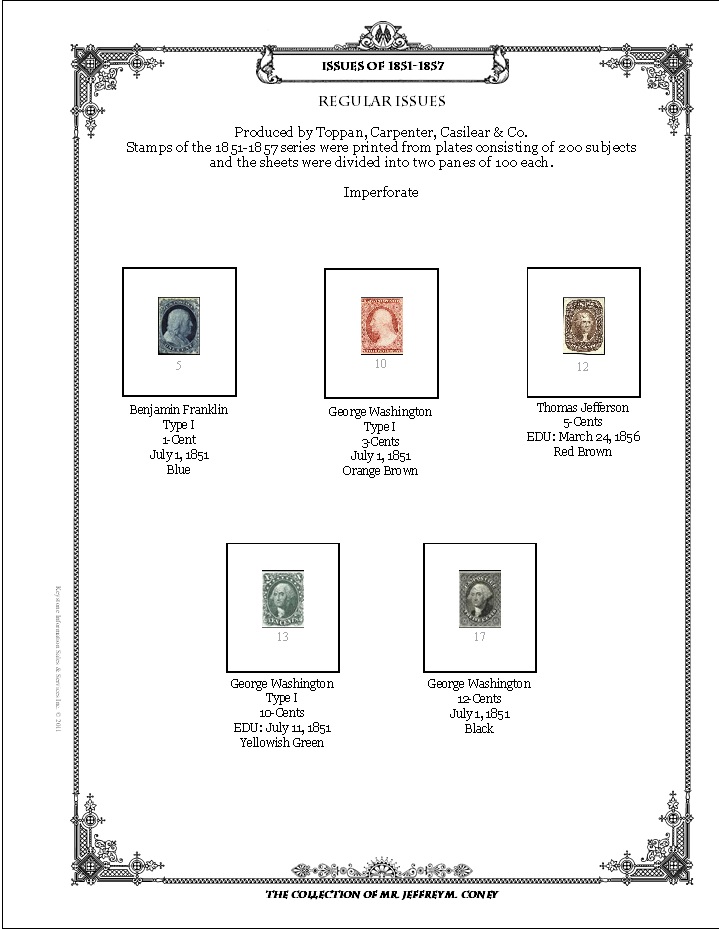  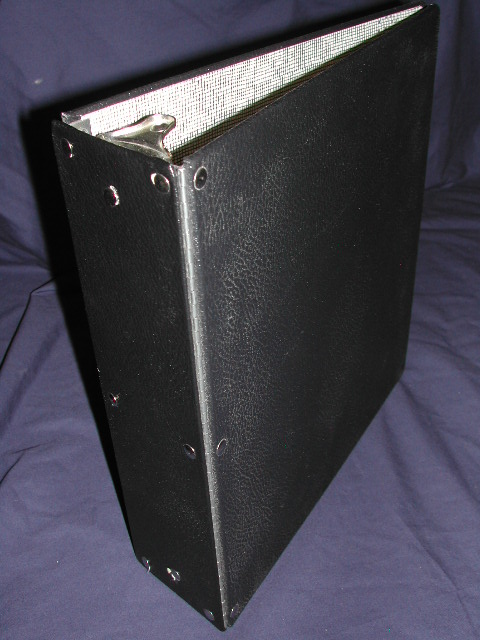 |
|
Send note to Staff
|
|
|
Pillar Of The Community
United States
8956 Posts |
|
|
Jconey, all due respect and your page layout is nice, but the border is way too busy for my taste. I use a straight border for my collection - it does not take away from the stamps.
Peter |
|
Send note to Staff
|
|
|
Pillar Of The Community
United States
571 Posts |
|
|
Peter: That's precisely why we design our own, to our own taste. Admittedly, I do gravitate towards filigree and Victorian era artwork, I hardly notice it after having worked in these pages for so long.
On Albumeasy 4.0: I just watched the V4.0.1 tutorial and over-all, I do understand freeware concepts and I can appreciate the interface from having done some web design work but I would urge the addition of drag and drop for the masses who don't want to do or understand command line work. This is bound to severely limit the appeal. The amount of work that would require might surpass the threshold for the authors free time and free development spirit. Having said that, I'd commend the author as this freeware has come a long way from the first version. |
|
Send note to Staff
|
|
|
Valued Member
Canada
439 Posts |
|
|
Hello jconey, Quote:
If album easy were able to use the same formats/graphics, etc... Assuming that your border graphic is one large image, then all you need do to use it in AlbumEasy is to add your graphic as a background image, in which case it would then be repeated on every page. AlbumEasy can even be set to automatically shrink the images in the stamp boxes to leave the wide spacing between boxes and images as per your example. The only thing on your page that AlbumEasy cannot do is the vertical text in the left margin - unless of course, it is part of the border graphic in which case it will be added to the page. Quote:
I might think about it, but I'm disinclined to fix what already works (for me).
Versatility and previous work compatibility wins in the end. I'll post again if you won me over. If you are happy with MS Publisher then what is the point of considering something else? My goal isn't to win anyone over, I provide AlbumEasy as a free tool that some people like, others don't, either way it makes absolutely no difference to me whether someone uses it or not. Although, I do encourage others to try it in the hope that they may find it useful. I must admit though that I do get a certain amount of satisfaction when I hear of someone using it, and conversely, I do, irrationally I know, get a little bit hurt when I receive the occasional nasty email along the lines of how I have wasted their time with my terrible software and that I have absolutely no shame. So if you want to use AlbumEasy go ahead and I'll be happy to give you any assistance you need in getting your pages set up, but if you don't, it makes no difference to me, it is no skin off my nose. Clive |
|
Send note to Staff
|
AlbumEasy - Free software for creating custom stamp album pages ChromaMate - Compare, match, analyse, free colour matching software ImageSleuth - Images, hidden inside images, revealed. A retroReveal alternative PSGSA - The Philatelic Society for Greater Southern Africa |
|
|
Replies: 80 / Views: 16,618 |
|



 Posted 12/07/2020 2:05 pm


