|
This page may contain links that result in small commissions to keep this free site up and running.

Welcome Guest! Registering and/or logging in will remove the anchor (bottom) ads. It's Free!
To participate in the forum you must log in or register.
| Author |
 Replies: 142 / Views: 28,553 Replies: 142 / Views: 28,553 |
|
|
|
Valued Member
United Kingdom
6 Posts |
|
|
Thanks Mark, that is certainly getting there. Unfortunately PAGE_TEXT_RIGHT honours the ALBUM_PAGES_SPACING on the right so 10mm in from the border and this is another command that can only be used once in a file.
Any further ideas welcome? |
Send note to Staff 
|
|
|
Valued Member
Canada
58 Posts |
|
|
Oof. Justification is a bear. I don't think there's a command to do absolute positioning on the horizontal axis, especially outside the bounds of standard padding.
I'm curious about your footer text. What does "CAL 09.5" represent? How do you want it to change from page to page? |
|
Send note to Staff
|
|
|
Valued Member
United Kingdom
6 Posts |
|
|
Hi Mark - Lighthouse pages tend to number with year.seq, at least for the later issues.
These are appendix pages for issues they don't cover so I have called them CAL year.seq, CAL standing for Customised Advertising Labels which is what they are known as to collectors. Lighthouse themselves do the same for Ross Dependency (RD) and other back-of-the-book stuff. If I need to insert pages then I number them like 97.6a or similar. Not critical but it reminds me where to put them after exhibiting. |
|
Send note to Staff
|
|
|
Valued Member
Canada
440 Posts |
|
|
renowden and Mark (madbaker), thanks for sharing excellent examples :) A bit of background: When I first created AlbumEasy, it offered a somewhat restricted set of features, so setting the spacing using the ALBUM_PAGES_SPACING command seemed like a simple way to control the automatic placement of elements on the page for the whole album. I later added the PAGE_START_VAR command, which allows one to override the page spacing per page to tweak the spacing when, for example, a row of stamps does not quite fit on the page. Subsequently, as new features and commands have been added to AlbumEasy, ALBUM_PAGES_SPACING has often become more of a hindrance than a help. For the most part, I now find it more convenient to set it to very low values, even 0.0 0.0. The tradeoff is that it sometimes requires a little more typing but offers more flexibility in return. For example, with 0.0 vertical spacing, I include a PAGE_VSPACE(6.0) between rows of stamps. I also often use the PAGE_TEXT_PARAGRAPH_START command in place of the PAGE_TEXT commands when I need a little more flexibility. For example, renowden's issue with PAGE_TEXT_RIGHT placing the text 10mm in from the righthand border can be overcome by using the PAGE_TEXT_PARAGRAPH_START because it accepts a right-padding parameter. Because this can be a negative value, setting it to -8.0 will pad the right-hand end of the text 2mm in from the border. e.g PAGE_TEXT_PARAGRAPH_START(HN 16 RIGHT 0 0 -8.0)
Abcdefghijklmnop
PAGE_TEXT_PARAGRAPH_END
As you have noticed, many commands, such as the ALBUM_PAGES_SPACING, ALBUM_PAGES_MARGIN_TXT, ALBUM_PAGES_HEADER, and ALBUM_PAGES_FOOTER commands, set parameters that persist for the whole album, regardless of where the commands are placed in the album file. If more than one of these commands is given in the file, then the parameters set by the last instance of the command take precedence. I think it would probably be worthwhile to offer more flexibility for some of these commands for the next release of AlbumEasy (likely not before March or April). My overriding concern is ensuring strict backwards compatibility when I add any changes. Clive |
|
Send note to Staff
|
AlbumEasy - Free software for creating custom stamp album pages ChromaMate - Compare, match, analyse, free colour matching software ImageSleuth - Images, hidden inside images, revealed. A retroReveal alternative PSGSA - The Philatelic Society for Greater Southern Africa |
|
|
Valued Member
United Kingdom
6 Posts |
|
|
Thanks Clive, I appreciate your efforts. I have now got a solution that will work in 99% of the pages I create. As you pointed out I will need to make extra effort in cases where more room is required for the occasional page. This is what I now have...
PAGE_START_GROUP_BEGIN
PAGE_VSPACE (12.0)
PAGE_TEXT_CENTRE (OPTIMA 24 "NEW ZEALAND" 10.0)
# Only one ALBUM_PAGE_FOOTER command is recognised so an alternative method must be used
# ALBUM_PAGES_FOOTER (HN 7 R $$2)
# Move down to the bottom of the page below the border
PAGE_SET_VERTICAL_POS (280.2)
# Insert the text 10mm to the right to counter the ALBUM_PAGES_SPACING
# However BEWARE, if you change the horizontal spacing using PAGE_START_VAR then this
# will move the footer.
PAGE_TEXT_PARAGRAPH_START(HN 7 RIGHT 0 0 -10.0)
$$2
PAGE_TEXT_PARAGRAPH_END
# Head back up to the top of the page to continue
PAGE_SET_VERTICAL_POS (50)
# Now insert the year. Additional spacing to centre the page can be added afterwards
PAGE_TEXT_CENTRE (HN 6 $$1 3.0)
PAGE_START_GROUP_END
I can now after some years create more than one page per file! Having been a software developer myself I am fully aware of problems that arise when the specification changes during the life of the project, even when fully justified. Even with added flexibility it is heaps easier to use than Word, Publisher or graphics programs. The only thing that came close was a program my father used on his Amstrad PCW in the 80s - I think it was called LocoScript or similar - but he had a distinct advantage as he only collected Machins so all the boxes were the same size :) |
|
Send note to Staff
|
|
|
Valued Member
Canada
440 Posts |
|
|
Quote:
The only thing that came close was a program my father used on his Amstrad PCW in the 80s - I think it was called LocoScript or similar - but he had a distinct advantage as he only collected Machins so all the boxes were the same size :) renowden, That brings back happy memories. Personal computing in the late 70's and early 80s was an exciting time to be involved in the tech industry, Not many of the increasing range of computers made it to South Africa, thanks to a combination of sanctions and the small market, but I enjoyed reading the reviews in various computer journals as each new machine came out. Clive |
|
Send note to Staff
|
AlbumEasy - Free software for creating custom stamp album pages ChromaMate - Compare, match, analyse, free colour matching software ImageSleuth - Images, hidden inside images, revealed. A retroReveal alternative PSGSA - The Philatelic Society for Greater Southern Africa |
|
|
Valued Member
United States
5 Posts |
|
|
First of all, thanks for these great examples I have learned a lot about Album Easy just by reading through them a first time. I have copied many of them over to keep and use later. They have given me quite a few new ideas for my albums.
Unless I missed it, I didn't see anything about rotating a square (which was my original search that led me to this page). There are many stamps out there that are square that needs to be rotated 45 degrees to position the image on the stamps as they should be.
Is there a command or set of commands to position a square with one of the points pointing upward, e.g. a square rotated 45 degree? Thanks in advance. |
|
Send note to Staff
|
|
|
Valued Member
Canada
440 Posts |
|
|
Hi sluggo63, Quote:
Unless I missed it, I didn't see anything about rotating a square (which was my original search that led me to this page). There are many stamps out there that are square that needs to be rotated 45 degrees to position the image on the stamps as they should be.
Is there a command or set of commands to position a square with one of the points pointing upward, e.g. a square rotated 45 degree? Thanks in advance. One option would be to use the STAMP_ADD_DIAMOND command to add these stamp boxes. Another option would be to use the PAGE_ADD_BOX command to add a box anywhere on the page rotated to a specified angle. Clive |
|
Send note to Staff
|
AlbumEasy - Free software for creating custom stamp album pages ChromaMate - Compare, match, analyse, free colour matching software ImageSleuth - Images, hidden inside images, revealed. A retroReveal alternative PSGSA - The Philatelic Society for Greater Southern Africa |
|
|
Valued Member
United States
5 Posts |
|
|
Thanks Clive. I certainly did miss that one. I was so focused on looking for 'square' that I didn't even think about anything else. Guess that rattlesnake would have bit me.
Thanks again for your help. PS. I'm really enjoying playing around and learning more about this program. I now have several stamps on album pages that otherwise would still be in envelopes. |
|
Send note to Staff
|
|
|
New Member
2 Posts |
|
|
Is there a way to rotate text? I've tried putting it in a text box and rotating that, but the text is still horizontal. |
|
Send note to Staff
|
|
|
Valued Member
Canada
440 Posts |
|
|
Quote:
Is there a way to rotate text? I've tried putting it in a text box and rotating that, but the text is still horizontal. Unfortunately, not in the current version of AlbumEasy. As you have discovered, the text is still horizontal when the boxes are rotated. I have added rotated text to my ever-growing to-do list as a possibility for the next release of AE, which will hopefully be in the next few months. Clive |
|
Send note to Staff
|
AlbumEasy - Free software for creating custom stamp album pages ChromaMate - Compare, match, analyse, free colour matching software ImageSleuth - Images, hidden inside images, revealed. A retroReveal alternative PSGSA - The Philatelic Society for Greater Southern Africa |
|
|
Valued Member
13 Posts |
|
|
Hi every one i'm new to Albumeasy and I need a little help. I'm trying to align the single box to the left in the middle and with a gap between the four boxes. I can't figure this out and any help would be much appreciated. Here is the code PAGE_START PAGE_VSPACE (1.0) PAGE_TEXT_CENTRE (TB 10 "TEST PAGE") PAGE_VSPACE (5.0) # parquet | = = ROW_ALIGN_TOP ROW_START_FS (CN 6 0.1 0) STAMP_ADD (32 58 "" "" " " "") STAMP_ADD (58 32 "" "" "" "") STAMP_ADD (58 32 "" "" "" "") PAGE_VSPACE (-29) ROW_START_FS (CN 6 0.1 0) STAMP_ADD_BLANK (32 0) STAMP_ADD (58 32 "" "" "" "") STAMP_ADD (58 32 "" "" "" "") 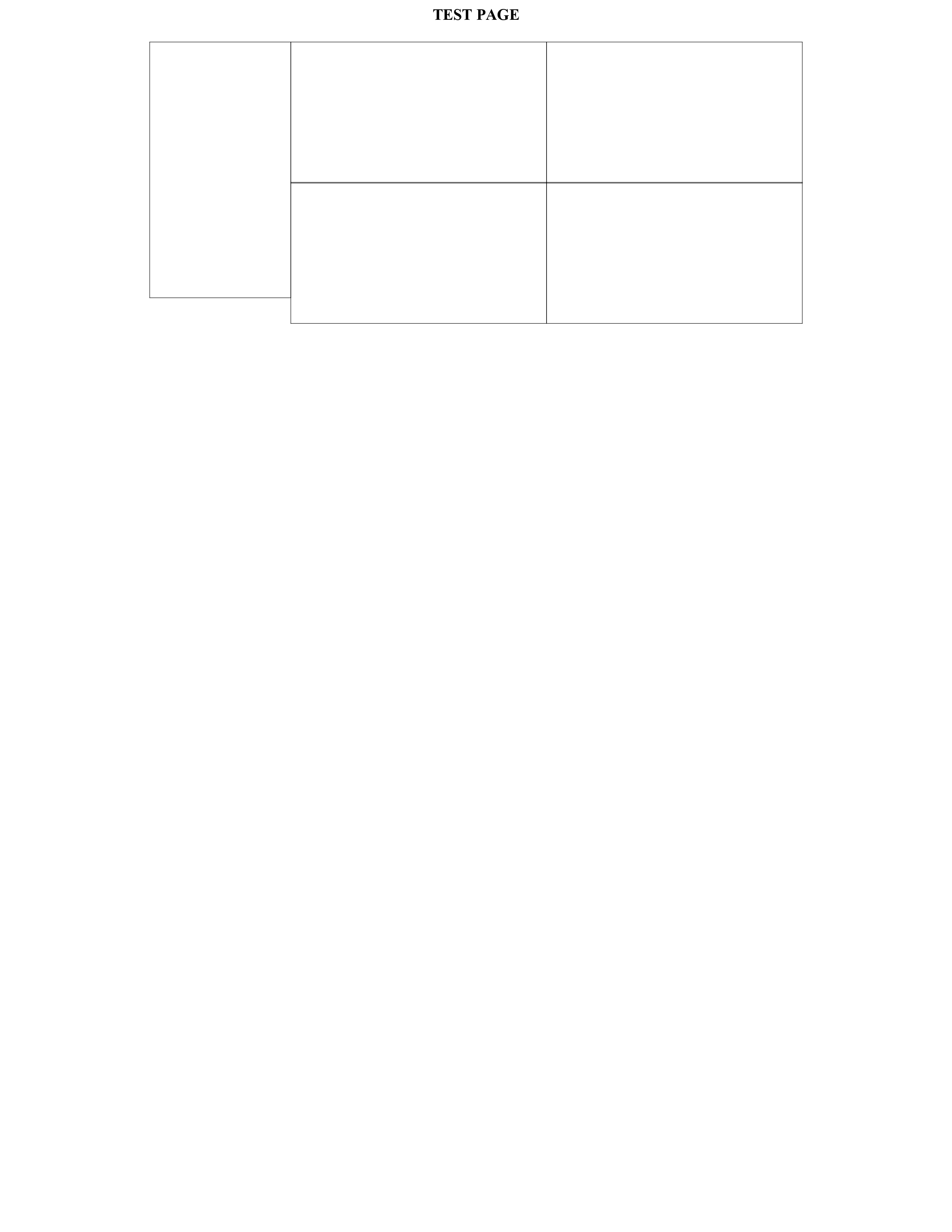 |
|
Send note to Staff
|
|
|
Valued Member
Canada
440 Posts |
|
|
Dj925, I think that this is what you are trying to achieve. Please let me know if I am mistaken: 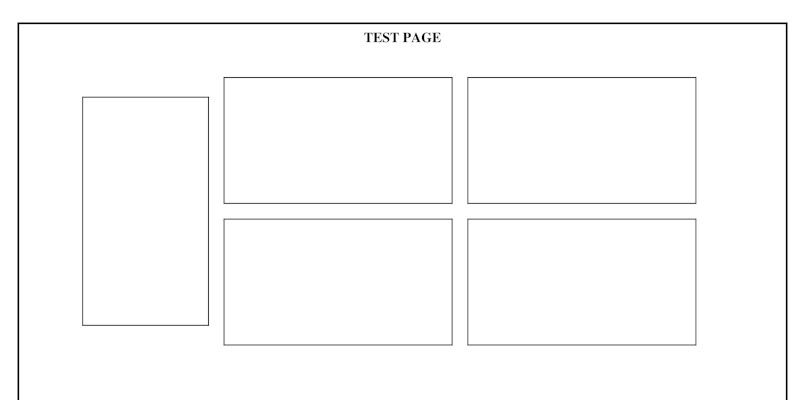 This is what I used PAGE_START PAGE_VSPACE (1.0) PAGE_TEXT_CENTRE (TB 10 "TEST PAGE") PAGE_VSPACE (5.0) PAGE_COLUMN_START(15.0 35.0 0.0 0.0 0.0) #start of first column PAGE_VSPACE (5.0) ROW_START_FS (CN 6 0.1 4.0) STAMP_ADD (32 58 "" "" " " "") PAGE_COLUMN_NEXT #start of second column ROW_START_FS (CN 6 0.1 4.0) STAMP_ADD (58 32 "" "" "" "") STAMP_ADD (58 32 "" "" "" "") ROW_START_FS (CN 6 0.1 4.0) STAMP_ADD (58 32 "" "" "" "") STAMP_ADD (58 32 "" "" "" "") PAGE_COLUMN_STOP The last parameter of the ROW_START_FS command is the spacing between the stamps. If set to zero, then the boxes will touch. I used 4mm in this example. ROW_ALIGN_TOP is unnecessary, as this is the default The easiest way to achieve this layout is to divide the page into vertical columns, each of which acts like an individual page. In this example, the first column contains the tall vertical stamp. I have set it to be 15% of the page width; the second column will fill the remainder of the page width, 85%. I have also added 35mm of padding to the left side of the first column to shift the tall vertical stamp to the right. I have inserted 5mm of vertical space above this stamp. The actual amount will depend on the spacing between the rows set by ALBUM_PAGES_SPACING. Hopefully, this helps. Please let me know if you have any more questions or if I have misunderstood your requirements. Clive |
|
Send note to Staff
|
AlbumEasy - Free software for creating custom stamp album pages ChromaMate - Compare, match, analyse, free colour matching software ImageSleuth - Images, hidden inside images, revealed. A retroReveal alternative PSGSA - The Philatelic Society for Greater Southern Africa |
|
|
Valued Member
United States
10 Posts |
|
|
I'm grateful for this thread, as I was poking around looking for tips on borders for AlbumEasy. Made this page today, matching the Scott Specialty border. I doubt I'll actually use it, as part of the reason I'm making pages is to save page space, but it was pretty fun to make this anyway. 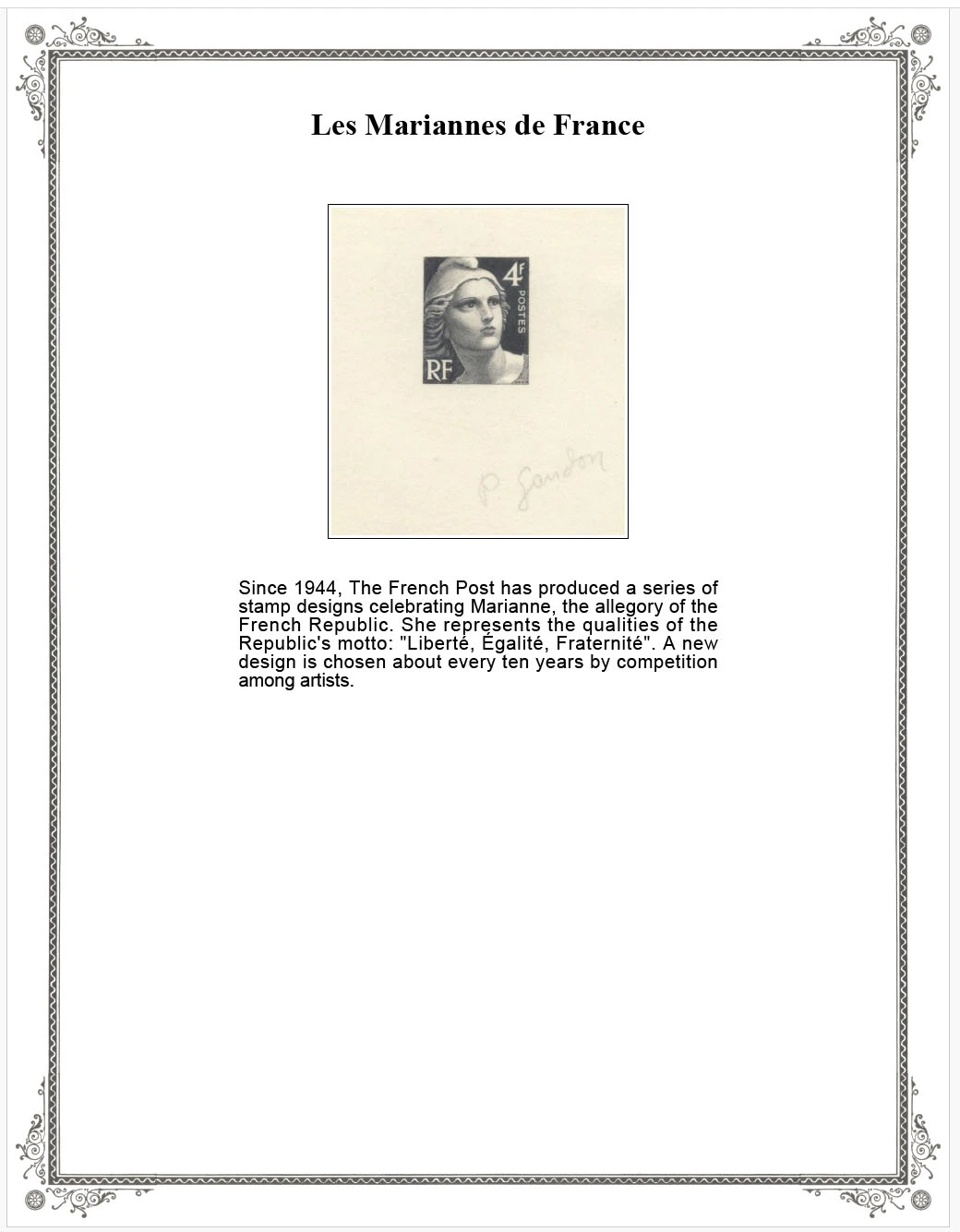 |
|
Send note to Staff
|
|
|
Valued Member
Canada
440 Posts |
|
|
Dave, Thanks for sharing your page. The border looks great  Clive |
|
Send note to Staff
|
AlbumEasy - Free software for creating custom stamp album pages ChromaMate - Compare, match, analyse, free colour matching software ImageSleuth - Images, hidden inside images, revealed. A retroReveal alternative PSGSA - The Philatelic Society for Greater Southern Africa |
|
|
Replies: 142 / Views: 28,553 |
|
|
To participate in the forum you must log in or register. | |
 Transvaal Postal History Help Earliest Stamp With In-Design Date? My First Stamps Help Newbie.help With Stamp Identification (J29) Inherited These Stamps, Are They Genuine? APS Membership Discount Metropex Stamp Show: Roseville, Minnesota October 23-24 Weird Covers, 1885,1886, And 1982 For Users Of Two-Post Blue International Albums What Is Your Experience With Binders. New Member Posting Image Of Avatar, Front And Back Of U2 Cut Square, Market Value Or References? Working On An Offline Collection George Washington 3 Cent 1861 With Print On The Back Hello From The Netherlands - New Member Then And Now, From Old Postcards New Member Wanting To Add An Avatar Sparks Auction Fees? 163 VF Nyfm Vertically Ribbed 163 XF Quartered Cork, Labeled Jumbo 136 VF Quadruple Split H Grill Nashville Philatelic Society-Your Invitation To Our Auction Night Meeting Monday, October 26, 2026 Nashville Philatelic Society-Your Invitation To Our Meeting Monday, October 19, 2026 Christmas Around The World 2026 C.e. In The Large Queen Cancel A More Condensed Album Page Experiment. US Scott #3 Postmarked Or Fake? Transvaal Postal History Help Earliest Stamp With In-Design Date? My First Stamps Help Newbie.help With Stamp Identification (J29) Inherited These Stamps, Are They Genuine? APS Membership Discount Metropex Stamp Show: Roseville, Minnesota October 23-24 Weird Covers, 1885,1886, And 1982 For Users Of Two-Post Blue International Albums What Is Your Experience With Binders. New Member Posting Image Of Avatar, Front And Back Of U2 Cut Square, Market Value Or References? Working On An Offline Collection George Washington 3 Cent 1861 With Print On The Back Hello From The Netherlands - New Member Then And Now, From Old Postcards New Member Wanting To Add An Avatar Sparks Auction Fees? 163 VF Nyfm Vertically Ribbed 163 XF Quartered Cork, Labeled Jumbo 136 VF Quadruple Split H Grill Nashville Philatelic Society-Your Invitation To Our Auction Night Meeting Monday, October 26, 2026 Nashville Philatelic Society-Your Invitation To Our Meeting Monday, October 19, 2026 Christmas Around The World 2026 C.e. In The Large Queen Cancel A More Condensed Album Page Experiment. US Scott #3 Postmarked Or Fake?
Disclaimer: While a tremendous amount of effort goes into ensuring the accuracy of the information contained in this site, Stamp Community assumes no liability for errors. Copyright 2005 - 2026 Stamp Community Family - All rights reserved worldwide. Use of any images or content on this website without prior written permission of Stamp Community or the original lender is strictly prohibited.
Privacy Policy / Terms of Use Advertise Here |
| Stamp Community Forum |
© 2007 - 2026 Stamp Community Forums |
| It took 0.35 seconds to lick this stamp. |
 |
|
|
|


 Posted 01/02/2025 12:32 pm


