Stamp Community Family of Web Sites
Thousands of stamps, consistently graded, competitively priced and hundreds of in-depth blog posts to read


Stamp Community Forum
 
Username:
Password:
Save Password
Forgot your Password?

This page may contain links that result in small commissions to keep this free site up and running.

Welcome Guest! Registering and/or logging in will remove the anchor (bottom) ads. It's Free!

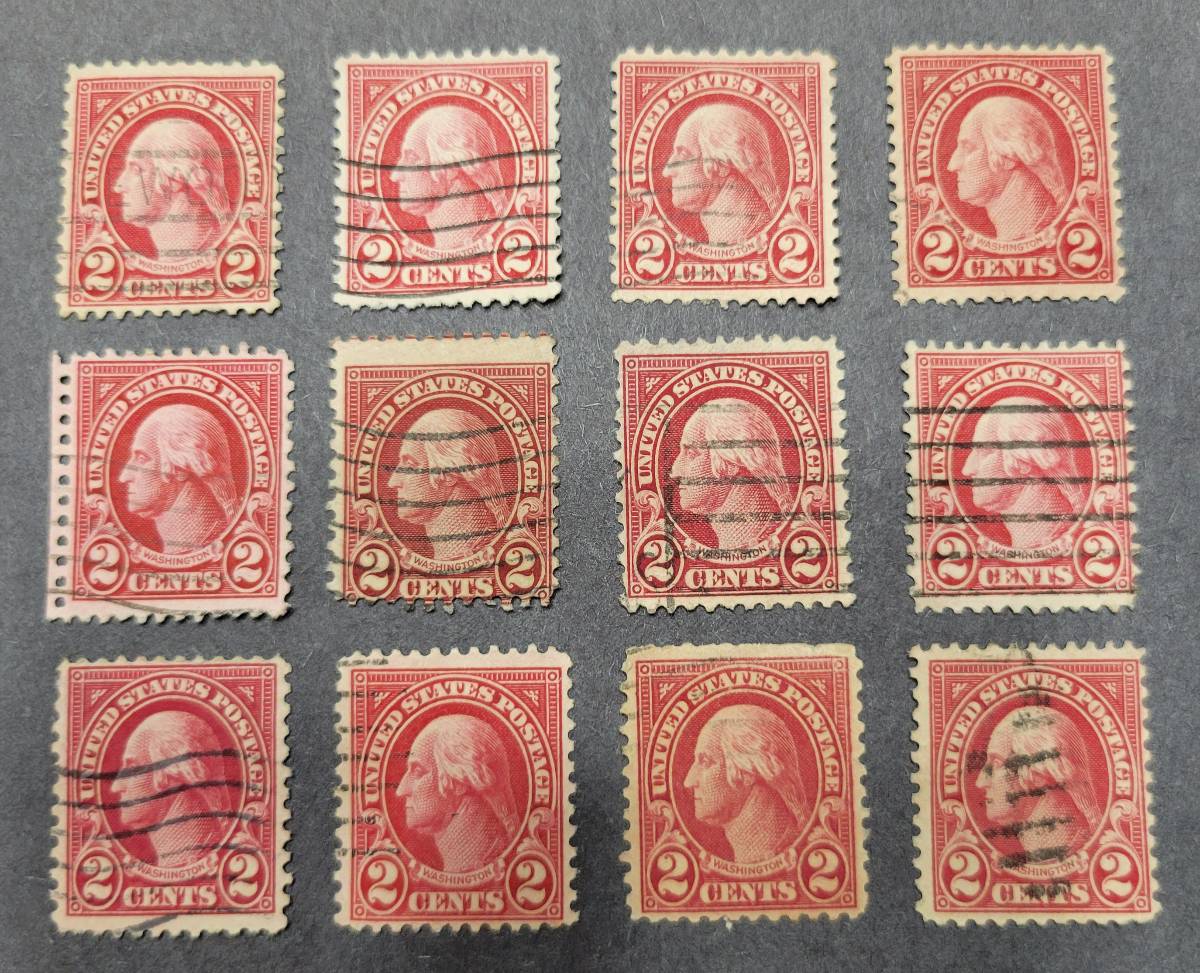
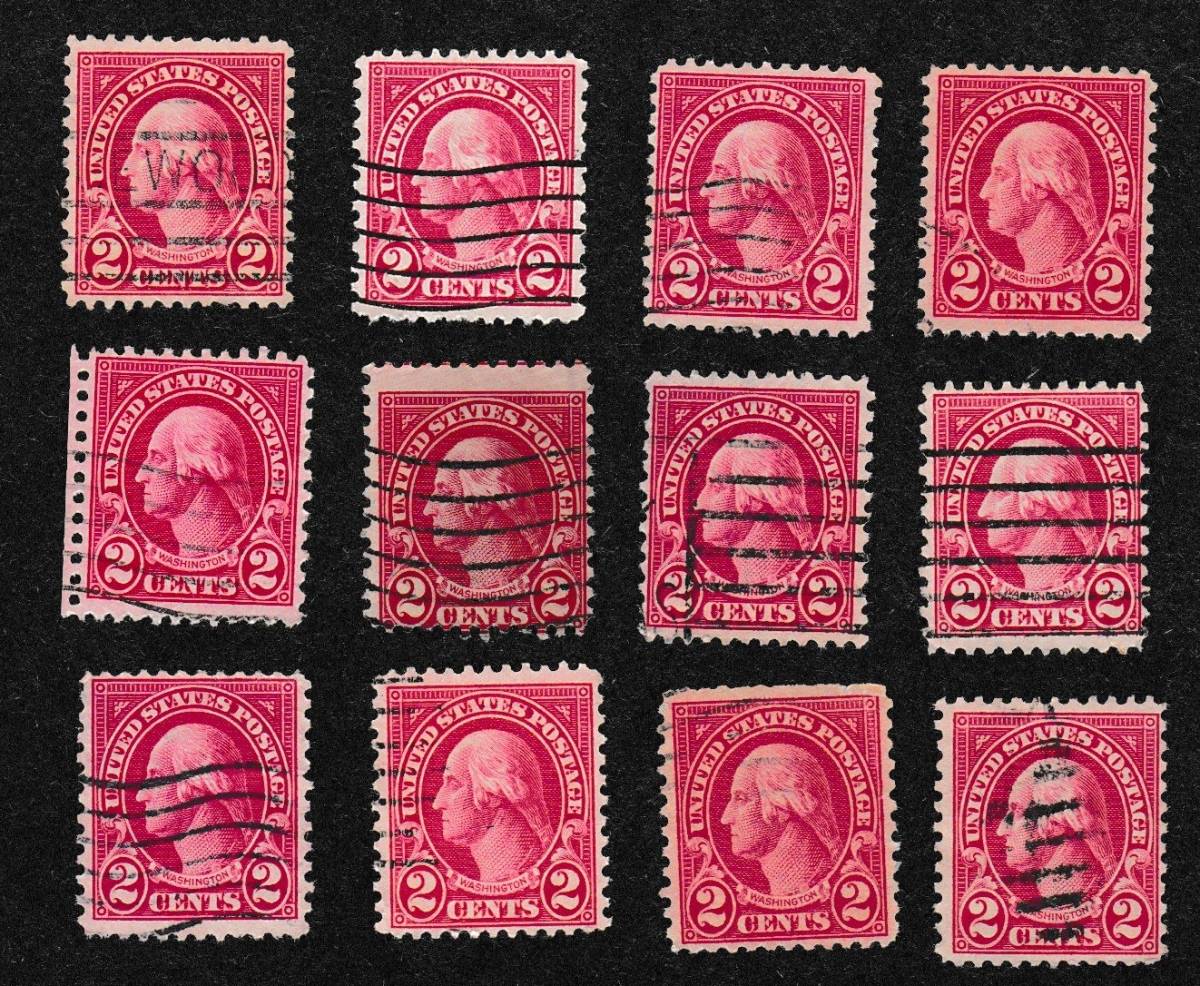
Scott 634 . Any Of These Carmine Lake Or Lake?

 
To participate in the forum you must log in or register.
Author Previous TopicReplies: 10 / Views: 1,351Next Topic  
Pillar Of The Community
United States
1088 Posts
Posted 04/15/2023   5:59 pm  Show Profile Bookmark this topic Add NicholasC to your friends list Get a Link to this Message
Here's a small arrangement of different shades:


Any of these Carmine Lake or Lake? I have my thoughts, I'd like to hear yours.

The color differences in the picture are consistent with what I see laid out on my desk.

*** Moved by Staff to a more appropriate forum. ***
Send note to Staff
Edited by NicholasC - 04/15/2023 6:41 pm

Pillar Of The Community
United States
8956 Posts
Posted 04/15/2023   7:01 pm  Show Profile Bookmark this reply Add Petert4522 to your friends list  Get a Link to this Reply
It is a shame that you did not scan these on black matte paper - that would have at least make it a bit easier


Peter
Send note to Staff  Go to Top of Page
Pillar Of The Community
United States
1088 Posts
Posted 04/15/2023   7:02 pm  Show Profile Bookmark this reply Add NicholasC to your friends list  Get a Link to this Reply
I can do that if you think it will help.
Send note to Staff  Go to Top of Page
Pillar Of The Community
United States
1088 Posts
Posted 04/15/2023   7:17 pm  Show Profile Bookmark this reply Add NicholasC to your friends list  Get a Link to this Reply
This help? I'll also do a regular scan with my scanner.

Send note to Staff  Go to Top of Page
Pillar Of The Community
United States
4302 Posts
Posted 04/15/2023   7:22 pm  Show Profile Bookmark this reply Add Parcelpostguy to your friends list  Get a Link to this Reply
Here is the problem, your image was color adjusted by the scanner as shown by the fact the background paper is grey, not black. See how that changes the colors as seen in your two posts.

So far I will say no stamp on the out edge is one of the colors you are asking about.
Send note to Staff  Go to Top of Page
Pillar Of The Community
United States
1088 Posts
Posted 04/15/2023   7:53 pm  Show Profile Bookmark this reply Add NicholasC to your friends list  Get a Link to this Reply
Here's a photo scan. I don't have anything that is more black.

Send note to Staff  Go to Top of Page
Edited by NicholasC - 04/15/2023 8:20 pm
Moderator
Learn More...
United States
12330 Posts
Posted 04/15/2023   8:51 pm  Show Profile Bookmark this reply Add 51studebaker to your friends list  Get a Link to this Reply
Are you scanning with the scanner lid closed?
Don
Send note to Staff  Go to Top of Page
Pillar Of The Community
United States
1088 Posts
Posted 04/15/2023   8:57 pm  Show Profile Bookmark this reply Add NicholasC to your friends list  Get a Link to this Reply
Yes. I put the stamps face down on the glass and the black construction paper on top of them. Close the lid. The scanner simply doesn't show the color range and the stamps just don't seem that bright. The first two images are from my camera and the shade differences are more accurate based on what I see with my own eyes.
Send note to Staff  Go to Top of Page
Moderator
Learn More...
United States
12330 Posts
Posted 04/15/2023   9:01 pm  Show Profile Bookmark this reply Add 51studebaker to your friends list  Get a Link to this Reply
Ah, sounds like a good scanning procedure. What scanner are you using and is it using the default configuration?
Send note to Staff  Go to Top of Page
Pillar Of The Community
United States
1088 Posts
Posted 04/15/2023   9:18 pm  Show Profile Bookmark this reply Add NicholasC to your friends list  Get a Link to this Reply
I have a Canon Pixma MX472 printer/scanner, which I know isn't great. I used the photo source scan for that last image, even though stamps are not photos. When I use the document scan, the background is much more black. I think I'm using all default settings.

Here is the document scan image:


Send note to Staff  Go to Top of Page
Edited by NicholasC - 04/15/2023 9:19 pm
Pillar Of The Community
United States
1088 Posts
Posted 04/15/2023   9:24 pm  Show Profile Bookmark this reply Add NicholasC to your friends list  Get a Link to this Reply
I'm reviewing all the images now from my desktop computer rather than my phone. The 3rd image (the photo scan) seems the most realistic, but that 1st image still seems to show the best color variance even though the image seems a bit darker that it should be. The 2nd stamp in the 2nd row is really quite different than the rest.
Send note to Staff  Go to Top of Page
  Previous TopicReplies: 10 / Views: 1,351Next Topic  
 
To participate in the forum you must log in or register.

Go to Top of Page

Disclaimer: While a tremendous amount of effort goes into ensuring the accuracy of the information contained in this site, Stamp Community assumes no liability for errors. Copyright 2005 - 2026 Stamp Community Family - All rights reserved worldwide. Use of any images or content on this website without prior written permission of Stamp Community or the original lender is strictly prohibited.
Privacy Policy / Terms of Use    Advertise Here
Stamp Community Forum © 2007 - 2026 Stamp Community Forums
It took 0.19 seconds to lick this stamp. Powered By: Snitz Forums 2000 Version 3.4.05