|
This page may contain links that result in small commissions to keep this free site up and running.

Welcome Guest! Registering and/or logging in will remove the anchor (bottom) ads. It's Free!
To participate in the forum you must log in or register.
| Author |
 Replies: 42 / Views: 3,736 Replies: 42 / Views: 3,736 |
|
|
|
Pillar Of The Community
Netherlands
6638 Posts |
|
|
Quote:
Lets say I'm missing Chile pages for 2006 for some reason for a Scott Specialty Chile album I have. I order them from Scott/Amos, they print them on demand, and they make a few bucks. Davo Albums in the Netherlands will even print you a single page if you're willing to pay for it. However, Davo only publishes albums for a limited number of countries, mostly European. Printing pages on demand does seem economically doable. Even a single missing page. You can only order pages from their current range in the current format. Here in their home market, a page costs you € 4.95, excluding P&P. It takes up to four weeks to deliver within the Netherlands. Pages are printed in Germany. Indeed, having a limited coverage for which there is demand and being 'in print' will make it economically viable. But DAVO does not offer such service for discontinued albums. |
Send note to Staff 
|
|
|
Pillar Of The Community
United States
6466 Posts |
|
|
The only "major" catalog publisher that appears to actively be doing this is Palo, and they also offer the most flexibility in this regard. You can get any of their pages in 4 different versions (assuming the pages are offered in all of them):
1. Pages printed in color,
2. Pages printed in color, hingeless
3. Pages printed in black & white
4. Pages printed in black & white, hingeless
Numbers 1 and 2 are the default listings on the website, but 3 and 4 are available upon request at the same prices as their color counterparts. Personally, I can't stand album pages printed in color, as you can't tell at-a-glance which spots need to be filled, so I always request black & white pages.
Now add to that flexibility, the fact that they will provide any individual pages you want in any quantity, not just predetermined page sets. I can get numerous sets of black & white hingeless pages for an issue that I'm specializing in, whether it's flyspecking, color shades, cancels, whatever I want.
They will even make custom pages for you if you can provide them the layout/measurement information; this comes at a higher cost and I've never personally had the need, so I've not explored it.
They've taken the correct business approach IMO: "If you've got the money, we'll provide whatever you want." |
|
Send note to Staff
|
|
| Edited by revenuecollector - 02/15/2024 08:53 am |
|
|
Pillar Of The Community
United Kingdom
8624 Posts |
|
|
That's basically Palo's business model, isn't it? Steiner's pages tarted up and printed on demand for the well-heeled (on leaves that don't fit any binders other than their own). It's a different operation to, say, Gibbons' run of specifically designed British Empire albums for 1840 to 1970 (when available, which is another story). |
|
Send note to Staff
|
|
|
Pillar Of The Community
United States
6466 Posts |
|
|
Quote:
That's basically Palo's business model, isn't it? Steiner's pages tarted up and printed on demand for the well-heeled (on leaves that don't fit any binders other than their own). It's a different operation to, say, Gibbons' run of specifically designed British Empire albums for 1840 to 1970 (when available, which is another story). No, Palo offers specific sets of pages for each country chronologically, the way other makers do. What I highlight above is in addition to that. Turnaround on predefinded sets of pages is faster than custom orders. As far as the "on leaves that don't fit any binders other than their own" complaint, literally ALL of the album page brands use different proprietary post/punch measurements to prevent cross-use of their binders. Scott, Leuchturm, Safe, Lindner, Davo, they are all different measurements, so I don't know why you call out Palo specifically here. The only way to get around this is to re-punch pages or use springback binders, which suck, as they don't lay flat. |
|
Send note to Staff
|
|
|
|
Pillar Of The Community
United Kingdom
8624 Posts |
|
|
Actually, most of Gibbons's albums are 22-ring or 4-ring, both standard formats.
I was making the point that, having fiddled the Steiner pages onto its own larger design, it's likely that Palo then (sensibly) prints to order. I can't see it keeping a warehouse stacked with Cayman Islands or Grenadines pages.
Leeches suck, springback binders don't. They're an attractive, traditional way of displaying stamps. If the flatness is of concern, the collector can spring for linen-hinged pages. |
|
Send note to Staff
|
|
|
Pillar Of The Community
United States
590 Posts |
|
|
"But I can also print on Scott Specialty-bordered paper (the regular blank pages from Amos) by saving my Steiner page files as Word documents using a simple free online "PDF to Word" program and then manually deleting each page border one page at a time to get borderless Steiner pages which I can print onto Scott bordered paper just fine. This Old World technology is crude but effective -- but Scott/Amos could just sell me the pages I need if they wanted to." DrewM thanks. Nice advice all the way through. You have really adapted. Once you get the PDF to Word, what do you to delete fhe border? |
|
Send note to Staff
|
|
|
Pillar Of The Community
United States
1434 Posts |
|
|
Quote:
Once you get the PDF to Word, what do you to delete fhe border? What do you mean? What's it's all in Word, you just select the border with your mouse, and press the Delete key. |
|
Send note to Staff
|
|
|
Pillar Of The Community
United States
590 Posts |
|
|
DrewM - Nice post and thanks for the tips. I really like Steiner pages printed on large paper. Looks much better than on 8 by11. Now swallowing more of the Steiner pill. |
|
Send note to Staff
|
| Edited by stampgreendragon - 02/18/2024 11:11 am |
|
|
Pillar Of The Community
1363 Posts |
|
|
"Once you get the PDF to Word, what do you to delete fhe border?" was the question. Well, here's a very long explanation of the entire process I use to do this, so get your popcorn . . . .
As noted by others, to delete something like a page border, you just hover over it -- in the corner of the border works well -- and select (click click) the border. When the border is highlighted, hit "Backspace" or "Delete" and away goes the border. Then on to the next page to get rid of its border. A bit laborious, and sometimes I find the highlighting of a border takes many clicking attempts (for some reason), but it really is easy and does not take much time.
THINGS YOU CAN DO:
(1) If you want to change the font on the entire document, choose "Select All," the entire document gets highlighted, and then you can change the font (using the list of font names) on every single page all at once. Steiner pages are in Arial which I don't much like, so I choose a nicer font. Palatino is nice. Or use Arial. It's your album.
After that, I do two more things:
(2) I go back and change each country heading, one by one, to a much nicer font like Engravers MT which looks very much like the Scott Specialty font. My pages usually go in among Scott Specialty pages, so this harmonizes things nicely.
(3) Finally, and this will be completely an option for you, I go over each page -- with my catalogue open -- and decide if I actually want to collect each stamp or not. If I don't (too expensive or just silly or whatever), I highlight that stamp's box and hit "backspace" to delete it. No need to waste any money on a stamp I don't wnat. I do this quite often for souvenir sheets which are mainly a tax on stamp collectors that I don't like.
THINGS OUT OF PLACE ON THE PAGE?
If removing stamp boxes leaves the resulting page unbalanced (and this is not very often), it's possible to copy other boxes on some page and paste them onto your unbalanced page. Just "Copy and Paste" to a particular spot on the unbalanced page. You can replace a single out-of-alignment box with two stamp boxes or a row of boxes that way. It's even possible to move boxes up down and sideways, though I find this frustratingly difficult to do in Word. Ao I've pretty much given up trying to do that.
Sometimes text gets moved around accidentally by the computer gremlins. To fix this, highlight this mislocated words, then go up to "Layout" and you'll see "Left" and "Right". Select the up and down arrow next to one of these repeatedly to move things from side to side. It kind of works.
Since some stamps and souvenir sheets are missing, I end up with "incomplete" collections of many countries. But that's what I want. I don't think we should make "completeness" a fetish. My goal is to have a collection that emphasizes a country's history, culture, people, current events, and so on. I have no interest in stamps showing Mickey Mouse, Lady Diana, Elvis, souvenir sheets to raise money, endless issues of cats or Olympic Games or anything else not representative of that country.
I do try to complete sets of stamps, but I feel no obligation to collect every silly thing a country decides to issue -- and this method helps me do that. Obviously, this works for my home-made pages but not for preprinted pages which will contain these other stamps. But I can sometimes remove those pages, especially souvenir sheets. Or I reprint those pages and replace as above.
I use "Small PDF" for this. Select "PDF to Word" to do what I do. Other PDF to Word programs will undoubtedly work just as well. You can do this for free, but subscribing for a small fee makes it even easier to do. Steps:
1) In the drop-down box on Small PDF, select "device" (my computer) as the location of the pages I want to improve.
2) In the box that appears, scroll down to choose the page file you want. At first, you may need to search for these files on your "device" going from folder to file to document to whatever to find it. Remember which of your folders they're in! Maybe do this first before you even start so you remember! Eventually, from use, a list of these files will pop up automatically.
3) Download that file.
4)) Hit the "duplicate" button at the upper right (for some reason).
5) Then go ahead and edit the pages.
6) Print them out, and "save". I print in small batches rather than an entire country since if I make a mistake (misspelling the country's name is one!), I really don't want to reprint so many pages!
If I had a large-format printer, I'd load Scott Specialty paper and print the resulting pages on it. I don't, so I print on regular printer paper and take those pages to Fedex and print one-by-one (not as a batch since the machine tends to jam that way) onto blank Scott Specialty paper that I've loaded into the large-paper hopper on the side of the machine. Just to be safe, pull out all the other paper drawers a few inches to disable them. Check each page as it comes out and redo if you see a problem.
It does take awhile to do this photocopying page by page, but the result is really good-looking pages. And it's kind of mindless fun.
[I do apologize to all of you who are wizards trained in computer
programming -- click, click, click, "turn it off and reboot" -- since this must all sound really dopey. But I don't even know how to use Excel. And I've tried a few page-layout programs but my brain freezes up really fast. So this is my pathetic layman's way of doing this, and it works just fine, and my pages look wonderful.] |
|
Send note to Staff
|
| Edited by DrewM - 02/28/2024 4:13 pm |
|
|
Moderator

United States
12330 Posts |
|
|
While I wouldn't recommend MS Word as an album page maker, some folks tend to use it for various reasons. I would note that MS Word supports 'layers'. Put another way, when you open a file, the words and images are all sitting on a middle layer. But you can add a lower layer by going to Design and selecting Watermark. You can then add something like a border on this lowest layer and the other layers are 'unaware' of the lower layer. (i.e. moving text or images around on the middle layer ignore the lower layer. Going further, you can also add a new layer above the middle layer by going to Inset and then selecting Text Box. The Text Box layer 'floats' above the middle layer and you can configure it to ignore the middle layer. Text Boxes can also contain images if desired. MS Word can be 'strong armed' into an album page maker but it is a bit tedious and time consuming. Don Edit: Add screen capture example 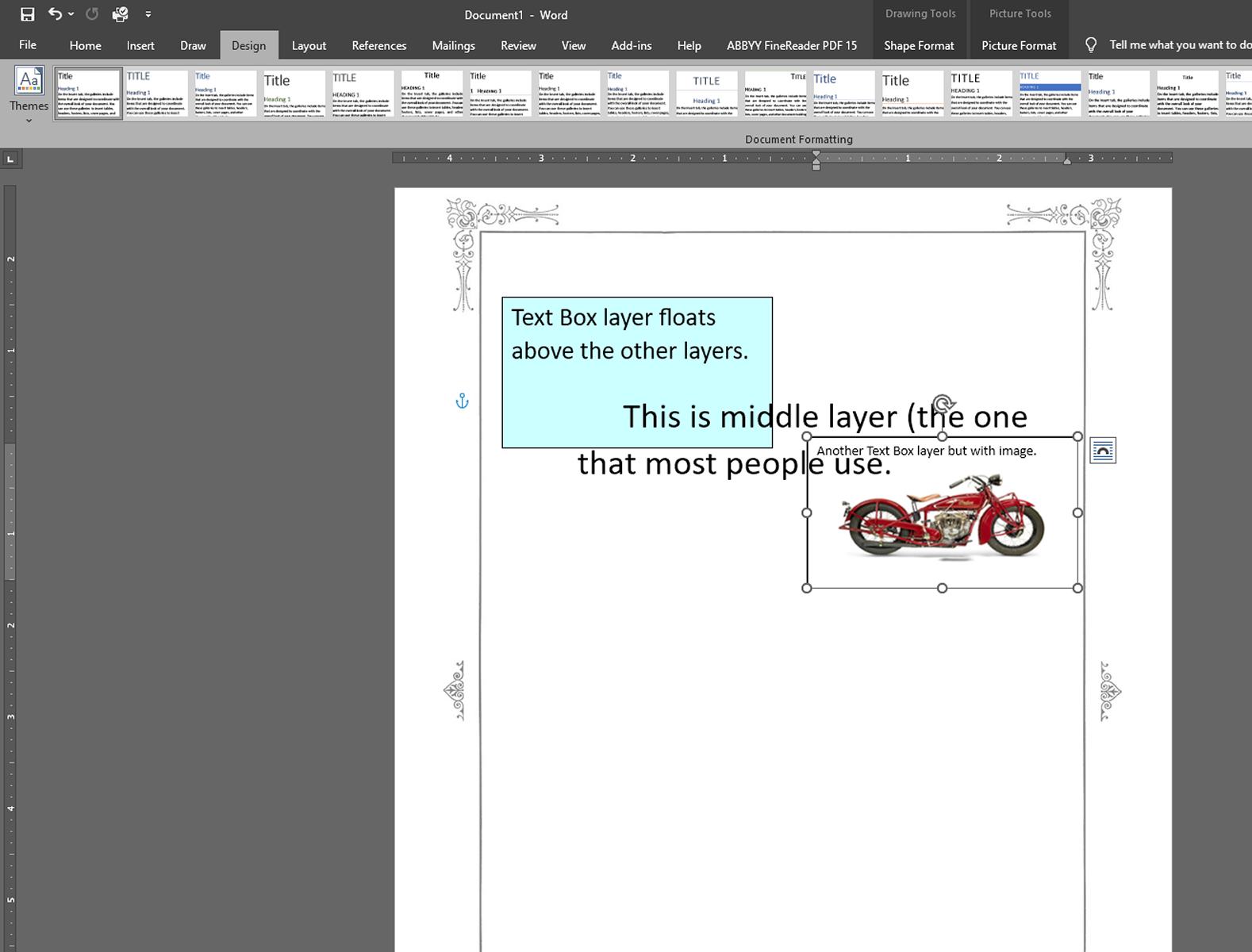 |
|
Send note to Staff
|
|
|
Pillar Of The Community
United States
590 Posts |
|
|
Thank you, DrewM, for your insightful contributions. I've enjoyed reading your thoughts on stamp albums in your previous posts. Your perspectives are well-articulated, and I find myself in agreement with many of your points. In particular, I must agree that the combination of Steiner albums on Scott pages is exceptionally elegant. However, it's disappointing to see Amos missing out on a significant opportunity by not embracing the idea of printing specialty albums for every country. In the end we stamp collectors must adjust. Many stamp collectors resort to some pretty hokey stuff like combining Big Blue with Scott specialty. Another one I saw was combining lighthouse and Davo pages in a Springback. Putting Steiner on Specialty adds some consistency. |
|
Send note to Staff
|
|
|
Valued Member
10 Posts |
|
|
I just wrote a post in this same subject area. I am a French Colonies collector. I called Amos on the phone to find out where the specialty pages were for French Indochina.
They told me they were in the "French Offices Abroad" album.
I then ordered the album. The pages arrived today and guess what?
No French Indochina!
Honestly.
Now I have to wrestle with them to get a refund because the pages are useless to me.
If anyone knows where French Indochina is in the current specialty series please let me know. Because Amos does not know. I have old Big Blue pages for Indochina but they are the very thin 2-sided International pages. Which I would rather avoid.
|
|
Send note to Staff
|
|
|
Replies: 42 / Views: 3,736 |
|
|
To participate in the forum you must log in or register. | |
Disclaimer: While a tremendous amount of effort goes into ensuring the accuracy of the information contained in this site, Stamp Community assumes no liability for errors. Copyright 2005 - 2026 Stamp Community Family - All rights reserved worldwide. Use of any images or content on this website without prior written permission of Stamp Community or the original lender is strictly prohibited.
Privacy Policy / Terms of Use Advertise Here |
| Stamp Community Forum |
© 2007 - 2026 Stamp Community Forums |
| It took 0.22 seconds to lick this stamp. |
 |
|
|
|


 Posted 02/15/2024 02:19 am





