Stamp Community Family of Web Sites
Thousands of stamps, consistently graded, competitively priced and hundreds of in-depth blog posts to read


Stamp Community Forum
 
Username:
Password:
Save Password
Forgot your Password?

This page may contain links that result in small commissions to keep this free site up and running.

Welcome Guest! Registering and/or logging in will remove the anchor (bottom) ads. It's Free!

Black Background On Scan

 
To participate in the forum you must log in or register.
Author Previous TopicReplies: 13 / Views: 9,563Next Topic  
Pillar Of The Community

Canada
2574 Posts
Posted 12/15/2010   06:37 am  Show Profile Bookmark this topic Add timbres667 to your friends list Get a Link to this Message
How do get a well ajust and nice black background on your can.
Send note to Staff

Pillar Of The Community
United Kingdom
1361 Posts
Posted 12/15/2010   06:41 am  Show Profile Bookmark this reply Add AnthonyUK to your friends list  Get a Link to this Reply
You could try my tutorial - https://goscf.com/t/10675

The easy way is to scan in a Hagner.
Send note to Staff  Go to Top of Page
Bedrock Of The Community
Australia
38679 Posts
Posted 12/15/2010   07:01 am  Show Profile Bookmark this reply Add rod222 to your friends list  Get a Link to this Reply
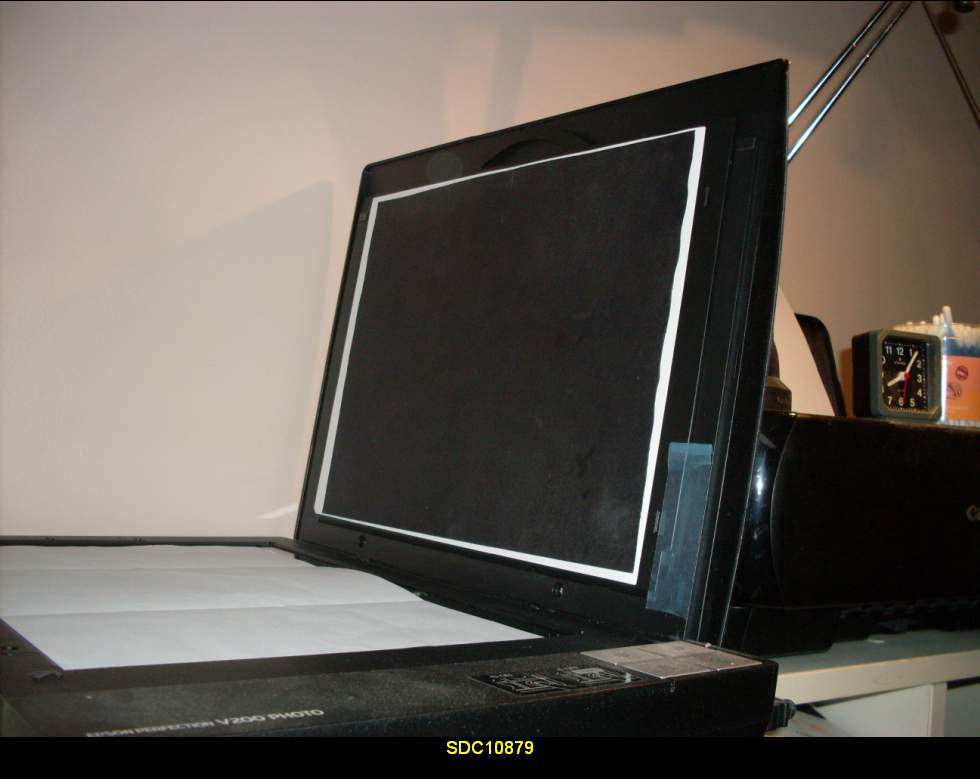
Have an A4 sheet of black card stock,
and attach it to the lid of your scanner with blu tack.

How easy is that?


Send note to Staff  Go to Top of Page
Edited by rod222 - 12/15/2010 07:09 am
Pillar Of The Community
Canada
2574 Posts
Posted 12/15/2010   07:30 am  Show Profile Bookmark this reply Add timbres667 to your friends list  Get a Link to this Reply
Anthony
Picasa is great
Rod
It's a good idea but I don't want to buy a whole pack just to use one sheet. I'll try to find something.

Thank you to both of you.
Send note to Staff  Go to Top of Page
Pillar Of The Community
United States
5894 Posts
Posted 12/15/2010   07:41 am  Show Profile Bookmark this reply Add smauggie to your friends list  Get a Link to this Reply
Yeah, I scan with Hagners almost exclusively.
Send note to Staff  Go to Top of Page
Bedrock Of The Community
Australia
38679 Posts
Posted 12/15/2010   08:30 am  Show Profile Bookmark this reply Add rod222 to your friends list  Get a Link to this Reply

Quote:
It's a good idea but I don't want to buy a whole pack just to use one sheet. I'll try to find something.


Whaaa?

A poster size black kraft paper is $1.50
just cut out an A4


C'mon, get the imaginative juices happening!
Send note to Staff  Go to Top of Page
Pillar Of The Community
Canada
2574 Posts
Posted 12/15/2010   09:06 am  Show Profile Bookmark this reply Add timbres667 to your friends list  Get a Link to this Reply
Rod
Thanks for the tip. The problem here in Montreal it's very cold and there is allot of snow. We just stay home and watch the furnace. I'll get the poster when spring come... Me in the snow storm
Send note to Staff  Go to Top of Page
Edited by timbres667 - 12/15/2010 09:09 am
Pillar Of The Community
United States
4106 Posts
Posted 12/15/2010   09:30 am  Show Profile Bookmark this reply Add stampvirgin to your friends list  Get a Link to this Reply
If you don't have black paper.. you can scan the stamp. open it in image editor, then bucket paint around it with black.
Send note to Staff  Go to Top of Page
Moderator
Learn More...
United States
4788 Posts
Posted 12/15/2010   1:25 pm  Show Profile Bookmark this reply Add kirks to your friends list  Get a Link to this Reply
Rod, have you ever had an issue with the black background affecting the "white balance" of your scans?

I'm still trying to figure out how to get more accurate colors in my scans.

KirkS
Send note to Staff  Go to Top of Page
Pillar Of The Community
United Kingdom
1361 Posts
Posted 12/15/2010   1:56 pm  Show Profile Bookmark this reply Add AnthonyUK to your friends list  Get a Link to this Reply
You can also get a black background with the scanner lid open. Maybe a small piece of glass might be needed to keep the stamp flat.

The black card - which I also have taped to my scanner lid - doesn't affect the colour as far as I can tell. I think it calibrates itself each time as it is set to auto exposure.
Send note to Staff  Go to Top of Page
Bedrock Of The Community
Australia
38679 Posts
Posted 12/15/2010   5:28 pm  Show Profile Bookmark this reply Add rod222 to your friends list  Get a Link to this Reply

Quote:
Rod, have you ever had an issue with the black background affecting the "white balance" of your scans?

I'm still trying to figure out how to get more accurate colors in my scans.


Yes, I have had problems in the past Kirk,
just cannot recall the circumstances,
they have been random and do not occur too often,
it may be the make up of the stamps being scanned
in the group, say ones with black borders or something like that.

Occaisionally, I find it useful to reset scanner defaults
to factory.
A hazy memory may suggest some very white stamps
scan grey or indistinct, but I am guessing.

My basis for scanning is still in line with my collecting
that is "recreational", I scan all at 600dpi
and save as *.jpg

Purists may require a higher dpi and save as a more solid
format. That is not my cynosure, and colour
accuracy falls in the same pigeonhole.

Scanning is better than b/w copier, and meets the demand
for identification and flyspecking, if I were
scanning for a bound book then I would opt
for something different.

For times when shades are pertinent (the KG5 grey India for example)
I find scanning the 5 shades together to illustrate the
subleties of change, rather than trying to accurately calibrate
the scanner for each individual example.
Send note to Staff  Go to Top of Page
Moderator
Learn More...
United States
4788 Posts
Posted 12/15/2010   5:45 pm  Show Profile Bookmark this reply Add kirks to your friends list  Get a Link to this Reply
Thanx, Rod
Send note to Staff  Go to Top of Page
Rest in Peace
Canada
6750 Posts
Posted 12/17/2010   10:38 pm  Show Profile Bookmark this reply Add Puzzler to your friends list  Get a Link to this Reply
Hagner = Vario = black plastic page with clear pockets in various sizes

I use those also.

But for some things I use a 8-1/2 x 11 inch piece of construction (crafts) paper, the kind that comes in a pack of 25 or 50 sheets with different colours repeated. I still haven't used all the colours for anything but it is nice to have the back sheet around.
Send note to Staff  Go to Top of Page
Pillar Of The Community
USA
3315 Posts
Posted 12/18/2010   12:48 am  Show Profile Bookmark this reply Add laswabbie to your friends list  Get a Link to this Reply
Using a black or dark blue background brings out the quality of the perforations quite well. On dark colored stamps - which seem to be more and more popular these days - calls for a light colored background. I also use black or dark blue paper when scanning. I don't believe I've had a problem doing so.
Send note to Staff  Go to Top of Page
  Previous TopicReplies: 13 / Views: 9,563Next Topic  
 
To participate in the forum you must log in or register.

Go to Top of Page

Disclaimer: While a tremendous amount of effort goes into ensuring the accuracy of the information contained in this site, Stamp Community assumes no liability for errors. Copyright 2005 - 2026 Stamp Community Family - All rights reserved worldwide. Use of any images or content on this website without prior written permission of Stamp Community or the original lender is strictly prohibited.
Privacy Policy / Terms of Use    Advertise Here
Stamp Community Forum © 2007 - 2026 Stamp Community Forums
It took 0.34 seconds to lick this stamp. Powered By: Snitz Forums 2000 Version 3.4.05