| Author |
 Replies: 18 / Views: 3,817 Replies: 18 / Views: 3,817 |
|
Bedrock Of The Community
Australia
38679 Posts |
|
|
|
advice received:
Don Lind has posted an answer to the question "How to stop indexing on a fresh install?":
Sure... but this isn't anything new... Picasa has worked like this since day one.
When you install it, you tell it to search either your whole computer or your "My Documents" area.
Then, it starts searching.
At any time (yes, even immediately after the searching starts), you can do a Tools -> "Folder Manager..." menu choice.
To tell Picasa to ignore folders, directory trees, or entire disks, set them to "Remove from Picasa"
To have Picasa look in certain folders or directory trees, or disks, set them to "Scan Always".
Don't bother with "Scan Once".
And for what its worth, Picasa handles upwards of one million photos, if you want... Bet it wouldn't have crashed... :-)
============
Managing Picasa Settings: Controlling how folders are monitoredShare
Gmail
Blogger
Buzz
Orkut
Google Reader
Bookmarks
» More
Comment Print Picasa scans your computer to find folders containing compatible photo file types, and then displays photos from these folders. The photos stay in their original folder locations. You can use the Folder Manager to control the folder locations on your hard drive that the Picasa monitors.
Follow these steps:
Click the Tools menu in Picasa.
Select Folder Manager.
Select a folder from the folder list on the left that you want to add or remove from Picasa's watch list.
Select one of the following monitoring options on the right:
'Scan Always': Picasa views all compatible image types in these folders, and it automatically adds new photos. Picasa actively scans this folder for changes.
'Scan Once': Picasa accesses all compatible image types in these folders only once. It doesn't detect new photos added to folders with this setting.
'Remove from Picasa': Picasa doesn't look in folders that are marked with this status.
Click the OK button to save your changes.
The folders that you've set Picasa to continously scan are listed in the 'Watched Folders' section.
You can also set a folder to 'Remove from Picasa' by right-clicking (Windows) or Control-clicking (Mac) the folder in Picasa and selecting 'Remove from Picasa.'
|
|
Send note to Staff
|
|
|
|
|
Pillar Of The Community
Canada
1084 Posts |
|
|
Moderator

United States
4788 Posts |
|
|
Thanks Rod.
This is helpful info for me. I may try Picasa again; it was brand new the last time I used it.
Kirk |
Send note to Staff 
|
|
|
Moderator
United States
4788 Posts |
|
|
By the way, Rod. Not to "hijack" your thread, but I wanted to tell you about my scanning exercises. I think I'm getting better. One thing I've learned -- I was using too much software. I was using Adobe Photoshop, which is too big and too complicated for my novice graphics skills. I went to my drawer of old CDs and found a copy PaintShop Pro v4.0 (back when it was a free program). It's a lot simpler and you don't have to be a graphic artist to use it. PaintShop Pro 'misbehaves' a bit under Windows 7. It doesn't crash, but the old-style interface seems a little counter-intuitive for those used to Win-7. There is a free graphics program PAINT.NET the looks promising. It sounds like it is part of Windows, but isn't. It's very powerful, but not quite as complicated as Photoshop. Again, for me, I need simplicity more than I need lots of features. If anyone is interested, the link is xxxxxxxxxxxxxxxxCorrected link for direct download: http://www.dotpdn.com/files/Paint.N....Install.zipKirk |
|
Send note to Staff
|
| Edited by kirks - 12/23/2010 1:57 pm |
|
|
Bedrock Of The Community
Australia
38679 Posts |
|
|
Cynical: No, I am a bit lacking in this regard,
I use ACDSee and click on the image
and "create a contact sheet" to reduce a high
def image to fit on SCF
( a very clunky route)
Kirk: I'm with you, early next year when I'm settled
i'll try the new Picasa, and jam the indexing,
I'll still keep the old version as standby.
Thanks for the Paint link, I don't have any image
drawing tools at the moment, Paint wouldn't load
last time I tried.
Like you, I need a simple non bloat drawing prog,
that at least offers the little red arrows, to
indicate flyspecks etc. and a blur tool for
modern cover addresses.
|
|
Send note to Staff
|
|
|
Bedrock Of The Community
Australia
38679 Posts |
|
|
Kirk,
what am I doing wrong?
I click on your link, and either way the dowload
is subterfuge and wants to download a search tool.
Boy, that gets up my nose, it's fraudulent.
|
|
Send note to Staff
|
|
|
Pillar Of The Community
Canada
1084 Posts |
|
|
Rod: to further educate me - what is a "contact sheet" and how do get those titles on to the bottom of your images? |
|
Send note to Staff
|
|
|
Rest in Peace
Canada
5701 Posts |
|
|
Moderator
United States
4788 Posts |
|
|
Rod: I updated the link with a direct pointer to their download link.
Try it again.
Kirk |
|
Send note to Staff
|
|
|
Bedrock Of The Community
Australia
38679 Posts |
|
|
BeeSee, I may have to employ you as my promotions manager  The pay's poor, but the work rewarding. Cynical, In ACDSee, you say click on 3 stamp images (the three are highlighted) then you click on "create a contact sheet" and the three stamps appear in one image. I have created a contact sheet of up to 500 stamps See here, 3 Belgian stamps, if you note "labels" you click on that, and the stamps file name appears in yellow in the contact sheet 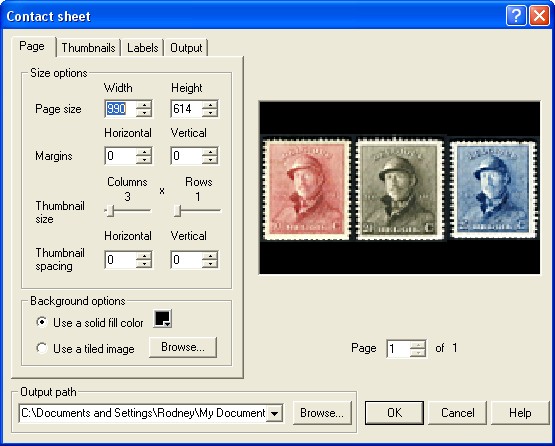 |
|
Send note to Staff
|
|
|
Rest in Peace
Canada
5701 Posts |
|
|
Bedrock Of The Community
Australia
38679 Posts |
|
|
It would be better if it was ACDC we could get cheap tickets BC. Kirk: The rotten thing declined again, PAINT does just not like my computer  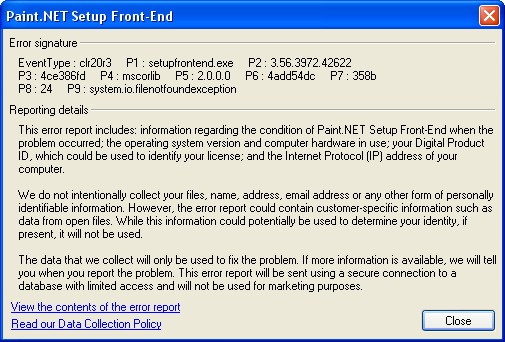 |
|
Send note to Staff
|
|
|
Moderator
United States
4788 Posts |
|
|
Uh oh... my bad.
You told me you were running XP -- and this thing uses the .NET framework. I bet you don't have it installed.
It's free and you can get via Windows Update, but I don't think I would recommend it. It tends to be a bit of a resource hog and might result in a noticeable slowing of your machine.
Sorry about that,
Kirk |
|
Send note to Staff
|
|
|
Rest in Peace
Canada
5701 Posts |
|
|
Pillar Of The Community
Canada
1084 Posts |
|
|
BeeSee: I think I told Litho some time ago that ACDSee was no relation to you. I stand corrected. |
|
Send note to Staff
|
|
|
Pillar Of The Community
Canada
1084 Posts |
|
|
Rod: I did not have a clue that ACDSee was capable of stuff like that. For me that information is worth much more than the price of admission here and I thank you for that and I'm sure there are "ghosts" here thinking the same thing. |
|
Send note to Staff
|
|
|
Replies: 18 / Views: 3,817 |
|




 Posted 12/22/2010 9:21 pm