If you use an HP scanner/printer and you notice your stamp scans seem off color or lighter then they should its not the resolution.
your scanner is auto correcting the color there is an option on the right hand side (Sharpen) that you have to turn off each time you load the program. Sharpen is located in a pull down menu on the right side of the HP solution center
I didnt notice this slight changing in color until I took Rods advice and put a black background on my scanner plate and noticed the scanner was changing it to a dark grey. I thought it was just a cheap scanner when infact it was auto adjusting my color.
Edwin, Thanks for posting. I have an HP scanner and printer and have downloaded a newer Solution Center (I had been using older programs and actually like them better) and now most of the time I notice the picture on screen is grayed out rather than black (with a black background). This might explain the whole matter.
Sometimes the grey goes away (is this a hair commercial?) and the black returns but only after I have been accessing the resolution settings ( probably in that same menu). Old and new not talking to each other completely.
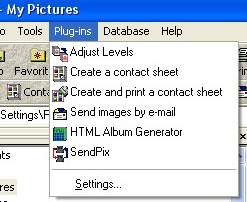
Edwin: I will check that out. I have an older HP3670 that came with HP Director/HP Photo & Imaging and I think my ACDSee came with it as well (I think the ACDSee is missing some of the fancy plug-ins that Rod seems to have on his).
I also have an HP Deskjet F4435 (3 in 1) with scanner with Solution Center that I got for Christmas.
Will have to play around with both of them to see what happens.
Rod: I have, I think, 4 plug-ins, none of which mention contact sheets. I have clicked on everything in my ACDSee to do what you do but it just doesn't happen.
Rod: I have followed your advice and now use my ADSee 3.1 as a file manager/database for my scan images. Recently I finally figured how how to do captions and add descriptive text through Properties but do not have the contact sheet plug-in as I mention above.
I note, however. on another of your posts that you use Agent Ransack to link stamp images to descriptive text files. If you don't mind would you describe the differences between the ACDSee operation and what you do with Ransack?
Disclaimer: While a tremendous amount of effort goes into ensuring the accuracy of the information contained in this site, Stamp Community assumes no liability for errors. Copyright 2005 - 2026 Stamp Community Family - All rights reserved worldwide. Use of any images or content on this website without prior written permission of Stamp Community or the original lender is strictly prohibited. Privacy Policy / Terms of UseAdvertise Here





 Posted 01/06/2011 11:17 am