| Author |
 Replies: 17 / Views: 2,833 Replies: 17 / Views: 2,833 |
|
Bedrock Of The Community
Australia
38679 Posts |
|
|
Gold and silver seem to defract the light as seen on this Hoxha minisheet. Whilst the gold text is completely blurred on the minisheet, on the real item the printing is clear and precise. (BTW : I'll have to add this to the thread "odd perforations") Any tips on getting around this irritation? 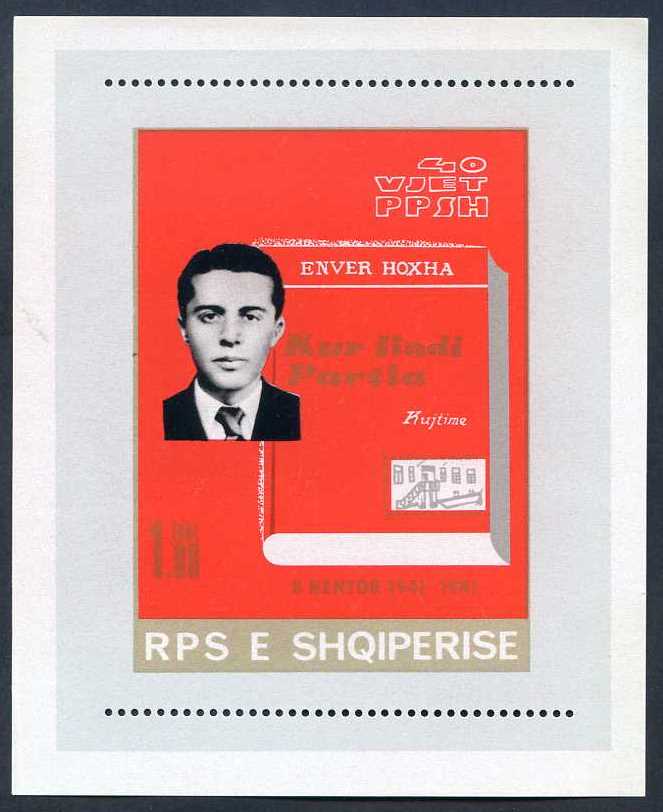 |
|
Send note to Staff
|
| Edited by rod222 - 05/03/2011 10:02 am |
|
|
|
|
Pillar Of The Community
United States
3568 Posts |
|
|
Rod, maybe instead of scanning a close picture without flash. The bright light seems to be the problem. I just don't know if a picture can be sharp enough. - Jeff |
Send note to Staff 
|
|
|
Pillar Of The Community
United States
2547 Posts |
|
|
I seem to recall a recommenation of placing the stamp on a thin piece of clear plastic like from a sandwitch bag. I have never tried it but it is probably worth a shot. |
|
Send note to Staff
|
|
|
Valued Member
220 Posts |
|
|
Use a Sony FD Mavica and put a piece of black electrical tape over the flash and a good soft white light source. |
|
Send note to Staff
|
|
|
Pillar Of The Community
Canada
2277 Posts |
|
|
Had the same problems with stamps and other items as well. Bright light I think as JH said is what kills it. A differnt indirect light source no flash and a tripod for stabilization is key but I certainly havn't mastered it .
Thought maybe you were out panning for them big aussie nuggets by the title. |
|
Send note to Staff
|
|
|
Bedrock Of The Community
Australia
38679 Posts |
|
|
OK, thanks gentlemen,
I only have a scanner and hence a fixed light source
so I'll try various plastic bags, and report back the results.
Result:
Used a brand new archival plastic pocket
I use for stamp storage ( similar to a very
clear, thin sandwich bag)
with the minisheet inside, (ie : 1 layer)
the resltant scan was not improved much.
Placing the bag on the scanner platen,
then the minisheet on top (hence 2 layers)
the result whilst not perfect was 100% better
than straight on platen pass.
The script could be easily read.
Thanks for the suggestion Russ.
|
|
Send note to Staff
|
| Edited by rod222 - 05/03/2011 6:08 pm |
|
|
Pillar Of The Community
Australia
4034 Posts |
|
|
Hello! Rod.
I read the title to this thread and got a
picture that you were digging the foundation
for your shed and found Gold.
Sadly I was wrong. lol at myself. KG5
While talking about gold.
You were the 1st person to call me KG5.
When trying to use KGV as a user name elsewhere
it was taken but KG5 was not.
Thanks! KG5 is as good as gold. |
|
Send note to Staff
|
|
|
Bedrock Of The Community
Australia
38679 Posts |
|
|
No need to be sad John, :)
I hope I am wise enough to know
that a lot of money is a curse.
Glad to see you found KG5 :)
I think the King would be pleased to
have you continue on with his legacy.
|
|
Send note to Staff
|
|
|
Pillar Of The Community
United States
2547 Posts |
|
|
Pillar Of The Community
United States
3568 Posts |
|
|
I would like a little bit of a curse, please. And while we are at it Rod, could you post you new scan so we can see the writing also? Pleeeezzzz? |
|
Send note to Staff
|
|
|
Bedrock Of The Community
Australia
38679 Posts |
|
|
Cannot do Jeff,
In a peculiar occurence, when I reduce the scan
to fit the 90Kb limitation,
the jpg image goes out of focus again with the gold script.
You shall just have to take my word for it :)
|
|
Send note to Staff
|
|
|
Valued Member
United States
27 Posts |
|
|
Does your scanner have any way to scan a raw image? Perhaps to a bitmap? JPEG is compressed, and that includes colors. A raw image, such as a bitmap with 24bit or better color would store something nearer the right color, and not mess up as much when scaled. |
|
Send note to Staff
|
|
|
Bedrock Of The Community
Australia
38679 Posts |
|
|
That's it SiBurning,
as a bitmap the gold was clear and crisp.
Something I shall have to live with
as a *.jpg image 240Kb as a Bitmap 4.8 Mb
I can live with the blurry gold.
Thanks for the solution! Sb
|
|
Send note to Staff
|
|
|
Pillar Of The Community
United States
3568 Posts |
|
|
Valued Member
Panama
155 Posts |
|
|
What I can't achieve is the white on stamps, if you have one of my stamps in front of you the white will be white but when I scan the white turns light brown or as in this case light orange, here is an example  Darn! Bob |
|
Send note to Staff
|
|
|
Valued Member
United States
27 Posts |
|
|
There might be ways to keep the color when you compress to JPEG. It might mean using different software or changing the settings, and figuring out just what settings to use. It might pay to look at a really good program such as photoshop or gimp. You can toss the larger image once you compress it to JPEG, but you can't undo the poor conversion you get from the scanner's JPEG engine. |
|
Send note to Staff
|
|
|
Replies: 17 / Views: 2,833 |
|




 Posted 05/03/2011 09:58 am


 Well I guess that I am greatly blessed

