Stamp Community Family of Web Sites
Thousands of stamps, consistently graded, competitively priced and hundreds of in-depth blog posts to read


Stamp Community Forum
 
Username:
Password:
Save Password
Forgot your Password?

This page may contain links that result in small commissions to keep this free site up and running.

Welcome Guest! Registering and/or logging in will remove the anchor (bottom) ads. It's Free!

Computer Printed Cachets

 
To participate in the forum you must log in or register.
Author Previous TopicReplies: 9 / Views: 2,589Next Topic  
Valued Member
USA
134 Posts
Posted 12/09/2011   2:28 pm  Show Profile Bookmark this topic Add Johnmacco007 to your friends list Get a Link to this Message
I would like to pose a question to those who use their computers to design and print cachets. How does one go about doing this? My computer has Open Office program on it. I do not know if this program can help. I am totally a novice at this. Any feedback is appreciated.
Send note to Staff

Pillar Of The Community
United States
2972 Posts
Posted 12/09/2011   2:33 pm  Show Profile Bookmark this reply Add stamperdude to your friends list  Get a Link to this Reply
I use Office Word with the envelope templates. I then add my text and images. After that I print it on my old Epson photo printer and hope it doesn't jam, smear, or smudge. If it does then I just print another one and save the imperfect one for normal mail usage (usually to another collector).
Send note to Staff  Go to Top of Page
Bedrock Of The Community
United States
12128 Posts
Posted 12/09/2011   2:48 pm  Show Profile Bookmark this reply Add wt1 to your friends list  Get a Link to this Reply
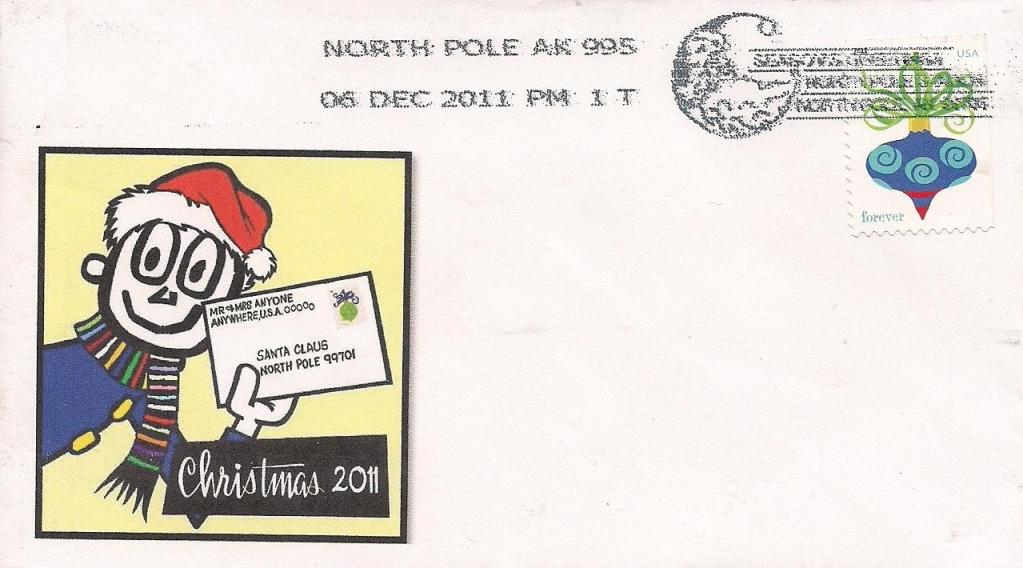
Ditto. I process my own first day or special cancel covers (without cachets) and then customize the computer-generated cachet afterwards. I can then customize the size to the specific stamp and/or cancellation. I do it on a cheap $50 HP printer. It's works most of time; a few times the printer will foul up and a few times I will foul up and insert the envelope in the wrong direction. Should the latter occur and part of the cachet prints on the stamp, I find that you can soak the stamps immediately thereafter and the water-soluable ink will easily come off and you can at least recover the used stamp to use elsewhere in your collection.

Here's an example of one I just did today:

Send note to Staff  Go to Top of Page
Edited by wt1 - 12/09/2011 7:06 pm
Pillar Of The Community
United States
862 Posts
Posted 12/10/2011   10:17 am  Show Profile Bookmark this reply Add raywrio to your friends list  Get a Link to this Reply
John,

Hopefully this will help you create an envelope with a cachet. I also use both Word and OpenOffice.

Open up a new blank doc in Writer. From the tool bar select Insert > Envelope > New Doc . This will open the doc as an envelope. On the Envelope tab either leave blank or add an addressee. On the format tab go to the third section and select the envelope type you want.

To insert a picture again from the tool bar select Insert> Picture> From File. Select the file you want to use as your cachet. Now just resize the picture to the left and save.

This is a basic setup, you will probably need to tweak it your liking. Let the fun begin. Ray
Send note to Staff  Go to Top of Page
Pillar Of The Community
United States
558 Posts
Posted 12/13/2011   5:22 pm  Show Profile Bookmark this reply Add SueStamps to your friends list  Get a Link to this Reply
This is a fascinating topic!
But, I am not sure I totally understand. When you say you are designing and printing your own cachets, are you doing this on a blank envelope, and then addressing and mailing it to someone who is a stamp / cover collector, or are you doing this to keep for yourself?

I see the cachet cover from wt1 with postmarked, so was this printed, and sent to someone and they sent it back? How did it get postmarked it you printed it? sorry if my questions are silly, but I am still learning and loving it!

I would love to see some other home made cachet covers and understand more on this topic.

Thank you,
SueStamps
Send note to Staff  Go to Top of Page
Bedrock Of The Community
United States
12128 Posts
Posted 12/13/2011   6:02 pm  Show Profile Bookmark this reply Add wt1 to your friends list  Get a Link to this Reply

Quote:
I see the cachet cover from wt1 with postmarked, so was this printed, and sent to someone and they sent it back? How did it get postmarked it you printed it?


I sent blank covers with first class postage on them, with my return address affixed with removable tape to the Postmaster in the city offering the cancel, in this case, North Pole, Alaska. They cancelled the covers and sent them back to me by first class mail. When I received them back I removed my address label and created my own computer-generated cachet making sure to size it in such a manner that it would not interfere with the cancellation.

Of course, you could do it the other way and prepare the covers with the cachet and send them along, but it could create some problems. Namely, if you're using an ink jet printer and there happens to be damp weather, the cachet could run and ruin the cover; then there is always the possibility that the cancellation could be obscured by your cachet. If I get the covers cancelled first, I can eliminate both problems.

By the way, if you want to include a self-addressed stamped envelope with your request to the Postmaster, they will accommodate sending thc covers back to you in an outside envelope, so as not to apply any of those bar codes, etc. I've found that I can often avoid that extra cost if I simply attach a piece of Scotch Removable Transparent Tape to the bottom 1/2" of the envelope, the bar code gets applied there, and when the cover gets returned, I can simply remove the tape (and the bar code.)

I have not done this as a profit making venture--I'm not that much of an artist. I simply send and create a couple of covers through the process described and either keep them for my personal collection and/or trade with other collectors who might be interested.

Although they will never be "valuable", they can be a rather enjoyable sideline to cover collecting.
Send note to Staff  Go to Top of Page
Valued Member
USA
134 Posts
Posted 12/13/2011   6:15 pm  Show Profile Bookmark this reply Add Johnmacco007 to your friends list  Get a Link to this Reply
I have been sending for pictorial cancels for years and the tip to send a sase with the covers is an excellent one. Most of the time, the pictorial cancel will be used on the return envelope.
Send note to Staff  Go to Top of Page
Edited by Johnmacco007 - 12/13/2011 6:17 pm
Pillar Of The Community
United States
558 Posts
Posted 12/15/2011   6:57 pm  Show Profile Bookmark this reply Add SueStamps to your friends list  Get a Link to this Reply
Hi wt1,
I am so slow with understanding this. Please be patient with me, but I have more questions.. This is just so interesting and I would like to try it but I still don't quite understand and have not heard about this before....

Do you mean... did you mail a plain envelope or did you print out a cachet (picture of Christmas 2011) on it before you mail it out?


Quote:
to the Postmaster in the city offering the cancel, in this case, North Pole, Alaska. They cancelled the covers and sent them back to me by first class mail. When I received them back I removed my address label and created my own computer-generated cachet making sure to size it in such a manner that it would not interfere with the cancellation.


so for an example, how did the envelope get to the North Pole Alaska? I don't see an address on the envelope. So did you have two removable tapes, one with your return address on it, and one removable tape with the words: North Pole Alaska on it?

How does the Postmaster know to send it back to you? Do you put a note inside? I am so confused, lolol....
Send note to Staff  Go to Top of Page
Bedrock Of The Community
United States
12128 Posts
Posted 12/15/2011   7:24 pm  Show Profile Bookmark this reply Add wt1 to your friends list  Get a Link to this Reply
It's past the December 10th deadline for the North Pole, Alaska cancel, but here were the instructions:

http://about.usps.com/news/state-re...011_1108.htm

To explain how I got the cover, I sent along a brief note asking for the cancel and enclosed plain 6-3/4" envelopes with Christmas stamps affixed.

I used removable tape to apply my address label and a strip of the tape at the bottom 1/4" of the envelope that I could take off after mailing to remove the bar code, and when the cover is returned to me by mail, I remove both strips of tape.

The other way you could do it is as johnmacco007 suggests, and merely enclose a #10 self-addressed stamped envelope for the safe return of your covers and then there is no need to apply the tape as I suggested.

The end result is a blank cover with just the stamp and postmark. I then prepare a cachet on MS Word with an appropriate graphic and size it to fit the envelope, allowing sufficient space so as not to have it run into the postmark itself.

For the cost of a couple of postage stamps, it can be quite fun to do.

P.S. If you want to keep up with new pictorial postmarks being offered around the country, download the bi-weekly edition of the Postal Bulletin from the USPS web site and they are all listed in the Stamps/Philately section, along the correct mailing address to use. Here's the link:

http://about.usps.com/postal-bulletin/pb2011.htm

Depending on the date of the cancel, you typically have 30 to 60 days to request the special cancellation from the post office offering them.
Send note to Staff  Go to Top of Page
Edited by wt1 - 12/15/2011 7:33 pm
New Member
Australia
1 Posts
Posted 01/01/2012   12:18 am  Show Profile Bookmark this reply Add lasaboy to your friends list  Get a Link to this Reply
Caches can be produced by anyone a company, business or an individual and most postal authorities are only to happy to help cancel them in one form or another, the IPDA (Internet Philatelic Dealers Association)through Michael Dodd of CDD Stamps is producing one for our tenth anniversay on the 23 February 2012.

Send note to Staff  Go to Top of Page
  Previous TopicReplies: 9 / Views: 2,589Next Topic  
 
To participate in the forum you must log in or register.

Go to Top of Page

Disclaimer: While a tremendous amount of effort goes into ensuring the accuracy of the information contained in this site, Stamp Community assumes no liability for errors. Copyright 2005 - 2026 Stamp Community Family - All rights reserved worldwide. Use of any images or content on this website without prior written permission of Stamp Community or the original lender is strictly prohibited.
Privacy Policy / Terms of Use    Advertise Here
Stamp Community Forum © 2007 - 2026 Stamp Community Forums
It took 0.49 seconds to lick this stamp. Powered By: Snitz Forums 2000 Version 3.4.05