You shall have great fun Conker,
and (possibly) never lose an image if you go the Windows explorer route
Welcome to the "Filing Cabinet System" :)
Remember, You will one day need more than
just 1 folder for a country!
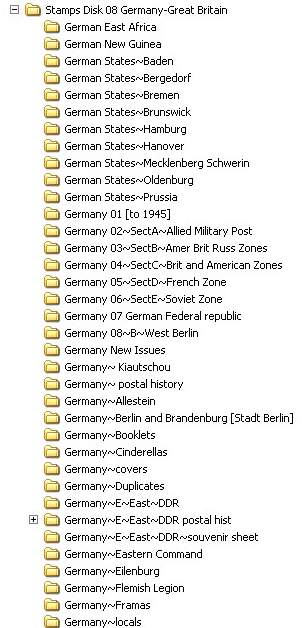
When you hit Germany you will need the "Germany" folder
then 20 sub folders under Germany!
Foldernormous!
Avoiding reinventing the wheel my code is borrowed from Country Catalogue
So
C:/Stamps/Germany/Fed rep/SG2167 (1986) T0832 300pf fanny hensel [0m1]
1:C Drive
2:"Stamps"Folder (This is the Biggie, it holds every stamp I have)
32 Gb
advantage..backing up
select the stamps folder, drag the mouse to your
external drive and "copy" ...go and have a cup of tea and a sticky bun, whilst the computer does your bidding.
3: Germany =first Subfolder
4: Fed rep = second subfolder fed rep of germany stamps 1949>
5: SG2167=catalogue number
6: (1986) = date
advantage...put the text string (1986 and it will pull up every german stamp for that year
7: T0832 = Type
advantage type can be adjusted by user to include all
stamps of a certain type
I use 832 for all famous german women
spread acros 6 years of issues
type in text string T0832 and you have every stamp of that series
8: 300pf fanny hensel = stamp details
9: [0m1] = I have 0 mint stamps, and 1 used stamp
advantage [missing]
use text string [missing and you have a printable "want list"
Hope that helps
Good luck
When you become a stamp maniac

this is what Germany can end up looking like....





 Posted 01/11/2012 6:49 pm


