| Author |
 Replies: 94 / Views: 11,837 Replies: 94 / Views: 11,837 |
|
|
|
Pillar Of The Community

Canada
3963 Posts |
|
|
Forgot to mention. The reason I have to start keeping track is that some of the countries in my collection for instance Canada, US, Australia, Great Britain, Poland and Hungary are between 60 to 85% complete and I have purchased stamps on circuit night that I already had|| Dianne  |
Send note to Staff 
|
Don't grumble that the roses have thorns, be thankful that the thorns have roses |
|
|
Valued Member
Netherlands
230 Posts |
|
|
Thank you for the helpful answer.
But how do you number the stamps.
Just like First stamp in album is no. 1, or how else? |
|
Send note to Staff
|
|
|
Pillar Of The Community
Canada
3963 Posts |
|
|
I think to properly number stamps you need to have scott's catalogues, (or Stanley Gibbons or Micheal's) I guess it depends on how you are collecting. My albums all go in order of scott's numbers so that's how I'll catalogue them. Dianne |
|
Send note to Staff
|
Don't grumble that the roses have thorns, be thankful that the thorns have roses |
|
|
Valued Member
Netherlands
230 Posts |
|
|
Okay Dianne,
I have a S&G Catalogue, but is it necessary to keep holding on the catalogue numbers.
I'm asking that, because then I need a bigger sheet...:D
Is it an option to create my own numbers, and if I need the catalogue numbers, to look them up at that time?
So first stamp in album is no. 1, and the second is 2.
I'm asking that, because I have difficulties with reading those catalogues.
Many Thanks! |
|
Send note to Staff
|
|
|
Pillar Of The Community
Canada
3963 Posts |
|
|
Everyone should collect the way that makes it easier for them. Because I have many stamps from different countries, and a ton of spares, it's necessary for me to catalogue them so that I can find them when need be. You should come up with a system that works best for you. Dianne |
|
Send note to Staff
|
Don't grumble that the roses have thorns, be thankful that the thorns have roses |
|
|
Valued Member
Netherlands
230 Posts |
|
|
Okay, thank you Dianne! I gonna think about the cataloguing methods... |
|
Send note to Staff
|
| Edited by Ricky93 - 01/29/2012 10:58 am |
|
|
Pillar Of The Community
United States
2941 Posts |
|
|
Pillar Of The Community
Canada
6525 Posts |
|
|
Like Jkjblue, I use an old catalogue. Since I collect mainly Canada and US (though that does seem to be shifting somewhat) I use a 1974-75 Harris catalogue and mark off what I've acquired. It's small and goes with me to stamp club meetings. But it is starting to show some wear and tear, pages held together with tape, and the spinenow bound with red Tuck Tape. It never fails to raise a smile when I pull it out at meetings. I prefer to keep my hobby low tech (with the exception of my time on SCF of course ) and this does the trick. |
|
Send note to Staff
|
|
|
Pillar Of The Community
United States
857 Posts |
|
|
I only keep track in Excel of how many stamps are in a particular album and when it comes time to filling some holes, I just write down the pesky scott numbers on a piece of paper and take that to shows. |
|
Send note to Staff
|
|
|
Valued Member
Netherlands
230 Posts |
|
|
Ehm, what fields should I make in an Access database? Can someone help me with that? Thanks, Rik PS. I want to make it in Access, because I love that program  |
|
Send note to Staff
|
| Edited by Ricky93 - 01/30/2012 01:08 am |
|
|
Bedrock Of The Community
Australia
38679 Posts |
|
|
Quote:
EDIT: I realize me, that I don't have a scanner.
But can I make photo's of them?
Because I have a digital compact camera...
Digital cameras are not the go for Philately, a scanner really is a must. Good luck with your Access database, but for contructive criticism, remember you will always just end up with just a glorified catalogue sequence. An image database will always be with you, even if you sell your collection. Modern technology can have you plug in your stamp images to your Giant plasma screen and have each stamp 3 foot high and in your face. Your kids and grandkids will always have your collection. Just a few things to consider. 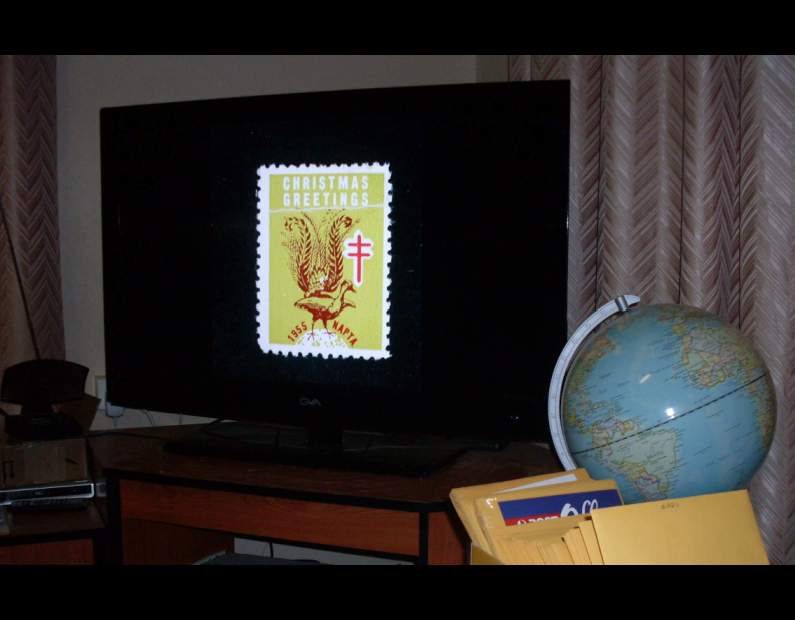 |
|
Send note to Staff
|
|
|
Valued Member
Netherlands
230 Posts |
|
|
Well, then I go save some money for a scanner.
But how do I scan them?
1 by 1 or whole pages? |
|
Send note to Staff
|
|
|
Valued Member
United States
194 Posts |
|
|
Hi rikdegraaff,
I had the same thoughts on what to do? In the thread "Spreadsheet and Stamp Collection" & here you have gotten great input from people who have been doing this for long time now. But there are many ways to do this and all are good ways, But what is easiest for you will make it more enjoyable vs a dull job. First, scanners are the way to go with stamps as rod222 has stated. Me I scan each stamp one at a time. I then use the three letter country code with my number of entry. USA Stamp 0001 for JPEG's and USA 0001 for its Doc file for all pertinent information on the stamp, including Scott, Stanley Gibbon, and Michel catalog numbers. Over kill, to some yes by a long shot, to me I learn more about the stamp itself. As in my Australia stamps I had learned so much from getting one to one with my stamps. With the different kinds of varieties and then asking questions on it and the wealth of knowledge and willingness to help you as I will grow. But it really boils down what do you want to do and how far do you want to go. A scan of a stamp, or an in-depth one or anywhere in between.
Series: Na
Description: Antarctica Research (1908 - 1909)
Face Value: 5 d (5 Pence)
Stamp Type: Regular Postage (vs Airmail)
Mint / Used: Used (vs Mint)
Stamp Size: Width 24 mm Height 39 mm
Perforation: 14 1/2 x 14 1/2
Designer: Na
Print Run: Na
Issue Date: 1961
Serial #: AUS 0012u (MY CATALOG NUMBER)
Scott #: AUS L1
Stanley Gibbon #: AUS 6
Michel #: AUS 6
Other Data: Members of Shackleton Expedition at Magnetic South Pole
With this I can have the stamp in question and all that I have in hand. and yes it does change as I learn more or correct information on the stamp. A spreadsheet will have the same info, (cut and past helps) to better sort. Yes it is a slower way to go but this is (at this time) my way of doing it. Access will do the same with a better way of sorting and retrieving information. data for access is stored in a spreadsheet so your fields can be as what ever you want. But fields calles Scott Catalog #, Stanley Gibbons Catalog #, Michels Catalog # and Your Catalog # would be a start. As also Country and date of issue, to name a few.
Again, all is the right way, but you must be happy. Sorry for being a little long in my reply
Tom |
|
Send note to Staff
|
|
|
Pillar Of The Community
United States
978 Posts |
|
|
Hi Rik
My stamps inventory contains every catalog number whether I have the stamp or not. I am currently converting a program I have to a new programming language. This program generates catalog numbers by using a definition. For instance, if the definition is X4-c the numbers generated will be X4 X4a X4b X4c. At one time I generated all the catalog numbers for Colombia with maybe a half page of definitions. The program has 2 outputs, one a list of numbers for use in other programs and the other a CSV(Comma Separated Variable) file which can be imported into any Microsoft Office program and Microsoft Works spreadsheet.
Once the conversion is complete I will make the program available to anyone who wants it for free. This program could help you with making the number tables.
Jerry B
|
|
Send note to Staff
|
|
|
Valued Member
United States
194 Posts |
|
|
Jerry, I will be waiting to see what you got there. Now will it work for us Mac users? I have the program Numbers which is there spreadsheet. I would think it should?
Tom |
|
Send note to Staff
|
|
|
Replies: 94 / Views: 11,837 |
|




 Posted 01/29/2012 07:37 am


