| Author |
 Replies: 83 / Views: 12,460 Replies: 83 / Views: 12,460 |
|
|
|
Pillar Of The Community
United States
898 Posts |
|
|
Jkblue: I think I have a similar model. For the interface, do you use the default HP software, or do you use something like Photoshop Elements, Irfanview, or something else?
-- Dave |
Send note to Staff 
|
|
|
Pillar Of The Community
2361 Posts |
|
|
One of the big mistakes that novices make is using the entire scanner glass as the scan area, and cropping away the excess. That invariably leads to bad results.
Prove it to yourself. Using the same stamp and settings, make scans with a 2x2, 3x3, 4x4, and 5x5 (inch) scan area, then compare. The smaller the scan area, the better off you are.
A $60 scanner will make decent scans of coins, too, if you know how; scans good enough for forums like ours; copper and bronze come out best, silver the worst.
I reduce all my SCF scans down to about 90KB with Microsoft Office Picture Manager, which is part of Windows; my scans of 3 covers (at a time) might run over 1.2MB, but they show up pretty good here. I do not use our "Free Image Optimizer" as there's at least two dozen ways to do it wrong, and I have tried them all. |
|
Send note to Staff
|
|
|
Pillar Of The Community
United Kingdom
1361 Posts |
|
|
Hi IBFS, Do a search for Tutorial:  I did put one together a few years ago which will answer a few of your questions. The general concensus is that for a regular image you can reduce the resolution and upload it to the site, or, save it on an external site if you want to show a high resolution image. JkjBlue - Your images look OK. |
|
Send note to Staff
|
|
|
Pillar Of The Community
1448 Posts |
|
|
Quote:
Jkblue: I think I have a similar model. For the interface, do you use the default HP software, or do you use something like Photoshop Elements, Irfanview, or something else?
-- Dave I use the generic "Solution Center" HP software set up for 1200dpi with a preview scan. I have scanned thousands of stamps at this setting with, IMHO, good results. http://bigblue1840-1940.blogspot.com/Now a post to SCF is not complete without an image....    |
|
Send note to Staff
|
|
|
|
Pillar Of The Community
United Kingdom
1361 Posts |
|
|
Jkjblue - I hope you don't mind but I think your images would benefit from straightening. It also has the added benefit of making your images slightly smaller. e.g.  Anthony |
|
Send note to Staff
|
| Edited by AnthonyUK - 02/07/2013 09:26 am |
|
|
Pillar Of The Community
United Kingdom
1356 Posts |
|
|
If your original question refers to scanning just for posting to SCF, and you are not too concerned about matching the quality of those who scan for other reasons, then a scan of 200 dpi will give you a stamp image of around the right size to post. The limit on the forum is 100kb.
If your image is still too large, you can use the forum's image optimizer. This can be found when you click to make a post. You will find it at the bottom of the text box, below "Upload Image".
Or you can use Paint/Photoshop or whatever ther image manipulation software you have on your PC.
You shouldn't need to sharpen.
|
|
Send note to Staff
|
|
|
Pillar Of The Community
669 Posts |
|
|
I scan my stamps at 800 dpi..then auto color correct and hi pass sharpen in Paintshop Pro..finally I upload the image files to Photobucket (free)..and post on this forum. You can see some of my scans in the Collecting by Engraver thread posted by me Graphis |
|
Send note to Staff
|
|
|
Pillar Of The Community
1545 Posts |
|
|
Looks like everybody has tried it differently. I have gotten a pretty good scan of my Scott #551 that I posted here on this site... https://goscf.com/t/18122&whichpage=5#259426It turned out to be a matter of playing around with the settings and using the image optimizer here. With my HP All-In-One, using the settings "Scan Picture" and with a DPI of 3600, It created a good image, but an absolutely massively sized file. But the optimizer here is amazing! I don't know how it re-sizes, but it does an excellent job of it. I too have tried photographing stamps, but as noted, lighting is an issue. But lighting/contrast in Photoshop can help with that without altering the accuracy of the image. I also hold a magnifying glass at the end of the macro lens, but the edges of the image are blurry. And holding that magnifying glass still, while pushing the "shutter" button ...well... No doubt, a dedicated flatbed scanner is the way to go, if available. I don't have one, and my needs were for something that could also print. What one buys is what one can afford . Thanks for all the input here! -IBFS |
|
Send note to Staff
|
|
|
Pillar Of The Community
United States
6664 Posts |
|
|
Here is a common US stamp that hopefully someone with a Stand alone scanner can post up an image of and also if anyone has a scanner with a Contact image sensor that can also post one up. This scan was done with an HP C-5180 all in one Scanner with CCD, scanned at 1200 dpi.. I use the default software (HP solution center) and I do zero enhancements, just scan and upload to Photobucket. Hugenot Walloon Tercentenary  And a Bi-color 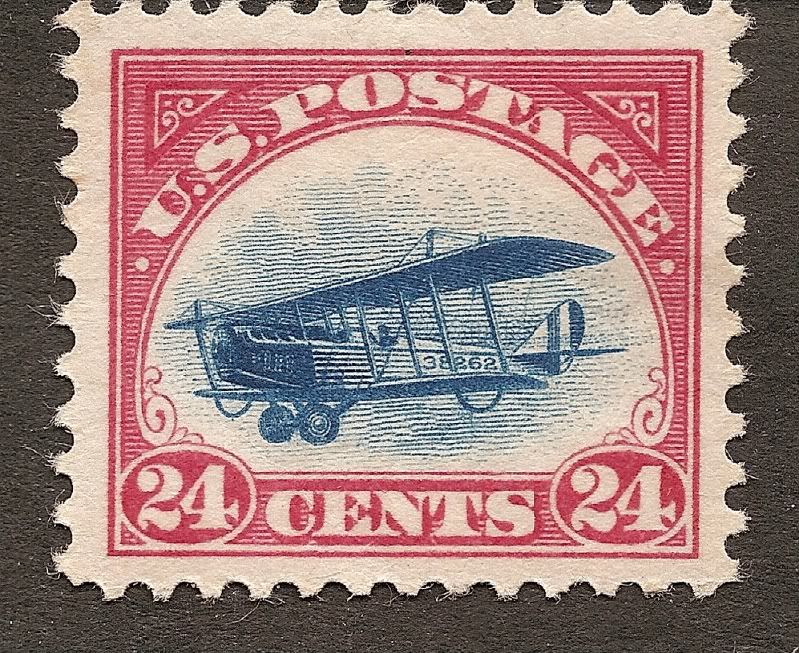 |
|
Send note to Staff
|
| Edited by stallzer - 02/07/2013 1:41 pm |
|
|
Pillar Of The Community
1448 Posts |
|
|
Quote:
This scan was done with an HP C-5180 all in one Scanner with CCD, scanned at 1200 dpi.. I use the default software (HP solution center) and I do zero enhancements, just scan and upload to Photobucket.
Nice images. Of course I may be prejudiced, as I do the same thing. |
|
Send note to Staff
|
|
|
|
Pillar Of The Community
1448 Posts |
|
|
Quote:
Jkjblue - I hope you don't mind but I think your images would benefit from straightening. Perhaps.  I do straighten them if it bothers me, but for the most part I keep them "natural".  |
|
Send note to Staff
|
|
| Edited by Jkjblue - 02/07/2013 1:56 pm |
|
|
Pillar Of The Community
United States
898 Posts |
|
|
Jkjblue & others: Thanks very much for the info about what software interface you use, and to all for the great scans!
When I needed a new printer a couple of years ago, I went to Costco and they only sold all-in-1 units. So I had a scanner in that I had never used. But when my stand-alone scanner did not survive my household move a few months ago, I've been employing the all-in-1, but for scanning the occasional document, and not yet for scanning stamps. However, I need to start scanning in some stamps, and was glad to hear what people who had great scans were doing for settings, software, etc.
I would like to remain with this all-in-1 unit because of space, and because it's wireless, so I no longer need to run a cable from it to my laptop (which is all I use).
Thanks, all!
-- Dave |
|
Send note to Staff
|
|
|
Pillar Of The Community
United States
898 Posts |
|
|
Pillar Of The Community
1448 Posts |
|
|
Quote:Looks like everybody has tried it differently. I have gotten a pretty good scan of my Scott #551 that I posted here on this site... https://www.stampcommunity.org/topi...age=5#259426 I brake for Stamps- You got it! Nice scan.  Actually, if you do not want a massive file, rather than scanning at 3600dpi, a scan @ 1200 or even 600dpi should suffice.  Yugoslavia (Slovenia) Scott 3L6 "Chain Breaker" Yugoslavia (Slovenia) Scott 3L6 "Chain Breaker" This image was scanned @ 1200dpi, then uploaded to Picasa web albums, and image linked here with 800 px option. And I had straightened the image, as it was a bit too crooked for me. |
|
Send note to Staff
|
|
|
|
Pillar Of The Community
1545 Posts |
|
|
Many great scans. What gets me is the large size. Here are a couple of mine to match with stalzer. Scott #614 (Booklet Pane) on HP Office Jet 5610 All-In-One scanned as "picture". 300 PPI: 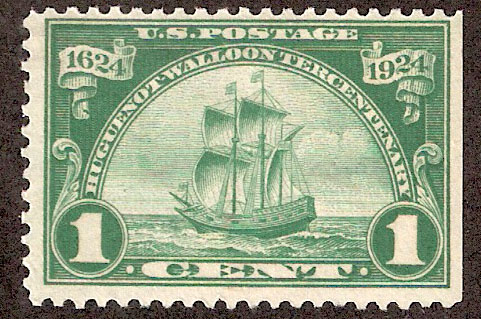 1200 PPI re sized by image optimizer. 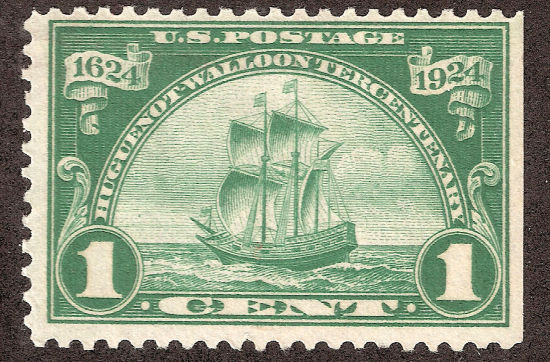 The lower PPI looks better and is closer to the right color than the higher PPI which had to be re-sized. The 300 PPI did not have to be re-sized. ...I'm learning... -IBFS |
|
Send note to Staff
|
|
|
Replies: 83 / Views: 12,460 |
|




 Posted 02/07/2013 01:15 am


