| Author |
 Replies: 83 / Views: 12,462 Replies: 83 / Views: 12,462 |
|
Pillar Of The Community
1545 Posts |
|
|
Everyone here has scanned stamps. Is there any advice on scanner settings? Don't laugh...I use an HP All-In-One to scan with. Buying a high quality super scanner just to scan stamps seems like it shouldn't be a necessary move. What DPI is best? 300? 3600? Then the file size gets larger. Will it upload into the post? I could find upload limits for avatars but not posts. Is "sharpening" important? Any Thoughts or advice please.  Thanks -IBFS |
|
Send note to Staff
|
|
|
|
|
Pillar Of The Community
United States
1179 Posts |
|
|
I normally scan everything at 360DPI. If I am plating or checking for re-cutting or a special I can't see, I scan at 1800 or 2400dpi so I can enlarge and manipulate in Photoshop. I use an basic Epson V600 to scan connected to a MAC. As for "SHARPENING"... I'm not sure how it works on the HP. I would play around with it and see how it looks to you. (I'll get jumped here) Digital "SHARPENING" is a pixel manipulation. I've use all the time when I work in Photoshop. Is that the program you are using? If yes, you can use the basic SHARPEN tools or you ned to go under the the Filter drop down; select "Unsharp Mask" (which allows manual manipulation); then select "IMAGE" / "ADJUSTMENTS" and do finer manipulations there.
For uploading into the post, they have an Scan "Optimizer" which allows you to downsize the size of the file to upload. |
Send note to Staff 
|
|
|
Pillar Of The Community
United States
6664 Posts |
|
|
I also use a HP all in one (C5180) and my scans come out very good. I scan at 1200DPI for Stamps and 1000 DPI for covers.
All I use is the HP solution center for Software as it seems to do very well. |
|
Send note to Staff
|
|
|
Pillar Of The Community
United States
611 Posts |
|
|
I started using a camera and the results are much better. My all-in-one has been going downhill. The photos reveal a sharpness I never had with the scanner. |
|
Send note to Staff
|
|
|
Pillar Of The Community
Canada
5821 Posts |
|
|
Quote:
I use an HP All-In-One to scan with. Buying a high quality super scanner just to scan stamps seems like it shouldn't be a necessary move. You only get what you paid for. IMO there is no way you're going to get the same results with a an All in one scanner as with a stand alone. I've had an Epson Perfection 4490 Photo for over 4 years now and I'm happy with the results. Look at some of nethryk's scans which are superb, he also uses an Epson V500 or V600 like Hals I suppose. As far as "scanner setting" go, you can fool around all you want on one of those AIO's but you're not going to get the quality of a standalone. |
|
Send note to Staff
|
|
|
Pillar Of The Community
Canada
5821 Posts |
|
|
@1847bill, what type of camera are you using.
I've tried with my Sony using macro setting but if I use flash it's
overexposed and without flash and using normal lighting it's not bright enough.
In addition the edges look a bit distorted.
Now for coins obviously a digital is great. |
|
Send note to Staff
|
|
|
Pillar Of The Community
United States
6462 Posts |
|
|
Coins = camera
Stamps = scanner
Do either using the opposite equipment and you're guaranteed subppar results.
As far as scanners are concerned, all-in-ones tend to be pretty abysmal.
In the scanner software turn off all the auto-color, auto-contrast, auto-sharpening nonsense. If you leave that garbage turned on, you'll get blobs of pixels rather than accurate stamp images.
The DPI doesn't matter unless you are using the image for printing. You're more concerned with the number of pixels total on each side of the image. For most images posted here, 800-1000 pixels on the longest side is sufficient.
Use JPEG format for stamp images, *NOT* GIF or BMP.
Do not crank up the compression to make the file size tiny. That introduces artifacts. File storage is of no concern. Use "high quality" or whatever high qualitative setting your scanning or image editing software uses. I save out of Photoshop using a setting of "10" on a 12-point compression scale (higher meaning less compression and better quality). |
|
Send note to Staff
|
|
|
|
Pillar Of The Community
United States
1614 Posts |
|
|
If you use a camera, just make sure you have it set on "macro"
I use the Epson V30 with the lid up at 600dpi and think the scans come out great |
|
Send note to Staff
|
|
|
Pillar Of The Community
United States
6664 Posts |
|
|
Quote:
there is no way you're going to get the same results with a an All in one scanner as with a stand alone. Quote:
all-in-ones tend to be pretty abysmal. There is no difference between a stand alone or all in one scanner fundamentally. They all work in the same basic way and the only differences between scanners is whether it's CIS or CCD Technology. CIS = Contact image sensor CCD = Charged coupled device The difference between the 2 technologies is argued by many as to if there is any noticeable difference. If you buy a cheap stand alone you get cheaper Electronics, if you buy a cheaper all in one you get cheaper electronics. I own a very nice all in one and all of you have seen the scans I post and they turn out very nice. $40 worth of Electronics for an assembly line item can make a huge difference. What would be fun to do is compare the two. We could scan a common stamp with a stand alone, all in one, CIS & CCD it could provide some useful information. My all in one is about at end of life Technology wise and I'm not sure if I'll get another or go to a stand alone, so this would help. |
|
Send note to Staff
|
| Edited by stallzer - 02/06/2013 6:32 pm |
|
|
Pillar Of The Community
Canada
5821 Posts |
|
|
Quote:
What would be fun to do is compare the two. We could scan a common stamp with a stand alone, all in one, CIS & CCD it could provide some useful information. Lets do it. Should be fun. |
|
Send note to Staff
|
|
|
Pillar Of The Community
United States
6664 Posts |
|
|
Pillar Of The Community
Canada
5821 Posts |
|
|
stallzer, I don't have any of those expensive classic US you have.
How about some of those US Giori multicoloured ones from the early sixties ?
Most members here should have mint copies. |
|
Send note to Staff
|
|
|
Pillar Of The Community
Canada
5821 Posts |
|
|
Just taking a quick look on the net it appears that the CIS although better is way more expensive than CCD. On this comparison chart it shows my Epson 4490 going for between $120 - $208 whereas a Panasonic KVS2026C is $750.00 to $1,659.00. http://www.scanners.jakimodel.info/...99-2907.htmlLike that's overkill which I don't need nor can afford. Well maybe I could but the wife would certainly not approve.  |
|
Send note to Staff
|
|
|
Pillar Of The Community
1448 Posts |
|
|
 Kiauchau 1906-16 Scott $2 1/2 slate & carmine Kiauchau 1906-16 Scott $2 1/2 slate & carmine
"Kaiser's Yacht Hohenzollern" Originally scanned @ 1200dpi with HP Officejet 4500 G510n-z "All in One" Suits my needs. |
|
Send note to Staff
|
|
|
|
Pillar Of The Community
1448 Posts |
|
|
I would suggest that if one wishes to compare scanner images, pick an inexpensive engraved stamp. The German 1m carmine rose "General Post Office in Berlin" design might suffice. Example....  Originally scanned @ 1200dpi with HP Officejet 4500 G510n-z "All in One" No manipulation or sharpening attempted. |
|
Send note to Staff
|
|
|
|
Pillar Of The Community
1448 Posts |
|
|
 Germany Scott 64 (Type II) 3m black violetUnveiling Kaiser Wilhelm I Memorial, Berlin Germany Scott 64 (Type II) 3m black violetUnveiling Kaiser Wilhelm I Memorial, BerlinThe advantage of using higher dpi for a scan is one can enlarge all or part of the stamp, the better to see detail by the eye. If one wanted to take a look at the Kaiser and his horse carefully... A 200dpi image would yield this....  A 600dpi image would yield this....  And a 1200 dpi image would yield this.... 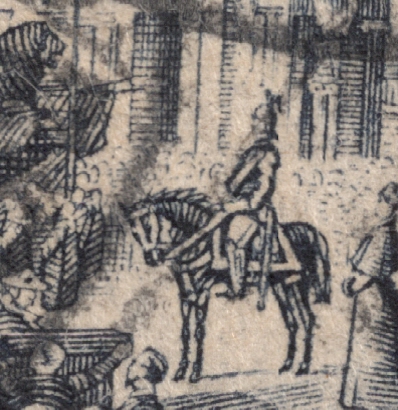 Which one do you prefer?  And how is the HP "All in One" doing? |
|
Send note to Staff
|
|
|
|
Replies: 83 / Views: 12,462 |
|




 Posted 02/06/2013 3:29 pm





